AliExpress Profit Calculator: Free Margin Tool 2026
AliExpress Profit Calculator: Free Margin Tool 2026
Quick answer: Click the Profit tab in the free AliShopping Tools Chrome extension on any AliExpress product page — it automatically reads the product cost, pre-fills shipping, platform fees, ad spend, and return reserve, then shows your real net margin per unit so you know if the product makes money before spending on ads.
The single biggest mistake new dropshippers make is eyeballing margin. "Costs $3, sell for $25, that is $22 profit." Then ad spend, platform fees, shipping, and returns eat the $22 and leave you negative.
A real profit calculator closes that gap. The Profit tab in the free AliShopping Tools Chrome extension does it automatically on every AliExpress product page — no spreadsheet, no manual entry, no guessing at CPA.
This tutorial shows how to use it to figure out if a product actually makes money before you commit a dollar to ads.
Profit tab cost buckets
| Cost bucket | Typical range | Tab default |
|---|---|---|
| Product cost (AliExpress) | Listed price | Read from page |
| Shipping (to customer) | 2-8 USD | Category-calibrated |
| Payment processing | 2.9 percent plus 0.30 USD | Stripe / Shopify standard |
| Ad CPA (category-typical) | 6-35 USD | Category benchmark |
| Refund / return reserve | 3-8 percent of revenue | 5 percent default |
| Platform fees (if applicable) | 2-5 percent | Shopify basic default |
What Does the Profit Tab Calculate?
The Profit tab runs a live simulation on whatever AliExpress product you are viewing. It reads the product cost, factors in realistic shipping, platform fees, payment processing, and a category-calibrated ad spend benchmark, then computes net profit per unit and a monthly projection at realistic volume.
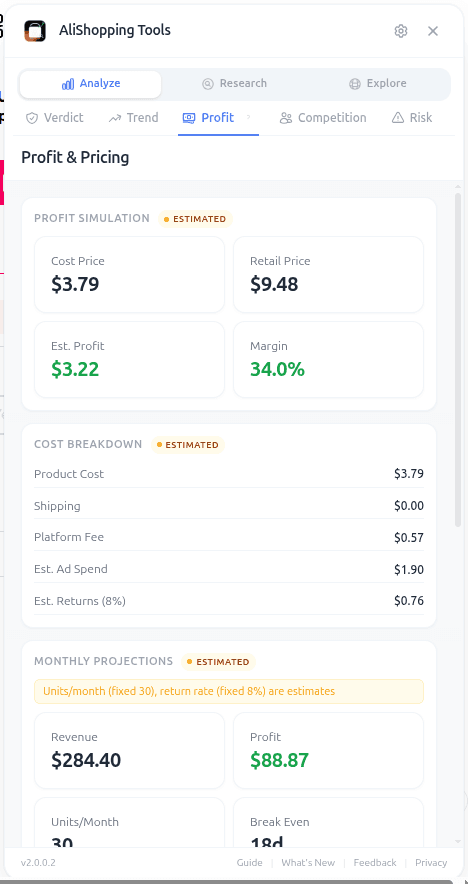
You can override any of the inputs — retail price, ad CPA, return rate — and the calculation updates instantly. It also surfaces two or three pricing strategies (penetration, mid-market, premium) and shows which one yields the strongest total profit after factoring in expected volume changes.
The key word is "net." Most online calculators stop at "retail minus cost." The Profit tab does retail minus cost minus shipping minus 2.9% + $0.30 payment processing minus category-typical CPA minus expected refund rate. That is the only number that matters when you are deciding whether to test a product.
How Do You Open the Profit Calculator?
Step 1 — Install the extension. Install AliShopping Tools from the Chrome Web Store. Free, no account. Extension ID is agiaehdeifaihlndhnhcmopjpjijnfap.
Step 2 — Open an AliExpress product page. The extension sidebar loads automatically on *.aliexpress.com/item/* URLs.
Step 3 — Click the Profit tab. Third tab in the panel. The initial calculation uses detected product price plus default retail (a typical 5-8x markup on cost, adjusted by category). Change any input in the form and the math updates live.
What each input means
- Product cost: auto-detected from the AliExpress page. Override if you have a negotiated supplier rate.
- Shipping cost: extracted from the page where available, else a category default.
- Retail price: the price you plan to sell at in your store. Edit this freely.
- Platform fees: Shopify or Woo standard (2.9% + $0.30 default). Adjustable.
- Ad CPA (cost per acquisition): category-calibrated benchmark. The single most important input — edit it to match your actual account data once you have it.
- Return rate: 5% default. Raise it for apparel or fragile items.
- Projected monthly units: estimated from order velocity. Override with your own conservative number.
Output fields:
- Profit per unit: net dollars after every cost line.
- Margin %: net profit divided by retail.
- Monthly profit projection: profit per unit times projected monthly units.
- Suggested pricing strategies: up to three retail prices with expected margin at each, so you can see where the sweet spot is.
Real-world workflow
You are looking at a pet hair remover roller. Cost is $2.60, shipping $1.90.
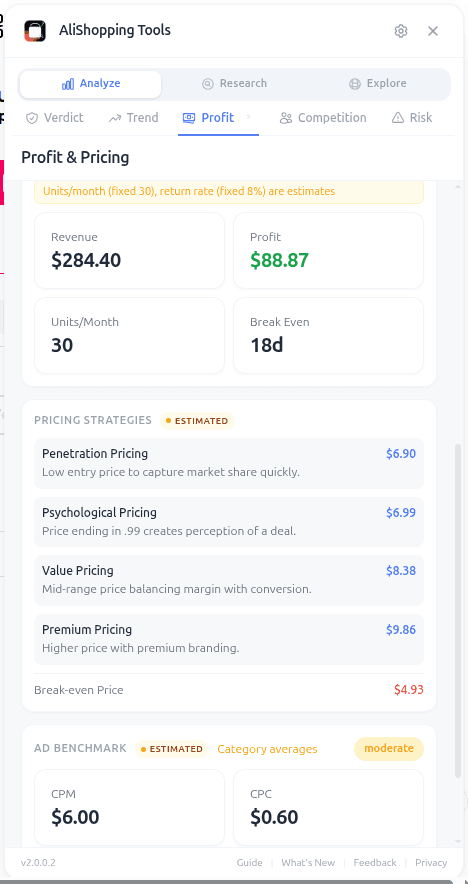
Default simulation (retail $16.99, CPA $6.50, 5% returns) shows profit per unit of $2.91 at a 17% margin. Tight. You ask yourself: can I get my ads cheaper than $6.50? Probably not for a cold audience.
You change retail to $19.99. Margin climbs to 28%. Still under the 30% threshold you usually want. You try $24.99. Margin hits 34%, profit per unit $8.45. The simulator warns that at $24.99 you may lose some price-sensitive conversions — projected monthly units drops from 280 to 220.
Total projected monthly profit: $19.99 price → $640. $24.99 price → $1,859. You pick $24.99, plan a creative that leans into quality and convenience rather than price, and move on. Six minutes of simulation saved you from testing at a losing price.
Cross-check: open the Trend tab to confirm demand is still Growing before you commit to ad spend.
The full margin formula behind the numbers
The Profit tab automates this math, but it helps to see the formula it is running so you can sanity-check any output or model a product by hand when you don't have the extension open.
Step 1 — Gross margin: Gross profit = Selling price − Product cost − Shipping to customer. Example: $35.00 selling price − $8.50 product cost − $3.00 shipping = $23.50 gross profit (67.1% gross margin). That number alone is misleading — apply the full stack below before deciding.
Step 2 — Platform fees (varies by sales channel):
| Platform | Fee |
|---|---|
| Shopify + payment processing | ~2.9% + $0.30 per transaction (Basic plan) |
| PayPal (if used) | ~3.5% + $0.30 per transaction |
| Amazon | 8-15% referral fee + $0.99/unit (individual) |
| TikTok Shop | ~5-6% commission |
| eBay | ~10-13% final value fee |
Step 3 — Ad spend (cost per order) — the most variable, most important cost:
| Operator stage | Cost per order (CPO) from paid ads |
|---|---|
| Beginner (untested product) | $15-30 |
| Validated product, early stage | $8-18 |
| Scaled product, optimised creative | $5-12 |
Step 4 — Returns and refunds by category:
| Category | Return rate |
|---|---|
| Electronics | 5-12% |
| Clothing/fashion | 15-30% (sizing issues) |
| Home goods | 3-8% |
| Beauty tools | 4-10% |
Worked example (validated product, CPO $12, 5% return rate on a $35 item): $35.00 selling price − $8.50 cost − $3.00 shipping − $1.32 platform fee − $12.00 ad spend − $1.75 returns = $8.43 net profit/order (24.1% net margin). At 100 orders/month that is $843 net profit; at 500 orders/month, $4,215.
What gross margin you need to target (assuming CPO $12, 5% returns): ~60% gross margin to hit 20% net, ~70% gross to hit 30% net, ~80% gross for a best-case 40% net. Products under 50% gross margin rarely survive paid advertising — the cost stack eats the profit before ads even scale.
Common mistakes
- Using the default CPA forever. The default is a category benchmark. Once you have 50+ real conversions, replace it with your actual number. Real CPAs diverge from benchmarks by a lot.
- Forgetting to include return rate. A 10% return rate on apparel wipes out a quarter of your margin. Do not leave it at 5% for clothing.
- Testing at a price you have not simulated. Even a $2 price difference changes the math meaningfully. Simulate first, set price second.
- Treating "monthly profit" as guaranteed revenue. It is a projection, not a promise. Use it to compare products, not to plan your quarter.
FAQ
Is the Profit tab really a free AliExpress profit calculator? Yes. The extension is free on the Chrome Web Store with no account required. No trial, no daily query limits on the calculator.
Does it work for Shopify sellers? The simulation assumes you are selling on Shopify, WooCommerce, or similar platforms with standard payment processing fees. You can adjust the platform fee input if you sell on a marketplace with different fees.
Where does the CPA benchmark come from? Category-level benchmarks updated from public advertising cost data across kitchen, home, apparel, electronics, pets, and beauty niches. Use it as a starting point, not as your actual CPA.
Can I save or export the simulation? The Profit tab is designed for fast in-session decisions, not for saving. For running comparisons across many products, bookmark the ones you simulate and re-open as needed. See best free Chrome extensions for dropshipping for alternative workflow tools.
What if the product cost on the page is wrong (variant pricing)? Override the cost field manually. Variant-heavy products (clothing, multi-color) sometimes default to the lowest variant. Plug in the variant you actually plan to sell.
Pair it with the other tabs
Profit tells you whether the money is there. The Verdict tab gives you a one-line read first, the Competition tab confirms you can compete at your chosen price, and the Risk tab makes sure the supplier will not vaporize your margin through late shipping or disputes.
Install AliShopping Tools on the Chrome Web Store — free, no account.
Stop assuming. Start simulating. Your margins will thank you.
Ready to find winning products?
Try AliShopping Tools — 15 free AI tools for product research.
Quick answers
Frequently Asked Questions
1Is the Profit tab really a free AliExpress profit calculator?
Yes. The extension is free on the Chrome Web Store with no account required. No trial, no daily query limits on the calculator.
2Does it work for Shopify sellers?
The simulation assumes you are selling on Shopify, WooCommerce, or similar platforms with standard payment processing fees.
You can adjust the platform fee input if you sell on a marketplace with different fees.
3Where does the CPA benchmark come from?
Category-level benchmarks updated from public advertising cost data across kitchen, home, apparel, electronics, pets, and beauty niches.
Use it as a starting point, not as your actual CPA.
4Can I save or export the simulation?
The Profit tab is designed for fast in-session decisions, not for saving.
For running comparisons across many products, bookmark the ones you simulate and re-open as needed.
See best free Chrome extensions for dropshipping for alternative workflow tools.
5What if the product cost on the page is wrong (variant pricing)?
Override the cost field manually. Variant-heavy products (clothing, multi-color) sometimes default to the lowest variant. Plug in the variant you actually plan to sell.
6What specific costs are included in the AliExpress profit calculator simulation?
The AliShopping Tools profit calculator automatically includes six distinct cost buckets: shipping, payment processing, ad CPA, refund reserve, platform fees, and supplier fees.
It utilizes category-calibrated defaults to pre-fill these fields instantly, allowing you to adjust values based on your specific carrier or ad strategy within seconds.
By covering every expense from transaction fees to potential refunds, this tool provides a comprehensive view of your true net margin without requiring manual spreadsheet entry.
7How do I calculate break-even ROAS using the extension?
The extension calculates your net margin in real-time, which allows you to instantly determine your break-even ROAS by comparing your total costs against your intended selling price.
By inputting your estimated Cost Per Acquisition (CPA) into the ad spend field, the tool reveals exactly how much revenue you need to generate to maintain profitability.
This process takes less than 10 seconds, enabling you to validate if a product can sustain aggressive ad campaigns before you spend a single dollar on traffic.
8Can I use the profit calculator on mobile devices or only desktop?
The profit calculator is currently available as a Chrome extension, meaning it functions on desktop browsers but is not compatible with mobile web browsers or the AliExpress mobile app.
To simulate margins, you must open the product page within the Chrome browser on a laptop or computer where the extension is installed.
This desktop-first approach ensures the tool can reliably read product data and display the cost breakdown interface without the layout constraints of a mobile screen.
9How accurate are the default shipping fee estimates in the tool?
The default shipping fee estimates are calibrated based on product category averages to provide a realistic starting point for your simulation within seconds.
While these defaults are generally accurate for standard e-packet or similar shipping methods, you should manually adjust the shipping input if you are using premium carriers or bulky items.
This feature helps you quickly filter out low-margin products, though verifying exact rates with your supplier is recommended for final financial planning.
10What is the minimum profit margin I should target for dropshipping with this calculator?
Targets vary a lot by niche, so treat any single number as a rough guide rather than a hard rule — most successful dropshippers want enough margin left after all fees and ad costs to comfortably absorb a bad week.
If the simulation shows a very thin margin, that's a signal the product carries more risk and may not be worth testing with real ad spend.
11What is a good gross margin for dropshipping?
Target at least 40 percent gross margin (selling price minus product and shipping costs, before fees and ads).
Products below 40 percent gross margin rarely achieve profitable ad economics because platform fees and customer acquisition costs erode the remaining margin quickly. 50 to 65 percent gross margin gives more room for ad spend optimization.
12How much does ad spend typically cost as a percentage of revenue?
At scale with optimized campaigns, ad spend typically runs 20 to 40 percent of revenue.
Early-stage testing is often much higher — 50 to 100 percent of revenue or more — because conversion rates are unoptimized.
Factor realistic long-term ad costs (30 percent of revenue) into your net margin calculations, not best-case scenario rates.
13How should I include product returns and refunds when calculating my dropshipping net profit for 2026?
Include returns by subtracting the average refund amount from your gross revenue before applying platform fees and ad spend.
For example, if your store sells $10,000 in a month and you have a 6% return rate, deduct $600, then calculate gross margin on the remaining $9,400.
After that, apply the platform fee (e.g., 5%) and typical ad spend (30% of revenue) to arrive at net margin.
Using AliShopping Tools, you can input the expected return percentage and instantly see how refunds shrink your profit, allowing you to set more realistic pricing thresholds.
More from the blog
Find Similar AliExpress Products: Free Tool 2026
Find similar AliExpress products 2026: compare price, supplier trust, and variants in 1 click — free Chrome extension. No signup, no account required.
Compare AliExpress Products Free: Side-by-Side 2026
Compare AliExpress products side-by-side in 2026: price, trust, net margin, review health, and shipping reality in one table — pick the better supplier fast.
AliExpress Daily Deals Chrome Extension (Free 2026)
AliExpress daily deals tracker 2026: auto-detect flash sales, coupons, and trending picks filtered by Winning Score. Free Chrome extension, 1-click setup.