Compare AliExpress Products Free: Side-by-Side 2026
Compare AliExpress Products Side-by-Side — Free Tool for Dropshippers
Quick answer: Use the Compare tab in the AliShopping Tools Chrome extension to pin two AliExpress listings side-by-side — it shows a unified table of price, net margin, supplier trust, review health, and shipping reality so you can pick the better supplier in under a minute without juggling browser tabs.
You found a product, then you found what looks like the same product from a different supplier at a different price. Which one do you source from? Most people open both listings in separate tabs, alt-tab back and forth, and try to hold the numbers in their head. That routine is how you end up sourcing from the wrong supplier because you misremembered which tab had the 4.8-star rating.
The Compare tab in the AliShopping Tools Chrome extension solves this with a single side-by-side view. Pin two listings, see every signal that matters stacked row-by-row, and make a clear decision.
This tutorial walks through pinning products, reading the comparison table, and using it as the final sourcing decision step before you commit.
What does the Compare tab do?
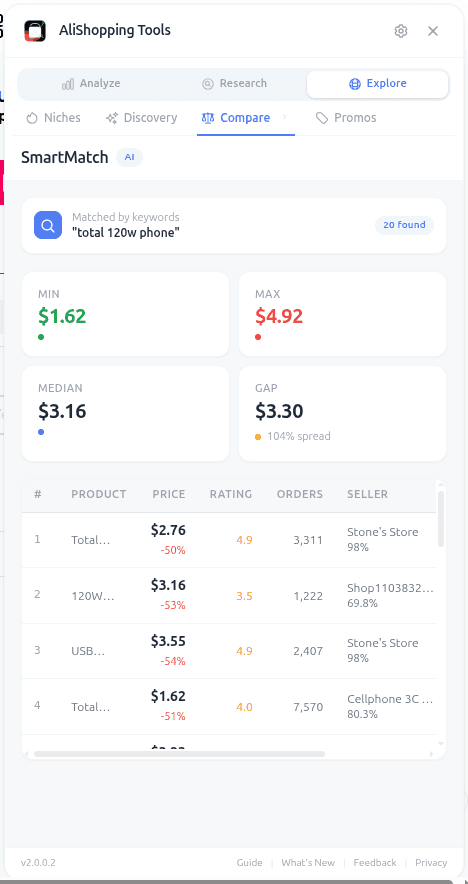
The Compare tab in the free AliShopping Tools Chrome extension lets you pin up to 2 AliExpress listings at a time and renders a unified comparison table:
| Signal | Listing A | Listing B |
|---|---|---|
| Price | $X | $Y |
| Retail estimate | $X | $Y |
| Net margin at detected retail | X% | Y% |
| Supplier trust | Score/Label | Score/Label |
| Supplier store age | X months | Y months |
| Review count | N | N |
| Review rating | X.X | X.X |
| Review distribution health | Clean / Suspicious | Clean / Suspicious |
| Shipping time (promised) | X-Y days | X-Y days |
| Shipping time (from recent reviews) | X days avg | X days avg |
| Winning Score | N | N |
| Verdict | Buy / Research / Skip | Buy / Research / Skip |
Differences are highlighted: the winning row in each category gets a green indicator, the losing row gets a red one. A summary banner at the top recommends the stronger candidate with the reasoning in one sentence.
How to use it
Step 1 — Install the extension free from the Chrome Web Store.
Step 2 — Pin the first listing. Open an AliExpress product, click the Compare tab, click "Pin this product." The extension stores the current listing's URL and data snapshot.
Step 3 — Pin the second listing. Navigate to a different AliExpress product (perhaps one from the Similar tab), click Compare, click "Pin this product" again.
Step 4 — Open the Compare view. Both pinned products now show side by side with the full signal table.
Step 5 — Read the summary banner + the row-by-row highlights. Make your call.
How do you read the comparison table?
The comparison is designed to surface the 2 or 3 rows that actually decide the call. Read top to bottom:
- Winning Score. A 10-point gap is significant. Favor the higher score unless there is a compelling reason not to.
- Net margin. Products look similar at list price but often differ materially on shipping cost, which flows into margin. A 5 percent margin gap at your expected retail is a real difference.
- Supplier trust + store age. Prefer the supplier with longer history and cleaner trust. A 6-month-old store running high volume is usually a riskier sourcing target than a 2-year-old store at similar price.
- Review distribution health. A listing with 2,000 reviews at 4.9 stars and 98 percent five-star ratings is usually farmed. A listing with 400 reviews at 4.5 with natural spread is more honest. The extension tags this "Clean" or "Suspicious" so you do not have to eyeball it.
- Shipping reality gap. The promised shipping time vs the average shipping time from recent reviews often diverges. Favor the supplier where reality matches promise.
If Listing A wins on 3 of those 5 and Listing B wins on 2, A is the call — unless one of B's wins is a deal-breaker category like supplier trust.
Real-world workflow
You identified two candidate suppliers for a foldable silicone pet water bottle.
Listing A: $8.40, Trust Excellent, 18-month store, 1,240 reviews at 4.7 (clean), promised 12-day shipping matching review avg of 13 days, Winning Score 81, Buy.
Listing B: $7.90, Trust Good, 7-month store, 2,100 reviews at 4.9 (suspicious distribution — 95 percent five-star), promised 10-day shipping vs review avg of 22 days, Winning Score 76, Research.
Compare banner reads: "Listing A recommended — stronger trust, cleaner reviews, shipping promise matches reality despite 6 percent higher price."
You source from A. Saved yourself the dispute queue that B's shipping reality would have generated.
Common mistakes
- Comparing on price alone. The cheaper listing is not always cheaper after you factor shipping reality into dispute costs.
- Ignoring the Review distribution health flag. 2,100 reviews at 4.9 is attractive on the surface. "Suspicious" means the distribution has been curated — the real customer-satisfaction picture is unknown.
- Comparing a general listing to a variant URL. Always pin main product URLs for apples-to-apples. Variant URLs anchor to specific SKUs and skew the comparison.
- Assuming 2 pins is enough. For important sourcing decisions, run Compare on 2 candidates twice — A vs B, then winner vs a third listing from Similar. This is cheap, and it catches edge cases.
Compare tab vs Similar tab
These two tabs work together but do different jobs.
- Similar tab surfaces the population of look-alike listings. Use it to discover candidates.
- Compare tab puts 2 of those candidates head-to-head. Use it to decide between them.
A typical workflow: Similar tab finds 6 candidates, you shortlist the top 2 by price + trust, Compare tab decides which of the 2 you source from.
FAQ
How many products can I compare at once? Two. This is intentional — side-by-side at 2 is readable; 3+ columns degrade quickly on extension-panel width. For 3-way decisions, run 2 rounds of 2-way comparisons.
Does the Compare tab store my pinned products across sessions? Yes, for 24 hours. You can pin a product in the morning, research other candidates during the day, and open Compare in the evening with both pins still intact. After 24 hours the data snapshot may be stale and the extension will suggest re-pinning.
Can I compare products from different categories? Technically yes, but the comparison loses meaning across categories (margin baselines and saturation norms differ). Compare is designed for same-product or near-variant sourcing decisions.
Is the comparison data live? The price, rating, and review count are refreshed when you pin. The Winning Score, margin estimate, and supplier trust are fetched live from the AliShopping Tools API. Re-pinning refreshes everything.
Does the recommendation banner ever get it wrong? The recommendation is heuristic — it weighs the dimensions we have found predictive in our testing. For 80+ percent of cases it matches the manual decision an experienced operator would make. For the rest, always read the row-by-row yourself. Our recommendation is input, not a rule.
Install and decide faster on sourcing
The Compare tab is the final sanity check before you source. Use it after the Similar tab finds candidates and before you commit to supplier, always. Combine with the Risk tab for deeper supplier analysis and the Verdict tab for the overall Buy/Research/Skip call.
For sourcing on price specifically, see our guide to comparing AliExpress suppliers to find the best price.
Install AliShopping Tools on the Chrome Web Store
Next time you are stuck between two suppliers, pin both. The table will decide for you.
Ready to find winning products?
Try AliShopping Tools — 15 free AI tools for product research.
Quick answers
Frequently Asked Questions
1How do I compare AliExpress products for free?
Install the AliShopping Tools Chrome extension and open any AliExpress product page.
The Compare tab shows side-by-side comparisons of price, shipping, supplier trust, review quality, order volume, and the AI winning verdict for up to eight products at once.
No account required, completely free as of April 2026, runs locally in Chrome.
2What metrics can I compare between AliExpress listings?
The Compare tab surfaces price, shipping cost and speed, supplier trust score, supplier age, review count and rating, order volume (7-day and 30-day), saturation level, AI winning verdict, and profit margin simulation side by side for every product you add.
This is the most thorough single-view comparison available for AliExpress without leaving the browser.
3Can I compare products across different AliExpress sellers?
Yes.
Add any AliExpress product to the Compare tab from the product page — the extension handles the data collection.
Each row is a separate listing, so you can line up the same product from five different sellers to find the best supplier, or compare five different products from the same category to pick a winner.
4Is there an AliExpress product comparison tool that is free?
Yes — AliShopping Tools is free forever for the core Chrome extension as of April 2026.
The Compare tab is included.
Most competing tools charge 20 to 80 USD per month for comparison features; the free extension covers the same workflow for solo and small-team operators.
5How many products can I compare at once?
Up to eight products at a time in the Compare tab.
This covers 95 percent of real comparison needs — in practice, operators rarely need to stack more than five listings side by side before a clear winner emerges.
If you need to compare more than eight, export the current comparison and start a fresh stack.
6Does the comparison work on mobile AliExpress?
The extension is a Chrome desktop extension, so the Compare tab only works when browsing AliExpress on desktop Chrome.
The AliExpress mobile app is not supported as of April 2026.
Chromium-based browsers (Brave, Edge, Arc) do work.
7Can I save product comparisons for later?
Comparisons persist in the extension for the duration of the browser session.
For long-term saving, export the current comparison as a screenshot or copy the data manually — as of April 2026 there is no cloud save, which keeps the extension fully local and privacy-preserving.
More from the blog
Find Similar AliExpress Products: Free Tool 2026
Find similar AliExpress products 2026: compare price, supplier trust, and variants in 1 click — free Chrome extension. No signup, no account required.
AliExpress Daily Deals Chrome Extension (Free 2026)
AliExpress daily deals tracker 2026: auto-detect flash sales, coupons, and trending picks filtered by Winning Score. Free Chrome extension, 1-click setup.
AliExpress Supplier Risk Check: Free Tool (2026)
AliExpress supplier risk check 2026: audit store age, dispute rate, and fulfillment signals in 1 click — free Chrome extension. No account, no signup required.