AliExpress Verdict Tab: Free AI Buy/Skip Tool (2026)
How to Use the Verdict Tab on AliExpress — AI Buy/Skip/Research Decision
Quick answer: Open any AliExpress product page with the free AliShopping Tools Chrome extension installed and click the Verdict tab — it gives you a Buy, Research, or Skip recommendation based on a 0-100 Winning Score that combines demand, trend, supplier trust, and margin signals in under three seconds.
Every AliExpress product looks promising until you dig into the data. Reviews, orders, trend, margin, competition — by the time you finish a spreadsheet, the excitement is gone and you still are not sure.
The Verdict tab removes that friction. It reads every signal the AliShopping Tools extension already collects and collapses them into a single recommendation you can act on.
This tutorial walks through what the verdict is, how to open it on any product page, and how to read the signals so you never second-guess a product decision again.
Verdict levels and meaning
| Verdict | Score range | What it means | Next step |
|---|---|---|---|
| Buy | 75-100 | Strong signals across all dimensions | Source sample, run small ad test |
| Research | 50-74 | Mixed signals, needs deeper look | Check Trend, Profit, Risk tabs individually |
| Skip | 0-49 | One or more critical dimensions fail | Move on to the next product |
What the Verdict tab does
The Verdict tab is the top-of-panel summary on every AliExpress product page after you install the AliShopping Tools Chrome extension. It runs a Winning Score model that combines demand, rating quality, trend phase, supplier trust, and margin potential into a single 0-100 score, then translates the score into a plain-language verdict: Buy, Research, or Skip.
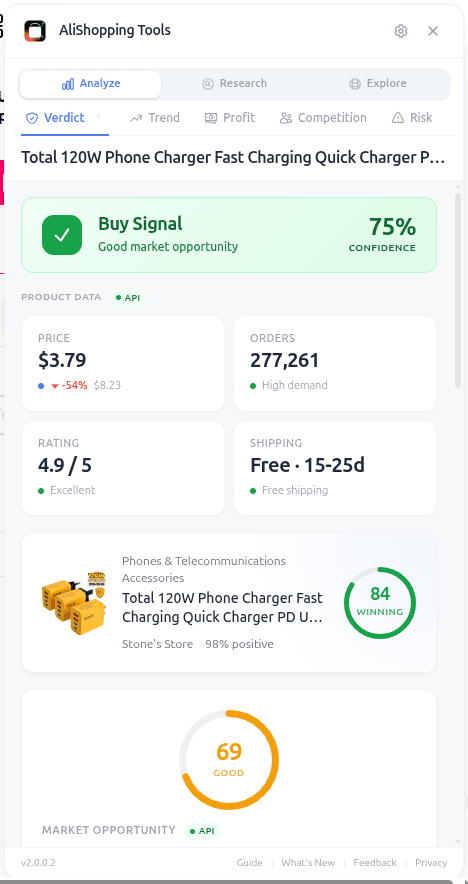
Under the headline verdict you will see a short list of supporting signals — things like HIGH_DEMAND, GOOD_RATING, RISING_TREND, or TRUSTED_SUPPLIER. These are not marketing copy. They map one-to-one to the data points the extension read off the product page, the seller profile, and the API response from our backend.
The point of the Verdict tab is not to replace your judgment. It is to give you a starting position in under three seconds so you can decide whether to do deeper research on the other tabs (Trend, Profit, Competition, Risk) or move on to the next product.
How to access it
Step 1 — Install the extension. Go to the Chrome Web Store and add AliShopping Tools. No account required. The extension ID is agiaehdeifaihlndhnhcmopjpjijnfap if you want to verify it before installing.
Step 2 — Open any AliExpress product page. The extension auto-injects a sidebar panel on *.aliexpress.com product URLs. You do not need to click anything to activate it.
Step 3 — Look at the Verdict tab. It is the first tab in the panel, open by default. You will see the verdict label, the numeric score, and the list of signals immediately.
What each signal means
The verdict is built from the following building blocks. When the Winning Score engine returns its verdict, it exposes the signals so you can see why.
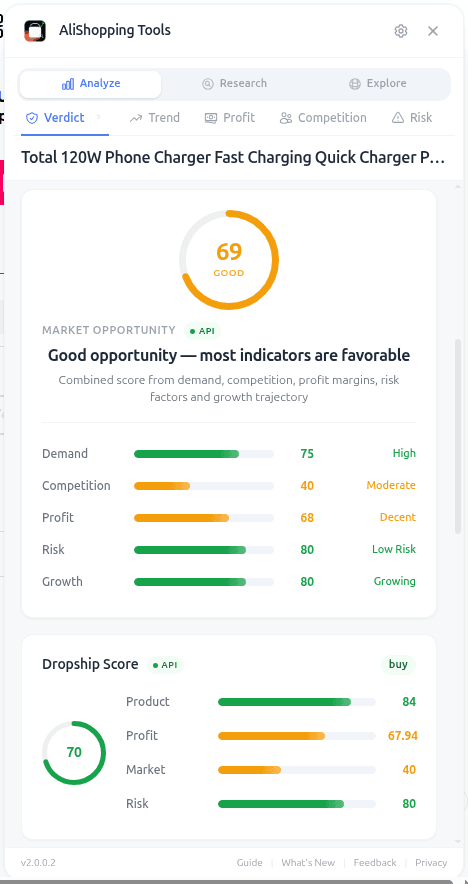
- Score (0-100): overall winning score. 75+ leans Buy. 50-74 leans Research. Below 50 leans Skip.
- HIGH_DEMAND: order velocity and wishlist counts are above category median.
- GOOD_RATING: rating 4.5+ with a large enough review count to trust the average.
- RISING_TREND: trend phase is Emerging or Growing (cross-check on the Trend tab).
- TRUSTED_SUPPLIER: supplier trust score is Good or Excellent (cross-check on the Risk tab).
- HEALTHY_MARGIN: estimated net margin clears 25% at the detected price (cross-check on the Profit tab).
- LOW_SATURATION: competition score is under 50% (cross-check on the Competition tab).
Absence of a signal is itself information. A product scoring 72 with HIGH_DEMAND and GOOD_RATING but no HEALTHY_MARGIN tells you the item sells but probably will not make you money after ads — a classic Research case.
Real-world workflow
You are scrolling an AliExpress category page looking for a new product to test. You click into a silicone collapsible water bottle.
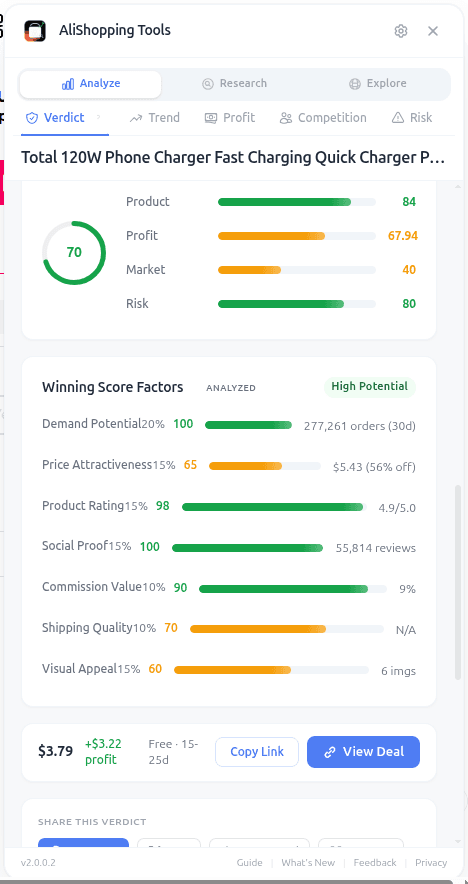
The Verdict tab shows Research — 68. Signals: HIGH_DEMAND, GOOD_RATING, RISING_TREND. No HEALTHY_MARGIN. No LOW_SATURATION.
You read that as: the product sells and customers like it, momentum is real, but margin and competition are question marks. You jump to the Profit tab and simulate — at the current $2.80 cost and detected $14.99 average retail, net margin after ads lands at 19%. Too thin. You bump your test retail to $19.99 and margin climbs to 33%. Now you open the Competition tab — saturation is 61%, 180 active sellers. Crowded but not suffocating.
You make the call: test it at $19.99 with a TikTok angle that differentiates from the generic listings, or pass and find something with cleaner signals. That decision took four minutes instead of forty.
Common mistakes
- Treating the verdict as final. Research means research. A 68 is an invitation to open the other tabs, not to reject the product.
- Ignoring missing signals. A Buy verdict with no TRUSTED_SUPPLIER signal means you still need to check the Risk tab before ordering a sample.
- Comparing scores across categories. A 72 in electronics is not equivalent to a 72 in home decor — category baselines differ. Use the verdict to rank within a category.
- Refreshing to chase a better score. The score is deterministic for a given product snapshot. Hitting reload will not change it. Change what you are evaluating instead.
FAQ
Is the Verdict tab really free? Yes. The extension is free on the Chrome Web Store. No account, no paywall, no trial timer. See our best free Chrome extensions for dropshipping roundup for context on how it compares.
Where does the score come from? It is calculated server-side from public AliExpress data (orders, ratings, price, review text, seller profile) plus the extension's own trend and saturation models. It is not user-voted or editable.
Can I trust a Buy verdict blindly? No. Treat Buy as "worth your time to verify." The per-tab views exist for a reason — margin assumptions depend on your own ad costs, and supplier risk depends on your tolerance.
Does the verdict update over time? Yes. Because the inputs (orders, trend, rating) change, the verdict can shift. Products we flagged as Buy three months ago may now be Research if the trend has peaked. Always re-check before a big buy.
What if the Verdict tab shows "No data"? Some very new listings or deleted products will not have enough data for a confident score. In that case the tab will tell you, and you should rely on manual research or wait until the listing accumulates a few hundred orders.
Install and try it on your next product
The Verdict tab is the fastest way to stop staring at AliExpress listings and start making decisions. Pair it with the Trend tab for momentum, the Profit calculator for margin, and the Risk tab for supplier sanity checks.
Install AliShopping Tools — Free on Chrome Web Store
Next time you open an AliExpress page, the verdict will be waiting for you.
Ready to find winning products?
Try AliShopping Tools — 15 free AI tools for product research.
Quick answers
Frequently Asked Questions
1Is the Verdict tab really free?
Yes.
The extension is free on the Chrome Web Store.
No account, no paywall, no trial timer.
See our best free Chrome extensions for dropshipping roundup for context on how it compares.
2Where does the score come from?
It is calculated server-side from public AliExpress data (orders, ratings, price, review text, seller profile) plus the extension's own trend and saturation models.
It is not user-voted or editable.
3Can I trust a Buy verdict blindly?
No. Treat Buy as "worth your time to verify." The per-tab views exist for a reason — margin assumptions depend on your own ad costs, and supplier risk depends on your tolerance.
4Does the verdict update over time?
Yes.
Because the inputs (orders, trend, rating) change, the verdict can shift.
Products we flagged as Buy three months ago may now be Research if the trend has peaked.
Always re-check before a big buy.
5What if the Verdict tab shows "No data"?
Some very new listings or deleted products will not have enough data for a confident score.
In that case the tab will tell you, and you should rely on manual research or wait until the listing accumulates a few hundred orders.
6Can I use the Verdict tab across many AliExpress listings during a niche research session?
There's no built-in batch-scan feature — the Verdict tab evaluates one product page at a time, the same page you're currently viewing.
For a niche research session, the practical workflow is opening candidates one by one and noting the Buy/Research/Skip verdict as you go, rather than a bulk lookup.
7How does the Verdict tab calculate the margin potential signal and what profit margin should I aim for?
The margin potential signal gives you a rough sense of how much room is left after estimated shipping and transaction costs are subtracted from the suggested retail price — treat it as a directional starting point, not a precise, guaranteed number, since your actual shipping method, destination, and fees will differ.
Compare it against your own target margin threshold before deciding a Buy verdict is worth pursuing.
8Does the Verdict tab work on the AliExpress mobile site or only on the desktop version?
The Verdict tab currently activates only on the desktop version of AliExpress with the Chrome extension installed — it doesn't appear on the mobile site or within the AliExpress app.
There's no committed mobile release date; for now, desktop Chrome is the only way to see the Buy/Research/Skip scores.
9Can I adjust how strict the Buy/Research/Skip verdict is?
The verdict tiers aren't currently user-adjustable — the Buy/Research/Skip cutoffs are fixed by the underlying model rather than something you can move in settings.
If you want a stricter bar than the default "Buy" verdict, the simplest approach is manually treating only the higher end of the score range as a green light for your own research.
10What privacy data does the Verdict tab collect, and is any personal information sent to external servers?
The Verdict tab sends the product page's public data (price, rating, order volume, and similar signals) to AliShopping Tools' scoring service to generate the verdict — it isn't reading your personal browsing history or account credentials to do this.
For the specifics of what's collected and how it's handled, check AliShopping Tools' published privacy policy rather than relying on a technical breakdown here.
More from the blog
Find Similar AliExpress Products: Free Tool 2026
Find similar AliExpress products 2026: compare price, supplier trust, and variants in 1 click — free Chrome extension. No signup, no account required.
AliExpress Daily Deals Chrome Extension (Free 2026)
AliExpress daily deals tracker 2026: auto-detect flash sales, coupons, and trending picks filtered by Winning Score. Free Chrome extension, 1-click setup.
AliExpress Trend Tab: Free Product Phase Check (2026)
See whether an AliExpress product is Emerging, Growing, Peak, or Declining before you commit to it. Free Chrome extension runs locally, no account needed.