AliExpress Supplier Risk Check: Free Tool (2026)
AliExpress Supplier Risk Check: Free Tool (2026)
Quick answer: Use the Risk tab in the free AliShopping Tools Chrome extension to check AliExpress supplier risk — it audits store age, dispute rate, rating, license verification, and response time, returning a 0–100 risk score and a plain-language trust label (Excellent/Good/Average/Poor) on any product page. No account needed, runs in under one second.
You found a great product. The Trend says Growing, the Profit simulation clears 32% margin, the Competition tab shows a clean lane. Then you order a sample and the supplier takes three weeks to ship, sends the wrong color, and ghosts your dispute.
Supplier quality is the hidden foundation of every dropshipping business. A bad one wipes out weeks of progress. The Risk tab in the free AliShopping Tools Chrome extension checks every AliExpress product page for supplier red flags and gives you a plain-language trust score before you commit.
This is the 1-click tool tutorial — how to open the Risk tab, read each signal, and act on it in seconds. If you want the human-judgment version (the red flags and the manual step-by-step vetting process behind the tool), read the companion AliExpress supplier risk red-flags playbook instead. This article automates that playbook; that one teaches it by hand.
What Does the Risk Tab Do?
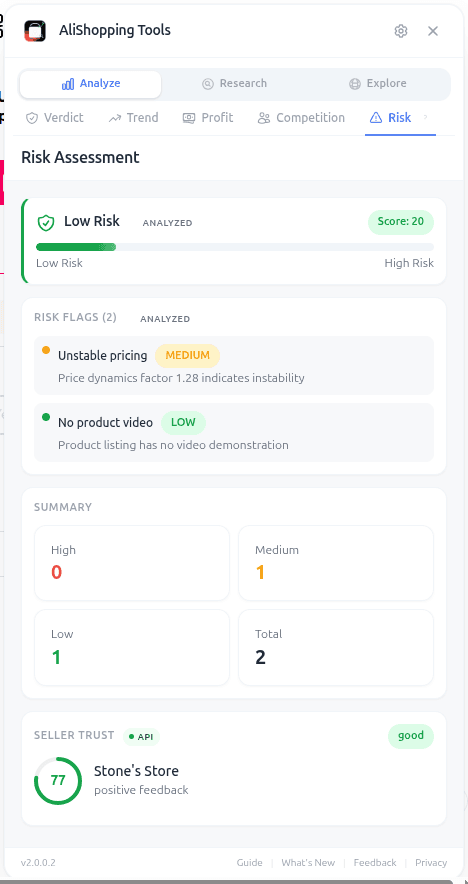
The Risk tab assesses the seller behind the product you are viewing. It pulls public seller data — store age, rating, dispute rate, license verification, response time — and combines them into a risk score from 0 to 100 and a trust score labeled Excellent, Good, Average, or Poor.
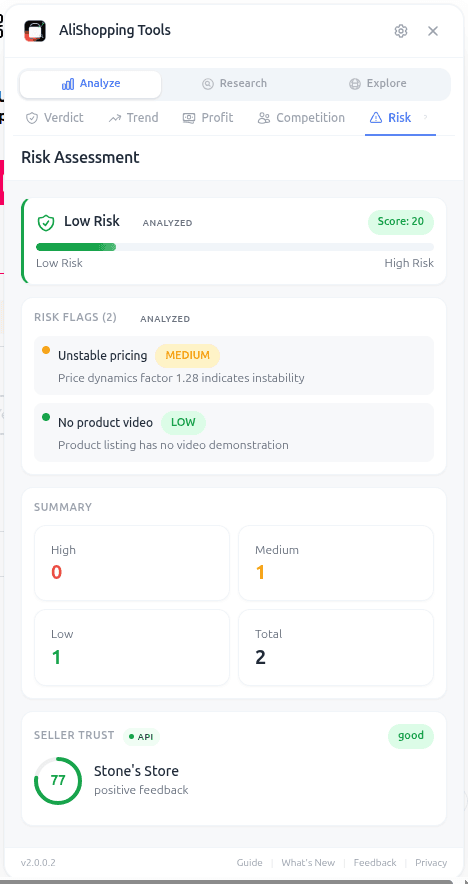
It also surfaces specific red flags. Instead of a vague "this is risky," you see the actual reasons: "new seller (store age under 90 days)," "dispute rate above category median," "no verified business license," "rating below threshold for low review count." You can decide which flags you care about and which you can tolerate.
The tab is not a blacklist. It is a structured read of the same signals an experienced sourcer would check manually, collapsed into a single view so you do not skip it when you are in a rush.
How to access it
Step 1 — Install the extension. Grab AliShopping Tools from the Chrome Web Store. Free, no account, extension ID agiaehdeifaihlndhnhcmopjpjijnfap.
Step 2 — Open any AliExpress product URL. The sidebar auto-injects on *.aliexpress.com/item/* pages.
Step 3 — Click the Risk tab. Fifth tab in the panel. Trust score renders immediately; the detailed flags and seller history fill in within a second or two.
What Does Each Risk Signal Mean?
- Risk score (0-100): higher = riskier. Under 30 is safe territory, 30-60 needs context, over 60 is avoid-unless-necessary.
- Trust score label: Excellent / Good / Average / Poor. Use this for the fast read.
- Store age: how long the seller has been on AliExpress. Under 90 days is a flag regardless of rating, because there is not enough history to trust the average.
- Seller rating: 4.5+ with enough reviews to matter is healthy. A 4.9 with 12 reviews is noise, not signal.
- Dispute rate: percentage of orders that ended in disputes. Above the category median is a flag.
- Business license verified: binary. A verified license means AliExpress confirmed the entity behind the store. Worth more than one star of rating.
- Response time: average hours to reply to buyer messages. Fast responders resolve issues; slow responders create chargebacks.
- Specific red flags list: e.g. "high dispute rate," "new seller," "no license," "price outlier," "low on-time shipping rate." Each flag has a one-line explanation.
Real-world workflow
Two suppliers list the same yoga strap. Same price. Same photos.
Supplier A. Trust score Good. Risk score 24. Store age 4 years. Rating 4.6 on 2,800 reviews. License verified. Dispute rate 0.9%. One minor flag: response time 18 hours (a little slow but not alarming).
Supplier B. Trust score Poor. Risk score 67. Store age 71 days. Rating 4.8 on 42 reviews. No verified license. Dispute rate 3.4%. Three flags: new seller, no license, high dispute rate.
Supplier B looks better on rating (4.8 vs 4.6) and price is identical. Without the Risk tab you might pick B. With the Risk tab it is obvious Supplier A is the adult in the room — long history, verified license, low disputes. The 0.2-star rating gap is meaningless compared to the structural reliability gap.
You order from A, your delivery rate holds above 95%, your refund rate stays under 4%, and your payment processor leaves you alone. That is the Risk tab's real job.
Cross-check: the Verdict tab folds supplier trust into its overall score. If Verdict says Buy but Risk shows Poor, trust the Risk tab and dig deeper before ordering a sample.
Common mistakes
- Trusting star rating alone. A 4.9-star new store with 20 reviews is less reliable than a 4.6-star five-year store with 3,000 reviews. Volume of history matters.
- Ignoring "no verified license" on high-volume orders. For samples, an unlicensed supplier is tolerable. For a wholesale order or a product you plan to scale, verification is worth demanding.
- Dismissing a single flag as "probably fine." Flags compound. One flag on a strong profile is usually fine. Three flags together is a pattern.
- Forgetting to re-check before scaling. Seller quality shifts. A supplier that was Excellent six months ago may now be Good or Average if disputes have risen. Re-check before every significant reorder.
FAQ
Is the risk check really free? Yes. The Risk tab is included in the free AliShopping Tools extension. No account, no paywall.
What if a supplier has no flags but a low rating? Low rating with no flags usually means low volume (not enough data to compute a reliable flag set). Treat it as "unknown" and proceed with a small sample order rather than bulk.
Can I see the supplier's dispute breakdown? The Risk tab shows the dispute rate percentage and flags it if it is above category median. More granular dispute categorization (late, quality, wrong item) is planned but not in the current release.
Does the Risk tab work on Alibaba? No. It is scoped to AliExpress seller profiles. For Alibaba supplier vetting, you will want a separate manual process (trade assurance, video call, factory audit).
How often is the risk data refreshed? On every product page load. The underlying seller history updates roughly daily from AliExpress public data, so re-opening a page after a week gives you fresh numbers.
Pair it with the other tabs
Risk closes the loop. The Verdict tab gives you the one-line read, Trend confirms demand is rising, Profit confirms margin, and Competition confirms there is room. A product that passes all four tabs and has an Excellent supplier is as close to a safe bet as dropshipping offers.
For a deeper manual checklist beyond what the tab surfaces, see our AliExpress supplier risk 2026 guide and the supplier risk checklist.
Install AliShopping Tools — Free on Chrome Web Store
Stop skipping the supplier check. One bad supplier can cost you more than the product ever makes.
AliShopping Tools
See live AliExpress data in your browser.
Seller trust score, 90-day price history, and live promo codes — on every AliExpress product page. No account, free.
Ready to find winning products?
Try AliShopping Tools — 15 free AI tools for product research.
Quick answers
Frequently Asked Questions
1Is the risk check really free?
Yes. The Risk tab is included in the free AliShopping Tools extension. No account, no paywall.
2What if a supplier has no flags but a low rating?
Low rating with no flags usually means low volume (not enough data to compute a reliable flag set). Treat it as "unknown" and proceed with a small sample order rather than bulk.
3Can I see the supplier's dispute breakdown?
The Risk tab shows the dispute rate percentage and flags it if it is above category median.
More granular dispute categorization (late, quality, wrong item) is planned but not in the current release.
4Does the Risk tab work on Alibaba?
No. It is scoped to AliExpress seller profiles. For Alibaba supplier vetting, you will want a separate manual process (trade assurance, video call, factory audit).
5How often is the risk data refreshed?
On every product page load. The underlying seller history updates roughly daily from AliExpress public data, so re-opening a page after a week gives you fresh numbers.
6Can I use the AliExpress supplier risk check on mobile browsers or only desktop Chrome?
The risk check currently works only on the desktop version of Chrome — mobile browsers aren't supported, since it's delivered as a Chrome extension and mobile Chrome doesn't expose the extension framework the tool needs.
To check a product from a phone, open the desktop site in Chrome's "Request desktop site" mode, though the analysis works best on a full-size screen.
7Does the extension collect any personal data or browsing history?
The AliShopping Tools extension only reads publicly available seller information that AliExpress already publishes — store age, dispute rate, and similar signals — and the risk calculation runs locally in your browser.
It isn't tracking your separate browsing history to build the risk score; it's reading the product page you're already on.
8How should I interpret the Trust label (Excellent, Good, Average, Poor) when the risk score is borderline?
Treat the Trust label as a categorical summary that complements the numeric risk score; a borderline score (e.g., 68‑72) should be read with the label’s nuance.
The extension maps scores to labels as follows: Excellent = 90‑100, Good = 70‑89, Average = 50‑69, Poor < 50.
When a score lands near the top or bottom of a range, the label provides a quick visual cue, but you should still review the underlying red‑flag categories.
For example, a 71 score labeled “Good” may hide a single high‑severity flag that could be a deal‑breaker.
Combining the label with the detailed flag list gives the most reliable risk assessment.
9Can I export the risk scores for multiple products into a spreadsheet for bulk analysis?
There's no built-in export function in the Risk tab today.
You can manually copy the numeric score and Trust label from each product page into a spreadsheet if you want to compare several products side by side.
10Will the risk check affect page load speed or cause the product page to lag?
Any browser extension adds a little overhead, but the Risk tab is built to load its analysis after the main product page renders, so the page content appears first and the risk data fills in shortly after — it shouldn't noticeably slow down your browsing.
If a page feels sluggish, the usual fixes (too many extensions running at once, a stale browser cache) are more likely culprits than the Risk tab itself.
More from the blog
Find Similar AliExpress Products: Free Tool 2026
Find similar AliExpress products 2026: compare price, supplier trust, and variants in 1 click — free Chrome extension. No signup, no account required.
Compare AliExpress Products Free: Side-by-Side 2026
Compare AliExpress products side-by-side in 2026: price, trust, net margin, review health, and shipping reality in one table — pick the better supplier fast.
AliExpress Daily Deals Chrome Extension (Free 2026)
AliExpress daily deals tracker 2026: auto-detect flash sales, coupons, and trending picks filtered by Winning Score. Free Chrome extension, 1-click setup.