AliExpress Competition Tab: Read Market Crowding Free
How to Use the Competition Tab on AliExpress — Reading Market Crowding
Quick answer: Click the Competition tab in the AliShopping Tools Chrome extension on any AliExpress product page to read the real crowding signals — how many sellers list the same product, how their prices cluster, and how concentrated sales are among the top sellers. There is no single auto "saturation %" score; you read these signals together to decide whether a niche has room for a new entrant.
A great product in a crowded market is still a bad product for you. If hundreds of sellers are already listing the same item, you are fighting for scraps — competing on price, paying more per click, and watching margin evaporate.
The Competition tab in the free AliShopping Tools Chrome extension puts the crowding signals in front of you before you commit: how many sellers, how their prices compress, how concentrated the top sellers are — all without leaving the product page.
This tutorial shows how to read those signals and use them to pick markets with room to grow.
Competition tab signal reference
The Competition tab is built around a framework of competition signals. Some the extension surfaces for you; one — ad saturation — is a manual read the tool does not auto-measure. Read them together, not in isolation.
| Signal | What you see | How to read it |
|---|---|---|
| Active seller count | Number of similar listings matched | Fewer sellers = more room; a large count means crowded |
| Supplier concentration | How much of the orders the top sellers hold | Top-heavy = effectively closed to newcomers |
| Price compression | The spread of prices across sellers | Tight spread = commodity race; wide spread = room to position |
| Review velocity | How fast reviews are accumulating across sellers | Fast, broad review flow signals an active, contested market |
| Ad saturation | Manual / not auto-measured | Check ad libraries and TikTok yourself; the tab does not output an ad-saturation percentage |
What does the Competition tab measure?
The Competition tab analyzes how many sellers are listing the same or near-identical product, how tightly their prices cluster, and how concentrated sales are among the top few. It shows these as separate signals — it does not collapse them into a single auto "saturation percent." There is no per-product saturation number the tool measures for you; you read the signals and make the call.
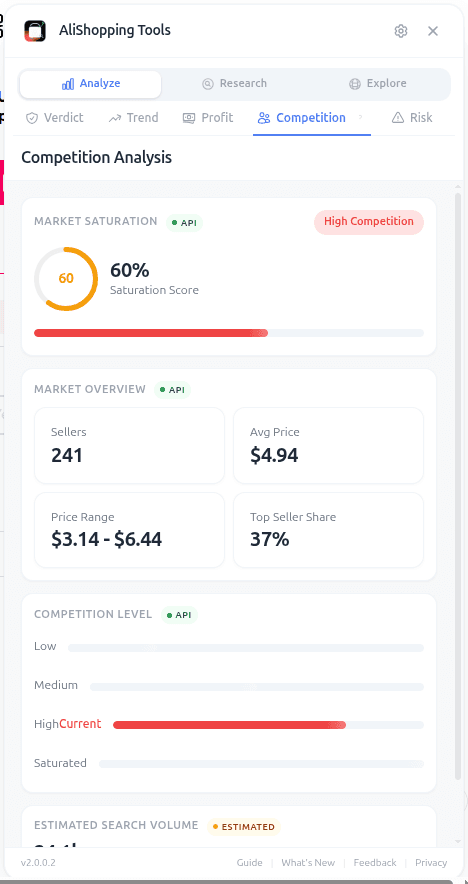
Few active sellers and a wide price spread means room for a new entrant. A market where the top few sellers already own most of the orders means a newcomer will have to outspend them on ads to get visibility.
The data comes from the AliShopping Tools backend matching similar listings across AliExpress and clustering them by product fingerprint (title, image, spec). It is not a keyword search — it is a similarity match, so it catches re-listings of the same product under different titles.
How do you open the Competition tab?
Step 1 — Install the extension. AliShopping Tools on the Chrome Web Store, free, no account. Extension ID agiaehdeifaihlndhnhcmopjpjijnfap.
Step 2 — Open any AliExpress product page. The sidebar auto-injects on *.aliexpress.com/item/* URLs.
Step 3 — Click the Competition tab. Fourth tab in the panel. The seller list, price spread, and top-seller concentration fill in after the backend finishes clustering similar listings (one to three seconds).
What each signal means
- Seller count: number of active listings the extension matched as the same product. Fewer sellers generally means more room; a large count means the market is crowded.
- Supplier / top-seller concentration: how much of the orders the top sellers hold. If a handful of sellers own most of the orders, the market is effectively closed to newcomers regardless of the absolute seller count.
- Average price: mean retail across matched listings.
- Price range (price compression): min and max retail. A wide range means sellers are differentiating on positioning; a narrow range means everyone is racing to the bottom.
- Review velocity: how fast reviews are accumulating across the matched sellers — a broad, fast review flow signals an active, contested market.
- Ad saturation: how heavily the product is already being advertised. This is a manual read — the tab does not output an ad-saturation number. Check ad libraries and TikTok yourself before you commit.
Read these signals together. There is no single auto "saturation percent" to lean on; the picture comes from the combination.
Real-world workflow
You shortlisted three products from your morning research session. You open each and check the Competition tab, reading the signals together rather than looking for one number.
Product A — LED strip lights. A very large seller pool, orders concentrated among a few dominant sellers, and prices bunched tightly together. Everyone is selling this and competing on price. Walk away.
Product B — magnetic knife holder. A moderate seller pool with a wide price spread — different sellers are winning on different angles (budget, premium, branded). Crowded but workable; there is room to find a positioning.
Product C — silicone stretch lid set. A small seller pool, no single dominant player, and a wide-enough price spread to pick your spot. Blue-ocean-ish.
You pick C as primary, B as backup, drop A. That call took under three minutes. Cross-check B and C on the Trend tab before you commit — few sellers plus fading demand is just an empty market.
Common mistakes
- Treating a crowded market as automatically off-limits. A moderate seller pool with a wide price spread is often the sweet spot — enough demand to validate the product, not so much that you are fighting a pure price war.
- Treating seller count alone as the whole picture. Many sellers with orders spread evenly is actually more open than a few sellers who each own a huge share. Read seller count and concentration together.
- Ignoring price compression. A narrow range (all sellers within a dollar or two of each other) signals commodity dynamics. A wide range signals room for positioning.
- Skipping the manual ad-saturation check. The tab does not measure how heavily a product is already advertised — go look at ad libraries yourself before you commit.
- Using competition signals in isolation. Few sellers plus a fading trend = a market nobody is fighting over for a reason. Always cross-check the Trend tab.
FAQ
How does the extension detect "similar" products? The backend clusters listings by image similarity, title tokens, and spec overlap. Minor variations (color, pack size) fall into the same cluster; distinct products (same category, different mechanism) are separated.
Does the crowding picture change over time? Yes. Markets crowd up as copycats enter. A niche with a handful of sellers three months ago may have many more today. Always re-check before a big buy.
Does the tab give me a single saturation number? No. There is no auto "saturation percent" the tool measures per product — and ad saturation specifically is a manual read. You weigh the seller count, concentration, price spread, and review velocity yourself, ideally alongside the Trend tab. Few sellers plus rising demand = your best shot at a blue-ocean win.
Why does the Competition tab sometimes show fewer sellers than an AliExpress search? The similarity clustering is stricter than a keyword search. A search for "LED light" returns thousands of hits, most of which are different products. The tab counts only sellers offering the matched product, not everyone in the broader category.
Can I change the similarity threshold? Not in the current version. The extension uses a single calibrated threshold across all categories for consistency. Future releases may expose this.
Pair it with the other tabs
Competition tells you whether there is room. The Verdict tab tells you the overall call, Trend confirms momentum, Profit confirms the margin survives your ad costs, and Risk confirms the supplier is not going to blow up your delivery times.
For the deeper market-saturation playbook, read our dropshipping competition analysis guide.
Install AliShopping Tools on the Chrome Web Store
Stop picking products blind to the seller pool. Stop entering races you cannot win.
Ready to find winning products?
Try AliShopping Tools — 15 free AI tools for product research.
Quick answers
Frequently Asked Questions
1How does the extension detect "similar" products?
The backend clusters listings by image similarity, title tokens, and spec overlap.
Minor variations (color, pack size) fall into the same cluster; distinct products (same category, different mechanism) are separated.
2Does saturation change over time?
Yes. Markets saturate as copycats enter. A product that was 30% saturated three months ago may be 60% today. Always re-check before a big buy.
3Is lower saturation always better?
Not if demand is zero. Pair a Low saturation read with the Trend tab showing Growing phase. Low saturation + rising demand = your best shot at a blue-ocean win.
4Why does the Competition tab sometimes show fewer sellers than an AliExpress search?
The similarity clustering is stricter than a keyword search.
A search for "LED light" returns thousands of hits, most of which are different products.
The tab counts only sellers offering the matched product, not everyone in the broader category.
5Can I change the similarity threshold?
Not in the current version. The extension uses a single calibrated threshold across all categories for consistency. Future releases may expose this.
6What does the 'top‑seller share' metric indicate and what thresholds should I watch for?
Top-seller share is a directional read on how concentrated sales are among the visible sellers for a matched product — a market where one or two sellers clearly dominate is harder to break into than one where sales are spread across many sellers.
Use it alongside the saturation score to judge whether you'd need real differentiation or could compete mainly on price.
7Can I access the Competition tab on a mobile device or only on desktop Chrome?
The Competition tab runs on the desktop version of Google Chrome, since it's part of the AliShopping Tools extension — it isn't supported on native mobile browsers like iOS Safari or the standard Chrome app on Android.
For reliable saturation checks, use a desktop or laptop with Chrome installed.
8How does the price range spread affect the saturation score and my pricing strategy?
A narrow price range across matched listings generally signals a more commoditized market with less room to differentiate on price, while a wide spread suggests sellers are positioned across different tiers (budget vs. premium).
Use the spread as a directional read on whether to position your offer toward the budget or premium end, rather than a precise scoring formula.
9How often does the extension update its seller data and can I force a refresh?
The extension refreshes its seller data periodically to keep the competition numbers reasonably current, and you can trigger a manual refresh from the Competition tab if you want the latest read right away.
Exact refresh timing isn't published — if something looks stale, a manual refresh is the fastest fix.
10Are there any hidden costs or usage limits with the free AliShopping Tools extension?
AliShopping Tools is free to use, with no hidden fees and no paid tier gating the core competition metrics — saturation score, seller count, and top-seller share are all available in the free extension.
There's no separate "Pro plan" or monthly usage cap on these features.
More from the blog
Find Similar AliExpress Products: Free Tool 2026
Find similar AliExpress products 2026: compare price, supplier trust, and variants in 1 click — free Chrome extension. No signup, no account required.
Compare AliExpress Products Free: Side-by-Side 2026
Compare AliExpress products side-by-side in 2026: price, trust, net margin, review health, and shipping reality in one table — pick the better supplier fast.
AliExpress Daily Deals Chrome Extension (Free 2026)
AliExpress daily deals tracker 2026: auto-detect flash sales, coupons, and trending picks filtered by Winning Score. Free Chrome extension, 1-click setup.