AliExpress Daily Deals Chrome Extension (Free 2026)
AliExpress Daily Deals — Free Chrome Extension for Trending Product Alerts
Quick answer: The Daily Deals tab in the free AliShopping Tools Chrome extension runs AliExpress's trending deals feed through the Winning Score engine — surfacing deals with a stronger opportunity score, real margin, and trusted suppliers first, and flagging the genuine discount against the recent average price. It replaces the noisy native deals page with a ranked list you can actually source from in under 5 minutes.
AliExpress pushes a daily deals feed on its homepage and product pages — flash discounts, trending drops, limited-time offers. The feed is designed to trigger impulse buys for end consumers. For dropshippers and resellers, it is mostly noise: half the products are already saturated, a quarter are from suppliers with poor trust scores, and the discounts are often price games rather than real value.
The Daily Deals tab in the AliShopping Tools Chrome extension pipes that same feed through the Winning Score engine, filters out the products that will not make you money, and surfaces only the deals worth acting on today.
This tutorial covers what the tab does, how to read the alerts, and how to use it as a daily 5-minute research ritual instead of an hour-long scroll.
What the Daily Deals tab does
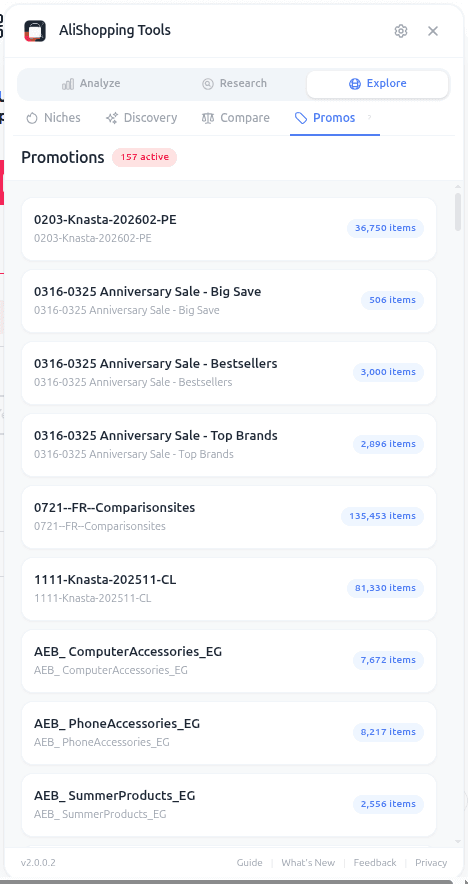
The Daily Deals tab in the free AliShopping Tools Chrome extension reads AliExpress's daily trending-deals feed, scores each product through the same Winning Score engine used across the extension, and ranks the deals by the signals that actually matter:
- Opportunity (Winning) score — the higher the score, the more the deal is worth a look
- Real margin at the detected retail price
- Supplier trust — Good or Excellent suppliers rank above risky ones
- Genuine discount — labelled against the recent average price, not the fake "original" price
The weakest deals sink to the bottom. A feed that originally had dozens of items surfaces a handful worth five minutes of your attention at the top.
Each row shows: product thumbnail, discounted price vs recent average, Winning score, margin estimate, supplier trust, and a quick "Open listing" button.
How to access Daily Deals
Step 1 — Install the extension free from the Chrome Web Store. No account needed.
Step 2 — Open AliExpress homepage or any AliExpress category page. The extension panel appears automatically.
Step 3 — Click the Daily Deals tab. The feed refreshes from AliExpress's deals API every 4 hours; the tab shows the most recent scan plus a timestamp.
Reading the deal alerts
How to read each signal on a row:
| Signal | Green (source it) | Yellow (check) | Red (skip) |
|---|---|---|---|
| Discount vs recent avg | 20-35 percent real discount | 10-20 percent | Below 10 percent or fake baseline |
| Winning (opportunity) score | Higher score, ranked near the top | Mid-pack | Low score, ranked low |
| Margin at deal price | Comfortable margin after costs | Thin but workable | Margin gone at the deal price |
| Supplier trust | Excellent | Good | Fair or Poor |
Read each deal row in this order:
- Discount vs recent average. AliExpress often shows "50% off $40 original" when the product has never sold at $40. The extension displays the real recent price trajectory so you see whether the discount is genuine or theatrical. Real discounts from a verified average are usually authentic.
- Winning (opportunity) score. A higher score means the product already had traction before the deal; the deal is a timing bonus. A low score means the deal is the only thing going for it — check the other signals hard.
- Margin at the discount price. If the margin survives your costs at the deal price, you can test it profitably. If the margin is gone at the deal price, the deal exists because the product has already been priced down to move inventory.
- Supplier trust. Even a strong deal is wasted if the supplier ships slowly or has a high dispute rate. Good or Excellent only. For how crowded the market already is, check the Competition tab — and remember ad saturation is a manual read, not a number the tool prints.
The ranking is conservative by design. The deals near the top are the ones worth checking.
Using it as a daily ritual
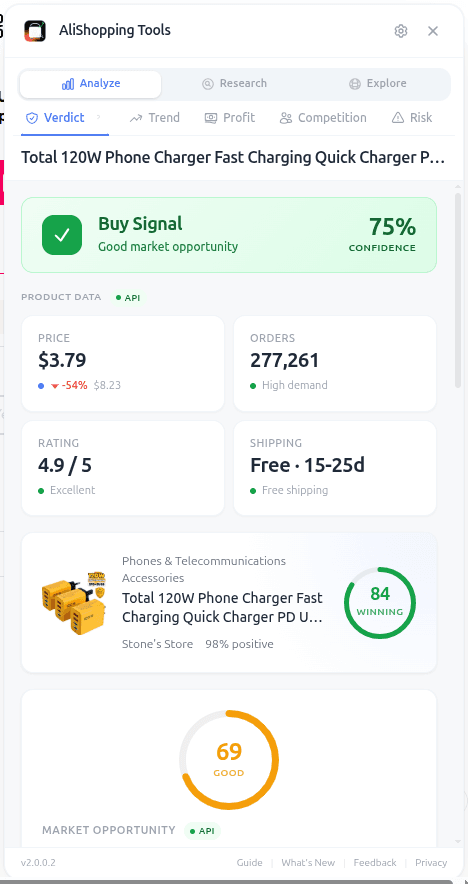
The Daily Deals tab is best used as a 5-minute morning habit, not an all-day feed.
- Open the tab once per day. Let the overnight scan populate with fresh deals.
- Scan the top 5 rows. Ignore anything past row 10 — if it did not surface in the top, the filter already deprioritised it.
- Click into 2 or 3 candidates. Run the full Verdict tab check on each.
- Move 1 candidate to your testing pipeline if it clears Verdict + manual supplier sanity.
- Log which deals you skipped and why. Over time you build a pattern library of deal types that work for your niche vs ones that do not.
This ritual replaces two bad habits: mindlessly scrolling the native deals feed for an hour, and missing genuine flash opportunities because you never checked.
Real-world workflow
Tuesday 9am. You open the Daily Deals tab. A handful of rows at the top.
Row 1: a foldable silicone pet water bottle, a real discount against its recent average, a strong opportunity score, comfortable margin at the detected retail price, and Excellent supplier trust.
You click into the listing. The Verdict tab returns a Buy label. Reviews scan clean (no template text, natural distribution). The Similar tab shows two other listings at similar price points; this one has the best supplier trust. You add it to your TikTok-creative testing list for the week.
The next rows get 15 seconds each. Two get shortlisted. A few get skipped (margin too thin, or the discount is theatrical against the real average). One gets bookmarked as "watch if the deal returns."
Total time: 6 minutes. One confirmed test candidate, two shortlisted. That is a productive morning research session that would have taken an hour of native-feed scrolling.
Common mistakes
- Trusting the discount percentage at face value. Always read the 30-day average the extension shows alongside it. A "70 percent off" on a product that has averaged $5 and is now $1.50 is not a real discount — it is a clearance signal, and clearance products are often discontinued SKUs.
- Sourcing a Daily Deal without running Verdict. The Daily Deals filter is a prequalification, not a full analysis. Always open the product and run the full tab stack before committing.
- Chasing flash deals on high-saturation products. If 180 other sellers are already racing on the same listing, the deal is probably a signal that everyone is discounting to move inventory at the same time. Skip.
- Treating Daily Deals as your only research source. It is one input. Combine with winning products monthly roundups, category scans on the Niches tab, and trend cross-checks on the Trend tab.
FAQ
How often does the Daily Deals scan refresh? Every 4 hours. AliExpress's deal feed itself rotates throughout the day, so the extension pulls fresh deals multiple times daily. The tab shows the last-scan timestamp.
How is the ranking tuned? Deals are ranked by the Winning Score engine plus margin and supplier trust, with defaults tuned for typical dropshipping profiles. See the Settings tab guide for the options available in your version.
Why are some days almost empty? Some days the deals feed is dominated by saturated or low-quality products and few clear the filter. That is the correct signal — better to see 2 quality deals than 40 traps.
Does this replace AliExpress's Choice program or Super Deals? It scopes deals from both feeds (where accessible) through the same filter. Choice and Super Deals tend to have higher supplier quality on average; both are included in the Daily Deals tab output.
Is my AliExpress browsing data collected? No. The extension runs the scan locally against the deals API and does not log per-user browse history. See AliShopping Tools privacy for details.
Install and never miss a good deal again
The Daily Deals tab turns a noisy feed into a focused 5-minute ritual. Pair it with the Trend tab for momentum confirmation and the Niches tab for category-level opportunity scans.
Install AliShopping Tools — Free on Chrome Web Store
Tomorrow morning, open the Daily Deals tab before you open anything else.
Ready to find winning products?
Try AliShopping Tools — 15 free AI tools for product research.
Quick answers
Frequently Asked Questions
1How do I get AliExpress daily deals alerts for free?
Install the AliShopping Tools Chrome extension — the Daily Deals tab pipes AliExpress's trending deals feed through the Winning Score engine and surfaces only deals with real margin, reasonable saturation, and trusted suppliers.
No account, no subscription, free as of April 2026.
You can configure alert frequency in Settings so only deals above a winning-score threshold notify you.
2What is the Daily Deals tab in AliShopping Tools?
The Daily Deals tab is a filtered view of AliExpress's native trending deals feed.
It takes AliExpress's flash-drop promotions, applies the AliShopping Winning Score, and shows only deals with acceptable margin, non-saturated competition, trusted supplier ratings, and real discount (not a pre-inflated price game).
It replaces the noisy default AliExpress deals page with a ranked, actionable list.
3Are AliExpress daily deals actually worth sourcing from?
Some are, most are not.
The native AliExpress daily deals feed mixes real discounts with pre-inflated price games and pushes products that are already saturated for dropshippers.
The Daily Deals tab filters both noise types out.
Typically three to ten deals per day pass the filter — these are the ones worth a closer look, not the hundred-plus in the raw feed.
4How often does the Daily Deals tab refresh?
The Daily Deals tab pulls fresh data every time you open it.
AliExpress itself rotates the deals feed multiple times a day; the extension reads whatever is currently live.
For daily workflow, opening the tab once in the morning and once at end-of-day catches the two main deal waves.
5Can I filter daily deals by margin or winning score?
Yes.
Open Settings and set thresholds for minimum winning score, minimum margin percentage, maximum saturation, and minimum supplier trust score.
Deals below thresholds are hidden from the Daily Deals tab.
Defaults are tuned for typical dropshipping use; operators running high-volume low-margin stores often set lower margin floors.
6Does the Daily Deals tab work without a login?
Yes.
The tab reads the publicly-accessible AliExpress deals feed without requiring any AliExpress or AliShopping account.
It runs locally in Chrome, does not upload your activity, and does not need credentials.
As of April 2026, there is no paid tier — the Daily Deals tab is part of the free Chrome extension.
7What is the difference between AliExpress daily deals and trending products?
Daily deals are time-limited discount drops (flash sales, coupon stacks, clearance).
Trending products are items with rapidly rising sales or search volume.
The Daily Deals tab covers the former.
For the latter, use the Trend tab in AliShopping Tools which classifies products by phase (Emerging, Growing, Peak, Declining).
Both tabs together cover the two main ways dropshippers discover winners.
More from the blog
Find Similar AliExpress Products: Free Tool 2026
Find similar AliExpress products 2026: compare price, supplier trust, and variants in 1 click — free Chrome extension. No signup, no account required.
AliExpress Trend Tab: Free Product Phase Check (2026)
See whether an AliExpress product is Emerging, Growing, Peak, or Declining before you commit to it. Free Chrome extension runs locally, no account needed.
AliExpress Verdict Tab: Free AI Buy/Skip Tool (2026)
AliExpress Verdict Tab 2026: AI scores Buy/Skip/Research in 1 click using 30+ signals — free Chrome extension. How to read the score and act on it.