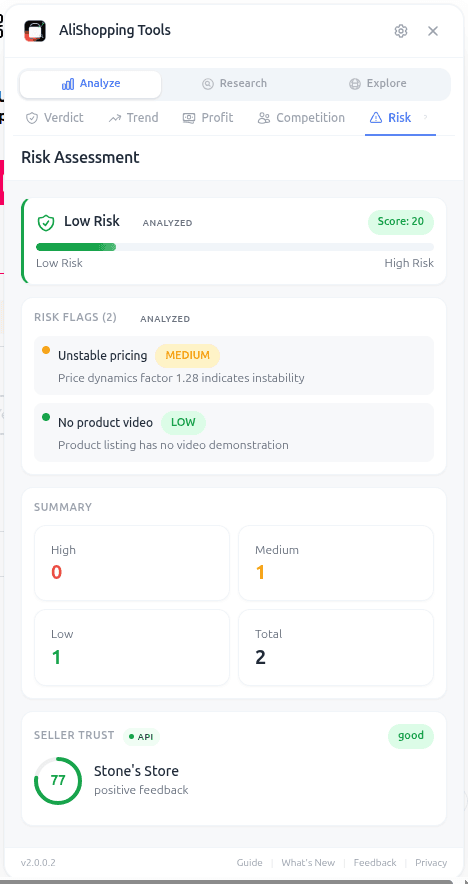
AliExpress Supplier Risk Check: Free Tool (2026)
AliShopping Tools
See live AliExpress data in your browser.
Seller trust score, 90-day price history, and live promo codes — on every AliExpress product page. No account, free.
Product Tracker Free Beta
Track any AliExpress product’s real price, orders, stock & rating for 180 days. Data doesn’t lie. But discounts can.
Before you buy
Is this deal real? Check the price history before you buy.
Prices often spike just before a “sale.” See 180-day price history and fake discount detection — free, no account needed.
Verify on AliShopping Deals →Ready to find winning products?
Try AliShopping Tools — 15 free AI tools for product research.
Quick answers
Frequently Asked Questions
1Is the risk check really free?
Yes. The Risk tab is included in the free AliShopping Tools extension. No account, no paywall.
2What if a supplier has no flags but a low rating?
Low rating with no flags usually means low volume (not enough data to compute a reliable flag set). Treat it as "unknown" and proceed with a small sample order rather than bulk.
3Can I see the supplier's dispute breakdown?
The Risk tab shows the dispute rate percentage and flags it if it is above category median.
More granular dispute categorization (late, quality, wrong item) is planned but not in the current release.
4Does the Risk tab work on Alibaba?
No. It is scoped to AliExpress seller profiles. For Alibaba supplier vetting, you will want a separate manual process (trade assurance, video call, factory audit).
5How often is the risk data refreshed?
On every product page load. The underlying seller history updates roughly daily from AliExpress public data, so re-opening a page after a week gives you fresh numbers.
6Can I use the AliExpress supplier risk check on mobile browsers or only desktop Chrome?
The risk check currently works only on the desktop version of Chrome — mobile browsers aren't supported, since it's delivered as a Chrome extension and mobile Chrome doesn't expose the extension framework the tool needs.
To check a product from a phone, open the desktop site in Chrome's "Request desktop site" mode, though the analysis works best on a full-size screen.
7Does the extension collect any personal data or browsing history?
The AliShopping Tools extension only reads publicly available seller information that AliExpress already publishes — store age, dispute rate, and similar signals — and the risk calculation runs locally in your browser.
It isn't tracking your separate browsing history to build the risk score; it's reading the product page you're already on.
8How should I interpret the Trust label (Excellent, Good, Average, Poor) when the risk score is borderline?
Treat the Trust label as a categorical summary that complements the numeric risk score; a borderline score (e.g., 68‑72) should be read with the label’s nuance.
The extension maps scores to labels as follows: Excellent = 90‑100, Good = 70‑89, Average = 50‑69, Poor < 50.
When a score lands near the top or bottom of a range, the label provides a quick visual cue, but you should still review the underlying red‑flag categories.
For example, a 71 score labeled “Good” may hide a single high‑severity flag that could be a deal‑breaker.
Combining the label with the detailed flag list gives the most reliable risk assessment.
9Can I export the risk scores for multiple products into a spreadsheet for bulk analysis?
There's no built-in export function in the Risk tab today.
You can manually copy the numeric score and Trust label from each product page into a spreadsheet if you want to compare several products side by side.
10Will the risk check affect page load speed or cause the product page to lag?
Any browser extension adds a little overhead, but the Risk tab is built to load its analysis after the main product page renders, so the page content appears first and the risk data fills in shortly after — it shouldn't noticeably slow down your browsing.
If a page feels sluggish, the usual fixes (too many extensions running at once, a stale browser cache) are more likely culprits than the Risk tab itself.
Related Articles
- Find Similar AliExpress Products: Free Tool 2026guides
- Compare AliExpress Products Free: Side-by-Side 2026misc
- AliExpress Daily Deals Chrome Extension (Free 2026)misc
- AliExpress Competition Tab: Read Market Crowding Freeguides
- AliExpress Profit Calculator: Free Margin Tool 2026guides
- AliExpress Supplier Trust Checker: 7 Red Flags Before You Buy (2026)misc
Related Tools
More from the blog
Find Similar AliExpress Products: Free Tool 2026
Find similar AliExpress products 2026: compare price, supplier trust, and variants in 1 click — free Chrome extension. No signup, no account required.
Compare AliExpress Products Free: Side-by-Side 2026
Compare AliExpress products side-by-side in 2026: price, trust, net margin, review count and rating, and shipping reality in one table — pick the better supplier fast.
AliExpress Daily Deals Chrome Extension (Free 2026)
AliExpress daily deals in a Chrome extension: promotion-feed deals ranked by discount, commission and rating, refreshed twice a day. Free, no account needed.