






Risk Assessment
Identify risk flags, seller trust issues, and business license status before committing to a supplier. Avoid chargebacks, IP bans, and unreliable shipping.
A product can look profitable on paper and still bankrupt your store if the supplier is unreliable. The Risk tab is your background check on every product and seller — surfacing red flags like price volatility, IP concerns, slow shipping, return-rate spikes, and missing business licenses. It's the tab that prevents you from learning hard lessons through chargebacks.
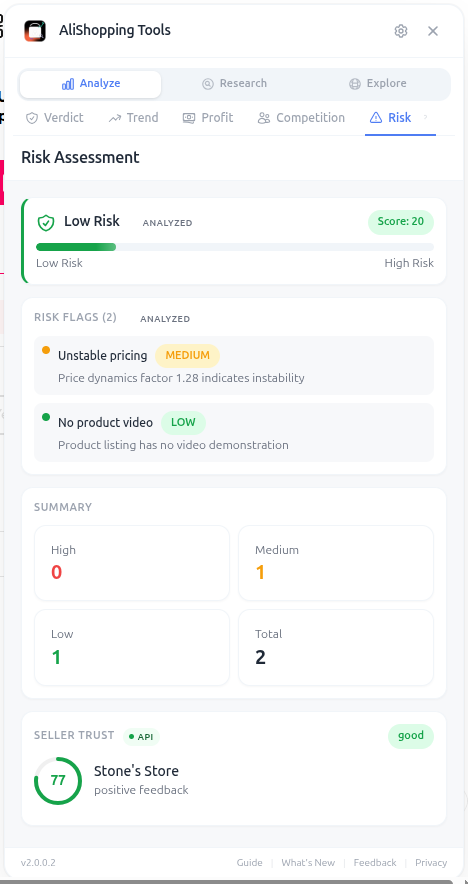
The Risk Score runs from 0 to 100, but unlike the Winning Score, higher means worse. Anything above 60 deserves serious scrutiny. Anything above 80 should be an automatic pass unless you have a strong reason to override.
Why It Matters
Refunds, chargebacks, and PayPal disputes don't just cost you the product — they cost you the ad spend that acquired the customer, the processing fees, AND your account standing with payment processors. A single dispute rate above 1.5% can get your Stripe or PayPal account frozen. Picking trustworthy suppliers is the cheapest insurance policy in dropshipping.
What You'll See
- Risk Score (0-100) — overall risk rating where higher = riskier
- Risk Flags — specific warnings (price volatility, slow shipping, IP/trademark, return spike)
- Seller Trust — composite rating from store age, store history, feedback score, and positive-feedback percentage
- Business License — whether the seller has a verified business license
- Shipping Reliability — historical accuracy of delivery time estimates
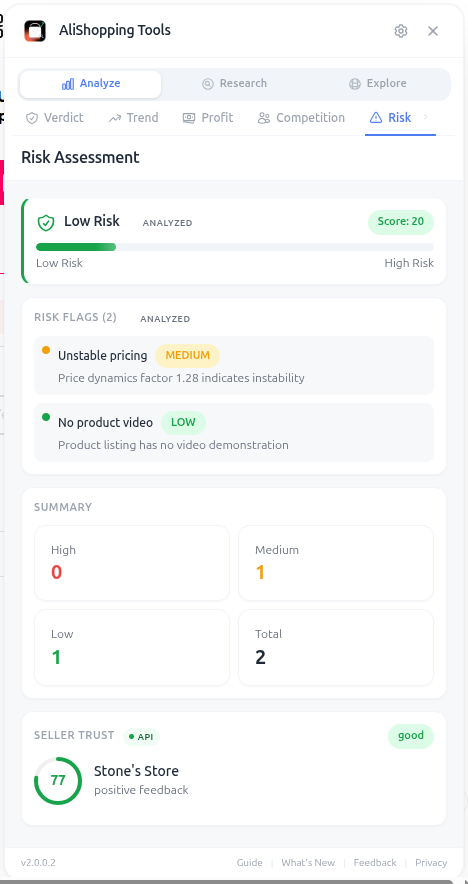
The Business License check is more important than most dropshippers realize. AliExpress sellers with verified licenses have stricter buyer protection rules and are far less likely to disappear with your inventory deposit.
How to Use It
- Open the AliExpress product page.
- Switch to the Risk tab.
- Read the Risk Score: green (0-30) safe, yellow (31-60) review, red (61-100) high risk.
- Read each Risk Flag carefully — even one critical flag can be a deal-breaker.
- Check Seller Trust — under 60% trust or store age under 6 months is usually a no-go.
- Verify Business License status, especially for products over $20 retail.
- Check Shipping Reliability if you sell into picky markets (Germany, Japan).
- Cross-reference findings with the Verdict and Profit tabs before making a final decision.
Real Example
A trendy "neck massager" shows Risk Score 72 with three flags: "Price increased 18% in last 14 days," "Trademark concern - product brand name in title," and "High return rate cluster (electronics)." The seller is only 4 months old with no business license. Despite a 78 Winning Score and great margins on paper, this is a clear pass — the trademark flag alone could trigger a Facebook ad rejection or worse, an IP complaint. You search for the same product from a verified seller with a 2+ year track record.
Pro Tips
- Trademark/IP flags are the most dangerous — Facebook will permanently ban ad accounts for repeat IP violations.
- Always favor sellers with verified business licenses for products over $30 retail.
- A small risk score increase (e.g., 35 → 50) is worth investigating — sometimes it's a single flag you can mitigate, sometimes it's a hidden disaster.
- If Shipping Reliability is poor, consider switching to a US/EU warehouse seller even at a higher unit cost.
Common Mistakes
- Ignoring Risk because the Profit tab looks great. Refunds eat margins faster than ads do.
- Trusting brand-new sellers (under 6 months) for high-volume launches.
- Skipping the IP/trademark flags — these can permanently kill ad accounts.
Related Guides
FAQ
Frequently Asked Questions
1How does the Risk Score direction differ from the Winning Score?
The Risk Score runs 0–100 but higher means worse, unlike the Winning Score.
Per the guide, anything above 60 deserves serious scrutiny, above 80 should be an automatic pass unless you have a strong reason to override.
Green is 0–30 safe, yellow 31–60 review, red 61–100 high risk.
A single dispute rate above 1.5% can get your Stripe or PayPal account frozen, which is why trustworthy suppliers are the cheapest insurance in dropshipping.
2Which Risk Flags are most dangerous?
Per the guide, trademark and IP flags are the most dangerous because Facebook permanently bans ad accounts for repeat IP violations — these should be hard passes even if other metrics look great.
The neck-massager example had Risk Score 72 with three flags: price increased 18% in 14 days, trademark concern on the brand name in the title, and a high return-rate cluster for electronics.
Despite Winning Score 78 and great margins, the trademark flag alone made it a pass.
3Why does the guide insist on verified business licenses?
AliExpress sellers with verified business licenses have stricter buyer-protection rules and are far less likely to disappear with inventory deposits, per the guide.
The recommendation: always favor sellers with verified licenses for products over $30 retail, and check Shipping Reliability if you sell into picky markets like Germany or Japan.
Under 60% seller trust or store age under 6 months is usually a no-go for high-volume launches regardless of the product's margin potential.
Related Guides
AI Verdict
Get a Strong Buy, Buy Signal, Hold / Watch, or Pass AI recommendation in seconds for any AliExpress product. Includes Winning Score, Market Opportunity radar, and price history.
Trend Analysis
See trend classification (Rising, Peaking, Stable, Declining), Momentum Score, and TikTok Viral potential for any AliExpress product. Free, updated daily.
Profit Simulator
Calculate full unit economics for any AliExpress product — product cost, shipping, processing fees, ad spend, net margin, and monthly revenue projections.
Competition
Assess market saturation, seller distribution, and monthly search volume for any AliExpress product. Know if a niche is open or crowded before spending on ads.