Review Aggregator
Analyze rating distribution, filter by star level, browse buyer countries, and spot quality issues before importing any AliExpress product to your store.
Customer reviews are the most honest source of truth about a product, but reading hundreds of them manually is impossible. The Reviews tab aggregates every review on a listing, structures the data by star rating, country, and keyword, and surfaces the negative feedback you actually need to see — saving you from importing products that will trigger refund storms.
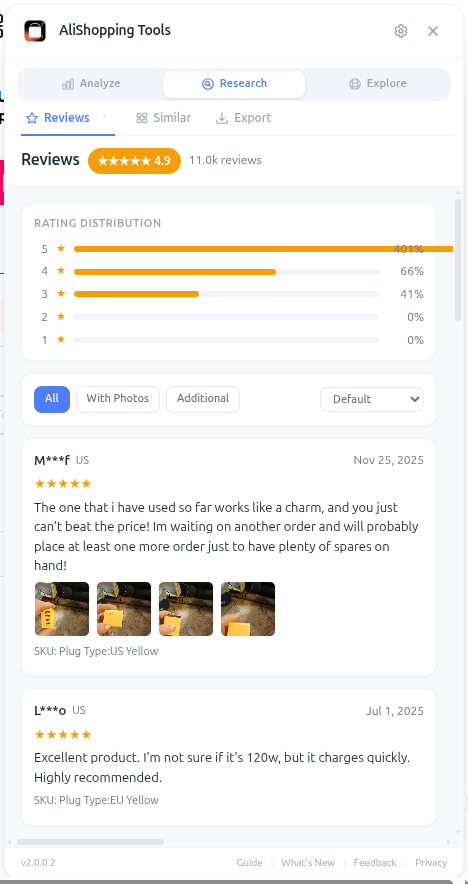
The most underused feature is the Star Filter. Instead of scrolling past 200 cherry-picked 5-star reviews to find the actual complaints, you can click "1 star" and read every negative review in 90 seconds. The patterns you spot here will save you thousands in refunds.
Why It Matters
Negative reviews are diagnostic. If 8 out of 12 one-star reviews mention "smaller than expected," you know exactly what your refund driver will be — and you can either preemptively address it in your product description or skip the product entirely. Positive reviews mostly just tell you the product exists; negative reviews tell you why it fails.
What You'll See
- Rating Distribution — bar chart showing percentage of 1-5 star reviews
- Star Filter — click any star level to read only those reviews
- Buyer Country Breakdown — which countries are buying the product most
- Image Gallery — all customer-uploaded photos in one scrollable view
- Review Highlights — auto-extracted keywords (e.g., "fast shipping," "great quality," "smaller than expected")
The Buyer Country Breakdown validates whether your target market is actually buying. If you're selling into the US but 80% of reviews are from Russia and Brazil, that's a signal the product hasn't been tested in your market yet — risky for cold ad launches.
How to Use It
- Open the AliExpress product page.
- Switch to the Reviews tab.
- Read the Rating Distribution — anything below 90% positive deserves scrutiny.
- Click the 1 star filter and read every negative review.
- Note recurring complaints — these become your refund predictions.
- Click 2 star and read those too.
- Browse the Image Gallery to see real product quality (not seller photos).
- Check the Buyer Country Breakdown to confirm demand in your target market.
Real Example
A "wireless earbuds" product has 92% positive reviews (looks great), but when you click the 1-star filter you see 14 reviews mentioning "stopped working after 2 weeks" and 9 mentioning "left earbud quieter than right." That's a quality control problem you'd be inheriting. You check the Buyer Country chart — 60% of buyers are in Europe, only 8% US. Combined with the QC issues, you skip this product despite its high overall rating. The Reviews tab just saved you a $2,000 ad test that would have ended in chargebacks.
Pro Tips
- The Image Gallery is the best preview of how your product will actually look in customer hands — way more honest than seller photos.
- Use the keyword highlights as ad copy material — phrases customers actually use in reviews are higher-converting than marketing speak.
- A product with 95%+ positive but only 50 reviews is riskier than 88% positive with 2,000 reviews — sample size matters.
- Compare Buyer Country distribution to AliExpress's "ship to" availability for your target market.
Common Mistakes
- Reading only 5-star reviews — you'll miss every red flag.
- Trusting the overall percentage without checking sample size.
- Ignoring the Image Gallery and trusting seller-staged photos instead.
Related Guides
FAQ
Frequently Asked Questions
1Why does the guide recommend reading 1-star reviews first?
Because negative reviews are diagnostic.
If 8 out of 12 one-star reviews mention "smaller than expected," you know exactly what your refund driver will be — and you can either preemptively address it in your product description or skip the product entirely.
Positive reviews mostly just tell you the product exists; negative reviews tell you why it fails.
The Star Filter lets you read every one-star review in 90 seconds instead of scrolling past 200 cherry-picked five-stars.
2What does the Buyer Country breakdown tell me?
Per the guide, it validates whether your target market is actually buying.
If you're selling into the US but 80% of reviews are from Russia and Brazil, the product hasn't been tested in your market yet — risky for cold ad launches.
The wireless earbuds example had 92% positive overall but the Buyer Country chart showed 60% Europe and only 8% US, combined with 14 one-star mentions of "stopped working after 2 weeks" — that killed the product despite the high headline rating.
3Does a high positive percentage always mean a safe product?
No per the guide — sample size matters.
A product with 95%+ positive but only 50 reviews is riskier than 88% positive with 2,000 reviews.
The Rating Distribution alone can hide quality-control problems: the wireless earbuds example showed 92% positive but one-star reviews revealed a systemic quality problem (14 "stopped working after 2 weeks" + 9 "left earbud quieter than right").
The guide's rule: always drill into 1-star and 2-star reviews, always check the Image Gallery for real buyer photos, not seller-staged shots.
Related Guides
Discovery
Browse a real-time trending product feed with category filters, winning badges, and sales velocity data. Discover fresh AliExpress dropshipping candidates daily.
Price Compare
Find cheaper suppliers for any AliExpress product with AI-powered keyword matching. Compare price, shipping, delivery time, and seller rating side by side — free.
Niche Research
Search AliExpress by keyword with price, category, max delivery, and sort filters. Every result is AI-scored — find your next dropshipping winner faster.
Export
Download product photos, video, specs, and reviews in one click. Properly named files ready for your Shopify store or ad creative folder. No manual saving.