






Content Export Suite
Download product photos, video, specs, and reviews in one click. Properly named files ready for your Shopify store or ad creative folder. No manual saving.
Once you've decided to sell a product, you need media: photos for your store, a video for ads, specs for your product page, and reviews for social proof. Manually right-clicking and saving each asset takes 20-30 minutes per product. The Export tab does all of it in one click — photos, video, specs, and reviews — ready to drop into Shopify or your ad creative folder.
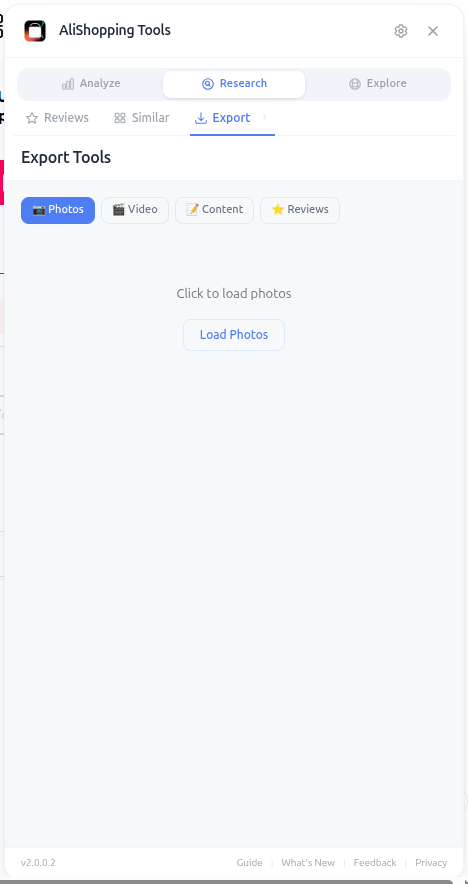
Everything downloads in original resolution, properly named, and organized into folders. Reviews export with star ratings, text, and customer photos so you can use them as social proof on your product page or in ad creatives.
Why It Matters
Content is the second-biggest bottleneck in dropshipping (after product research). Stores with high-quality, original-looking content convert 2-3x better than stores using stock supplier photos. Spending 5 minutes exporting and editing assets per product compounds to massive time savings across a portfolio of 20+ products.
What You'll See
- Photos Export — all product images in original resolution (main, variants, description images)
- Video Export — saves the product video as MP4 if available
- Specs Export — title, description, specifications table, attributes in structured format
- Reviews Export — customer reviews with ratings, text, and images for social proof
How to Use It
- Open the AliExpress product page.
- Switch to the Export tab.
- Select which content types you need (you can grab all four).
- Click the export button for each section.
- Photos download as a ZIP file with original filenames preserved.
- Video downloads as a single MP4 file.
- Specs export as structured text or CSV (importable to Shopify).
- Reviews export as CSV with columns for rating, country, text, and image URL.
Real Example
You've just decided to launch a "magnetic phone wallet" product. You click Export and grab all four asset types in 8 seconds. The ZIP contains 14 product photos at 1500x1500 resolution. The video is 18 seconds — perfect for TikTok. The specs CSV imports cleanly into your Shopify product, and the reviews CSV gives you 32 customer reviews to paste into your product page review section. Total time from "I want to sell this" to "I have all the assets ready": under 3 minutes.
Pro Tips
- Always edit the title, description, and at least one image before publishing — identical content hurts SEO and can trigger Facebook ad rejections.
- Use customer review photos (not seller photos) as your main product image — they look authentic and outperform staged shots.
- Filter exported reviews to keep only 4-5 star with photos — these are your social proof gold.
- Organize exports into folders by product so you can rebuild the store fast if needed.
Common Mistakes
- Publishing exported content as-is — Google penalizes duplicate descriptions and Facebook flags identical media across stores.
- Forgetting to remove watermarks or supplier logos from images.
- Using only seller-staged photos and ignoring the customer photo gallery.
- Not backing up exports — re-exporting after the listing is removed is impossible.
Related Guides
FAQ
Frequently Asked Questions
1What does the Export tab download in one click?
Per the guide, four asset types: Photos (all product images in original resolution — main, variants, description images), Video (the product video as MP4 if available), Specs (title, description, specifications table, attributes in structured format — CSV importable to Shopify), and Reviews (customer reviews with ratings, text, and images for social proof).
Everything downloads in original resolution, properly named, and organized into folders.
The guide's example grabbed all four in 8 seconds: 14 photos at 1500x1500, an 18-second video perfect for TikTok, specs CSV, and 32 reviews — ready in under 3 minutes.
2Why should I edit exported content before publishing?
Per the guide, publishing exported content as-is is a top mistake — Google penalizes duplicate descriptions and Facebook flags identical media across stores.
Always edit the title, description, and at least one image.
The recommendation to use customer review photos (not seller photos) as your main product image because they look authentic and outperform staged shots.
Filter exported reviews to keep only 4–5 star with photos as your social-proof gold, and remove watermarks or supplier logos from any image you do reuse.
3Why does content speed matter for dropshipping?
Per the guide, content is the second-biggest bottleneck in dropshipping after product research.
Stores with high-quality, original-looking content convert 2–3x better than stores using stock supplier photos.
Spending 5 minutes exporting and editing assets per product compounds to massive time savings across a portfolio of 20+ products — and manually right-clicking and saving each asset takes 20–30 minutes per product without the Export tab, which is why the speed difference is the pitch here.
Related Guides
Discovery
Browse a real-time trending product feed with category filters, winning badges, and sales velocity data. Discover fresh AliExpress dropshipping candidates daily.
Price Compare
Find cheaper suppliers for any AliExpress product with AI-powered keyword matching. Compare price, shipping, delivery time, and seller rating side by side — free.
Niche Research
Search AliExpress by keyword with price, category, max delivery, and sort filters. Every result is AI-scored — find your next dropshipping winner faster.
Reviews
Analyze rating distribution, filter by star level, browse buyer countries, and spot quality issues before importing any AliExpress product to your store.