Hot Products Discovery
Browse a real-time trending product feed with category filters, winning badges, and sales velocity data. Discover fresh AliExpress dropshipping candidates daily.
Searching for products you don't know exist is impossible. The Discovery tab solves this by surfacing real-time trending products across AliExpress in a single feed — refreshed every few minutes — so you can browse what's actually selling RIGHT NOW instead of guessing keywords or copying last month's "winning products" lists.
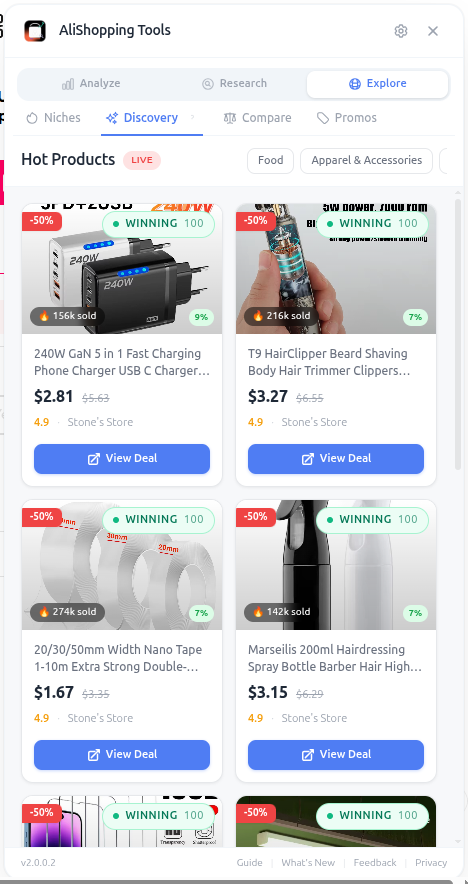
The feed is generated by combining order velocity spikes, search interest growth, and review acceleration across the AliExpress catalog. Products that show momentum across all three signals get flagged with a Winning badge.
Why It Matters
The biggest source of dropshipper burnout is "what should I sell next?" paralysis. Discovery removes that block by handing you 20-30 fresh candidates every time you open it. It's also a defense against staleness — if you're only researching products from YouTube videos or Facebook groups, you're chasing trends that already peaked weeks ago.
What You'll See
- Trending Product Feed — scrollable grid of products experiencing real momentum right now
- Category Filters — Electronics, Beauty, Home, Fashion, Pets, Kids, Tools, etc.
- Winning Badges — visual indicators on products meeting multiple winning criteria
- Sales Velocity — orders per day/week shown on each card
- Quick Analyze — tap any card to jump to its full Verdict, Trend, Profit, and Risk analysis
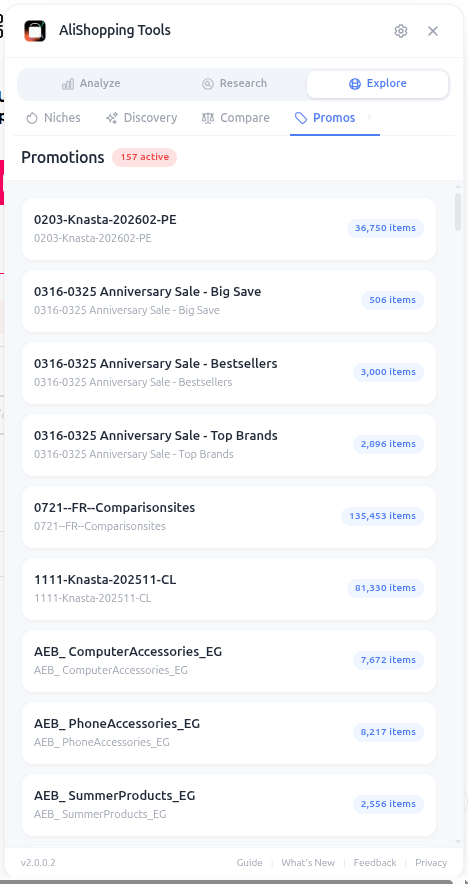
The Promotions filter is a gold mine during AliExpress sale events (Singles' Day, Anniversary Sale, Choice Day). It surfaces products with steep flash discounts that you can buy at suppressed prices and resell at normal margins.
How to Use It
- Open any AliExpress page (homepage, search, or product).
- Click the Discovery tab in the side panel.
- Browse the default trending feed.
- Use Category Filters to narrow to your preferred niche.
- Look for Winning badges first — these are pre-filtered by the algorithm.
- Check Sales Velocity to confirm real demand (10+ orders/day is meaningful).
- Click any card to open the product page and run a full analysis.
- Add interesting products to a separate browser tab group for batch evaluation later.
Real Example
You open Discovery on a Tuesday morning and filter to "Beauty." Three products stand out with Winning badges: a magnetic eyelash kit (45 orders/day), a silicone face cleansing brush (32 orders/day), and an LED neck massager (28 orders/day). You open all three in tabs, run Verdict + Profit + Risk on each, and disqualify the neck massager (high refund risk on electronics). The eyelash kit becomes your next ad test. Total research time: 8 minutes for 3 fully vetted candidates.
Pro Tips
- Make Discovery part of your daily routine — 5 minutes each morning surfaces more opportunities than an hour of manual searching.
- During AliExpress sale events, switch to the Promotions filter to find products at 30-50% off normal pricing.
- Combine Discovery with the Niches tab — use Discovery for inspiration, then Niches to drill into the keyword.
- Cross-reference Discovery winners with the Trend tab to confirm Rising momentum (some Discovery products are at peak, not rising).
Common Mistakes
- Picking products from Discovery without running Risk and Profit checks — the feed shows momentum, not safety.
- Ignoring Sales Velocity numbers and just clicking the prettiest images.
- Only browsing Discovery once a week — the feed updates throughout the day.
Related Guides
FAQ
Frequently Asked Questions
1How is the Discovery feed generated?
Per the guide, the feed combines order velocity spikes, search interest growth, and review acceleration across the AliExpress catalog — refreshed every few minutes.
Products that show momentum across all three signals get flagged with a Winning badge.
The point is to escape the "what should I sell next?" paralysis by handing you 20–30 fresh candidates every time you open it, rather than chasing trends from YouTube videos or Facebook groups that already peaked weeks ago.
2What Sales Velocity threshold signals real demand?
Per the guide, 10+ orders/day is meaningful.
The Beauty filter example in the guide surfaced three winners: a magnetic eyelash kit at 45 orders/day, a silicone face cleansing brush at 32, and an LED neck massager at 28.
All three had Winning badges, but the neck massager got disqualified after a Risk check (high refund risk on electronics).
The Discovery feed shows momentum, not safety — still run Verdict, Profit, and Risk on each candidate before committing.
3When should I use the Promotions filter on Discovery?
During AliExpress sale events like Singles' Day, Anniversary Sale, and Choice Day, per the guide.
The Promotions filter surfaces products with steep flash discounts that you can buy at suppressed prices and resell at normal margins — 30–50% off supplier cost during these windows.
The broader recommendation is to make Discovery a daily 5-minute morning routine because the feed updates throughout the day — once-a-week scanning misses the fastest-moving opportunities.
Related Guides
Price Compare
Find cheaper suppliers for any AliExpress product with AI-powered keyword matching. Compare price, shipping, delivery time, and seller rating side by side — free.
Niche Research
Search AliExpress by keyword with price, category, max delivery, and sort filters. Every result is AI-scored — find your next dropshipping winner faster.
Reviews
Analyze rating distribution, filter by star level, browse buyer countries, and spot quality issues before importing any AliExpress product to your store.
Export
Download product photos, video, specs, and reviews in one click. Properly named files ready for your Shopify store or ad creative folder. No manual saving.