Niche Research
Search AliExpress by keyword with price, category, max delivery, and sort filters. Every result is AI-scored — find your next dropshipping winner faster.
When you have a niche idea but don't know which specific products to test, the Niches tab is your starting point. It's a keyword-driven search interface layered on top of AliShopping Tools' scoring engine, so every result comes pre-scored with a Winning Score — letting you skip past low-quality listings and focus only on products that meet your criteria.
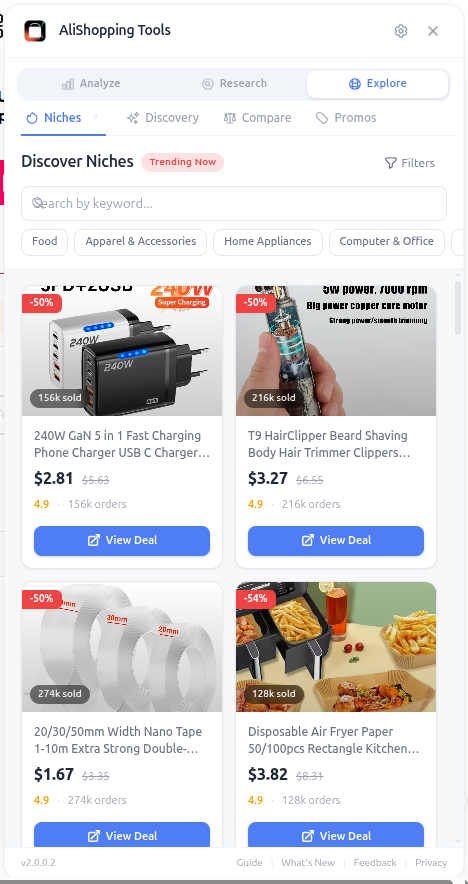
Unlike AliExpress's native search, which sorts by sales (favoring stale "winners" with thousands of reviews), Niches sorts by Winning Score by default. That means newer products with rising momentum surface at the top, which is exactly what you want for finding fresh opportunities.
Why It Matters
The biggest leverage point in product research is your search filter. AliExpress's default search is optimized for buyers, not sellers — it surfaces products with the most reviews, which are usually past their peak. Filtering by Winning Score, max delivery time, and price range eliminates 90% of the noise instantly and shows you only products worth analyzing further.
What You'll See
- Keyword Search — type any niche keyword and get scored results instantly
- Price Range Filter — set min/max retail price bounds
- Category Filter — limit to specific AliExpress categories
- Delivery Days Filter — max shipping time by destination country
- Sort Options — Winning Score, price, orders, trend momentum
- Trending Badges — visual indicators for products with rising demand
The Delivery Days filter is critical for stores selling into impatient markets like the US and Western Europe. Filtering to max 15-day delivery automatically removes sellers without ePacket or USA warehouse fulfillment.
How to Use It
- Open any AliExpress page.
- Switch to the Niches tab.
- Type a niche keyword (e.g., "kitchen gadget," "car accessory," "pet grooming").
- Set your price range — for impulse buys, try $5-30; for premium items, $30-100.
- Pick your destination country and set max delivery to 15-20 days.
- Sort by Winning Score (default) to see top-scoring products first.
- Look for Trending badges — these are products with rising momentum.
- Click any result to open the product page and run a full analysis.
Real Example
You want to test the "car accessories" niche. You search for "car phone holder," set price range $5-25, max delivery 18 days, sort by Winning Score. The top 5 results all score 75+, and 2 have Trending badges. You open all 5 in tabs, run Verdict + Profit + Risk on each, and identify the best candidate: a magnetic vent-mount holder with score 81, 38% net margin at $24.99 retail, low risk score, and an established 5-year-old seller. From keyword to vetted product in under 6 minutes.
Pro Tips
- Start with broad 1-2 word keywords, then narrow with 3-4 word variants once you find a winning angle.
- Use the Trending filter combined with Winning Score sort to find products that are both rising AND high-quality.
- Save your favorite filter combinations in browser bookmarks for repeat searches.
- Cross-check Niches results with the Discovery tab — if a product appears in both, that's a strong signal.
Common Mistakes
- Searching with overly specific keywords that return only 5-10 results — broaden first, narrow later.
- Forgetting to set the delivery filter and ending up with 60-day shipping suppliers.
- Sorting by orders (the AliExpress default) instead of Winning Score, which surfaces stale products.
Related Guides
FAQ
Frequently Asked Questions
1How is Niches sorting different from AliExpress's default search?
Per the guide, AliExpress's native search sorts by sales, which favors stale "winners" with thousands of reviews that usually peaked already.
Niches sorts by Winning Score by default — so newer products with rising momentum surface at the top, which is exactly what you want for fresh opportunities.
The guide's argument is that AliExpress default is optimized for buyers, not sellers, and filtering by Winning Score plus max delivery plus price range eliminates 90% of noise instantly.
2Why is the Delivery Days filter critical?
Per the guide, it is critical for stores selling into impatient markets like the US and Western Europe.
Filtering to max 15-day delivery automatically removes sellers without ePacket or USA warehouse fulfillment — which are the sellers most likely to cause refund storms and chargebacks from impatient customers.
Not setting the filter is one of the three Common Mistakes called out at the end of the guide, right alongside overly specific keywords and sorting by orders.
3What price range does the guide recommend for impulse vs premium products?
Impulse buys work at $5–$30 retail, premium items at $30–$100.
Use the filters to set your price range and max delivery days, then sort by Winning Score.
Look for products scoring 75+ with Trending badges — those are strong candidates.
Check the Profit tab for margin and the Supplier tab for seller reliability before committing.
Related Guides
Discovery
Browse a real-time trending product feed with category filters, winning badges, and sales velocity data. Discover fresh AliExpress dropshipping candidates daily.
Price Compare
Find cheaper suppliers for any AliExpress product with AI-powered keyword matching. Compare price, shipping, delivery time, and seller rating side by side — free.
Reviews
Analyze rating distribution, filter by star level, browse buyer countries, and spot quality issues before importing any AliExpress product to your store.
Export
Download product photos, video, specs, and reviews in one click. Properly named files ready for your Shopify store or ad creative folder. No manual saving.