Profit Simulator
Calculate full unit economics for any AliExpress product — product cost, shipping, processing fees, ad spend, net margin, and monthly revenue projections.
Profitability is the only metric that ultimately matters. The Profit Simulator tab gives you a complete unit economics breakdown — product cost, shipping, processing fees, ad cost, net margin — and projects monthly revenue at different daily order volumes. It's the calculator that turns "this product looks cool" into "this product makes $4,200/month at 15 orders/day."
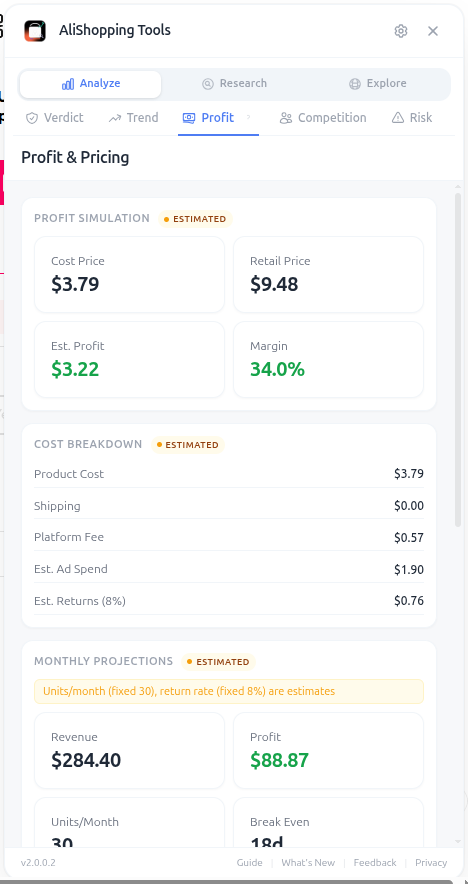
Every cost line is auto-populated from real AliExpress pricing and category benchmarks, so you don't have to manually look up shipping rates or estimate Stripe fees. You just type in your target retail price and the tab recalculates everything live.
Why It Matters
Most product research tools only show you the AliExpress price and call it a day. That's useless. To know if a product is profitable, you need to model the FULL stack of costs: product, shipping, payment processor, platform fees, refunds, and most importantly, customer acquisition cost. The Profit Simulator does all of that in one screen.
What You'll See
- Cost Breakdown — product cost, ePacket shipping, payment processing (~3%), platform fees, estimated CPA
- Margin Calculator — set your retail price and see gross margin, net margin, and profit per unit instantly
- Monthly Projections — revenue + profit at 5, 10, 25, and 50 orders/day
- Pricing Strategies — three suggested price points (aggressive, balanced, premium)
- Ad Benchmarks — typical CPC and CPM for the category, plus break-even ROAS
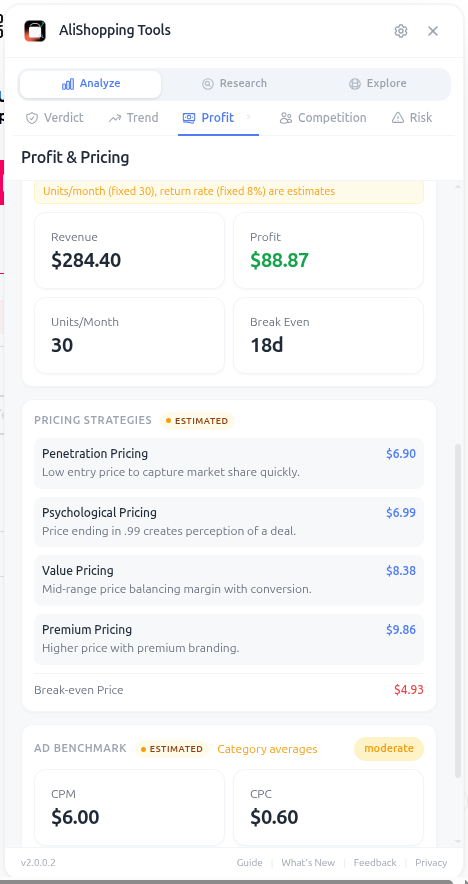
The Ad Benchmarks section is the secret weapon. Knowing that beauty products average $1.20 CPC while pet products average $0.45 changes which categories you target. The break-even ROAS tells you the minimum return on ad spend you need to not lose money — anything below that and you're paying for the privilege of selling.
How to Use It
- Open any AliExpress product page.
- Switch to the Profit tab.
- Review the auto-populated cost breakdown.
- Drag the retail price slider to your target price (rule of thumb: 3-5x the AliExpress price for impulse buys).
- Watch the net margin update — anything below 30% is dangerous, 40%+ is comfortable.
- Check the monthly projection at 10 orders/day to see if the absolute profit number is worth your time.
- Compare the three Pricing Strategy cards to choose between volume play vs. premium positioning.
- Note the break-even ROAS and use it as your minimum target when launching ads.
Real Example
The Profit Simulator lets you input any product's cost, shipping, and your target retail price. It calculates total cost (product + shipping + processing + platform fees + estimated CPA), net profit per unit, margin percentage, and break-even ROAS. Use it to model different retail prices and CPA scenarios before committing budget — always model with higher CPA than average because ads typically cost more in week one.
Pro Tips
- Always model with a HIGHER CPA than the suggested benchmark — ads almost always cost more in week one than the average.
- If net margin is below 25%, walk away. There's no recovery when refund rates spike.
- Use the Premium pricing strategy for products with strong perceived value (LED, beauty, gadgets) and Aggressive for commodities.
- Test the simulator at multiple retail prices to find the price-elasticity sweet spot.
Common Mistakes
- Forgetting to add ad cost in your "profit" calculation — gross margin minus product cost is NOT profit.
- Under-estimating refund rates. Add a 5-8% buffer for refunds and chargebacks on impulse-buy products.
- Setting unrealistic order volumes in projections (50/day from a cold start is fantasy).
Related Guides
FAQ
Frequently Asked Questions
1What cost lines does the Profit Simulator auto-populate?
Per the guide, every cost line is auto-populated from real AliExpress pricing and category benchmarks: product cost, ePacket shipping, payment processing (~3%), platform fees, and estimated CPA.
You type in your target retail price and the tab recalculates gross margin, net margin, and profit per unit live.
Monthly revenue projections run at 5, 10, 25, and 50 orders/day.
Three suggested price points (aggressive, balanced, premium) plus Ad Benchmarks (typical CPC and CPM for the category plus break-even ROAS) round out the screen.
2What net margin threshold does the guide treat as safe or dangerous?
Below 25% margin is the walk-away threshold — there is no recovery when refund rates spike.
Below 30% is dangerous, 40%+ is comfortable.
Always model with higher CPA than the suggested benchmark because ads almost always cost more in week one than the average.
3What is break-even ROAS and why does it matter?
Break-even ROAS is the minimum return on ad spend you need to not lose money — if ads return less than that per dollar spent, you are paying for the privilege of selling.
The wireless car charger example had break-even ROAS 1.54, with a target of 2.0 for safety.
The guide's rule: note the break-even ROAS before launching and use it as your minimum target.
Anything below that means stop the ad immediately rather than waiting for "optimization" that usually does not come.
Related Guides
AI Verdict
Get a Strong Buy, Buy Signal, Hold / Watch, or Pass AI recommendation in seconds for any AliExpress product. Includes Winning Score, Market Opportunity radar, and price history.
Trend Analysis
See trend classification (Rising, Peaking, Stable, Declining), Momentum Score, and TikTok Viral potential for any AliExpress product. Free, updated daily.
Competition
Assess market saturation, seller distribution, and monthly search volume for any AliExpress product. Know if a niche is open or crowded before spending on ads.
Risk Assessment
Identify risk flags, seller trust issues, and business license status before committing to a supplier. Avoid chargebacks, IP bans, and unreliable shipping.