Export AliExpress Content Free: Photos/Video/Reviews
Export AliExpress Content Free: Photos/Video/Reviews
Quick answer: Use the Export tab in the free AliShopping Tools Chrome extension — one click pulls the cleaned title, full image gallery, description, and video from any AliExpress product page into a structured format ready to paste into Shopify or any other platform. It replaces 20+ minutes of manual right-click-save and title rewriting per product.
Adding an AliExpress product to your Shopify store sounds like a five-minute task. Then you actually try to do it.
You right-click the first image to save it. Then the second. Then the third. You copy the title and realize it contains three languages, six emojis, and the phrase "hot selling 2024." You try to copy the description and discover it is rendered as one giant image. You give up and retype everything.
Twenty minutes later, you have one product listed. You have 19 more to add before you can launch. This is how dropshipping ambitions die — not because the products are bad, but because the mechanical work of getting them into your store is a grind.
The Export tab in AliShopping Tools fixes this. One click pulls the title, images, and description from any AliExpress product page, cleaned up and ready to paste into Shopify (or any other platform). It is free, built into the extension, and exists because this workflow should never have been painful in the first place.
Here is how to use it.
What the Export Tab Does
The Export tab is a content-extraction utility inside the AliShopping Tools Chrome extension. Instead of making you right-click every image and manually clean up messy titles, it gathers the product content you actually need — title, images, description — in a structured format ready to move into your store.
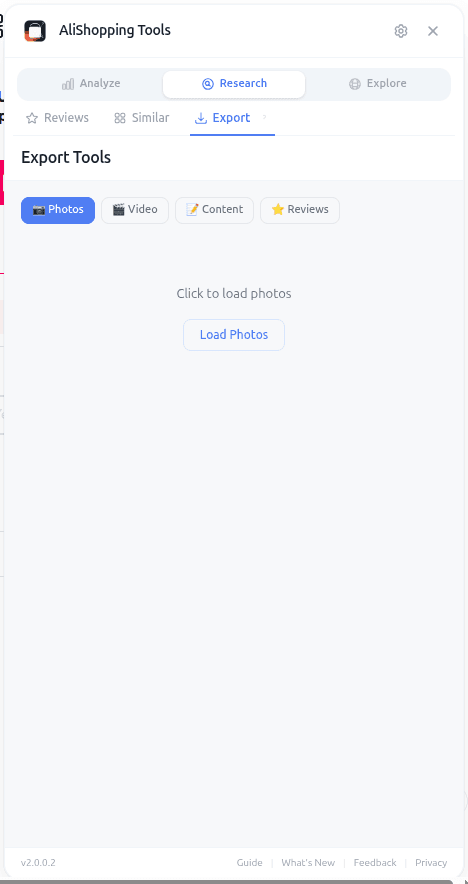
It handles the cleanup automatically. AliExpress titles packed with keyword spam get the noise trimmed. Product images are collected from the main gallery. The description — whether it is plain text, HTML, or a series of images — is pulled into a usable format. If the product has video content, that surfaces too.
The output is designed to drop into any ecommerce platform. Shopify is the most common target for dropshippers, but the same exported assets work for WooCommerce, BigCommerce, Wix, or a custom storefront. It is just content; the extension does not care where you paste it.
How to Access the Export Tab
Three steps, same as every other feature.
Step 1 — Install AliShopping Tools. Free on the Chrome Web Store. No account, no trial, no credit card.
Step 2 — Open the AliExpress product page you want to export. You need to be on the specific product detail page — a category page will not work because the extension needs a single product context.
Step 3 — Click the Export tab in the AliShopping Tools panel. The content loads automatically. You do not need to scroll down the product page or manually trigger anything.
From there you click the export actions and grab what you need. The whole loop takes under 30 seconds per product once you have the rhythm.
UI Elements Breakdown
The Export tab is organized by content type, so you grab only what you need for the current product.
Title. The product title surfaces at the top, cleaned of common noise patterns (excessive keywords, emoji clutter, promotional phrases like "2024 HOT"). You can copy the cleaned version or access the original if you want to edit manually.
Images. The image gallery from the AliExpress listing surfaces in a thumbnail grid. You can export individual images or grab the full set. Images are the most time-consuming piece of manual imports, so this is usually where the Export tab saves the most time.
Description. The product description — whether AliExpress delivered it as text, HTML, or images — gets extracted into a format you can use. For image-based descriptions, the images themselves are pulled so you can drop them directly into a Shopify rich-text block or convert them to alt-text-friendly content.
Video (if available). If the product listing includes a demo video, the Export tab surfaces it. Product videos boost conversion significantly, so exporting them when available is almost always worth it.
Reviews (bonus). You can also export review content for products you plan to build social-proof assets around. See the Reviews tab guide for how to analyze reviews; Export is where you pull them out for use in ad copy or landing pages.
Each export action gives you the content in a format ready to paste — no intermediate cleanup required in most cases.
Real-World Workflow: Adding 10 Products to Shopify in an Hour
Say you just validated 10 products using Verdict, Trend, Profit, Competition, and Risk checks. Now you need to get them into your Shopify store fast.
Open the first validated product on AliExpress. Click the Export tab. Copy the cleaned title and paste it into Shopify as the product title. Export the image set and upload to your product media. Grab the description content and paste it into the description editor, cleaning up any final formatting. If there is a video, upload that too.
That is one product in about 6 minutes — compared to 20+ minutes of manual right-clicking and copy-pasting. Do that 10 times and you are live in an hour instead of a full workday.
The time savings compound as you scale. A store with 50 products is 50 hours of manual work — or about 6 hours with the Export tab. The difference is what separates a side project from a business.
Worth noting: the Export tab does not push content to Shopify automatically. You still paste it into your store yourself. This is intentional — you want a human eye on every product before it goes live, because even with perfect extraction, your store needs your pricing strategy, your brand voice in the final copy, and your product positioning. Export eliminates the mechanical work; the strategic work stays with you.
Common Mistakes to Avoid
Skipping the analysis before exporting. The Export tab makes it trivial to import any AliExpress product into your store. That is a feature, but it becomes a trap if you skip validation. Always run Verdict, Profit, Competition, and Risk checks first. Exporting a bad product is faster than ever, which means you can fill your store with bad products faster than ever. Validate, then export.
Pasting raw titles into your store. Even with noise cleanup, AliExpress titles are built for AliExpress search, not your store. Always give the title a final human pass — match it to your brand voice, emphasize the key benefit, and remove anything that sounds like it was written for a Chinese wholesale marketplace.
Using image-based descriptions as-is. Many AliExpress descriptions are image-heavy. They look fine on AliExpress but hurt your SEO and accessibility when dumped straight into your Shopify description field. Use the exported images as reference, but write a fresh text description focused on benefits, specs, and buyer objections.
Forgetting to edit for your market. AliExpress sellers often reference payment methods, shipping terms, or store policies that do not apply to your store. Always scan the exported content for lines like "contact store before purchase" or promotional language that makes sense only on AliExpress. Strip it out before your product goes live.
FAQ
Is it really free? Yes. The Export tab, like the rest of AliShopping Tools, is free with no account requirement.
Does Export push content directly to Shopify? No. The extension extracts content from AliExpress and puts it in a format you can copy and paste into Shopify (or any other platform). You control what actually gets published to your store.
Which formats does Export support? Title and description come through as text. Images are individual image files. Videos are video files. Everything is in formats every major ecommerce platform accepts.
Can I export products in bulk? The Export tab works on one product at a time — the product currently open on AliExpress. For bulk workflows, you combine Export with your own routine: Discovery to find candidates, analysis tabs to validate, then Export to grab the content for each validated winner.
Does the exported content include price? The Export tab focuses on product content (title, images, description, video). For pricing strategy, use the Profit Simulator to decide your retail price — AliExpress cost is not your selling price, so you do not want to copy it over directly anyway.
Stop Copy-Pasting. Start Publishing.
The dropshippers who scale are not the ones who work longer hours. They are the ones who eliminate the repetitive, low-value mechanical work that consumes a beginner's entire weekend. Product content extraction is exactly that kind of work — necessary, but brainless, and the wrong place to spend your focus.
Install AliShopping Tools — Free on Chrome Web Store
Already installed? Open any validated AliExpress product and click the Export tab. Your next 10 products are going to be in your store by tonight instead of next weekend.
Ready to find winning products?
Try AliShopping Tools — 15 free AI tools for product research.
Quick answers
Frequently Asked Questions
1Is it really free?
Yes. The Export tab, like the rest of AliShopping Tools, is free with no account requirement.
2Does Export push content directly to Shopify?
No.
The extension extracts content from AliExpress and puts it in a format you can copy and paste into Shopify (or any other platform).
You control what actually gets published to your store.
3Which formats does Export support?
Title and description come through as text. Images are individual image files. Videos are video files. Everything is in formats every major ecommerce platform accepts.
4Can I export products in bulk?
The Export tab works on one product at a time — the product currently open on AliExpress.
For bulk workflows, you combine Export with your own routine: Discovery to find candidates, analysis tabs to validate, then Export to grab the content for each validated winner.
5Does the exported content include price?
The Export tab focuses on product content (title, images, description, video).
For pricing strategy, use the Profit Simulator to decide your retail price — AliExpress cost is not your selling price, so you do not want to copy it over directly anyway.
6Can the Export tab also pull product variant options like size and color automatically?
The Export tab pulls the variant options (size, color, and similar attributes) that are visible on the AliExpress listing along with the product content, so you don't have to retype them by hand.
Always double-check the extracted variants against the live listing before publishing, since some suppliers structure their variant data inconsistently.
7Is the Export feature compatible with mobile browsers or only desktop Chrome?
Export currently works only on the desktop version of Google Chrome — it doesn't run on mobile browsers or on other desktop browsers.
Make sure you're on an up-to-date version of Chrome with the AliShopping Tools extension installed and enabled, then open the product page you want to extract.
8How does the Export tab handle product descriptions that are originally images rather than text?
When a product description is made up of images rather than text, the Export tab pulls those images along with the rest of the product content so you can include them in your Shopify listing.
You'll generally still want to add your own text description for SEO, since image-only descriptions don't give search engines anything to read.
9Does the exported content retain the original AliExpress product URL for reference or backlink purposes?
The exported content doesn't automatically carry over the original AliExpress product URL — the export is meant to be a clean, self-contained set of content for your own store.
If you want to keep a reference link for your own records, copy the product URL yourself before or after exporting.
10Can I schedule the Export tab to run automatically each day for new AliExpress listings?
There's no built-in scheduler — each export is triggered manually by clicking the Export button on a product page you have open.
If you want to automate bulk extraction across many listings, you'd need a separate browser-automation tool; AliShopping Tools itself doesn't run exports in the background or on a schedule.
More from the blog
AliExpress Shipping to the UK: Delivery Times, VAT & Customs (2026)
How long AliExpress takes to reach the UK, how 20% VAT and post-Brexit customs work, and which shipping method is fastest for UK shoppers in 2026.
AliExpress Shipping to the USA: Delivery Times, Customs & Duty (2026)
How long AliExpress takes to the USA, what import duty you pay after the 2026 de minimis change, and which shipping method is fastest. Realistic estimates.
AliExpress Shipping to New Zealand: Delivery Times, GST & Tracking (2026)
How long AliExpress takes to reach New Zealand, how 15% GST is collected on your order, and how to track a parcel from China to NZ. Delivery estimates by method for 2026.