Free AliExpress Review Analyzer: Checker Tool Workflow (2026)
Free AliExpress Review Analyzer: Checker Tool Workflow (2026)
Quick answer: Use the Reviews tab in the free AliShopping Tools Chrome extension as an AliExpress review analyzer and checker — it measures review velocity, sentiment breakdown, authenticity signals (burst patterns, photo velocity, country skew), and recurring buyer complaints in seconds, no account required. This replaces manual review-by-review reading and surfaces whether a star rating is genuine or manufactured. For the underlying detection framework, see the full fake AliExpress reviews guide.
A product with 2,000 five-star reviews looks like a no-brainer. Then you dig in and realize half the reviews are one-word "good" posts, another big chunk arrived in a single suspicious week, and the actual written feedback reveals a sizing problem every customer complains about.
AliExpress review data is a goldmine — if you know how to read it. The problem is that reading it manually takes forever, and your brain is terrible at spotting statistical patterns in hundreds of short comments.
The Reviews tab in AliShopping Tools does the analysis for you. It looks at review velocity, sentiment, authenticity signals, and buyer patterns, then gives you a clear read on whether the product actually delivers what the star rating implies. It is free, lives on the product page, and runs in about a second.
Here is how to use it.
What the Reviews Tab Does
The Reviews tab is an AliExpress review analyzer built into the AliShopping Tools Chrome extension. Instead of dumping the raw review feed in front of you, it pulls out the signals that actually matter for product research. This is the free-tool companion to our full fake AliExpress reviews guide — the guide explains what the red flags are; this walkthrough shows how the analyzer surfaces them on the page.
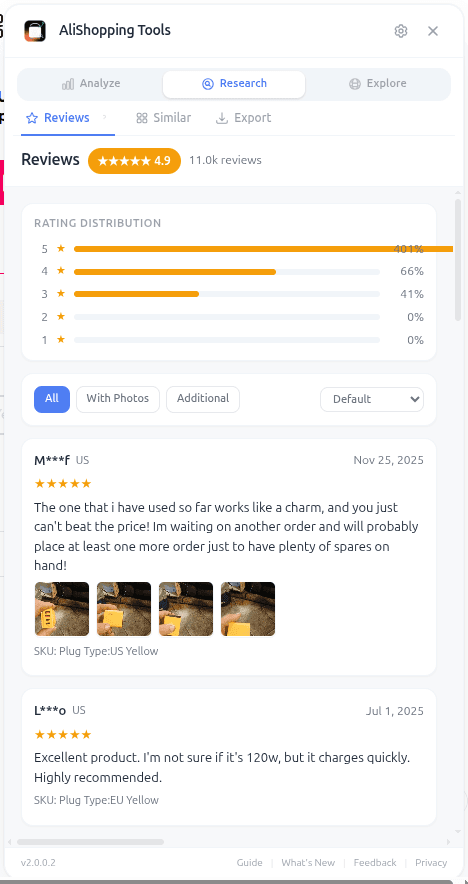
It measures review velocity — how fast reviews are coming in and whether the pace is accelerating, steady, or slowing. It reads sentiment — what customers are actually saying, not just how many stars they left. It flags patterns that suggest review manipulation, like sudden bursts of near-identical short reviews. And it surfaces the recurring themes in written feedback so you can spot quality issues before you commit to a product.
The whole point is to replace "scrolling through 50 reviews hoping to get a feel for the product" with a structured view that tells you in 30 seconds whether the reviews support the star rating or contradict it.
How to Access the Reviews Tab
You can open it in three steps.
Step 1 — Install AliShopping Tools. Free on the Chrome Web Store, no account needed. Takes about 15 seconds.
Step 2 — Open the AliExpress product page you want to analyze. Paste the URL, click a link, or search on AliExpress and click a product. Any product detail page works.
Step 3 — Click the Reviews tab in the AliShopping Tools panel. The analysis loads automatically. You do not need to scroll down to the native AliExpress reviews section or click anything on the page itself.
The panel stays sticky while you browse, so you can jump between Verdict, Trend, Profit, Competition, Risk, and Reviews without reloading anything.
UI Elements Breakdown
The Reviews tab surfaces several distinct signals, each designed to answer a specific question.
Review velocity. This tells you whether reviews are accelerating, steady, or slowing down. Accelerating velocity alongside a healthy star rating is a strong positive — real customers are buying right now and reporting back. Decelerating velocity on a product with lots of historical reviews means the wave may have passed.
Sentiment breakdown. Beyond the 1-5 star distribution, sentiment analysis looks at what customers actually write. A product can have 4.7 stars but reveal sentiment concerns in the written feedback — "works fine but" patterns that the star rating hides.
Authenticity signals. The analyzer flags patterns common in manipulated reviews: clusters of reviews arriving in suspicious time windows, near-duplicate short comments, implausible ratios of photo reviews to text reviews. Clean patterns look one way; manipulated patterns look another.
Recurring themes. The tab extracts the specific complaints and praises that show up repeatedly. If 30% of 3-star reviews mention "smaller than expected," that is a sizing issue you need to address in your product description before you ship a single unit.
Each signal is designed to be glanceable. You should not need to study the tab — you should be able to read it like a dashboard.
Real-World Workflow: Vetting a Silicone Kitchen Tool
Imagine you are considering a silicone spatula set with 4.6 stars and 1,800 reviews. On paper it looks like a winner. Here is how the Reviews tab reshapes the decision.
Open the product page. Click the Reviews tab. You see review velocity is steady, not accelerating — no red flag, but also no momentum bump. Sentiment breakdown shows 78% positive, 15% neutral, 7% negative. The recurring themes list surfaces "melts in dishwasher" as a repeated complaint across 11% of reviews. Authenticity signals look clean — review timing is spread naturally, no burst clusters.
Now you know three things you did not know before: the product is genuinely liked, there is a specific quality concern worth addressing, and the reviews are real. You can still sell this product profitably — but you will want to verify with the supplier whether there is a dishwasher-safe variant, or position the item as hand-wash-only in your listing.
Compare that to a flashier product with 4.9 stars but authenticity flags, declining velocity, and a sentiment breakdown that reveals half the negative reviews mention "never arrived." That one is a pass no matter how good the rating looks.
The Reviews tab turns a surface-level rating into a decision-grade input. Pair it with the Verdict and Risk checks and you rarely get surprised post-purchase.
Common Mistakes to Avoid
Trusting the star rating alone. A 4.8-star rating with clean authenticity signals is very different from a 4.8-star rating with burst clusters and generic one-word reviews. The same number means wildly different things. The Reviews tab exists so you never have to trust the bare number again.
Ignoring recurring themes. If multiple reviews mention the same problem — sizing, durability, color accuracy — that problem is real. It does not go away when you sell the product from your store. Either address it in your listing, negotiate with the supplier, or pick a different product.
Confusing review count with review quality. A product with 200 authentic, detailed reviews is more trustworthy than a product with 3,000 reviews that look padded. Volume without quality is noise. The authenticity signals on the Reviews tab help you tell the difference.
Skipping reviews because the star rating is "fine." Even products with great ratings often have specific quality issues that show up only in written feedback. Spending 30 seconds on the Reviews tab costs you nothing and can save you from surprise refund requests.
FAQ
Is the Reviews tab really free? Yes. AliShopping Tools is free to install and use. The Reviews tab — like every other tab — costs nothing, works without an account, and has no trial limits.
Does it work on every AliExpress product page? Yes, any AliExpress product detail page. Open the page, click the extension, switch to the Reviews tab.
Can it detect fake reviews with 100% accuracy? No detector is perfect, and neither is this one. The authenticity signals surface patterns that strongly correlate with review manipulation, but they are heuristics, not a guarantee. Use them as one input alongside the other tabs.
What about reviews in other languages? AliExpress reviews come in many languages. Sentiment and theme extraction handle the most common ones. If a product has reviews almost entirely in a language outside the main set, thematic insights may be thinner — but velocity and authenticity signals still work because they are based on timing and volume patterns.
How does this compare to the Verdict tab? Verdict gives you an overall winning score based on demand, rating, trend, and more. Reviews zooms into the review dimension specifically — velocity, sentiment, authenticity, themes. Use Verdict for the go/no-go call, use Reviews when you need to understand the customer experience at a deeper level.
Stop Guessing What Customers Actually Think
Reviews are the closest thing you get to talking to real customers before you sell a product. Ignoring them is expensive. Reading them manually is slow. Analyzing them algorithmically takes seconds and gives you signals the raw feed cannot.
Install AliShopping Tools — Free on Chrome Web Store
Already installed? Open any AliExpress product and click the Reviews tab. The next time a 4.9-star product looks perfect, you will know whether to trust it in under a minute.
AliShopping Tools
See live AliExpress data in your browser.
Seller trust score, 90-day price history, and live promo codes — on every AliExpress product page. No account, free.
Ready to find winning products?
Try AliShopping Tools — 15 free AI tools for product research.
Quick answers
Frequently Asked Questions
1Is the Reviews tab really free?
Yes. AliShopping Tools is free to install and use. The Reviews tab — like every other tab — costs nothing, works without an account, and has no trial limits.
2Does it work on every AliExpress product page?
Yes, any AliExpress product detail page. Open the page, click the extension, switch to the Reviews tab.
3Can it detect fake reviews with 100% accuracy?
No detector is perfect, and neither is this one.
The authenticity signals surface patterns that strongly correlate with review manipulation, but they are heuristics, not a guarantee.
Use them as one input alongside the other tabs.
4What about reviews in other languages?
AliExpress reviews come in many languages.
Sentiment and theme extraction handle the most common ones.
If a product has reviews almost entirely in a language outside the main set, thematic insights may be thinner — but velocity and authenticity signals still work because they are based on timing and volume patterns.
5How does this compare to the Verdict tab?
Verdict gives you an overall winning score based on demand, rating, trend, and more.
Reviews zooms into the review dimension specifically — velocity, sentiment, authenticity, themes.
Use Verdict for the go/no-go call, use Reviews when you need to understand the customer experience at a deeper level.
6How quickly does the Reviews tab load analysis for a product with hundreds of reviews?
The Reviews tab analyzes a product's reviews in a few seconds for a typical listing.
Very large review counts can take a little longer on the first pass, and results are cached so repeat checks are faster.
Everything runs locally in your browser, so there's no extra network delay beyond the normal AliExpress page load.
7Can I use the free AliShopping Tools Reviews tab on my phone or tablet?
The Reviews tab is a Chrome extension feature, so it runs on the desktop version of Chrome — it does not work inside the AliExpress mobile app or on mobile browsers.
If you need to check a product from a phone, open the desktop site via Chrome's "Request desktop site" option, though the analysis works best on a full-size screen.
8Is there a way to export the sentiment and authenticity data from the Reviews tab?
There's no built-in export button for the Reviews tab today.
You can screenshot the breakdown or note the sentiment/authenticity numbers manually if you want to compare products side by side.
9How does the analyzer treat reviews that include photos versus text‑only reviews?
Yes — the analyzer treats photo reviews as a separate signal from text-only reviews, tracking photo velocity alongside sentiment to help spot coordinated fake-photo campaigns.
Text-only reviews are still scored for sentiment and authenticity.
Comparing the two views helps you judge whether a wave of positive photo reviews looks organic or manufactured.
More from the blog
How to Spot Fake AliExpress Reviews in 30 Seconds (2026 Guide)
Fake AliExpress reviews follow 7 patterns: burst dates, identical wording, no buyer photos. Spot all 7 in 30 seconds — or auto-flag them with a free extension.
Winning Products August 2026: 12 Back-to-School Peak Categories
12 dropshipping categories for August 2026 — back-to-school peak (first two weeks), dorm setup, and the early-fall transition — plus how to vet any candidate with AStools before you spend.
Winning Products July 2026: 12 Post-618 Categories
12 dropshipping categories for July 2026 — post-618 restock, back-to-school prep, summer peak — plus how to vet any candidate with AStools before you spend.