How to Discover New AliExpress Products Before Competitors (Free, 2026)
Discover New AliExpress Products: Free Tool 2026
Quick answer: Use the Discovery tab in the free AliShopping Tools Chrome extension to discover new AliExpress products — it surfaces listings with real early-traction signals (accelerating order velocity, rising reviews on new arrivals, categories where demand outpaces supply) instead of AliExpress's promoted category feeds. Each discovery card links directly to full AI analysis. Free, no account required.
Finding a winning product on AliExpress feels like hunting through a warehouse the size of a city. Millions of listings, most of them mediocre, and the few real opportunities buried under a mountain of lookalikes and stale bestsellers.
Most people handle this by scrolling category pages for hours, bookmarking anything that looks promising, and hoping their gut is right. That approach burns a weekend and usually produces a list of products that peaked three months ago.
There is a better way. The Discovery tab in AliShopping Tools surfaces new and rising AliExpress products based on real demand signals — order velocity, search momentum, recent listing activity — so you stop finding yesterday's winners and start spotting tomorrow's.
Here is exactly how to use it.
What Does the Discovery Tab Do?
The Discovery tab is a product-finding surface that lives inside the AliShopping Tools Chrome extension. Instead of showing you whatever AliExpress wants to promote in its category feeds, it pulls together products that are showing early signs of traction — listings with accelerating order counts, new arrivals gaining reviews quickly, and categories where demand is rising faster than supply.
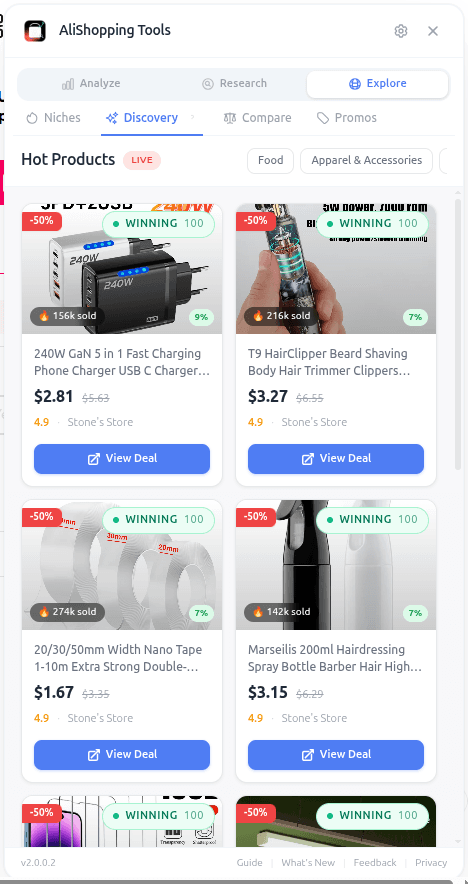
Each discovery card shows you a quick read of the product: the product image and title, a price indicator, and enough context to decide in two seconds whether the item is worth a deeper look. From there you can click straight into the full analysis — Verdict, Trend, Profit, Competition, Risk — without leaving the browser.
The whole point is to shorten the distance between "I need a new product to test" and "here are five candidates worth validating today." You skip the hours of blind scrolling and get a curated starting list based on what is actually moving on the platform right now.
How Do You Open the Discovery Tab?
You can open Discovery in three steps once the extension is installed.
Step 1 — Install AliShopping Tools. Grab it from the Chrome Web Store. It is free, no account required, and takes about 15 seconds to install. The extension icon will appear in your Chrome toolbar.
Step 2 — Open any AliExpress page. Go to aliexpress.com — a product page, a category page, or the home page all work. The extension auto-detects AliExpress and activates.
Step 3 — Click Discovery in the tab bar. The AliShopping Tools panel appears alongside the page. Click the Discovery tab and the curated product list loads automatically.
That is the entire setup. No sign-up flow, no onboarding quiz, no plan selection.
UI Elements Breakdown
The Discovery tab layout is built to help you scan fast and click into depth when something catches your eye.
Product grid. The main view is a grid of product cards. Each card has a large image, the product title, and a price. Clicking the image or title jumps you to that product on AliExpress, where the other 13 tabs (Verdict, Trend, Profit, etc.) immediately become available for that item.
Refresh. A refresh control lets you pull a new batch when you have worked through the current list. Use it whenever you want fresh candidates without navigating away.
Loading and empty states. If the feed is still loading, you will see a loading indicator. If no results are available for your current context, the tab tells you instead of showing a confusing blank screen — so you know to try again or adjust your approach.
The grid is intentionally minimal. The goal is to get you into a full analysis as quickly as possible, not to overload the card itself with data that belongs on the product page.
Real-World Workflow: Finding Candidates for a Home Office Store
Say you run a home office niche store and you need three new products to test this month. Here is how the Discovery tab fits into a real research session.
Open AliExpress. Click the AliShopping Tools icon and switch to the Discovery tab. Browse the grid for 2 to 3 minutes and bookmark anything that visually fits your brand — maybe a cable management tray, an adjustable monitor riser, and a mini humidifier.
Now you go deep. Click the first bookmarked product. You land on its AliExpress product page, and the extension automatically loads the full panel. Run the Verdict check for a winning score, the Trend tab to confirm it is Emerging or Growing (see the 7 signs guide for what to look for), the Profit simulator to confirm healthy margins, and the Competition tab to make sure saturation is not already High.
If the product clears all four gates, it goes into your testing shortlist. If it fails on Competition or Trend, you drop it and pick up the next one. Twenty minutes of focused work replaces a weekend of wandering through category pages.
The Discovery tab is the funnel entry. The deeper tabs are where you validate. Together they turn product research from guesswork into a repeatable process — see how to find winning products on AliExpress for the four-signal scoring method that runs on every candidate, and how to check AliExpress supplier risk before you commit to any seller.
Common Mistakes to Avoid
Treating Discovery as a shortlist. The Discovery grid is a starting list, not a finished list. Every product still needs a full Verdict, Trend, Profit, Competition, and Risk check before you commit. Products surface in Discovery because they show early signals — but early signals are not the same as validated opportunities.
Picking the first product you see. The grid is ordered to put surface-worthy products at the top, but that does not mean the top card is always the best fit for your store. Scroll, compare 5 to 10 candidates, and pick the one that matches your audience and price point — not the one that happens to be on screen first.
Skipping the other tabs. Discovery tells you what to look at. Verdict, Trend, Profit, Competition, and Risk tell you whether to actually sell it. Skip those and you are back to guessing. The entire point of the workflow is that each tab answers a different question — use all of them.
Refreshing obsessively. The feed is curated based on real data, not randomized for entertainment. If you refresh five times in a row hoping to see something wildly different, you are wasting time. Work through the current batch first, then refresh.
FAQ
Is the Discovery tab really free? Yes. The entire AliShopping Tools extension is free to install and use. No account, no credit card, no trial countdown. Install it and the Discovery tab is there.
How often does the Discovery feed update? The feed refreshes with fresh candidates whenever you hit refresh. What appears is based on current demand signals, so the exact products rotate as the underlying data shifts.
Can I filter the Discovery feed by category? The current Discovery view shows a curated product grid. For category-specific exploration, combine Discovery with the Niches tab — Niches lets you drill into specific verticals, Discovery surfaces movement across them.
Does Discovery work on any AliExpress page? Yes. The extension auto-activates on any aliexpress.com page — product detail, category, search, or home. Discovery itself is a tab inside the extension panel, not tied to a specific page type.
Will the Discovery feed duplicate products I already have in my store? Discovery does not know your store inventory. It surfaces fresh candidates from AliExpress — you decide which ones fit your catalog. Cross-reference with your own product list before you add anything to your testing pipeline.
Find the Next Winner Before Everyone Else Does
The best dropshippers are not the ones with secret suppliers or insider information. They are the ones with faster feedback loops — people who can scan a fresh batch of candidates, validate the top few in minutes, and move on to the next round without getting stuck.
The Discovery tab exists to accelerate that loop. Curated candidates, one click away from full analysis, free forever.
Install AliShopping Tools — Free on Chrome Web Store
Already installed? Open any AliExpress page and click the Discovery tab. Your next test product is probably three scrolls away.
Ready to find winning products?
Try AliShopping Tools — 15 free AI tools for product research.
Quick answers
Frequently Asked Questions
1Is the Discovery tab really free?
Yes. The entire AliShopping Tools extension is free to install and use. No account, no credit card, no trial countdown. Install it and the Discovery tab is there.
2How often does the Discovery feed update?
The feed refreshes with fresh candidates whenever you hit refresh. What appears is based on current demand signals, so the exact products rotate as the underlying data shifts.
3Can I filter the Discovery feed by category?
The current Discovery view shows a curated product grid.
For category-specific exploration, combine Discovery with the Niches tab — Niches lets you drill into specific verticals, Discovery surfaces movement across them.
4Does Discovery work on any AliExpress page?
Yes.
The extension auto-activates on any aliexpress.com page — product detail, category, search, or home.
Discovery itself is a tab inside the extension panel, not tied to a specific page type.
5Will the Discovery feed duplicate products I already have in my store?
Discovery does not know your store inventory.
It surfaces fresh candidates from AliExpress — you decide which ones fit your catalog.
Cross-reference with your own product list before you add anything to your testing pipeline.
6How does the Discovery tab identify early‑traction products?
Discovery surfaces listings that show rising order momentum and growing review counts relative to their category — the goal is to catch products while supply/attention still lags behind buyer interest, rather than after everyone's already selling it.
Exact refresh cadence and scoring internals aren't published; treat the feed as a rotating shortlist to investigate further, not a guaranteed early-mover list.
7Can I export the list of products from the Discovery tab to a CSV file?
There's no built-in CSV export from the Discovery tab today.
You can copy the product details you're interested in manually, or open the individual product pages you want to shortlist and use the other tabs (Verdict, Trend, Profit, Competition, Risk) for a deeper look before adding them to your own tracking sheet.
8Is there a daily limit on how many product analyses I can run through the Verdict, Trend, Profit, Competition, and Risk tabs?
There's no daily cap on how many product analyses you can run across the Verdict, Trend, Profit, Competition, and Risk tabs — AliShopping Tools is free to use without an account or usage countdown.
If you're doing a lot of rapid-fire checks in a short window, you may occasionally notice a brief delay, but it isn't a hard limit.
9Does the AliShopping Tools extension work on mobile browsers or only desktop Chrome?
The AliShopping Tools Chrome extension, which powers the Discovery tab, works on the desktop version of Chrome — it isn't compatible with mobile browsers, since mobile Chrome doesn't support the extension framework the tool needs.
On a phone you can still browse AliExpress normally, but you'll miss the one-click Verdict, Trend, and Profit analyses; for full functionality, use a desktop or laptop with Chrome installed.
10How reliable are the profit estimates shown in the Discovery tab?
Profit estimates in the Discovery tab are a starting point built from the product's current price, an estimated shipping cost, and a margin you can adjust — useful for quickly ranking candidates, but not a substitute for calculating your actual landed cost and real ad spend before committing.
Shipping rates and supplier pricing can shift, so treat the number as directional and re-check it before you scale a product.
More from the blog
How to Do Product Research for Dropshipping: 7-Step Framework (Free Tools, 2026)
A repeatable 7-step product research framework for dropshippers in 2026 — from idea sourcing to live testing, using only free tools. No Ecomhunt subscription needed.
AliExpress Find Similar Products — 5 Methods That Actually Work in 2026
Found a great product on AliExpress but want alternatives, a cheaper version, or a better supplier? This guide covers every method to find similar AliExpress products — built-in tools, image search, keyword strategies, and the AStools extension.
What Is a Winning Score for Dropshipping Products? (Complete Guide)
The Winning Score (0–100) ranks every AliExpress product across 5 dimensions. Learn what it measures, how each tier is interpreted, and when to buy, test, or pass.