Explore AliExpress Niches Free: Discovery Tool 2026
Explore AliExpress Niches Free: Discovery Tool 2026
Quick answer: Use the free Niches tab in AliShopping Tools Chrome extension to explore AliExpress niches — it zooms out from single products to category and sub-category level, surfacing demand signals and trending sub-verticals so you can identify where opportunity clusters are before picking individual products to test. Free, no account required.
Most new dropshippers start with a product. They find something that looks cool, throw it in a store, and hope the audience shows up. It rarely works.
The dropshippers who build real businesses start with a niche. They pick a focused audience — home office professionals, new pet owners, indoor plant enthusiasts — and build around that audience's entire purchasing world. A focused niche makes your marketing cheaper, your branding easier, and your customer lifetime value higher because buyers come back for related products.
The hard part is picking the niche. AliExpress has thousands of categories and millions of products. Browsing them manually is like trying to drink from a fire hose. You need a way to see where demand is real, where competition is thin, and which sub-niches within a broader category actually have legs.
The Niches tab in AliShopping Tools is built exactly for that. It surfaces category-level opportunity signals and lets you drill into sub-niches without getting lost. Free, no account, lives inside the extension you already have open.
Here is how to use it.
What the Niches Tab Does
The Niches tab is a niche-exploration surface inside the AliShopping Tools Chrome extension. Instead of showing you one product at a time (like Verdict or Profit), it zooms out to the category and sub-category level so you can see where opportunity clusters live.
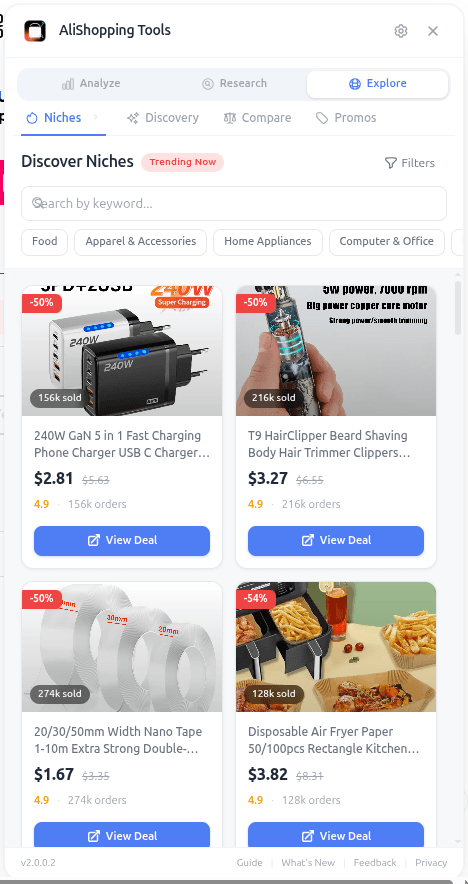
It gives you a structured view of AliExpress categories with the context a dropshipper actually needs: what products are trending within the niche, how demand looks at the niche level, and which sub-niches inside a broader category are worth a closer look. Think of it as a map — Niches tells you where to dig, then the per-product tabs (Verdict, Trend, Profit, Competition, Risk) tell you whether any specific dig is worth extracting.
The tab is particularly useful for two moments: when you are starting a new store and need to pick an initial niche, and when you have an existing store and want to identify adjacent sub-niches to expand into without fragmenting your brand.
How to Access the Niches Tab
Same pattern as every other feature.
Step 1 — Install AliShopping Tools. Free on the Chrome Web Store. No account or credit card.
Step 2 — Open AliExpress. Any page — product page, category page, home page. The extension activates on aliexpress.com.
Step 3 — Click the Niches tab in the panel. The niche explorer loads and you can start browsing.
You do not have to be on a specific product page for Niches to work — it is one of the surfaces that functions broadly across AliExpress, similar to Discovery.
UI Elements Breakdown
The Niches tab is structured to let you move between wide category views and specific sub-niche drilldowns.
Category view. Browse AliExpress categories and see niche-level context. This is where you get the "what is happening across this whole vertical" view — useful for spotting which broad verticals are currently active.
Sub-niche drilldown. Within any category, you can drill into sub-niches — specific segments with more focused product sets. Sub-niches are typically where the best dropshipping opportunities live, because they are narrow enough to build a brand around but large enough to have real demand.
Product surfacing. As you move through categories and sub-niches, the tab surfaces product cards — a sample of what is in that segment. Click through to get the full analysis on any product.
Cross-navigation. From a product you find via Niches, you can jump into Verdict, Trend, Profit, Competition, and Risk tabs for that product. The niche view is the entry; deep analysis happens in the per-product tabs.
The goal is to keep you moving: wide → narrow → specific product → validation → decision. Each level answers a different question and hands you off to the next.
Real-World Workflow: Picking a Starting Niche
Imagine you are launching a new dropshipping store and you have not yet committed to a niche. You know you want something with recurring demand and a clear audience, but you do not have a specific product in mind yet.
Open AliExpress and switch to the Niches tab. Browse top-level categories — Home & Garden, Sports, Pet Supplies, Beauty, Consumer Electronics. For each one you find interesting, drill into the sub-niches. Note which sub-niches feel rich (lots of products, variety, clear sub-audiences) and which feel thin (few products, generic items).
Say three sub-niches catch your attention: indoor gardening tools, pet grooming accessories, and home office organizers. Now you shift modes — from exploration to validation. For each sub-niche, pick 3 to 5 representative products and run the full per-product analysis. Verdict scores, trend classifications, profit margins after CPA, competition saturation, supplier risk.
After an hour of structured work, you have a clear picture. Indoor gardening has great sub-niche diversity but high saturation on the obvious picks. Pet grooming has lower saturation but narrower audience size. Home office has both strong trend signals and workable saturation in the specific sub-niche of "cable management and desk accessories."
You just picked a niche with data-backed reasoning in an afternoon — instead of spending three weeks second-guessing a random hunch. That is the entire value proposition of niche-driven research: faster, better decisions from structured exploration.
For an existing store, the same workflow helps you find adjacent sub-niches. Already selling home office products? Use the Niches tab to explore the cable management and ergonomic accessories sub-niches. Validated products there become natural additions to your catalog without drifting your brand.
Common Mistakes to Avoid
Going too broad. "Home goods" is not a niche — it is a department. The dropshippers who win are the ones who narrow down to a specific audience and product family. Use Niches to drill from broad categories into sub-niches, and keep drilling until you can describe your target customer in one sentence.
Ignoring saturation after picking the niche. A sub-niche might look exciting in Niches but be completely saturated when you run the Competition tab on specific products. Niches shows you the map; Competition tells you whether the territory is already claimed.
Picking niches only based on personal interest. If you happen to love a niche that also has strong demand and manageable competition, great. But personal interest alone is not a business reason. The data matters more than your enthusiasm. Niches you personally dislike but where demand is strong and competition is thin can still be profitable.
Not validating within the niche. Picking a sub-niche is step one. Picking the right products within that sub-niche is step two, and it is not optional. Use the 7 signs checklist on every candidate product. A great niche with bad product selection still loses.
FAQ
Is the Niches tab really free? Yes. Free to install, free to use, no account, no trial countdown.
Does it tell me which niche is "best" overall? No single niche is best for every dropshipper. The tab shows you categories and sub-niches with contextual data — you decide which one fits your budget, experience, and strategic direction. A niche that works for a beginner with $500 in ad budget is different from one that works for an experienced operator with $50,000.
Does it work on any AliExpress page? The tab activates once the extension is running on AliExpress. You can browse niches without being on a specific product page, which is different from tabs like Verdict or Profit that are product-specific.
How is Niches different from Discovery? Discovery surfaces rising products directly — it hands you candidates. Niches helps you explore categories and sub-niches structurally — it hands you the map. Most serious research sessions use both: Niches to pick your territory, Discovery to find candidates within it.
Can I filter niches by profit margin or trend? The current Niches view focuses on category and sub-niche exploration. Profit and trend signals are best assessed at the product level — which is why drilling from Niches into a specific product, then running Verdict/Trend/Profit on it, is the recommended workflow.
Pick the Right Territory, Then Dig
Niche selection is the highest-leverage decision you make in dropshipping. The right niche makes everything else easier — marketing is cheaper, branding is clearer, customers come back. The wrong niche makes everything harder, no matter how good your products are.
Install AliShopping Tools — Free on Chrome Web Store
Already installed? Open AliExpress and click the Niches tab. Your next store is going to start from a better foundation than the last one.
Ready to find winning products?
Try AliShopping Tools — 15 free AI tools for product research.
Quick answers
Frequently Asked Questions
1Is the Niches tab really free?
Yes. Free to install, free to use, no account, no trial countdown.
2Does it tell me which niche is "best" overall?
No single niche is best for every dropshipper.
The tab shows you categories and sub-niches with contextual data — you decide which one fits your budget, experience, and strategic direction.
A niche that works for a beginner with $500 in ad budget is different from one that works for an experienced operator with $50,000.
3Does it work on any AliExpress page?
The tab activates once the extension is running on AliExpress.
You can browse niches without being on a specific product page, which is different from tabs like Verdict or Profit that are product-specific.
4How is Niches different from Discovery?
Discovery surfaces rising products directly — it hands you candidates.
Niches helps you explore categories and sub-niches structurally — it hands you the map.
Most serious research sessions use both: Niches to pick your territory, Discovery to find candidates within it.
5Can I filter niches by profit margin or trend?
The current Niches view focuses on category and sub-niche exploration.
Profit and trend signals are best assessed at the product level — which is why drilling from Niches into a specific product, then running Verdict/Trend/Profit on it, is the recommended workflow.
6Can I export the niche data from the Niches tab to CSV or Google Sheets?
There's no built-in CSV export from the Niches tab today.
You can note down the categories and sub-niches you want to investigate further and drill into individual products for a deeper look using Verdict, Trend, and Profit.
7How often is the demand data refreshed in the Niches tab, and does it reflect near‑real‑time trends?
The demand data refreshes regularly to reflect current marketplace signals rather than being a one-time snapshot, so revisiting a category after some time gives you an updated read.
Very high-frequency flash-sale spikes may take a little longer to show up than steadier trend shifts.
8Is the Niches tab compatible with browsers other than Chrome, such as Edge or Firefox?
AliShopping Tools is distributed as a Chrome extension via the Chrome Web Store — it's built and tested for desktop Chrome. It does not have native support for Firefox or Safari.
9Does the Niches tab provide historical trend graphs for each category, and how far back do they go?
The Niches tab focuses on current category and sub-niche demand rather than a long historical chart.
For the kind of day-by-day price and trend history you'd want on a specific product, drill into that product and use the Price History and Trend tabs directly.
More from the blog
How to Do Product Research for Dropshipping: 7-Step Framework (Free Tools, 2026)
A repeatable 7-step product research framework for dropshippers in 2026 — from idea sourcing to live testing, using only free tools. No Ecomhunt subscription needed.
Koala Inspector Alternative 2026: Top Tools Compared
Best free Koala Inspector alternative 2026: a Chrome extension adding AliExpress price history, AI review analysis & supplier search Koala can't do — $0, no signup.
How to Measure Competition in a Dropshipping Niche (4-Signal Framework)
Seller count alone lies. Learn the 4 real signals that reveal true dropshipping niche competition — review velocity, price compression, ad saturation, and supplier concentration — plus a Competition Score framework to make faster go/no-go decisions.