AliExpress Daily Deals Chrome Extension (Free 2026)
AliExpress Daily Deals — Free Chrome Extension for Deal Discovery
Quick answer: The Daily Deals tab in the free AliShopping Tools Chrome extension collects AliExpress promotion-feed products twice a day, scores each one by discount × commission rate × rating, keeps the top fifty, and shows them as a ranked grid with the deal score on every card. Open it, scan the top rows, and take anything promising into the Verdict tab before you commit.
AliExpress pushes deal feeds constantly — flash discounts, promotion drops, limited-time offers. The feed is built to trigger impulse buys for end consumers. For dropshippers and resellers it is mostly noise: a lot of it is already saturated, and some of the discounts are priced against an "original" that nothing ever sold at.
The Daily Deals tab collects that promotional inventory on a schedule, ranks it on the three things AliExpress does report reliably, and gives you a short list instead of an endless scroll.
This tutorial covers what the tab actually computes, how to read a card, and where the ranking stops being enough.
What the Daily Deals tab does
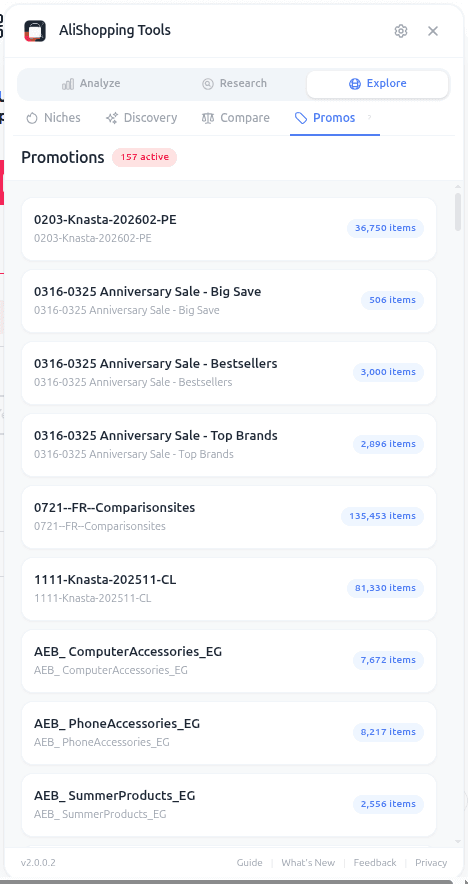
Twice a day the AliShopping Tools backend walks AliExpress's featured promotion sets and pulls the products in them. Each product gets a deal score, which is a deliberately simple multiplication:
discount percentage × commission rate × rating
Before scoring, two filters run server-side: commission rate must be at least 1 percent, and where AliExpress reports a rating it must be 80 percent or better. Products that clear both are sorted by deal score, and the top fifty are kept for that run. That set is what the tab shows you, highest score first, twenty per page with more loading as you scroll.
Each card shows: product image, discount percentage, the deal score badge, units sold, sale price with the original struck through, rating, commission percentage, and category. The View deal button opens the listing.
What the score is not: it is not the Winning Score. The Winning Score is the seven-factor 0–100 composite you see on the Verdict and product tabs; Daily Deals ranks on its own three-input deal score and nothing else. The two numbers are unrelated and will disagree.
How to access Daily Deals
Step 1 — Install the extension free from the Chrome Web Store. No account needed.
Step 2 — Open AliExpress. The extension panel appears.
Step 3 — Click the Daily Deals tab. It loads the most recent collection run. The collection runs twice daily — a morning and an evening pass — so the list changes at most twice a day. The refresh button in the header re-fetches the current run; it does not trigger a new collection.
Reading a deal card
The tab gives you three honest signals and one you have to treat carefully.
| Signal on the card | What it tells you | Where it falls short |
|---|---|---|
| Discount percentage | How far the sale price sits below the listed original | The baseline is AliExpress's own "original price" — inherit that number's problems |
| Deal score | The ranking input: discount × commission × rating | A high score can come from commission alone |
| Commission percentage | What the affiliate side pays | Nothing about whether the product sells |
| Units sold + rating | Actual traction on the listing | Volume can be historic, not current |
Read a card in this order:
- Discount, sceptically. The percentage is computed from the original price AliExpress reports, not from a price history we track. If a listing has never genuinely sold at its "original", the discount inherits that fiction. Treat a very large discount as a prompt to check, not as value confirmed.
- Deal score, as a ranking only. It sorts the list. Because commission is a multiplier, a high-commission product can outrank a better product with a thinner commission. That is a property of the formula, not a hidden judgement about quality.
- Units sold and rating. These are the closest thing on the card to demand evidence.
- Then leave the tab. Saturation, supplier reliability and your actual margin are not on this card and are not in the score. Open the listing and check the Competition tab and the profit calculator before you commit to anything.
Using it as a daily ritual
The tab suits a short habit, not an all-day feed — the data only changes twice a day, so checking it more often shows you the same list.
- Open it once, after a collection run. Morning is the natural slot.
- Scan the top rows. The list is capped at fifty per run and ordered by score.
- Click into two or three candidates. Run the full Verdict tab check on each.
- Move one candidate into testing if it clears Verdict plus your own supplier sanity check.
- Log what you skipped and why. Over time you learn which deal shapes work in your niche.
This replaces two bad habits: scrolling the native feed for an hour, and never checking it at all.
Real-world workflow
Tuesday morning. You open Daily Deals. The top card is a foldable silicone pet water bottle — a large discount badge, a high deal score, a healthy commission percentage, several thousand units sold.
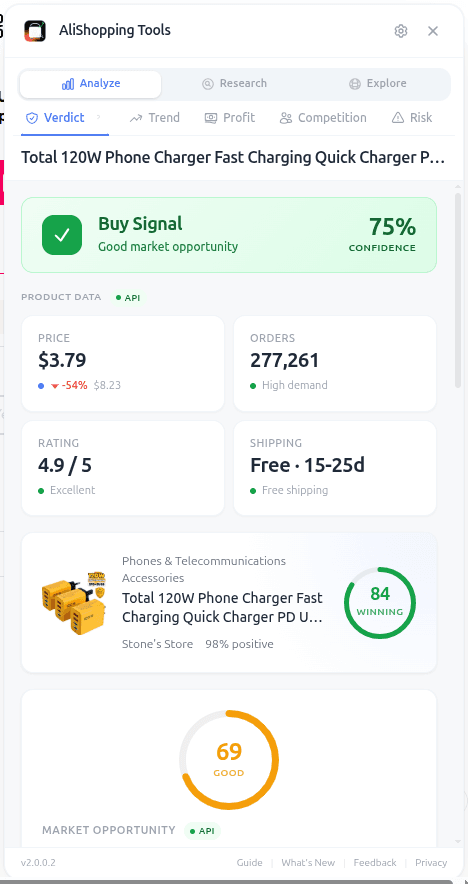
You click through to the listing. The Verdict tab returns Buy Signal — its second-highest band, above Hold / Watch and Pass. In the Reviews tab the stars are spread across the range rather than piled entirely on five, and the With Photos filter turns up plenty of real buyer shots. The Similar tab shows two comparable listings at close price points. You add it to the testing list for the week.
The next cards get fifteen seconds each. Most get skipped — high commission dragging up a score on a product with no volume behind it, or a discount whose original price looks invented. One gets bookmarked.
Total time: a few minutes, one test candidate. The ranking did the sorting; the analysis tabs did the deciding.
Common mistakes
- Reading the deal score as a verdict. It is discount × commission × rating. It contains no judgement about saturation, supplier quality or your margin. Ranking, not recommendation.
- Trusting the discount percentage at face value. It is computed against AliExpress's stated original price. There is no independent price history behind it.
- Sourcing a deal without running Verdict. The tab is a shortlist generator. Open the product and run the full tab stack before committing.
- Refreshing all day. Collection runs twice daily. Between runs the refresh button re-fetches the same set.
- Treating Daily Deals as your only research source. Combine it with the Niches tab and the Trend tab.
FAQ
How often does the list refresh? The backend collects twice a day, in a morning and an evening run, and keeps the top fifty deals from each. The tab loads the most recent run when you open it.
How is the ranking calculated? Deal score = discount percentage × commission rate × rating, after a server-side filter that drops anything below 1 percent commission or below an 80 percent rating where a rating is reported. Highest score first. It is not the Winning Score and is not user-adjustable.
Can I filter the deals myself? No. The tab has no user-facing filters or thresholds — you get the ranked list plus a refresh button. Sorting and the commission and rating cutoffs happen server-side, the same way for everyone.
Why are some days thin? The number of products that clear the commission and rating filters varies with whatever AliExpress has promoted that day.
Does it work without a login? Yes. No AliExpress account and no AliShopping account are required.
Is my browsing data collected? The deals list is fetched from AliShopping servers rather than scanned locally, and opening the tab or clicking a deal sends an anonymous usage event. You can review the privacy controls in the Settings tab, and the privacy policy has the specifics.
Install and stop scrolling the native feed
Daily Deals turns a noisy feed into a short ranked list. Pair it with the Trend tab for momentum and the Niches tab for category-level scans — and let the analysis tabs, not the deal score, make the call.
Sẵn sàng tìm sản phẩm thắng?
Thử AliShopping Tools — 15 công cụ AI miễn phí cho nghiên cứu sản phẩm.
Giải đáp nhanh
Câu hỏi thường gặp
1How do I get AliExpress daily deals alerts for free?
There are no alerts to get — the extension ships no notifications of any kind, so nothing pushes deals to you.
What you can do is install the free AliShopping Tools Chrome extension and open the Daily Deals tab yourself, which shows a pre-ranked list of AliExpress promotion products.
No account, no subscription.
If you want the deals in front of you daily, that means opening the tab, not configuring an alert.
2What is the Daily Deals tab in AliShopping Tools?
It is a ranked view of AliExpress's featured-promotion products, collected on our side twice a day.
Ranking uses a deal score built from three things only — discount depth, commission rate and product rating multiplied together — and the list is capped at the strongest results.
This is a different number from the Winning Score you see on a product page, which is a 0–100 composite of seven weighted signals; the two are not interchangeable.
Each card shows the discount percentage, the deal score, units sold, sale price against the crossed-out original, rating, commission rate and category.
3Are AliExpress daily deals actually worth sourcing from?
Some are, most are not.
The native AliExpress deals feed mixes real discounts with pre-inflated price games.
The Daily Deals tab helps by ranking rather than by verifying: it drops listings with negligible commission or a weak rating, then orders what is left by discount, commission and rating.
It does not check whether the "original" price was quietly raised first.
For that, open the product and read the price history chart on the Verdict tab — that is the check that tells you whether a discount is real.
4How often does the Daily Deals tab refresh?
The underlying list is rebuilt twice a day on our side, morning and evening, so checking it more than about twice daily will usually show you the same deals.
There is a refresh button in the tab header if you want to re-pull rather than rely on the cached response.
Opening it once in the morning and once in the evening is enough.
5Can I filter daily deals by margin or supplier trust?
No.
The extension has no filter controls of any kind — Settings covers locale, preferences, behaviour, appearance, privacy and about, and none of those groups contains a margin, saturation, supplier-trust or score threshold.
The Daily Deals ordering is fixed on our side and you cannot reweight it.
If a deal looks interesting, open the listing and use the Profit, Risk and Competition tabs to judge margin and supplier quality yourself.
6Does the Daily Deals tab work without a login?
Yes.
Neither an AliExpress account nor an AliShopping account is required, and there is no paid tier — the Daily Deals tab is part of the free Chrome extension.
Note that the list itself is not scanned in your browser: the tab requests a ready-made ranked list from AliShopping servers, and opening the tab or clicking a deal sends an anonymous usage event.
The Privacy and Data group in Settings controls that, and the privacy policy has the specifics.
7What is the difference between AliExpress daily deals and trending products?
Daily deals are time-limited discount drops (flash sales, coupon stacks, clearance).
Trending products are items with rapidly rising sales or search volume.
The Daily Deals tab covers the former.
For the latter, use the Trend tab in AliShopping Tools which classifies products by phase (Emerging, Growing, Peak, Declining).
Both tabs together cover the two main ways dropshippers discover winners.
Bài viết khác
Find Similar AliExpress Products: Free Tool 2026
Find similar AliExpress products 2026: compare price, supplier trust, and variants in 1 click — free Chrome extension. No signup, no account required.
AliExpress Trend Tab: Free Product Phase Check (2026)
See whether an AliExpress product is Emerging, Growing, Peak, or Declining before you commit to it. Free Chrome extension runs locally, no account needed.
AliExpress Verdict Tab: Free AI Product Decision Tool (2026)
AliExpress Verdict Tab 2026: one click returns Strong Buy, Buy Signal, Hold / Watch or Pass — free Chrome extension. How the four verdicts are scored and how they differ from the Winning Score.