AliExpress Verdict Tab: Free AI Product Decision Tool (2026)
How to Use the Verdict Tab on AliExpress — a Four-State AI Product Decision
Quick answer: Open any AliExpress product page with the free AliShopping Tools Chrome extension installed and look at the Verdict tab — in under three seconds it returns one of four calls (Strong Buy, Buy Signal, Hold / Watch, Pass) from a 0-100 composite that weights product fundamentals 30%, profit estimate 30%, market saturation 20% and risk 20%.
Every AliExpress product looks promising until you dig into the data. Reviews, orders, trend, margin, competition — by the time you finish a spreadsheet, the excitement is gone and you still are not sure.
The Verdict tab removes that friction. It reads every signal the AliShopping Tools extension already collects and collapses them into a single recommendation you can act on.
This tutorial walks through what the verdict is, how to open it on any product page, and how to read the signals so you never second-guess a product decision again.
Verdict levels and meaning
There are four verdicts, not three:
| Verdict | Score range | What it means | Next step |
|---|---|---|---|
| Strong Buy | 80-100 | All four input dimensions are strong | Source a sample, run a small ad test |
| Buy Signal | 60-79 | Solid overall, usually with one softer dimension | Confirm the soft dimension on its own tab first |
| Hold / Watch | 40-59 | Mixed signals — something real is being flagged | Check Trend, Profit, Competition and Risk tabs individually |
| Pass | 0-39 | One or more dimensions fail badly | Move on to the next product |
The Verdict is not the Winning Score
These are two different readouts and it is worth separating them before anything else, because they use different scales and different labels.
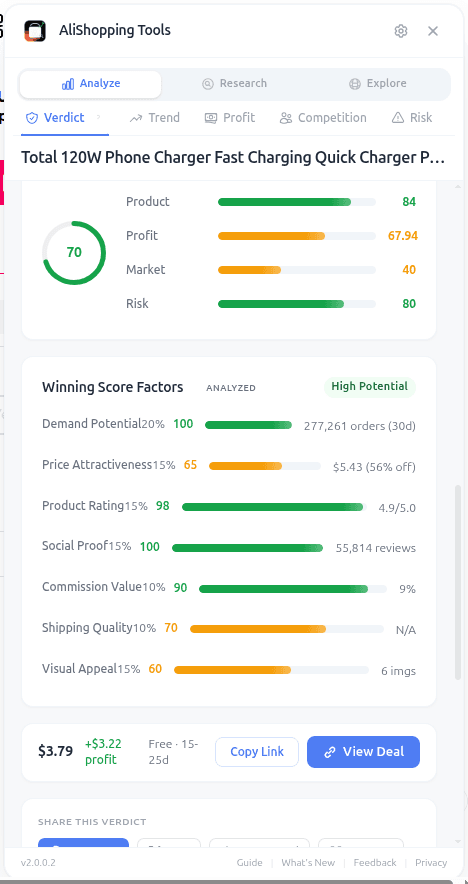
- The Winning Score is a 0-100 composite of seven weighted signals read off the listing itself — demand potential (20%), price attractiveness (15%), product rating (15%), social proof (15%), visual appeal (15%), commission value (10%) and shipping quality (10%). It sorts into three bands: High Potential (75+), Medium Potential (50-74), Low Potential (below 50). It says nothing about your margin or your competition.
- The Verdict is the go/no-go call. It runs off its own composite, which weights product fundamentals 30% (that is where the Winning Score feeds in), profit estimate 30%, market saturation 20% and risk 20% — so margin and competition, which the Winning Score deliberately excludes, are 50% of the Verdict.
That is why a listing can carry a High Potential Winning Score and still land on Hold / Watch: strong public signals, thin margin.
What the Verdict tab does
The Verdict tab is the top-of-panel summary on every AliExpress product page after you install the AliShopping Tools Chrome extension. It combines four scored dimensions — product fundamentals (30%), profit estimate (30%), market saturation (20%) and risk (20%) — into a single 0-100 number, then translates that number into a plain-language verdict: Strong Buy, Buy Signal, Hold / Watch, or Pass.
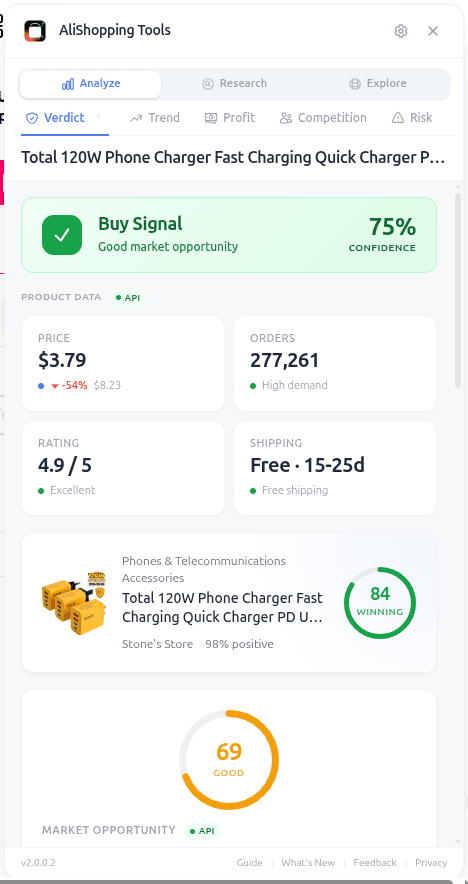
Under the headline verdict you will see a short list of supporting signals — High Demand, Good Rating, Great Price, Trusted Seller, Trending. These are not marketing copy. They map one-to-one to the data points the extension read off the product page, the seller profile, and the API response from our backend.
The point of the Verdict tab is not to replace your judgment. It is to give you a starting position in under three seconds so you can decide whether to do deeper research on the other tabs (Trend, Profit, Competition, Risk) or move on to the next product.
How to access it
Step 1 — Install the extension. Go to the Chrome Web Store and add AliShopping Tools. No account required. The extension ID is agiaehdeifaihlndhnhcmopjpjijnfap if you want to verify it before installing.
Step 2 — Open any AliExpress product page. The extension auto-injects a sidebar panel on *.aliexpress.com product URLs. You do not need to click anything to activate it.
Step 3 — Look at the Verdict tab. It is the first tab in the panel, open by default. You will see the verdict label, the numeric score, and the list of signals immediately.
What each signal means
The verdict is built from the following building blocks. Alongside the verdict label, the panel exposes the badges that fired so you can see why.
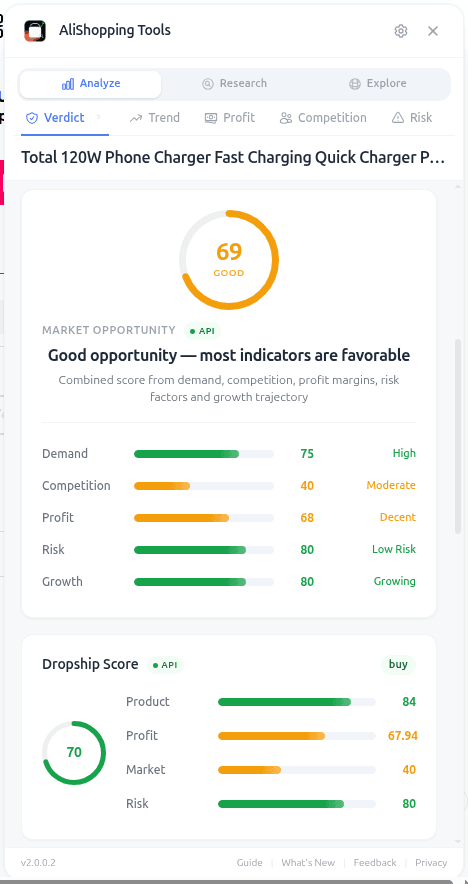
- Score (0-100): the verdict composite. 80+ is Strong Buy, 60-79 Buy Signal, 40-59 Hold / Watch, below 40 Pass. This is a different number from the Winning Score — do not read the two interchangeably.
- High Demand: the listing's order count clears the demand rule's threshold.
- Good Rating: the product rating clears the rating rule's threshold.
- Great Price: the listing carries a meaningful discount.
- Trusted Seller: the seller rating clears the trust rule's threshold.
- Trending: the trend read is positive (cross-check on the Trend tab).
Absence of a signal is itself information. A listing sitting at 58 with High Demand and Good Rating but nothing on price tells you the item sells and customers like it, while the price gives you no room — open the Profit tab before going further. That is a textbook Hold / Watch.
Real-world workflow
You are scrolling an AliExpress category page looking for a new product to test. You click into a silicone collapsible water bottle.
The Verdict tab shows Buy Signal — 68. Signals: High Demand, Good Rating, Trending. Nothing on price, nothing on seller trust.
You read that as: the product sells, customers like it, momentum is real — but the price carries no discount and the seller has not cleared the trust threshold, so margin and supplier reliability are the open questions. You jump to the Profit tab and simulate — at the current $2.80 cost and detected $14.99 average retail, net margin after ads lands at 19%. Too thin. You bump your test retail to $19.99 and margin climbs to 33%. Now you open the Competition tab — saturation is 61%, 180 active sellers. Crowded but not suffocating.
You make the call: test it at $19.99 with a TikTok angle that differentiates from the generic listings, or pass and find something with cleaner signals. That decision took four minutes instead of forty.
Common mistakes
- Treating the verdict as final. Hold / Watch means exactly that. A 58 is an invitation to open the other tabs, not to reject the product.
- Confusing the Verdict with the Winning Score. They are different metrics on different scales with different labels. "High Potential" is a Winning Score band; "Buy Signal" is a Verdict. Neither implies the other.
- Ignoring missing signals. A Buy Signal verdict with no Trusted Seller badge means you still need to check the Risk tab before ordering a sample.
- Comparing scores across categories. A 72 in electronics is not equivalent to a 72 in home decor — category baselines differ. Use the verdict to rank within a category.
- Refreshing to chase a better score. The score is deterministic for a given product snapshot. Hitting reload will not change it. Change what you are evaluating instead.
FAQ
Is the Verdict tab really free? Yes. The extension is free on the Chrome Web Store. No account, no paywall, no trial timer. See our best free Chrome extensions for dropshipping roundup for context on how it compares.
Where does the score come from? The product-fundamentals input (the Winning Score, 30% of the verdict) is calculated server-side from public AliExpress data — order volume, price and discount, rating, review count, listing images and video, commission rate and the shipping estimate. The profit, saturation and risk inputs come from the extension's own models. Nothing is user-voted or editable.
Is the Verdict the same as the Winning Score? No. The Winning Score is a 0-100 composite of seven listing signals, sorted into three bands (High / Medium / Low Potential). The Verdict is the go/no-go call with four states (Strong Buy, Buy Signal, Hold / Watch, Pass) and it folds the Winning Score in as 30% of a wider composite that also weighs profit, saturation and risk. The TikTok Viral Score is a third, separate metric again.
Can I trust a Strong Buy verdict blindly? No. Treat Strong Buy as "worth your time to verify." The per-tab views exist for a reason — margin assumptions depend on your own ad costs, and supplier risk depends on your tolerance.
Does the verdict update over time? Yes. Because the inputs (orders, trend, rating) change, the verdict can shift. A listing that read Strong Buy three months ago may read Hold / Watch today if the trend has peaked or the margin has compressed. Always re-check before a big buy.
What if the Verdict tab shows "No data"? Some very new listings or deleted products will not have enough data for a confident score. In that case the tab will tell you, and you should rely on manual research or wait until the listing accumulates a few hundred orders.
Install and try it on your next product
The Verdict tab is the fastest way to stop staring at AliExpress listings and start making decisions. Pair it with the Trend tab for momentum, the Profit calculator for margin, and the Risk tab for supplier sanity checks.
Install AliShopping Tools — Free on Chrome Web Store
Next time you open an AliExpress page, the verdict will be waiting for you.
Sẵn sàng tìm sản phẩm thắng?
Thử AliShopping Tools — 15 công cụ AI miễn phí cho nghiên cứu sản phẩm.
Giải đáp nhanh
Câu hỏi thường gặp
1Is the Verdict tab really free?
Yes.
The extension is free on the Chrome Web Store.
No account, no paywall, no trial timer.
See our best free Chrome extensions for dropshipping roundup for context on how it compares.
2Where does the score come from?
The product-fundamentals input (the Winning Score, 30% of the verdict) is calculated server-side from public AliExpress data — order volume, price and discount, rating, review count, listing images and video, commission rate and the shipping estimate.
The profit, saturation and risk inputs come from the extension's own models.
It is not user-voted or editable.
3Can I trust a Strong Buy verdict blindly?
No.
Treat Strong Buy as "worth your time to verify." The per-tab views exist for a reason — margin assumptions depend on your own ad costs, and supplier risk depends on your tolerance.
4Does the verdict update over time?
Yes.
Because the inputs (orders, trend, rating) change, the verdict can shift.
A product that returned Strong Buy three months ago can sit at Hold / Watch today if the trend has peaked.
Always re-check before a big buy.
5What if the Verdict tab shows "No data"?
Some very new listings or deleted products will not have enough data for a confident score.
In that case the tab will tell you, and you should rely on manual research or wait until the listing accumulates a few hundred orders.
6Can I use the Verdict tab across many AliExpress listings during a niche research session?
There's no built-in batch-scan feature — the Verdict tab evaluates one product page at a time, the same page you're currently viewing.
For a niche research session, the practical workflow is opening candidates one by one and noting which of the four verdicts comes back — Strong Buy, Buy Signal, Hold / Watch or Pass — rather than a bulk lookup.
7How does the Verdict tab calculate the margin potential signal and what profit margin should I aim for?
The margin potential signal gives you a rough sense of how much room is left after estimated shipping and transaction costs are subtracted from the suggested retail price — treat it as a directional starting point, not a precise, guaranteed number, since your actual shipping method, destination, and fees will differ.
Compare it against the margin you need before deciding a Strong Buy or Buy Signal is worth pursuing.
8Does the Verdict tab work on the AliExpress mobile site or only on the desktop version?
The Verdict tab currently activates only on the desktop version of AliExpress with the Chrome extension installed — it doesn't appear on the mobile site or within the AliExpress app.
There's no committed mobile release date; for now, desktop Chrome is the only way to see the verdict and its score.
9Can I adjust how strict the verdict is?
No.
The four bands are fixed in the extension — Strong Buy at 80 and above, Buy Signal 60-79, Hold / Watch 40-59, Pass below 40 — and Settings has no control for moving them.
If you want a stricter bar, read the numeric score rather than the label and set your own personal cut-off, for example only acting on Strong Buy.
10What privacy data does the Verdict tab collect, and is any personal information sent to external servers?
The Verdict tab sends the product page's public data (price, rating, order volume, and similar signals) to AliShopping Tools' scoring service to generate the verdict — it isn't reading your personal browsing history or account credentials to do this.
For the specifics of what's collected and how it's handled, check AliShopping Tools' published privacy policy rather than relying on a technical breakdown here.
Bài viết khác
Find Similar AliExpress Products: Free Tool 2026
Find similar AliExpress products 2026: compare price, supplier trust, and variants in 1 click — free Chrome extension. No signup, no account required.
AliExpress Daily Deals Chrome Extension (Free 2026)
AliExpress daily deals in a Chrome extension: promotion-feed deals ranked by discount, commission and rating, refreshed twice a day. Free, no account needed.
AliExpress Trend Tab: Free Product Phase Check (2026)
See whether an AliExpress product is Emerging, Growing, Peak, or Declining before you commit to it. Free Chrome extension runs locally, no account needed.