Compare AliExpress Products Free: Side-by-Side 2026
AliShopping Tools
See live AliExpress data in your browser.
Seller trust score, 90-day price history, and live promo codes — on every AliExpress product page. No account, free.
Product Tracker Miễn phí
Theo dõi giá thật, đơn hàng, tồn kho & đánh giá của bất kỳ sản phẩm AliExpress nào trong 180 ngày. Dữ liệu không nói dối.
Before you buy
Is this deal real? Check the price history before you buy.
Prices often spike just before a “sale.” See 180-day price history and fake discount detection — free, no account needed.
Verify on AliShopping Deals →Sẵn sàng tìm sản phẩm thắng?
Thử AliShopping Tools — 15 công cụ AI miễn phí cho nghiên cứu sản phẩm.
Giải đáp nhanh
Câu hỏi thường gặp
1How do I compare AliExpress products for free?
Install the AliShopping Tools Chrome extension and open any AliExpress product page.
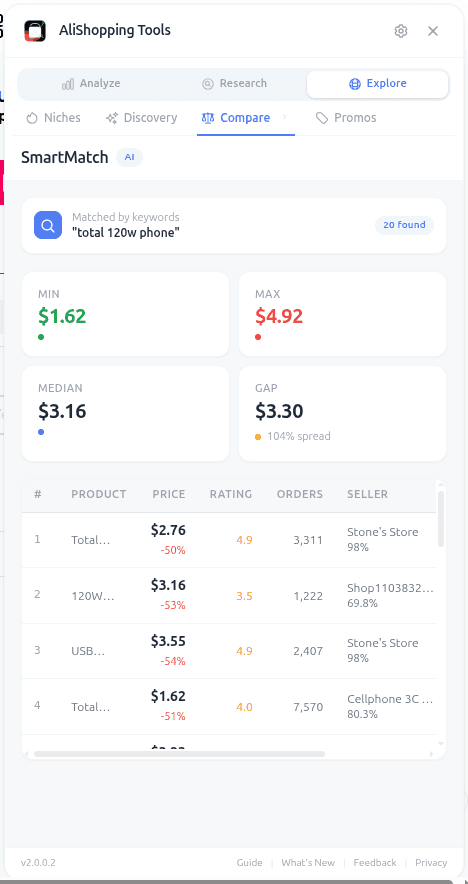
The Compare tab shows side-by-side comparisons of price, shipping, supplier trust, review count and rating, order volume, and the AI winning verdict for two pinned products at a time.
No account required, completely free as of April 2026, runs locally in Chrome.
2What metrics can I compare between AliExpress listings?
The Compare tab surfaces price, shipping cost and speed, supplier trust rating, supplier age, review count and rating, order volume (7-day and 30-day), saturation level, AI winning verdict, and profit margin simulation side by side for every product you add.
This is the most thorough single-view comparison available for AliExpress without leaving the browser.
3Can I compare products across different AliExpress sellers?
Yes.
Pin any AliExpress product to the Compare tab from its product page — the extension handles the data collection.
The two pinned listings can be the same product from two different sellers, which is the main sourcing use case, or two different products you are choosing between.
For a three-way decision, run two rounds: A against B, then the winner against the third listing.
4Is there an AliExpress product comparison tool that is free?
Yes — AliShopping Tools is free forever for the core Chrome extension as of April 2026.
The Compare tab is included.
Most competing tools charge 20 to 80 USD per month for comparison features; the free extension covers the same workflow for solo and small-team operators.
5How many products can I compare at once?
Two at a time.
That is deliberate: a side-by-side at two columns stays readable in the extension panel, while three or more degrade quickly at that width.
For a three-way decision, run two rounds of two-way comparisons — A against B, then the winner against the third listing.
6Does the comparison work on mobile AliExpress?
The extension is a Chrome desktop extension, so the Compare tab only works when browsing AliExpress on desktop Chrome.
The AliExpress mobile app is not supported as of April 2026.
Chromium-based browsers (Brave, Edge, Arc) do work.
7Can I save product comparisons for later?
Pinned products persist for 24 hours, so you can pin one in the morning, research other candidates during the day and open Compare in the evening with both pins intact.
After that the snapshot may be stale and the extension will suggest re-pinning.
For anything longer term, copy the data out manually — as of April 2026 there is no cloud save, which keeps the extension fully local and privacy-preserving.
Bài viết liên quan
- Find Similar AliExpress Products: Free Tool 2026guides
- AliExpress Daily Deals Chrome Extension (Free 2026)misc
- AliExpress Supplier Risk Check: Free Tool (2026)guides
- AliExpress Competition Tab: Read Market Crowding Freeguides
- AliExpress Shopify Direct Import Tutorial 2026 Guidemisc
- How to Use AliExpress Promo Codes — Step-by-Step Guide 2026promo
Công cụ liên quan
Bài viết khác
Find Similar AliExpress Products: Free Tool 2026
Find similar AliExpress products 2026: compare price, supplier trust, and variants in 1 click — free Chrome extension. No signup, no account required.
AliExpress Daily Deals Chrome Extension (Free 2026)
AliExpress daily deals in a Chrome extension: promotion-feed deals ranked by discount, commission and rating, refreshed twice a day. Free, no account needed.
AliExpress Supplier Risk Check: Free Tool (2026)
AliExpress supplier risk check 2026: audit store age, dispute rate, and fulfillment signals in 1 click — free Chrome extension. No account, no signup required.