
AliExpress to Shopify Complete Dropshipping Setup 2026
Quick answer: AliExpress to Shopify dropshipping in 2026 still works for the right niches: accessories, home goods, gadgets under $30, and fashion basics. The core setup requires a Shopify store, a payment gateway, and AliShopping Tools v2.0.0.23 for product research and direct AliExpress-to-Shopify import. Expect 2–4 weeks to find a winning product; plan 15–25 days shipping to Western markets. Install AliShopping Tools on the Chrome Web Store →
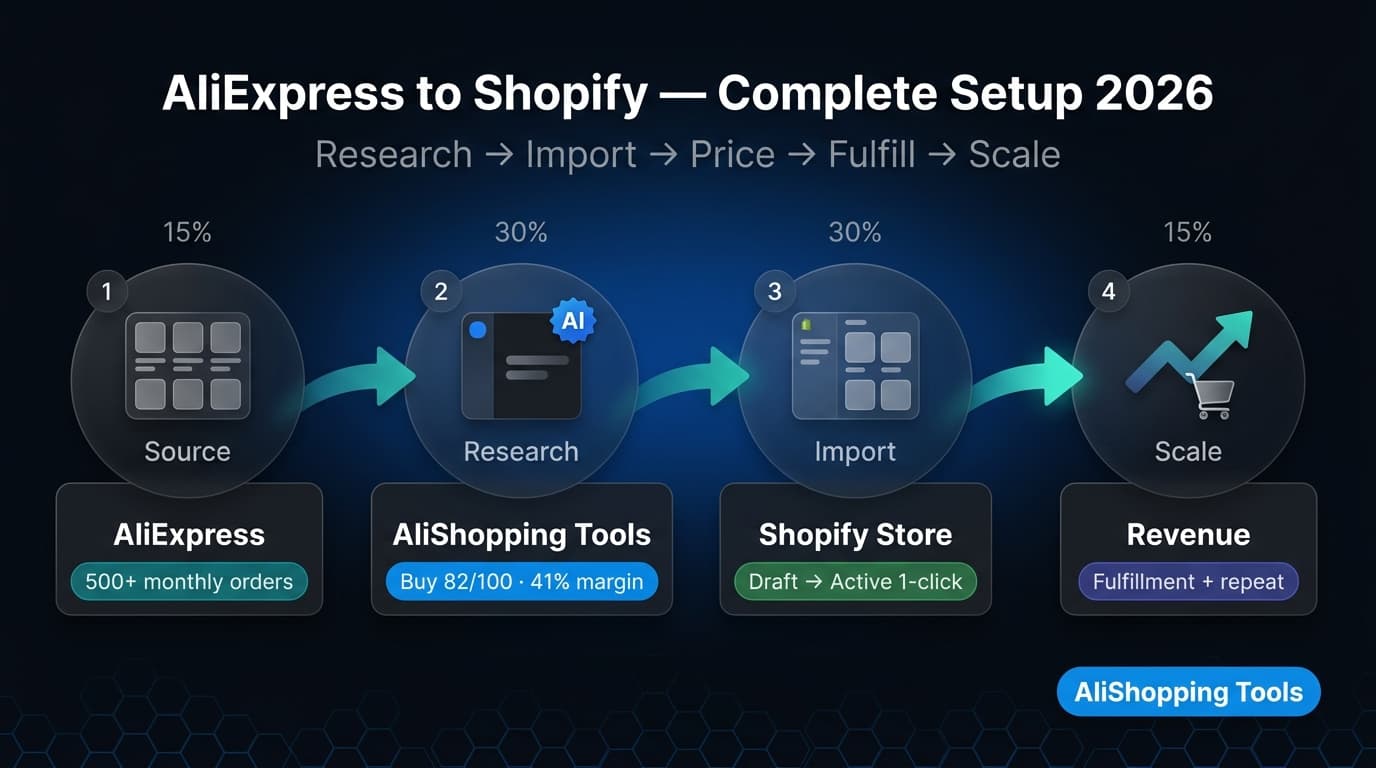
AliExpress and Shopify have been the default dropshipping stack for a decade. In 2026, that pairing is under more competitive pressure than it was in 2020 — faster-shipping alternatives, TikTok Shop, and improved AI-driven product discovery have all raised the baseline. But for operators who understand the constraints and work within them, the model still generates real revenue.
This guide covers the complete setup from zero to your first live store and first fulfilled order, including the parts most tutorials skip: real shipping expectations, how to filter products that will not survive customer scrutiny, and how to avoid the common fulfillment and quality traps that close most dropshipping stores in the first 90 days.
Is AliExpress + Shopify Still the Best Dropshipping Combo in 2026?
Yes, with conditions. AliExpress remains the largest open catalog of testable products with no minimum order quantities, real-time pricing, and global shipping infrastructure. Shopify remains the most-flexible storefront platform for dropshipping operations. The combination works because neither requires you to hold inventory or commit capital before validating demand.
The conditions where it works well in 2026:
- Accessories and gadgets under $30 — shipping cost is low relative to product cost; price comparison friction is high on branded competitors (Amazon, eBay) for non-branded goods
- Home décor and organizers — not brand-sensitive; buyers care about the product, not the supplier country
- Fashion basics — high margins relative to AliExpress prices; niche fashion stores beat Amazon at discovery
The conditions where it is harder now:
- Electronics above $50 — too much competition from Amazon, Temu, and direct-to-consumer brands with faster shipping and return policies
- Generic POD (print-on-demand) at scale — platform saturation; Printful/Printify have absorbed most of this demand
- Health and beauty — heavy regulatory scrutiny in EU/US; products require certification that most AliExpress suppliers cannot provide
The honest framing: AliExpress + Shopify is a sourcing and testing stack, not a passive income machine. Operators who treat it as a systematic product-testing process find winners. Operators who set up a store, import 20 products, and run a $20 Facebook ad expecting results do not.
What Do You Need Before You Start?
Before setting up anything technical, confirm you have these:
Shopify store — any paid plan (Basic at $39/month is sufficient to start). Shopify's 3-day trial gives you time to build the store before committing.
Payment gateway — Shopify Payments (where available) is the simplest option. Alternatively: Stripe, PayPal, or a regional gateway. Note that PayPal holds funds from new accounts for up to 21 days — factor this into your cash flow planning for early orders.
AliShopping Tools v2.0.0.23 — the Chrome extension handles product research (AI scoring, price history, profit simulation) and direct import to Shopify. This replaces the need for a separate research tool and a separate import app.
AliExpress account — required to place orders when customers buy. You can research and import products without an AliExpress account, but you need one to place the actual supplier order when a customer purchases from your store.
Budget for testing — realistic budget for the first 30 days is $200–$500 for Shopify subscription, ad spend, and a few sample orders to verify product quality before listing.
Step 1: Set Up Your Shopify Store
Shopify's official documentation covers the technical setup in full. The essentials for a dropshipping store:
- Create your Shopify account at shopify.com. Choose a store name that reflects your niche (not the platform name — do not name it "AliExpress Store").
- Choose a theme. For dropshipping, high-performance themes like Dawn (Shopify's default) or a conversion-focused paid theme (Booster, PageFly) are common starting points.
- Configure your payment gateway in Settings → Payments. Enable Shopify Payments if you are in a supported country.
- Set up shipping zones. For AliExpress dropshipping, common configurations are: complimentary shipping to all countries (absorbed into product price) or flat-rate shipping by region.
- Create basic pages: About, Contact, Shipping Policy, Returns Policy, Privacy Policy. These are required for payment gateway approval and trust signals.
Do not spend more than a day on store setup before validating your first product. Many operators over-invest in design before they have confirmed any product-market fit. A functional, clean store is enough to test.
Step 2: Install AliShopping Tools for Product Research
AliShopping Tools is the research layer that makes the AliExpress catalog navigable for serious dropshippers. Without a research tool, browsing AliExpress is guesswork — you cannot distinguish products with real demand from those that look good but have no order history.
Install AliShopping Tools on the Chrome Web Store →
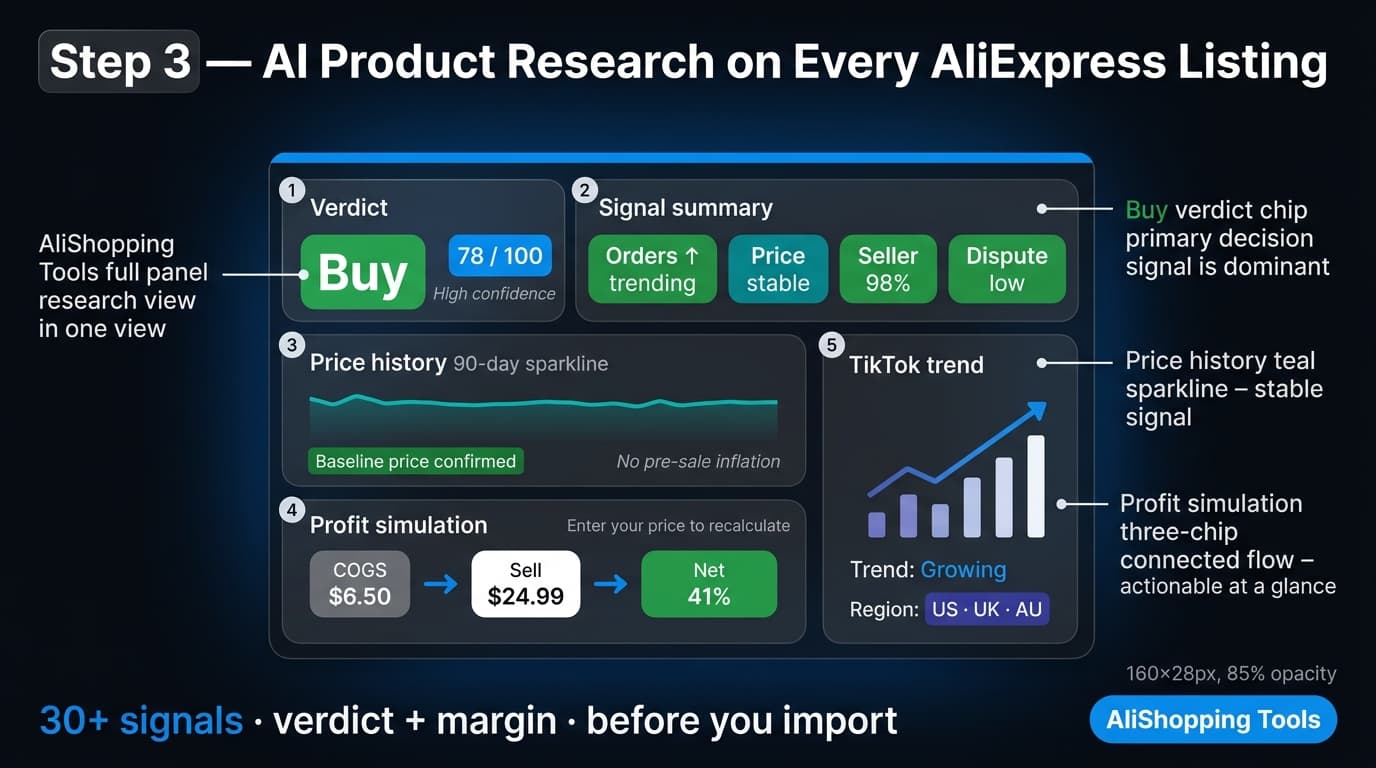
Once installed, AliShopping Tools activates automatically on every AliExpress product page. The sidebar panel shows:
- AI Verdict — four states: Strong Buy / Buy Signal / Hold / Watch / Pass, resolved from four weighted dimensions (product fundamentals 30%, profit 30%, market saturation 20%, risk 20%). A confidence figure is shown beside the verdict.
- Price history — 90-day chart showing whether the current price is the real baseline or inflated relative to historical levels.
- Profit simulation — enter your target selling price and the tool calculates gross margin, net margin, and break-even ROAS accounting for product cost, shipping, and estimated platform fees.
- Trend + TikTok signals — order velocity trend over 90 days. Whether momentum is building, peaking, or declining.
After installing the extension, connect your Shopify store via Settings → Shopify Integration. This connection enables the direct import feature in Step 4.
Step 3: Find Winning Products on AliExpress
Product selection is the highest-leverage step in the entire dropshipping workflow. A poor product with excellent marketing fails. A strong product with basic marketing can succeed.
What a strong AliExpress dropshipping product looks like in 2026:
| Signal | Threshold | Why |
|---|---|---|
| AliShopping AI Verdict | Buy Signal (≥60) — or Strong Buy (≥80) | Multiple signals converging on quality |
| Monthly orders | 500+ per month | Proven demand exists |
| Seller rating | ≥97% positive feedback | Indicates consistent quality and shipping |
| Price stability | Flat or falling over 90 days | Not inflated before a sale event |
| Shipping option | AliExpress Standard Shipping or ePacket | 15–25 days to Western markets |
| Review volume | 100+ reviews with photos | Real buyers, not fake reviews |
| Profit simulation | ≥30% net margin after all costs | Room for ad spend and returns |
Product categories to prioritize in 2026:
Electronics accessories (phone cases, cables, charging docks), home organization products, LED lighting, kitchen tools, fitness accessories, and niche fashion accessories consistently score well on the criteria above. These categories have high supplier competition on AliExpress, which keeps prices stable and quality more consistent.
Use AliShopping Tools Shopify Spy to validate the niche: Open any competitor Shopify store in your target niche. The AliShopping Tools panel activates on Shopify storefronts and shows the store's estimated revenue tier, product count, marketing stack (which ad platforms, email tools, and review apps they use), and live sales feed. If competitors in your niche are running ads and showing live sales activity, the niche has validated demand.
Step 4: Import Products to Shopify (v23 Direct Import)
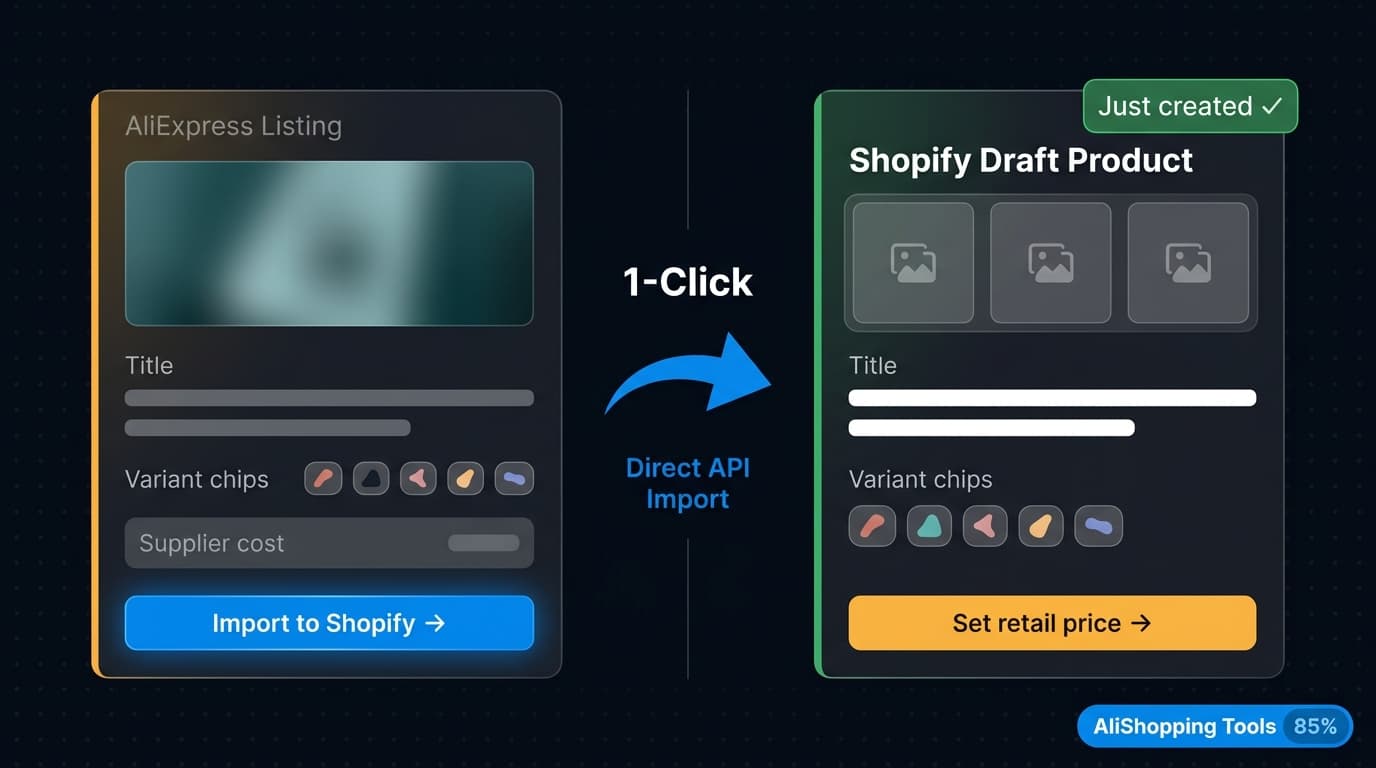
Once you have identified a product to test, AliShopping Tools v2.0.0.23 imports it directly to your Shopify store without leaving AliExpress.
- On the AliExpress product page, review the AI Verdict and price history in the panel.
- Click Import to Shopify in the extension panel.
- The store picker appears — select your destination Shopify store.
- Click Confirm Import.
- A toast notification confirms the import: "Product imported to [Store Name]."
- The product appears as a draft in your Shopify admin.
What is imported: product title, full description, all product images, variants (size, color, material), and the AliExpress supplier pricing.
What you set in Shopify afterward: your retail selling price, inventory settings, shipping configuration, and product category.
For a complete step-by-step walkthrough of the import process, see the AliExpress Shopify direct import tutorial.
If you are operating multiple Shopify stores, the multi-store picker lets you choose which store receives the import. See the multi-store Shopify setup guide for the full multi-store connection walkthrough.
Step 5: Set Pricing and Margins
Pricing is where most new dropshippers leave money on the table — either by pricing too low (chasing a race to the bottom) or too high (losing price-sensitive traffic to Amazon and eBay).
A practical pricing framework for AliExpress → Shopify in 2026:
| Cost component | Example |
|---|---|
| AliExpress product cost | $4.50 |
| Shipping cost (to customer) | $0 (ship included, absorbed into price) |
| AliExpress shipping cost (paid by you) | $2.00 |
| Total COGS | $6.50 |
| Target ROAS for paid ads | 3.5x |
| Implied selling price | $22.75 |
| Gross margin | 71% |
| After estimated ad spend (30%) | ~41% net margin |
The profit simulation in AliShopping Tools calculates this automatically when you enter your target selling price. Use it to stress-test pricing before committing to a campaign.
Pricing psychology for conversion:
- $19.99 and $24.99 outperform round numbers in A/B tests for impulse-buy categories
- Include shipping in the price — customers convert better at "$24.99 with shipping included" than "$20 + $4.99 shipping", even though the total cost is identical
- For products above $30, add a compare-at price in Shopify set to 1.5–2x the selling price. Only use this if the AliExpress price history confirms the supplier regularly offers the product at a higher price — do not fabricate discounts.
Step 6: Configure Order Fulfillment
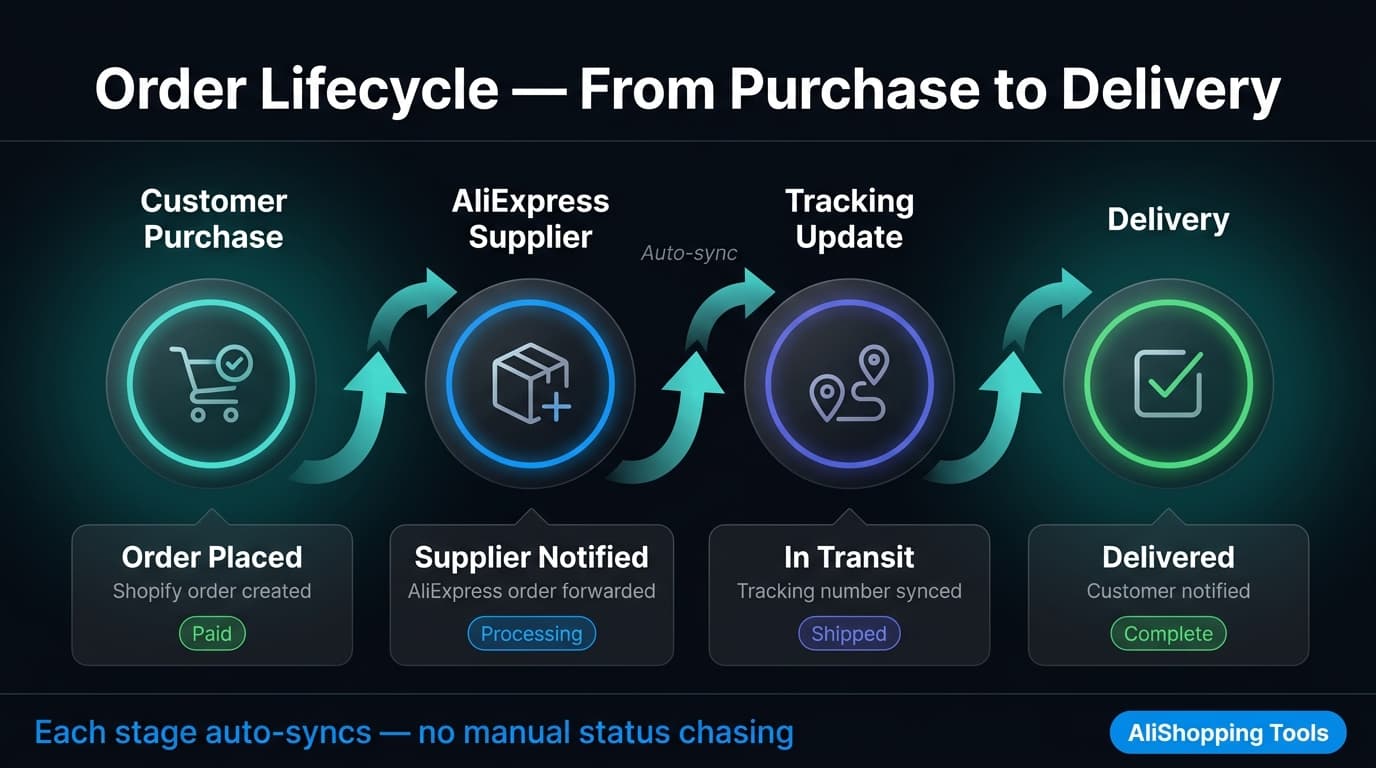
When a customer places an order in your Shopify store, you need to place the corresponding AliExpress order to ship to the customer. This is the fulfillment step.
Manual fulfillment: Log in to AliExpress, find the same product from the same supplier, place the order with the customer's shipping address, and mark the Shopify order as fulfilled with the AliExpress tracking number. This works at low volume (under 10 orders per day) but does not scale.
Semi-automated fulfillment with DSers: DSers is a Shopify app that connects your Shopify orders to AliExpress suppliers and lets you fulfill orders in bulk with one click. It handles order routing and tracking number import automatically. DSers is the recommended fulfillment tool once you are consistently processing more than 5 orders per day.
Note on the AliShopping Tools + DSers combination: AliShopping Tools is a research and import tool, not a fulfillment tool. Using AliShopping Tools for product discovery and import + DSers for order fulfillment is a natural combination — they serve different parts of the workflow.
Supplier backup: Always identify a backup supplier for your top-performing products before you scale. AliExpress suppliers occasionally run out of stock, close their stores, or change pricing without notice. The "Find on AliExpress" feature in AliShopping Tools lets you match any Shopify product image to AliExpress suppliers — useful for quickly finding a replacement when a primary supplier goes offline.
Step 7: Drive Traffic and Scale
A Shopify store with great products and no traffic generates zero revenue. Traffic strategy determines the pace of validation.
Paid traffic (fastest validation):
- Facebook/Instagram ads remain the primary channel for dropshipping product testing in 2026. Run $10–$20/day per product for 5–7 days. If a product generates at least 1 sale per $20 ad spend, it is worth scaling.
- TikTok ads work exceptionally well for products with a visual demonstration angle — before/after, unboxing, problem/solution.
Organic traffic (slower, more durable):
- TikTok organic is the highest-ROI organic channel for dropshipping in 2026 for operators willing to create video content consistently. Products with a visual "wow factor" or practical demonstration spread organically.
- SEO on your Shopify store takes 3–6 months to generate meaningful traffic, but provides a low-CAC traffic base once established. Optimize product titles and descriptions for the search terms buyers actually use.
Scaling from test to scale:
- Confirm a product is profitable at $50/day ad spend before increasing budget.
- Before scaling beyond $200/day, order samples of your top products to confirm quality matches the listing. At low volumes, quality issues are manageable. At scale, a 10% return rate destroys margins.
Tools That Complete Your AliExpress-Shopify Stack
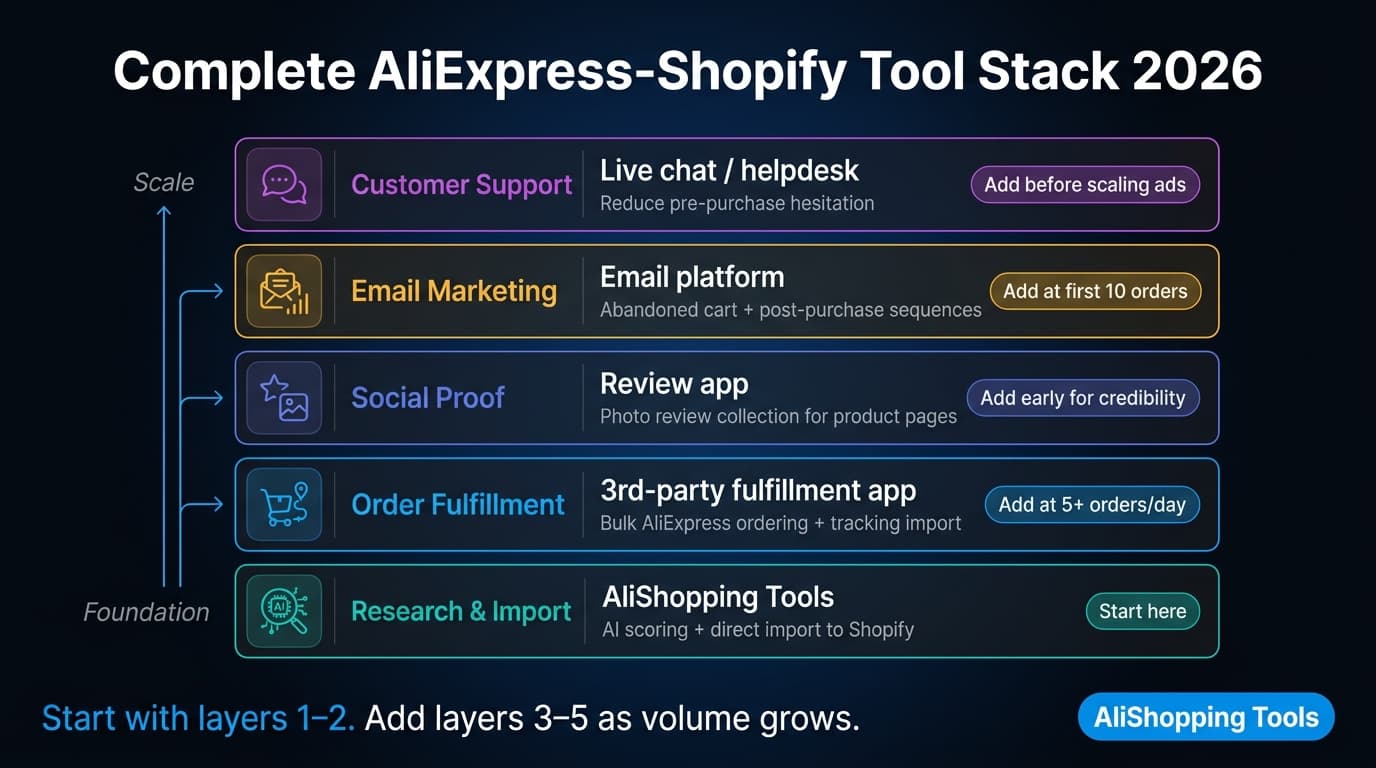
The AliShopping Tools + Shopify combination handles research and import. A complete operation typically adds the tools below. For a broader comparison of AliExpress-Shopify tooling options, see the best Shopify apps for AliExpress dropshipping guide.
| Tool | Purpose |
|---|---|
| AliShopping Tools | Product research, AI scoring, price history, direct import to Shopify |
| DSers | Order fulfillment, bulk AliExpress ordering, tracking number import |
| Klaviyo | Email marketing — abandoned cart, post-purchase sequences |
| Judge.me | Product review collection and display |
| Loox | Photo review collection — social proof for visual products |
| ReConvert | Post-purchase upsell pages |
| Tidio | Live chat — reduces pre-purchase hesitation |
Do not install all of these on day one. Start with AliShopping Tools + DSers + a review app. Add the others once you are processing consistent orders.
Common Pitfalls and How to Avoid Them
Pitfall 1: Importing products without checking shipping times to your target market. AliExpress standard shipping to the US, UK, EU, and Australia takes 15–25 days. Some product categories ship faster via ePacket or AliExpress Premium Shipping (7–14 days). Always check the shipping estimate to your specific target country before listing. If shipping takes 30+ days, customer satisfaction will be poor regardless of product quality. Display realistic shipping timelines on your store — hidden shipping times are the #1 driver of negative reviews and chargebacks.
Pitfall 2: Skipping price history verification before importing. Many AliExpress sellers inflate prices 2–3 weeks before sale events (618, 11.11, Summer Sale) and then present the inflated price as a discounted "sale price". A product currently at $8 that was at $5 six weeks ago is not a deal — it is an inflated price waiting for the sale to end. Always check the 90-day price history in AliShopping Tools before importing. Import products at their baseline price, not their inflated pre-sale price.
Pitfall 3: Not ordering samples before scaling. AliExpress product photos and descriptions are created by the supplier. The actual product may differ. At $20/day in ad spend, quality issues produce a handful of returns. At $500/day, a 15% return rate eliminates the entire margin. Order samples of any product before scaling past $100/day. This costs $5–$20 per sample and saves potentially thousands in returns and chargeback disputes.
Pitfall 4: Using the supplier's product description verbatim. AliExpress descriptions are written for the AliExpress catalog — they assume Chinese sizing conventions, use metric measurements, and sometimes include supplier branding. Rewrite descriptions in buyer-benefit language before publishing. This improves conversion rates and SEO performance on the product page.
Pitfall 5: Scaling ad spend before customer service is handled. At low volumes, you can handle support manually. As volume grows, response time slows and customer frustration builds. Set up a basic help desk (Tidio or Gorgias) and FAQ page answering common questions about shipping times, tracking, and returns before you scale. Proactive communication about shipping timelines reduces dispute rates significantly.
Frequently Asked Questions
Is AliExpress to Shopify dropshipping still profitable in 2026? Yes, for operators who choose the right niches and manage shipping expectations correctly. High-competition categories (electronics, branded goods) have tight margins in 2026. Low-competition niches in accessories, home goods, and fashion basics remain profitable with the right product selection and pricing strategy. Systematic product testing using AliShopping Tools' AI scoring reduces time wasted on products that will not convert.
How long does AliExpress shipping take to the US, UK, and EU in 2026? AliExpress Standard Shipping to the US typically takes 15–20 days. To the UK and Western Europe, 18–25 days is standard. ePacket (where available) is faster — 10–15 days to most Western markets. AliExpress Premium Shipping can reach 7–10 days for some routes. Always confirm the shipping estimate for your specific target country on the product listing before importing.
How do I import AliExpress products to Shopify without a third-party app? AliShopping Tools v2.0.0.23 includes direct Shopify import as a built-in feature of the extension. Open any AliExpress product page, connect your Shopify store in Settings, and click Import to Shopify in the extension panel. This uses the Shopify API directly — no separate import app required.
What is the minimum budget to start an AliExpress Shopify dropshipping store? Realistically: $39/month for Shopify Basic, $0 for AliShopping Tools, and $100–$200 for initial ad spend to validate one product. A $300 initial budget across the first month is a reasonable minimum to get meaningful test data. Lower budgets are possible but extend the time needed to validate whether a product works.
Do I need an AliExpress account to use AliShopping Tools for import? No. Product research and Shopify import via AliShopping Tools do not require an AliExpress account. You need an AliExpress account only when you manually place orders for customers. If you use DSers for automated order fulfillment, DSers manages the AliExpress order placement on your behalf.
How many products should I test before deciding a niche is viable? Test 5–10 products before drawing conclusions about a niche. A single product not converting can be a product problem, an ad creative problem, a targeting problem, or an offer problem — not necessarily a niche problem. Successful dropshipping operators typically test 20–50 products before finding 2–3 that scale.
AliShopping Tools
See live AliExpress data in your browser.
Seller trust score, 90-day price history, and live promo codes — on every AliExpress product page. No account, free.
Ready to find winning products?
Try AliShopping Tools — 15 free AI tools for product research.
Quick answers
Frequently Asked Questions
1Is AliExpress to Shopify dropshipping still profitable in 2026?
Yes, for operators who choose the right niches and manage shipping expectations.
Accessories, home goods, and fashion basics remain profitable.
High-competition categories like electronics and branded goods have tighter margins.
Systematic product testing using AliShopping Tools AI scoring reduces time wasted on products that will not convert, which is the key operational advantage in 2026.
2How do I set up AliExpress dropshipping with Shopify in 2026?
Create a Shopify store (Basic plan), install AliShopping Tools v2.0.0.23 from the Chrome Web Store, and connect your Shopify store in the extension Settings.
Use AliShopping Tools to research products on AliExpress using the AI verdict and price history signals, then click Import to Shopify to send products directly to your Shopify draft catalog.
Set your retail pricing and publish.
Use DSers for order fulfillment once you are consistently processing orders.
3How long does AliExpress shipping take to the US and UK in 2026?
AliExpress Standard Shipping to the US typically takes 15 to 20 days.
To the UK and Western Europe, expect 18 to 25 days. ePacket shipping (where available from the seller) is faster at 10 to 15 days.
AliExpress Premium Shipping can reach 7 to 10 days on some routes.
Always verify the shipping estimate for your specific target country on the product listing before importing and publishing.
4What is the minimum budget for AliExpress Shopify dropshipping?
A realistic minimum for the first month is around $300: approximately $39 for Shopify Basic, $0 for AliShopping Tools, and $150 to $200 for initial ad spend to test one or two products.
Lower budgets extend the time needed to validate product-market fit but are possible.
Budget for 3 to 5 product samples before scaling any ad spend above $50 per day.
5Do I need DSers to dropship from AliExpress to Shopify?
No.
At low order volumes (under 10 orders per day), you can fulfill AliExpress orders manually — place the order on AliExpress with the customer shipping address and enter the tracking number in Shopify.
DSers is recommended once order volume grows, as it automates bulk ordering and tracking number import.
AliShopping Tools handles product research and import; DSers handles order fulfillment — they serve different workflow stages.
6How many products should I test before scaling an AliExpress Shopify store?
Test 5 to 10 products before drawing conclusions about a niche, and expect to test 20 to 50 products total before finding 2 to 3 that scale consistently.
A single product not converting can reflect an ad creative issue, targeting mismatch, or pricing problem rather than a niche problem.
Use AliShopping Tools AI scoring to pre-filter products before testing — only test products whose verdict comes back Buy Signal or Strong Buy, with a stable 90-day price history.
More from the blog
AliExpress Shopify Direct Import Tutorial 2026 Guide
Import AliExpress products to Shopify in one click with AliShopping Tools v2.0.0.23. No CSV, no copy-paste — direct API import with multi-store picker.
Shopify Multi-Store AliExpress Dropshipping Guide 2026
Manage multiple Shopify stores sourcing from AliExpress with AliShopping Tools v2.0.0.23 multi-store picker. Connect and import across stores in one click.
AliExpress vs CJ Dropshipping 2026: Full Comparison
AliExpress vs CJ Dropshipping 2026: catalog size, shipping speed, pricing, and Shopify integration compared. Choose the right sourcing platform for your store.