
Shopify Multi-Store AliExpress Dropshipping Guide 2026
Quick answer: AliShopping Tools v2.0.0.23 includes a multi-store picker that lets you connect multiple Shopify stores and select the destination store each time you import an AliExpress product. Connect each store once in Settings, then choose from the picker on every import — no account switching, no separate sessions. Install AliShopping Tools on the Chrome Web Store →
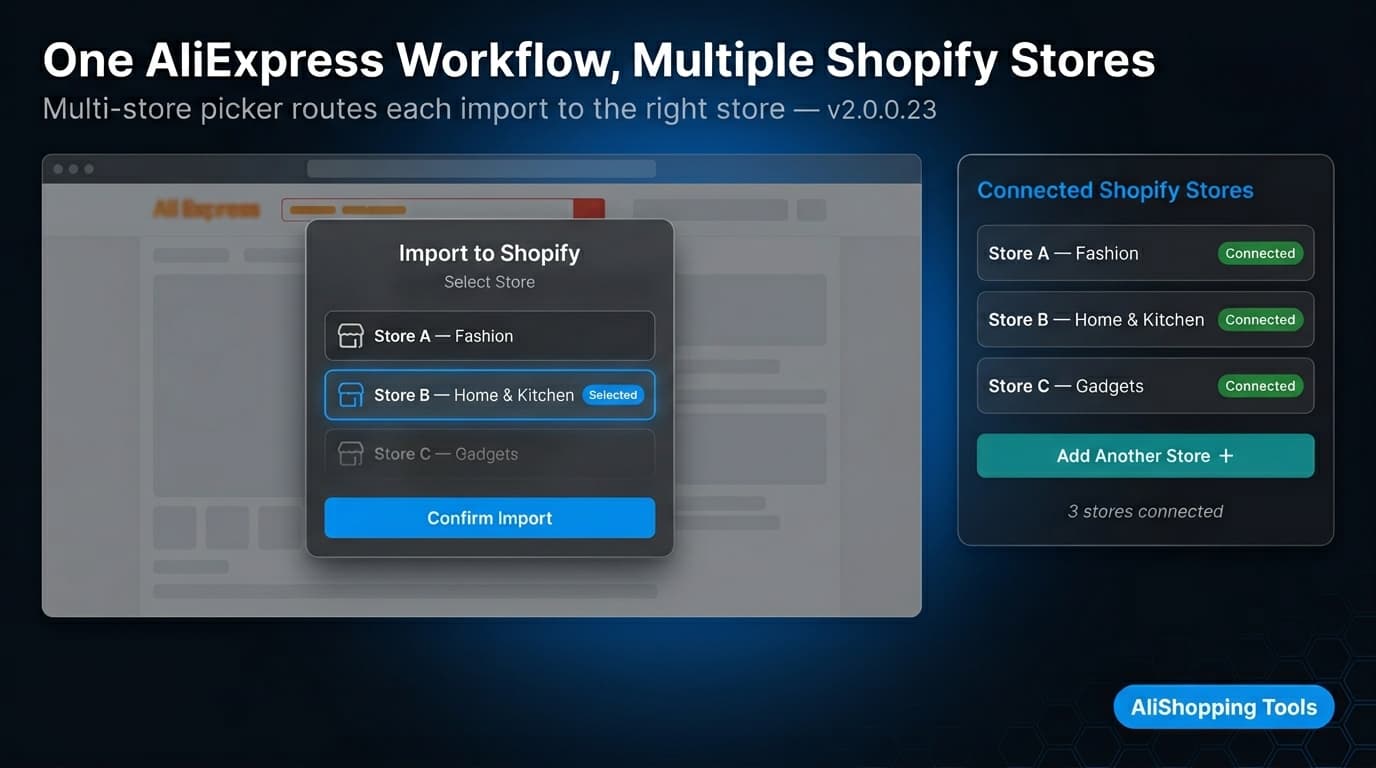
Running multiple Shopify stores from a single AliExpress sourcing workflow is one of the more operationally complex things a dropshipper can do — but the underlying product research and import steps are the same for every store. AliShopping Tools v2.0.0.23 formalizes this with a multi-store connection layer: connect each store once, then route imports to whichever store makes sense without any tool switching.
This guide explains who should run multiple Shopify stores, how the AliShopping Tools multi-store picker works, and how to set it up from scratch.
What Is Multi-Store Dropshipping with AliExpress?
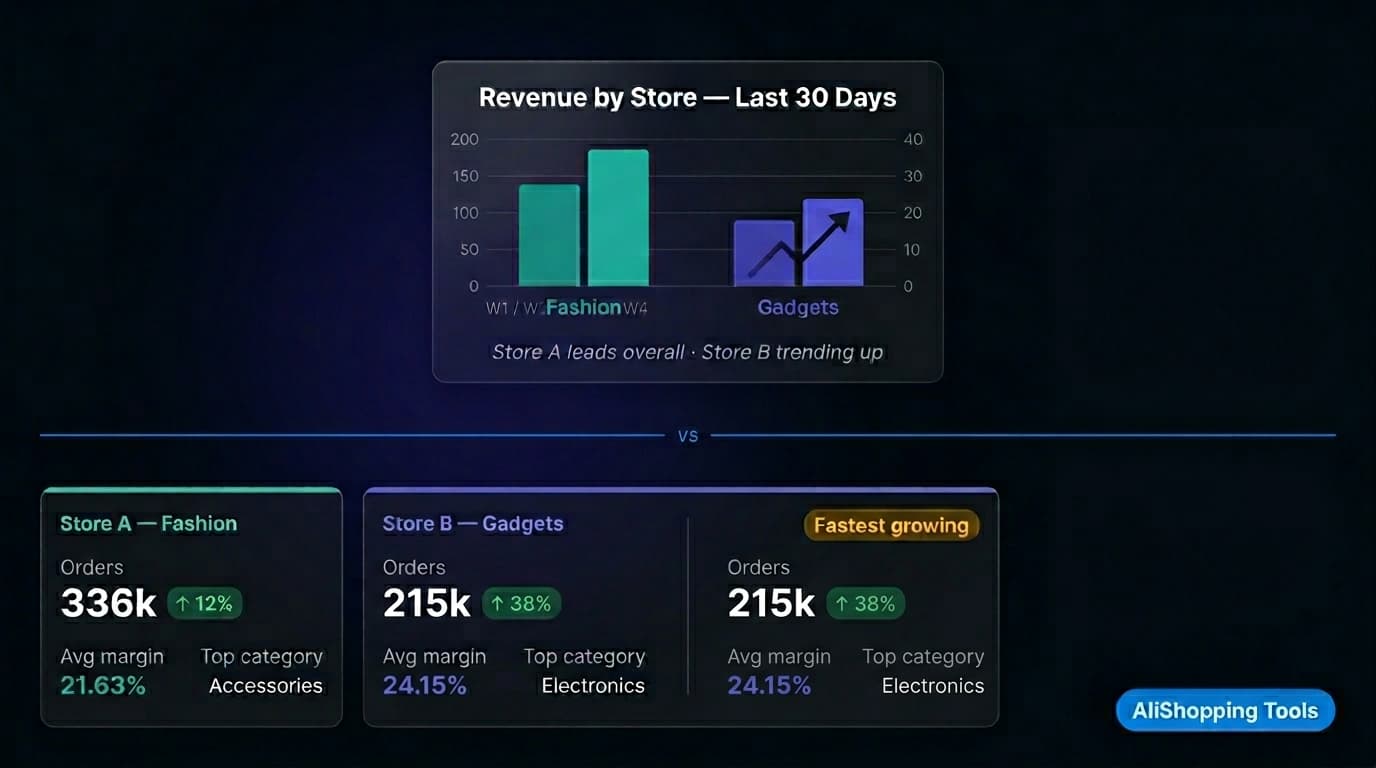
Multi-store dropshipping means operating more than one Shopify storefront — each targeting a different niche, geography, or customer segment — while sourcing products from the same AliExpress supply base.
The stores share sourcing (you research on AliExpress once) but operate independently on Shopify (separate branding, product catalogs, pricing, and customer data). A typical setup might include:
- Store A — Women's fashion accessories, targeting the US market
- Store B — Home and kitchen gadgets, targeting the UK and EU
- Store C — Electronics accessories, targeting global buyers in English
All three stores source from AliExpress. The sourcing workflow is identical — find products, check quality signals, import to Shopify. The only variable is which store the imported product goes to.
Without a multi-store tool, this requires logging into separate Shopify accounts or browser sessions, keeping separate bookmarks or spreadsheets to track which products have been tested in which store, and manually copying product data between stores. AliShopping Tools v2.0.0.23 centralizes the import step so you stay in one browser session and one extension.
Why You Might Run Multiple Shopify Stores
Multi-store operations are not right for every dropshipper, but there are legitimate use cases where the added complexity pays off:
Niche isolation. Mixing unrelated product categories in a single store hurts conversion rates — a shopper browsing women's earrings does not expect to see power tools in the recommended products section. Separate stores let you build focused brand identities for each niche.
Geographic pricing and compliance. Pricing strategy differs across markets. A product sold at $12 USD with standard US margins might need to be priced at €14 EUR to maintain profitability after VAT. Some products face import restrictions or certification requirements in specific countries. Running separate stores lets you configure pricing, currency, and product availability per market.
Testing niches in parallel. If you are validating multiple product niches simultaneously, keeping test inventories separate prevents cross-contamination of analytics. Conversion rates and ad performance are cleaner when each store serves a clearly defined audience.
Brand acquisition or sale preparation. Some operators run multiple stores with the intent to sell one or more once they reach stable revenue. Separate Shopify stores have cleaner financials for due diligence.
The tradeoff: each store requires its own Shopify subscription, customer support, and marketing spend. Multi-store operations scale the supply chain efficiency but do not reduce per-store operational overhead.
How Does the AliShopping Tools Multi-Store Picker Work?
AliShopping Tools v2.0.0.23 introduced a multi-store management layer built into the Shopify import feature. Here is how it works:
-
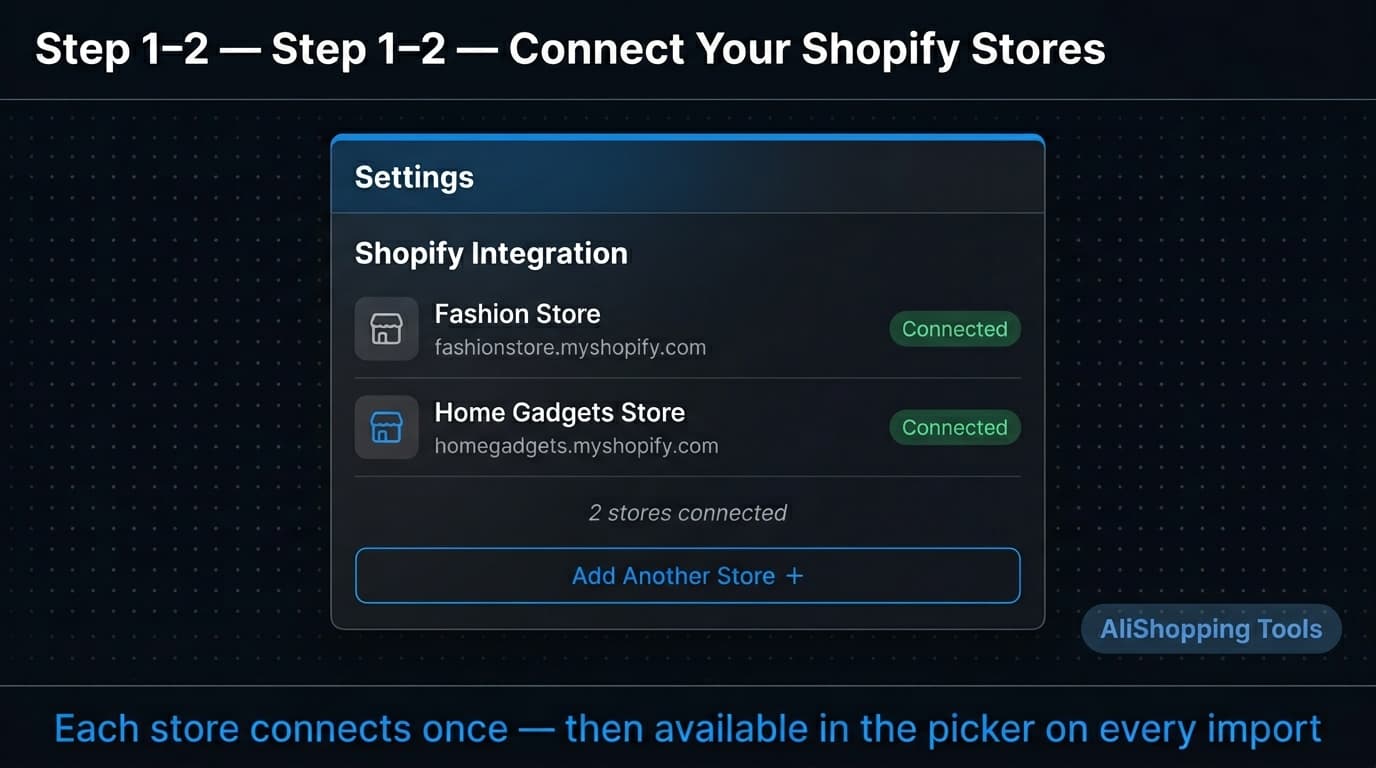
You connect each Shopify store once in the extension Settings. Each connection uses Shopify's standard OAuth authorization — the extension never stores your Shopify login credentials.
-
All connected stores are visible in a single list inside the extension. Store names and their
.myshopify.comURLs are displayed so you can identify each store without ambiguity. -
When you click Import on an AliExpress product, the store picker dialog appears. You select the destination store from the list and confirm. The product is sent directly to that store via the Shopify API.
-
A toast notification confirms the import — "Product imported to [Store Name]" — so you know the correct store received the product before you move on.
The picker appears on every import action, regardless of how many stores are connected. If you only have one store, it auto-selects that store so you can confirm with a single click.
Step 1: Connect Your First Shopify Store
If you have not yet connected any Shopify store to AliShopping Tools, start here.
- Open a Chrome tab on any AliExpress page.
- Click the AliShopping Tools icon in your Chrome toolbar (or the panel will open automatically on product pages).
- Navigate to Settings within the extension.
- Under Shopify Integration, click Connect Store.
- Enter your first store's URL in the format
your-store-name.myshopify.com. - You are redirected to a Shopify OAuth authorization page. Log in to Shopify if prompted.
- Click Install app (or Authorize) on the Shopify page.
- Shopify redirects back to the extension with a confirmation that the store is connected. The store name and URL appear in your connected stores list.
If the Shopify authorization page does not load, check that you are not using a browser extension that blocks third-party redirects (e.g., some privacy shields block OAuth flows). Temporarily disable them for the authorization step.
Step 2: Connect Additional Stores
Adding a second or third store follows the same process as the first, from within the same Settings panel.
- In the AliShopping Tools Settings, under Shopify Integration, you will now see your first connected store listed.
- Click Add Another Store (or the same Connect Store button — it adds to the existing list, not replacing it).
- Enter the URL for your next store (
second-store.myshopify.com). - Complete the Shopify OAuth authorization for that store account.
- The second store appears in your connected stores list alongside the first.
Repeat for each additional store you want to connect. There is no documented limit on the number of stores you can connect, though practically most dropshippers manage 2–5 stores at a time.
Important: Each store requires its own Shopify authorization. If two stores are under the same Shopify organization account, you will still need to authorize each store URL separately, as the Shopify API scopes are per-store.
Step 3: Using the Store Picker on Import
With multiple stores connected, the import workflow is:
- Open any AliExpress product page. The AliShopping Tools panel loads automatically.
- Review the product using the AI Verdict, price history, and profit simulation in the panel.
- Click Import to Shopify in the panel.
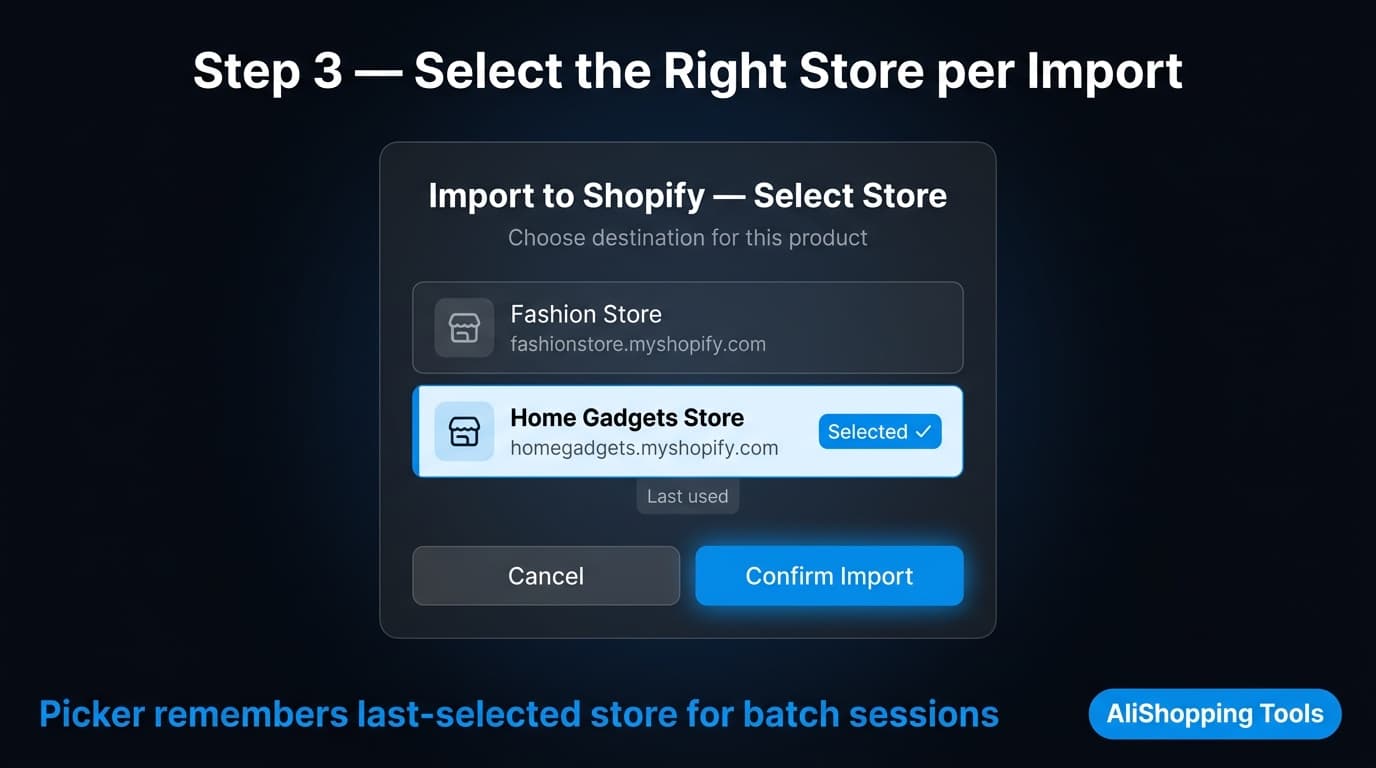
- The store picker dialog appears, listing all your connected stores with their names and URLs.
- Select the destination store — the one where this product belongs given its niche, target market, or category.
- Click Confirm Import.
- The toast notification confirms: "Product imported to [Store Name you selected]".
- The product appears as a draft in the selected store's Shopify admin.
The picker remembers your last-selected store by default, which speeds up batch importing when you are sourcing for one store in a single session. You can still change the selection at any time.
For a detailed walkthrough of the import steps themselves, see the AliExpress Shopify direct import tutorial.
Best Practices for Multi-Store AliExpress Sourcing
Maintain separate supplier lists per store
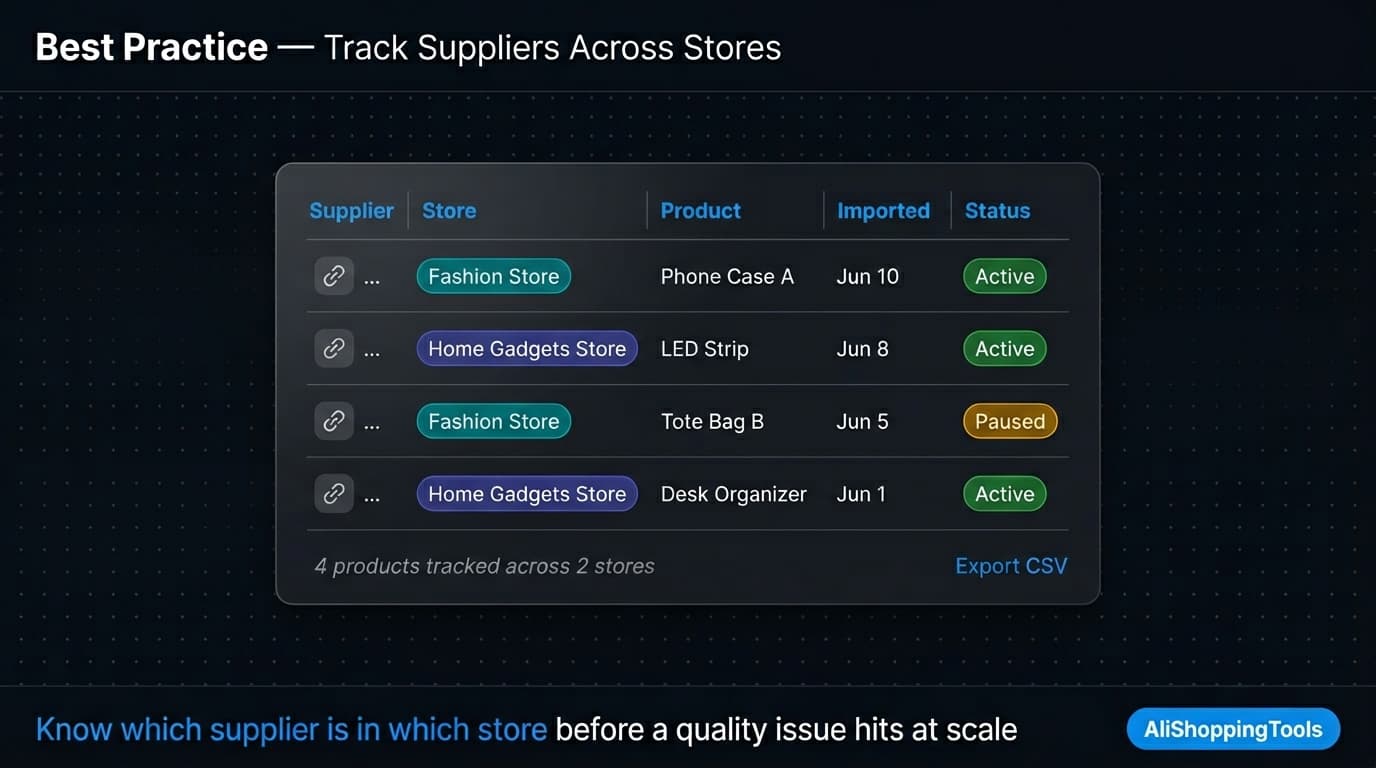
Even though you source from the same AliExpress pool, keep track of which suppliers are active in which store. If a supplier has a quality or shipping issue, you need to know which stores are affected — and which product listings to update or remove.
A simple shared spreadsheet with columns for supplier URL, store name, product name, import date, and status (Active / Paused / Removed) handles this at small scale.
Do not import the same product to competing stores in the same market
If two of your stores target the same buyer geography and price range, importing the same product to both creates internal competition in your own ad campaigns. Cross-reference your active product lists before importing.
Set distinct pricing rules per store
Avoid copy-pasting pricing from one store to another. Each store may have a different cost structure (different Shopify plan, different ad CPMs, different shipping zones) that changes the margin math. Use the profit simulation in AliShopping Tools to calculate the correct retail price for each store's cost structure separately.
Review and refresh connected store authorizations quarterly
Shopify access tokens can expire or be revoked (e.g., if you reset passwords or revoke app permissions in Shopify Settings → Apps). Check your connected stores list in AliShopping Tools every 3 months and reconnect any stores showing an error or disconnected status.
Use the CSV export for bulk testing across stores
When testing the same product in multiple stores simultaneously, use the Shopify-ready CSV export option in AliShopping Tools v2.0.0.23. Export the product once, then upload the same CSV to each store's product import. This is faster than running 3–5 separate direct imports when you want the same product live across all stores at once.
For a full overview of the AliExpress to Shopify dropshipping workflow — from store setup through to sourcing, pricing, and fulfillment — see the AliExpress to Shopify complete setup guide.
Install AliShopping Tools on the Chrome Web Store →
Frequently Asked Questions
How do I manage multiple Shopify stores with AliExpress dropshipping? AliShopping Tools v2.0.0.23 lets you connect multiple Shopify stores and choose the destination store each time you import an AliExpress product. Connect each store once via Settings → Shopify Integration, then use the store picker dialog that appears on every import. No separate browser sessions or account switching required.
Can I connect more than two Shopify stores to AliShopping Tools? Yes. You can connect multiple Shopify stores to AliShopping Tools. Each store requires a separate Shopify OAuth authorization during setup. All connected stores appear in the store picker when you initiate an import.
Does AliShopping Tools v2.0.0.23 work with Shopify Plus stores? The Shopify direct import feature uses the standard Shopify API, which is available on all Shopify plans including Shopify Plus. Shopify Plus store authorization follows the same OAuth flow as other plans.
What happens if I revoke the AliShopping Tools app in Shopify? If you revoke the app authorization in Shopify Settings → Apps, the AliShopping Tools connection for that store will stop working. Imports to that store will fail with a connection error. Reconnect the store in AliShopping Tools Settings → Shopify Integration to restore the connection.
Can I import the same AliExpress product to multiple Shopify stores at once? No — each import targets one store. Run separate imports for each store, or use the CSV export option to download a Shopify-ready file and upload it manually to multiple stores at once.
Is it better to use one Shopify store or multiple stores for AliExpress dropshipping? Start with one store. Multi-store operations multiply your Shopify subscription costs, customer support requirements, and marketing workload. Only expand to multiple stores once your first store is profitable and you have validated a second distinct niche that would cannibalize your first store if added to the same catalog.
AliShopping Tools
See live AliExpress data in your browser.
Seller trust score, 90-day price history, and live promo codes — on every AliExpress product page. No account, free.
Ready to find winning products?
Try AliShopping Tools — 15 free AI tools for product research.
Quick answers
Frequently Asked Questions
1How do I manage multiple Shopify stores with AliExpress dropshipping?
AliShopping Tools v2.0.0.23 lets you connect multiple Shopify stores and choose the destination store each time you import an AliExpress product.
Connect each store once via Settings → Shopify Integration, then use the store picker dialog that appears on every import.
All connected stores are listed with their names and myshopify.com URLs so you always import to the correct store.
2Can I import AliExpress products to multiple Shopify stores using AliShopping Tools?
Yes.
AliShopping Tools v2.0.0.23 supports multiple connected Shopify stores.
When you click Import to Shopify on an AliExpress product, the multi-store picker dialog appears.
Select the destination store and confirm.
Each import targets one store — run separate imports or use CSV export to add the same product to multiple stores at once.
3How do I connect a second Shopify store to AliShopping Tools?
Open AliShopping Tools Settings, go to Shopify Integration, and click Add Another Store (or Connect Store).
Enter the second store's myshopify.com URL and complete the Shopify OAuth authorization.
The store appears in your connected stores list and in the picker on every future import.
Each store requires its own separate Shopify authorization.
4Why should I run multiple Shopify stores instead of one store with many niches?
Separate stores keep niche audiences focused — mixing unrelated categories in one store reduces conversion rates because the brand identity is unclear.
Multiple stores also allow different pricing strategies per geography, cleaner analytics for A/B testing, and independent financials if you plan to sell one store.
The tradeoff is higher Shopify subscription costs and separate customer support for each store.
5What happens to my Shopify connection if I change my Shopify password?
Changing your Shopify password does not automatically revoke the AliShopping Tools API connection.
However, if you revoke the app in Shopify Settings → Apps, or if the access token expires due to inactivity, imports will fail with a connection error.
Reconnect the store in AliShopping Tools Settings → Shopify Integration to restore access.
6Does AliShopping Tools v2.0.0.23 work with Shopify Plus for multi-store import?
Yes.
The Shopify direct import feature uses the standard Shopify API, which is available on all Shopify plans including Shopify Plus.
Shopify Plus store authorization follows the same OAuth flow as Basic, Shopify, and Advanced plans.
Connect each Shopify Plus store URL individually in Settings to add it to your store picker.
More from the blog
AliExpress Shopify Direct Import Tutorial 2026 Guide
Import AliExpress products to Shopify in one click with AliShopping Tools v2.0.0.23. No CSV, no copy-paste — direct API import with multi-store picker.
AliExpress to Shopify Complete Dropshipping Setup 2026
Set up AliExpress dropshipping with Shopify in 2026: store setup, product research, direct import via AliShopping Tools, pricing, fulfillment, and scaling.
AliExpress vs CJ Dropshipping 2026: Full Comparison
AliExpress vs CJ Dropshipping 2026: catalog size, shipping speed, pricing, and Shopify integration compared. Choose the right sourcing platform for your store.