SmartMatch Price Compare
Find cheaper suppliers for any AliExpress product with AI-powered keyword matching. Compare price, shipping, delivery time, and seller rating side by side — free.
Two sellers can list the exact same product at wildly different prices on AliExpress — sometimes a 40-50% gap. The Compare tab uses AI keyword matching to find every alternative listing for the product you're currently viewing, then shows them side by side with price, shipping, delivery time, and seller rating. It's the difference between paying retail and paying wholesale.
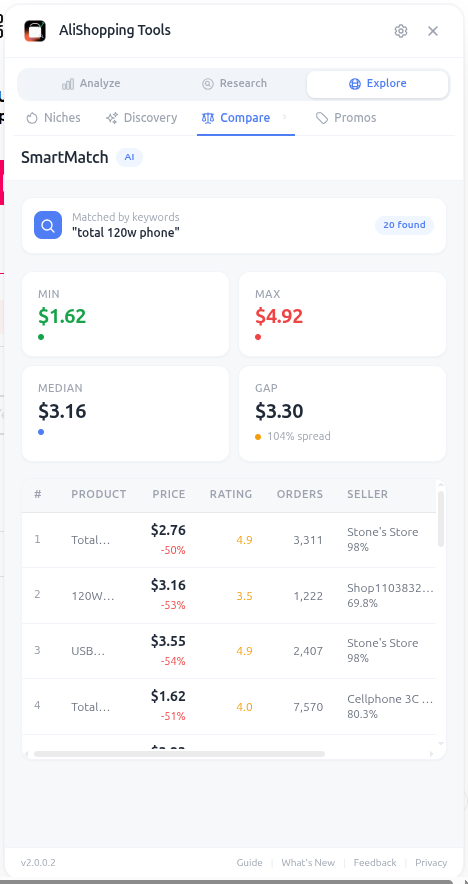
The matching is smarter than a simple keyword search. The AI extracts attributes like color, size, material, model number, and feature set, then searches for listings that share those attributes — even when the titles are written differently. This catches alternatives that a human searching with the original title would miss.
Why It Matters
Your supplier choice is the single biggest lever on your dropshipping margin. A $2 difference in unit cost is $2 of pure profit per order. Across 500 orders that's $1,000 — often the difference between a profitable test and a money-losing one. Compare also surfaces sellers with faster shipping, which directly reduces refund rates from impatient customers.
How It Works
- AI Keyword Matching — extracts attributes and searches for matching listings automatically
- Price Statistics — minimum, maximum, average, and median across all matches
- Seller Tags — Top Rated, Fast Shipper, Best Price, New Store
- Comparison Table — side-by-side price, shipping cost, delivery time, seller rating, total orders
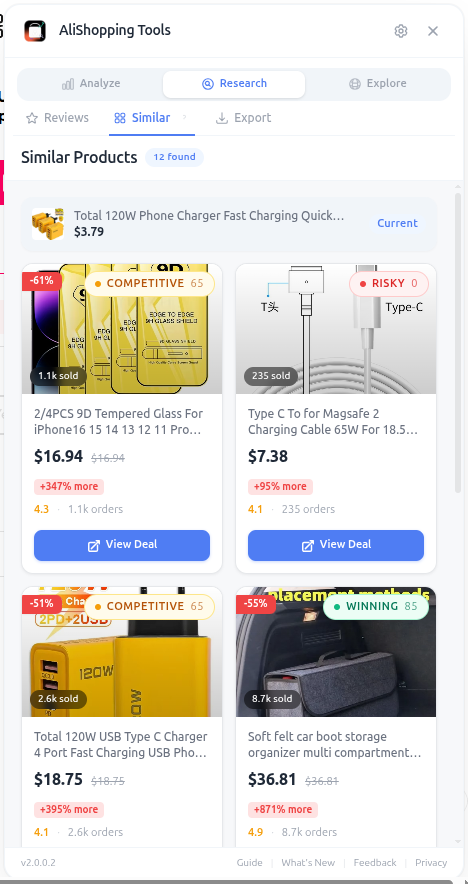
The Similar Products view goes one step further by showing products that aren't identical but are close enough to be substitutable — useful for finding upgraded versions, bundle options, or alternative colors.
How to Use It
- Open the AliExpress product page you're evaluating.
- Switch to the Compare tab.
- Wait 3-5 seconds for the AI to scan for matches.
- Read the Price Statistics bar — see if your current product is below, at, or above the median.
- Sort the comparison table by Price (lowest first) to find the cheapest alternative.
- Re-sort by Seller Rating to find the most trustworthy one.
- Click any result to open it in a new tab and run a full Verdict + Risk check.
- If a cheaper seller passes Risk, switch your sourcing immediately.
Real Example
You're evaluating a portable blender priced at $14.20. The Compare tab finds 11 matching listings with prices ranging from $8.90 to $16.50, median $12.40. The cheapest seller is new (3 months old) and risky. The second cheapest at $9.80 is a 4-year-old Top Rated store with 14K orders and 97% positive feedback. You switch to that supplier and save $4.40 per unit — at 200 orders that's $880 in additional profit you would have lost by sticking with the original listing.
Pro Tips
- Always sort by both Price AND Seller Rating — the cheapest is rarely the best, but the second or third cheapest from a trusted seller usually is.
- Use the Similar Products view to find upgraded versions with higher perceived value at similar cost.
- Save your final supplier choice in a spreadsheet — when one supplier disappears, you'll have backups ready.
- Re-run Compare every 30 days for active products — new sellers enter the market constantly.
Common Mistakes
- Picking the absolute cheapest seller without checking trust signals — you'll regret it the first time they ship counterfeits.
- Ignoring shipping cost and just comparing product price.
- Not re-comparing periodically — your "best supplier" may have raised prices or fallen behind newcomers.
Related Guides
FAQ
Câu hỏi thường gặp
1SmartMatch tìm listing thay thế thế nào?
Theo guide, AI trích attribute như màu, kích thước, chất liệu, model, bộ tính năng, rồi search listing chung attribute — ngay cả khi title viết khác nhau. Điều đó bắt được các lựa chọn mà người search với title gốc bỏ lỡ.
Chênh giá 40–50% giữa hai seller cùng sản phẩm là biên ròng mỗi đơn.
Ví dụ máy xay portable trong guide tìm 11 listing match dải 8,90–16,50 USD cho sản phẩm ban đầu 14,20 USD.
2Tab Compare hiển thị gì ngoài giá?
Thanh Price Statistics (min, max, trung bình, median qua tất cả match), tag seller (Top Rated, Fast Shipper, Best Price, New Store), và bảng so sánh song song giá, phí ship, thời gian giao, rating seller, tổng đơn.
Còn có view Similar Products cho sản phẩm không giống hệt nhưng đủ gần để thay thế — hữu ích tìm phiên bản nâng cấp, bundle, hoặc màu khác.
3Vì sao chọn seller rẻ nhất tuyệt đối thường sai?
Theo guide, rẻ nhất hiếm khi tốt nhất — bạn hối hận lần đầu họ ship hàng giả.
Luôn sort theo cả Price VÀ Seller Rating.
Ví dụ máy xay portable chọn rẻ thứ hai ở 9,80 USD từ store Top Rated 4 tuổi với 14K đơn và 97% positive feedback — tiết kiệm 4,40 USD/đơn vị so với 14,20 gốc, thêm 880 USD lãi trên 200 đơn.
Chạy lại Compare mỗi 30 ngày cho sản phẩm active vì seller mới vào thị trường liên tục.
Hướng Dẫn Liên Quan
Discovery
Browse a real-time trending product feed with category filters, winning badges, and sales velocity data. Discover fresh AliExpress dropshipping candidates daily.
Niche Research
Search AliExpress by keyword with price, category, max delivery, and sort filters. Every result is AI-scored — find your next dropshipping winner faster.
Reviews
Analyze rating distribution, filter by star level, browse buyer countries, and spot quality issues before importing any AliExpress product to your store.
Export
Download product photos, video, specs, and reviews in one click. Properly named files ready for your Shopify store or ad creative folder. No manual saving.