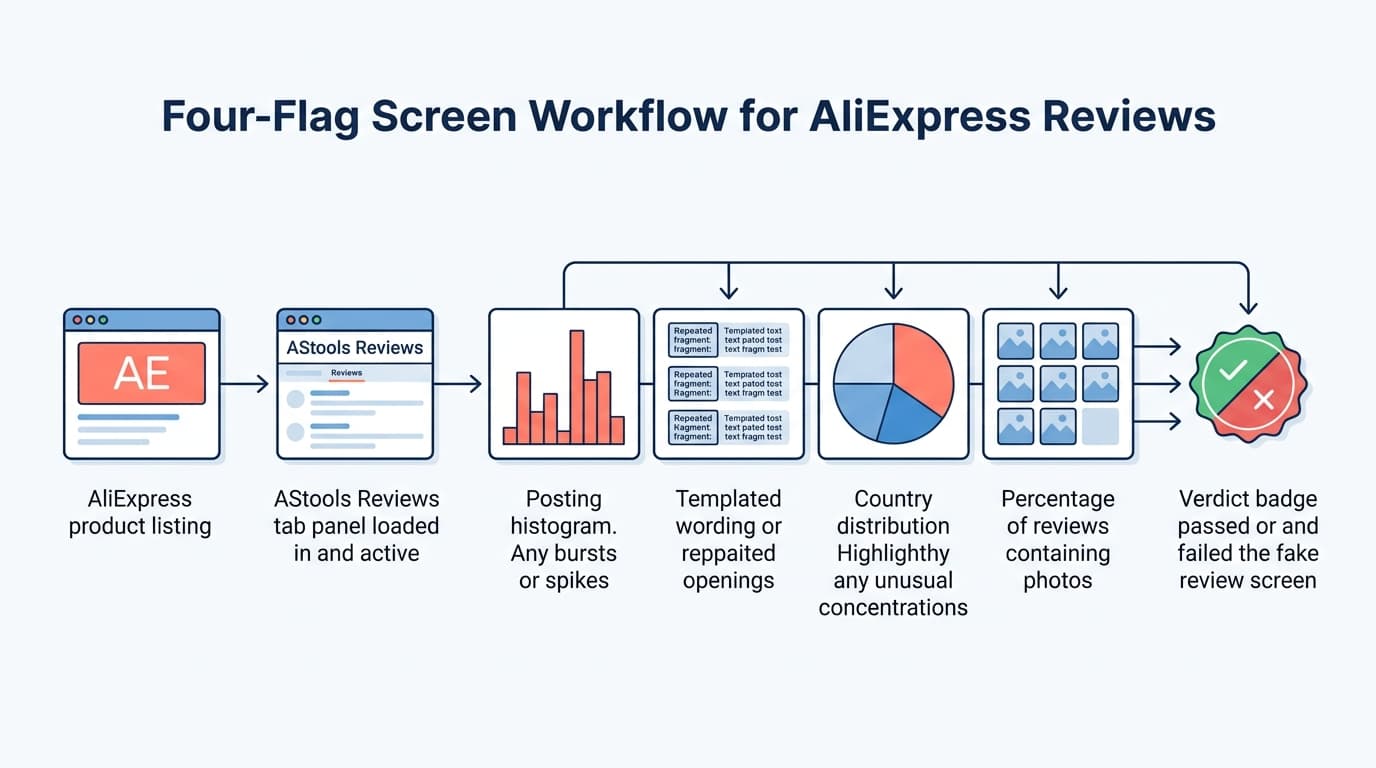
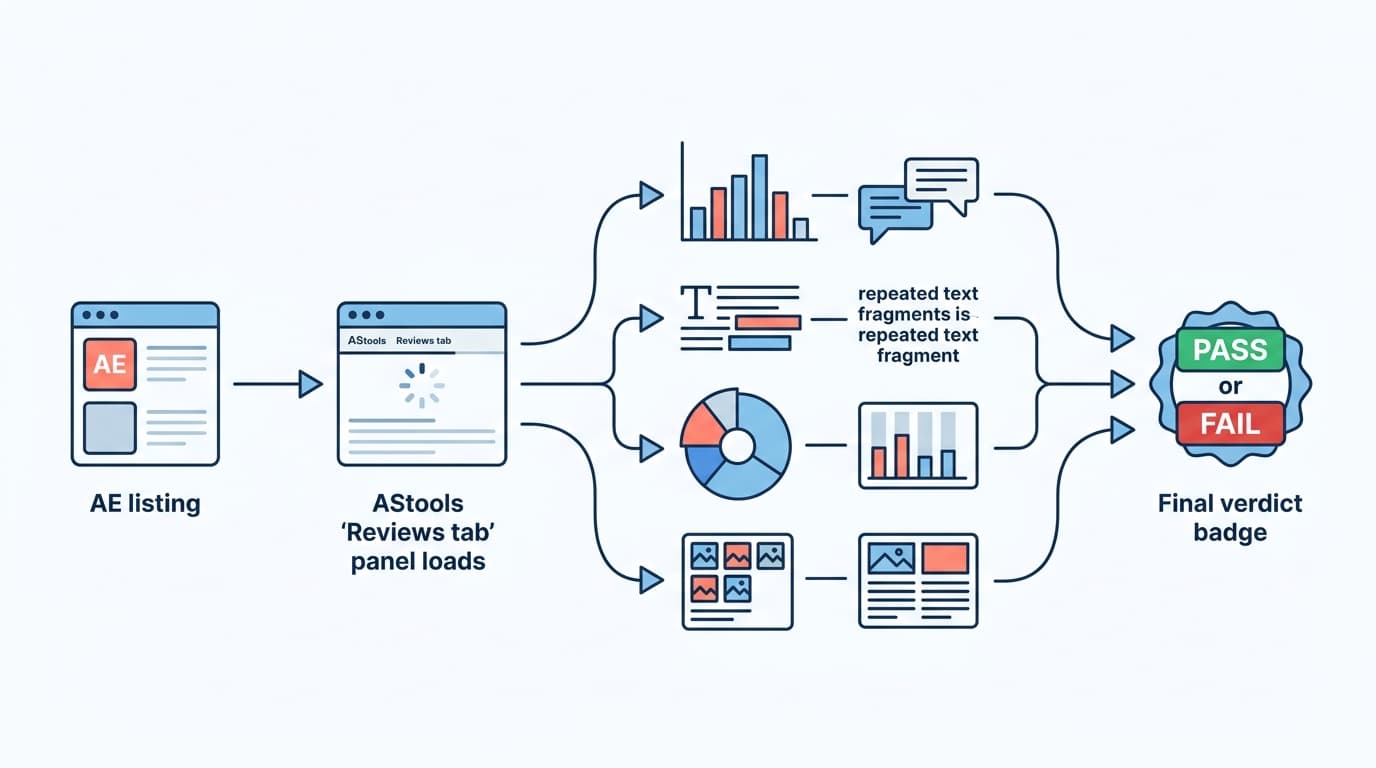
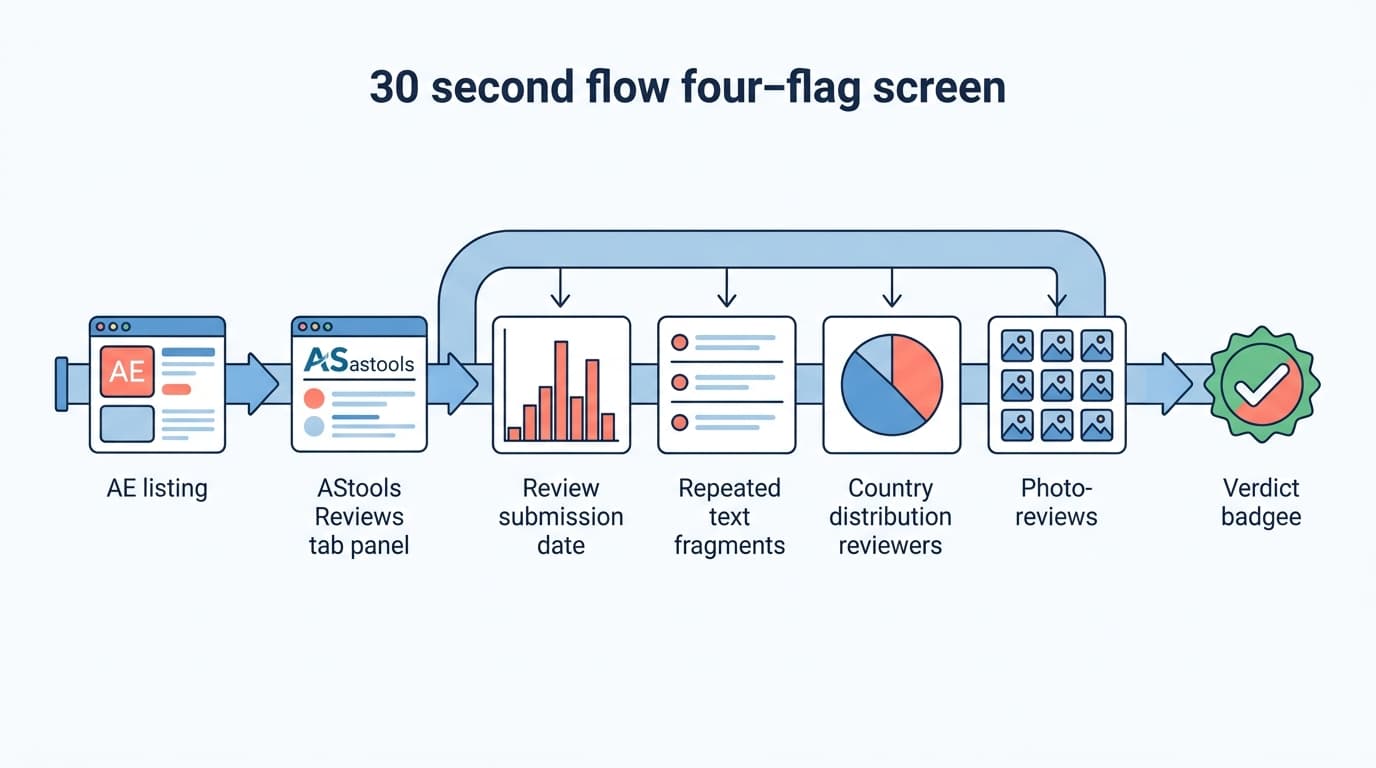
Four patterns flag a fake-review cluster in under 30 seconds: a posting-date burst (many reviews stacked in one week), templated wording where multiple reviews share the same opening sentence, country concentration where most reviews come from one market the seller does not primarily ship to, and near-zero photo-review ratio despite high review count.
2
What is review burst posting on AliExpress?
Review burst posting is when a seller receives dozens or hundreds of reviews concentrated in a single short window — days or weeks — rather than distributed naturally over time.
This pattern indicates bulk incentivized or paid review acquisition.
A healthy listing accumulates reviews gradually in proportion to sales volume, not in sudden spikes.
3
Does a high AliExpress rating guarantee product quality?
No.
AliExpress ratings can be manipulated through incentivized reviews, paid review services, and review gating.
A high headline rating paired with a poor dispute rate is more dangerous than a slightly lower rating with a clean one.
Always look past the average: read the full star distribution, check the dispute rate, and judge the review patterns yourself.
4
Is there a tool that detects fake AliExpress reviews automatically?
Not in AliShopping Tools, and you should be sceptical of anything claiming to.
The Reviews tab does not analyse review text, score authenticity, break reviews down by country or chart posting dates.
What it does is put the evidence one click away: the total review count, the full 1-5 star distribution as percentages, filters for All / With Photos / Additional, buyer photos in a lightbox, and an export to CSV, JSON, TXT or XLSX.
Spotting a seeded cluster is a judgement you make from that evidence.
5
Why do multiple AliExpress reviews start with the exact same phrase?
Identical opening sentences across multiple reviews usually indicate a fake-review cluster orchestrated by the seller to manipulate perception — a phrase like "Great product for the price" showing up word-for-word across several reviews is a strong signal of manipulation rather than genuine feedback, since real customers rarely phrase things identically.
Scanning the first line of several reviews is a fast way to spot this pattern.
6
What does country concentration reveal about AliExpress review authenticity?
A suspicious country concentration is when a large share of reviews come from a market the seller doesn't actually ship to, signaling a paid review farm.
Seeing lots of reviews from a country that's excluded from the shipping options is a clear red flag — cross-reference the review demographics against the seller's actual shipping policy.
7
Is a low number of photo reviews a warning sign on AliExpress?
Yes, a near-zero photo-review ratio is worth noting, since genuine buyers often upload images to show quality, especially for physical goods.
A listing with a large number of text reviews but very few photos is somewhat more likely to include manufactured or incentivized feedback than one with a healthy mix of both.
8
What is review seeding on AliExpress and how does it work?
Review seeding is a deceptive tactic where sellers generate a sudden cluster of positive feedback to artificially inflate a product's reputation shortly after launch.
This often manifests as a "burst posting" pattern, where dozens of 5-star ratings appear within a single week despite the item being new.
These seeded reviews are designed to trick the algorithm and buyers into thinking the product is a best-seller.
You can detect this by looking for a dense block of reviews posted within a short timeframe, contrasting with a lack of recent organic feedback.
9
How does the AStools Reviews tab help analyze AliExpress feedback?
It removes the scrolling, not the thinking.
The tab shows the total review count and the full 1-5 star distribution as percentages, so you can see what the average is actually made of.
A With Photos filter narrows the list to reviews with buyer images, which open full-size in a lightbox — the fastest way to check whether the item matches the listing shots.
An export to CSV, JSON, TXT or XLSX lets you sort reviews in a spreadsheet and read the negative ones as a block.
It does not group review text, detect duplicates, or report buyer countries; those checks stay manual.
4 Red Flags That Expose a Fake AliExpress Review Cluster (Quick Check)
Quick answer: Four red flags point to a seeded review cluster on an AliExpress listing — a posting-date burst, templated wording where multiple reviews share the same opening sentence, reviews heavily concentrated in one market, and an unusually thin share of photo reviews. If three of the four fire, treat the cluster as seeded. These are manual checks: you read the listing and judge. The AliShopping Tools Reviews tab makes the photo check and the star-distribution check one click each. For the complete 7-red-flag reference, see the full fake AliExpress reviews guide.
Fake reviews are the cheapest growth hack on AliExpress and the most expensive trap for buyers. A seeded review cluster pushes a mediocre product into your "high-rated" search filter, you order, the actual quality is well below the displayed rating, refunds eat your margin, and the listing looks fine for the next dropshipper who repeats the cycle.
This is not a "rate every review by hand" guide. AliExpress listings carry hundreds to thousands of reviews — manual auditing doesn't scale. The shortcut is pattern recognition: four signals that a seeded review cluster tends to leave behind, regardless of what the seller paid the review farm to write.
This is the quick-check companion to our full fake AliExpress reviews guide — that reference covers all 7 red flags in depth, while this page isolates the 4 that fire fastest so you can screen an entire dropshipping shortlist in a single coffee break.
Want the review evidence in one place?Install AStools (free Chrome extension) — the Reviews tab opens on every AE listing with the review count, the full star split, a photo filter and an export.
Why fake reviews matter for dropshippers (and buyers)
For dropshippers, fake reviews on a supplier listing are not just a vibes problem. They translate into specific costs:
Ad-targeting waste. You build creative around a "4.8 star" hero product. Real fulfillment quality is well below that. Refund rate runs far above what your model assumed. Customer-acquisition cost stays the same; customer-retention drops.
Chargeback exposure. Cardholder disputes on misrepresented quality stack up. Stripe / PayPal / Shopify Payments dispute rates over 1% trigger merchant review and reserves.
Refund provision miss.Profit-calculator math breaks if your refund-rate input is badly off. A thin-margin listing turns into a loss-making listing.
Brand drag. Even if you eat the refunds, customers who got the bad item leave reviews on YOUR storefront, not on the AE listing. The damage moves to your domain.
For buyers (non-dropshippers reading this guide), the cost is simpler: you pay for one quality tier and receive another, and the dispute window closes before you finish the trial.
The 4 red flags
Fake reviews come from review farms. Review farms produce reviews at scale on a deadline. Both constraints — scale and deadline — leave fingerprints. Four show up consistently.
Red flag 1 — Posting-date burst
A real product gets reviewed on a continuous curve: a few reviews early from the first buyers, more as orders fulfill, and a long tail after that scaled by ad spend and reorder cadence. The shape is gentle.
A seeded cluster has a different shape: a large block of reviews stacked into a few days, often early in the listing's life. That window is when the seller paid the farm. Outside the window, the review count is sparse.
How to check it: Sort the AliExpress review feed by date and page through it. You are looking for a dense block of reviews sharing near-identical dates, with thin activity either side of it. This is a manual read — no tool charts it for you.
A real listing also has bursts — sale events, mentions in lists like this one, viral creator videos. The difference: real bursts pair with a corresponding order-volume spike, which you can sanity-check on the Order Volume tab. Seeded bursts don't have matching order-volume signal because the orders never happened — only the reviews did.
Red flag 2 — Templated wording
Review farms hire writers who work from briefs. Briefs are short. Writers under deadline reuse openings.
The result: several reviews on a listing share an opening fragment like "Excellent product, fast delivery..." or "Very satisfied with the purchase..." or "Product as described, recommend..." — sometimes verbatim, sometimes with one or two words swapped. A real listing's openings are far more varied because real buyers don't share a brief.
How to check it: Sort reviews by recency and scan the first dozen or so openings. If several open with the same short fragment, that's templating. The more of them there are, the stronger the signal.
This one rewards the export. Pull the reviews out of the Reviews tab as CSV or XLSX, open the file in a spreadsheet, and scanning for repeated phrasing becomes much faster than clicking through pages on the listing. The reading is still yours to do — the extension does not group reviews or match text patterns.
Red flag 3 — Country concentration
AliExpress sellers ship globally. A listing that ships to many countries and runs ads across multiple markets should draw reviews from a spread of markets. Real listings tend to concentrate on a handful, but rarely collapse almost entirely onto one.
Seeded reviews tend to come from review farms operating in a single market — often the same country across multiple listings the seller has paid the same farm for. The result: a lopsided share of reviews from one country, even though the seller's shipping settings span multiple markets.
How to check it: Read the buyer countries in the AliExpress review feed itself and cross-check against the seller's stated shipping countries. A listing that ships to US/UK/AU/DE/CA but draws nearly all its reviews from a country it barely serves is a strong signal. The Reviews tab does not break reviews down by country — this check is manual.
Red flag 4 — Photo-review absence
Real customers leave photo reviews at some steady background rate that varies a lot by category — apparel and home decor index higher (people show off the buy); cables and small accessories index lower (nothing to photograph). What matters is not a universal percentage but the comparison: check the same category across several listings and see what normal looks like there before you judge any one listing.
Seeded reviews almost never include photos because the farm doesn't have the product. Photographing a product you don't have requires either stock-image manipulation or actually buying the product, which defeats the cost economics of seeding.
How to check it: This is the one the Reviews tab makes genuinely fast. Switch the filter from All to With Photos and compare against the total review count shown on the tab. A listing with a lot of reviews and almost nothing behind the photo filter is worth pausing on.
The reverse is also useful: a listing with a healthy block of photo reviews showing genuine in-environment use (kitchen counter, bathroom, real packaging) is a strong positive signal. Open them in the lightbox and look. Real buyers don't fake photo reviews — the cost is too high.
The 30-second workflow
This is the actual sequence to run on every listing you're considering.
Open the listing on AliExpress. Click into the product detail page from search or from another tab.
Open the AStools Reviews tab from the extension panel. You get the real review count and the full 1-5 star distribution as percentages — start there, because a high average over a thin sample, or an average hiding a fat 1-star block, changes how much any of the rest matters.
Hit the With Photos filter. Compare what comes back against the total count, and open a few photos in the lightbox to see whether the item matches the listing shots.
Scan the review feed by date. Look for a dense block of same-day reviews with thin activity either side.
Scan the openings. Sort by recency, read the first dozen, count repeated opening fragments. Export to CSV or XLSX first if you would rather do this in a spreadsheet.
Check the buyer countries against where the seller actually ships.
If three of four red flags fire, treat the cluster as seeded — skip the listing or run a small sample order before committing. If one or two fire, the listing is in a gray zone — check the supplier risk indicators on the same product. If zero or one fires, the cluster is likely organic. Calibrate against your own category before scaling; what looks abnormal in kitchenware is normal in cables.
Try the same workflow free — install AStools to pull up any AliExpress listing's review count, star split, photo filter and export in one click.
Real-vs-fake — side-by-side example
The pattern is much clearer with a comparison than from a description. The two listings below — one a clean organic-review listing in the kitchen-gadget category, one a seeded listing in the same category — sit side-by-side to show how the four flags read against each other.
Illustrative example — not measured data.
Signal
Listing A (organic)
Listing B (seeded)
Posting dates
Steady trickle week over week, no dense block
A large block stacked into a few days early on, sparse otherwise
Top opening fragments
Openings vary across the first 15 reviews
Most of the first 15 open with "Excellent product, very satisfied" or a close variant
Country distribution
Spread across several markets, with a long tail
Almost everything from a single market
Photo reviews
A healthy block behind the With Photos filter, genuine kitchen-counter shots
Almost nothing behind the filter
Manual red-flag count
0 of 4 fire
4 of 4 fire
The seeded listing carries the same reassuring "4.6 stars" badge as the organic one. The four-flag check pulls them apart in well under a minute. The displayed star rating is theater; the posting dates, the openings, the countries and the photo reviews are evidence — and you are the one reading them.
When the four-flag screen isn't enough
The 30-second workflow catches the high-volume seeded clusters — review farms working at scale. It does not catch:
Sophisticated seeding that uses multiple farms across multiple countries and varies opening templates per batch. This costs the seller more, so it's rare on cheap AE listings, but premium-tier listings sometimes invest. If margins on a candidate listing matter (high-AOV products), spend the extra 5 minutes reading 30 random reviews and looking for emotional inconsistency.
Genuinely poor products with genuinely angry honest reviews. The four-flag screen is about authenticity, not quality. A real listing with a mediocre rating and accurate negative reviews fails no flags but is still a bad supplier choice.
New listings with sparse data. On a listing with very few reviews, all four signals are statistically thin. Wait for the listing to mature, or run a small sample order.
Sometimes — they have a moderation pipeline. But review farms move faster than moderation, and seeded clusters routinely survive long enough to cover the entire window when the listing is being scaled. Treating "AE will catch it" as your defense leaves you exposed during the highest-spend period.
What if a listing has 4.7 stars but my four-flag check says seeded?
Trust the four-flag check. The star rating is the output the seller paid for; the four flags are the input pattern that produced it. A high-rated listing with all four red flags firing is much more likely to disappoint than a slightly lower-rated listing with none.
Does the AStools extension detect fake reviews for me?
No. It does not analyse review text, score authenticity, break reviews down by country, chart posting dates, or flag anything as suspicious. What it gives you is the evidence, faster: the total review count, the full 1-5 star distribution, filters for All / With Photos / Additional, buyer photos in a lightbox, and an export to CSV, JSON, TXT or XLSX. The four red flags in this guide are checks you run yourself.
Are the four flags specific to AliExpress, or do they work on Amazon / TikTok Shop / eBay?
The patterns are universal — review farms work the same way across platforms. Burst posting, templated wording, country concentration, and photo-review absence all generalize. The AStools Reviews tab is built for AliExpress; on other platforms you apply the patterns the same way, just without the photo filter and export to speed you up. See also TikTok Shop trending products methodology for the equivalent in the TT Shop ecosystem.
How does this compare with the 7-red-flag full guide?
The 7-flag fake-review reference guide is the deeper version — it covers all 7 patterns including timing of paid promotions, reviewer-account age, and language anomalies. This 30-second guide isolates the four signals that fire fastest and most reliably, so you can screen at scale before going deep on shortlisted listings.
What's a clean baseline for my category?
There isn't a universal number, and anyone quoting you one is guessing. Photo-review rates and country spread vary widely between apparel, kitchenware, and small electronics. Build your own baseline: check five or six listings in the category you're working in, note what the photo filter returns relative to total reviews, and judge outliers against that. The comparison-tab walkthrough helps when calibrating for a specific category.
The four-flag workflow takes well under a minute with the Reviews tab open and 10+ minutes by hand. The extension is free, one click, works on every AliExpress product detail page — it puts the review count, the star split, the photo filter and the export in front of you, and leaves the judgement where it belongs. Layer with the 7-flag supplier risk view for fulfillment-side trust and you've covered both questions before any spend.