






Getting Started with AliShopping Tools
Install AliShopping Tools and analyze your first AliExpress product in under 2 minutes. Free Chrome extension — no account, no signup, instant AI verdict.
AliShopping Tools
See live AliExpress data in your browser.
Shipping rates, profit margins, and Shopify import — all without leaving the product page.
AliShopping Tools is a free Chrome extension that turns AliExpress and Shopify into a product research lab. Instead of opening twenty browser tabs, copy-pasting prices into spreadsheets, and guessing whether a supplier is trustworthy, you get an AI verdict, profit calculator, risk scan, and competitor data inside one side panel — without ever creating an account.
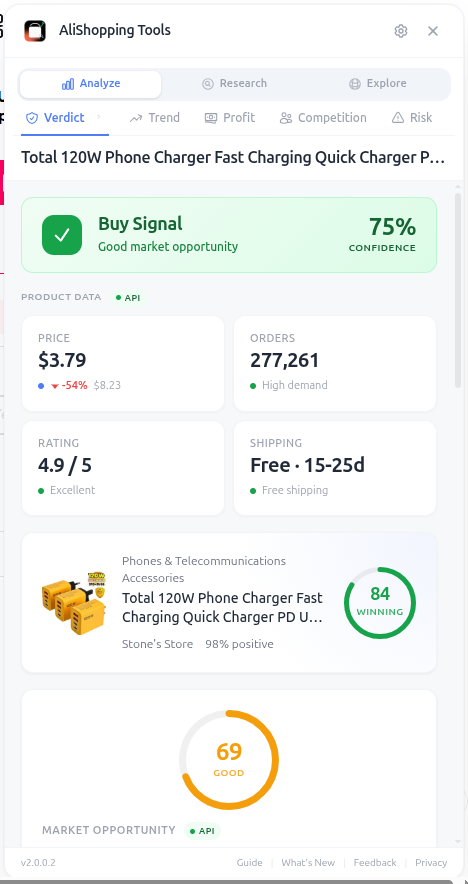
This guide walks you through installing the extension, opening your first product page, reading the panel, and switching between the 13 analysis tabs that the tool unlocks. By the end of two minutes you should be able to evaluate a candidate product and decide whether to add it to your testing pipeline.
Why It Matters
Most dropshippers fail not because they pick "bad" products but because they spend so much time on manual research that they only test 3-4 products a month. AliShopping Tools collapses what used to be a 30-minute research session into about 30 seconds, so you can comfortably evaluate 20 products an hour and only commit ad spend to the ones that pass every check.
Install the Extension
- Open the Chrome Web Store listing for AliShopping Tools.
- Click Add to Chrome, then confirm in the permission dialog.
- Pin the extension icon to your toolbar so you can spot it on any page.
- Open any AliExpress product URL — the side panel will auto-open the first time and remember your preference afterward.
- No login, no email, no payment. The extension is 100% free.
Open Your First Product
Navigate to any aliexpress.com/item/... URL. Within a second the side panel slides in from the right with the Verdict tab pre-loaded. You will see a colored badge — Strong Buy, Buy Signal, Hold / Watch, or Pass — plus a Winning Score, a Market Opportunity radar, and a price-history sparkline. If the badge is Buy Signal or Strong Buy, this is a candidate worth deeper analysis.
Switch Between Tabs
The panel exposes nine analysis tabs on AliExpress and four more on Shopify stores. The fastest way to learn the tool is to open one product and click through every tab in order:
- Verdict — the executive summary and Winning Score
- Trend — momentum classification and TikTok virality
- Profit — full P&L with margin sliders
- Competition — saturation, seller distribution, search volume
- Risk — red flags, seller trust, business license
- Discovery — real-time trending feed
- Compare — SmartMatch supplier price comparison
- Niches — keyword search with score-based sorting
- Reviews — rating distribution and buyer geography
- Export — one-click photos, video, specs, and reviews

On any Shopify store, four extra tabs unlock automatically: Store X-Ray (theme + product stats), App Stack (200+ app signatures), Product Catalog (every product paginated), and Live Sales (real-time order polling every 15 seconds).
Real Example
Imagine you spot a "magnetic phone holder" on AliExpress priced at $4.20. You open the page, glance at the Verdict (Buy, score 76), jump to Profit and set your retail price to $19.99 — net margin lands at 38%. The Risk tab shows a green seller with a 4-year-old store. The Compare tab finds three other suppliers between $3.80 and $5.10, confirming the price is fair. Total time: 45 seconds. You bookmark the product for ad testing without ever leaving the AliExpress tab.
Pro Tips
- Open 5-10 candidates in tabs and click through each Verdict — you can disqualify most in under 10 seconds.
- Use the Discovery tab as your morning routine to surface fresh trending products you would never find by searching manually.
- Combine the Niches keyword search with the Compare tab to find both winning products AND the cheapest supplier in one session.
- Export photos before importing the product to your store so you have a local backup of the supplier's media.
Common Mistakes
- Trusting only the Verdict score and skipping Risk — a high-margin product from a 2-month-old store is almost guaranteed to cause refund headaches.
- Forgetting to check the Profit tab at YOUR target retail price (not AliExpress's listed price), which is the only number that matters for ad math.
- Ignoring Shopify Live Sales when validating a niche — it is the closest thing to seeing real revenue without store access.
Related Guides
FAQ
Frequently Asked Questions
1Do I need to create an account to use AliShopping Tools?
No.
The extension is 100 percent free and requires no signup, no email, and no payment.
Install it from the Chrome Web Store, pin the icon, and the side panel opens automatically the first time you visit an AliExpress product page.
All analysis runs locally in your browser — you stay anonymous and your research history is never synced to a server.
2Which pages does the extension actually work on?
The side panel auto-opens on any AliExpress product URL (aliexpress.com/item/...) with nine analysis tabs: Verdict, Trend, Profit, Competition, Risk, Discovery, Compare, Niches, Reviews, and Export.
On any Shopify storefront four extra tabs unlock: Store X-Ray, App Stack, Product Catalog, and Live Sales.
It does not work on Amazon, eBay, Temu, or Walmart in this version.
3How long does it take to evaluate a product with the extension?
Experienced users disqualify weak products in under 10 seconds by reading only the Verdict badge and Winning Score.
A thorough pass — Verdict, Profit at your target retail price, Risk for supplier trust, and Compare for supplier pricing — takes about 30 to 45 seconds per product.
That lets you comfortably evaluate 20 or more candidates per hour instead of the 3 to 4 typical of manual research.
4What is the Winning Score and how is it calculated?
The Winning Score is a 0-to-100 composite computed server-side from multiple product signals (the exact formula is proprietary and updated as our model improves). 75 and up flags a strong candidate, 50 to 74 is moderate, and under 50 is weak.
Separately, the Verdict badge reads Strong Buy, Buy Signal, Hold / Watch, or Pass.
Neither is a guarantee — always validate with the other tabs before committing budget.