AliExpress Promotions Finder: Free Deal Tool 2026
AliExpress Promotions Finder: Free Deal Tool 2026
Quick answer: The free AliShopping Tools Chrome extension auto-detects all active promotions on any AliExpress product page — store coupons, platform-wide coupons, flash sales, and bundle discounts — stacked into a single panel. No account required. Stacking them correctly on bulk orders can save 20–40% on sourcing costs.
AliExpress runs more promotions than any other ecommerce platform on the planet. Store-level coupons, platform-wide coupons, flash sales, bundle discounts, time-limited deals that expire in four hours, category-specific drops. If you stack them correctly on a bulk order, you can save 20% to 40% on your product costs — which, for a dropshipper working on 30% margins, is the difference between profitable and underwater.
The problem is that AliExpress does not make this easy. Promotions are buried across the product page, checkout flow, and hidden coupon codes you only discover by accident. Half the time you finalize an order and realize there was a 15% off code active the whole time.
The Promotions tab in AliShopping Tools surfaces the active deals on any product in one view. You see what coupons apply, what flash sales are running, when they expire, and what the real unit cost drops to once everything is stacked. It is free, runs on the product page you already have open, and stops you from leaving money on the table.
Here is how to use it.
AliExpress promotion types the Promotions tab surfaces
| Promotion type | Typical savings | Stackable? |
|---|---|---|
| Store-level coupons | 5-15 percent | Yes, with platform coupons |
| Platform-wide coupons | 3-10 percent | Yes, with store coupons |
| Flash sales | 20-50 percent | Usually exclusive |
| Bundle / quantity discounts | 5-25 percent per unit | Yes, stacks with coupons |
| 11.11, Anniversary, Summer Sale | 15-40 percent | Usually exclusive of coupons |
| Time-limited deals (under 24h) | 10-30 percent | Varies per listing |
What the Promotions Tab Does
The Promotions tab is a deal-detection surface inside the AliShopping Tools Chrome extension. When you open an AliExpress product, it scans for every active promotion that applies — store coupons, platform coupons, flash sales, limited-time discounts, tiered quantity deals — and lays them out in one place.
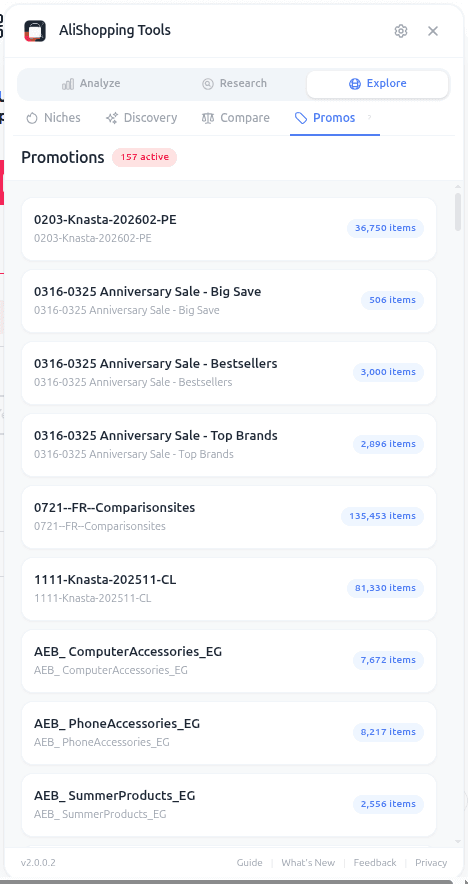
Instead of hunting through the product page, clicking into coupon drawers, and checking multiple promotion banners, you get a consolidated view: what is active, how much it saves, and when it expires. If there is a time-sensitive deal about to end, the expiry timer is visible so you can decide whether to act now or wait.
For dropshippers, this matters because product cost directly drives profit margin. A supplier price of $2.80 with a stackable 15% off coupon drops your real cost to $2.38, which changes the math on whether a product is worth testing. The Promotions tab turns that math into something you can see in seconds instead of spreadsheet-modeling after the fact.
How to Access the Promotions Tab
Three steps.
Step 1 — Install AliShopping Tools. Free on Chrome Web Store. 15 seconds, no account, no credit card.
Step 2 — Open any AliExpress product page. The Promotions tab reads the product's promotion context, so you need to be on a specific product detail page.
Step 3 — Click the Promotions tab in the panel. Active promotions load automatically. The tab also surfaces a status when no promotions are active, so you know the check ran.
The whole interaction is passive for you — the extension does the scanning, you read the results.
UI Elements Breakdown
The Promotions tab is organized by promotion type, because different promotions apply differently.
Active coupons. Store coupons (specific to the seller) and platform coupons (AliExpress-wide or category-wide) surface with the discount amount and conditions (minimum order value, eligible items). You see at a glance whether a coupon is worth claiming for your order size.
Flash sales. Time-limited discounts where the product is priced below its usual rate for a set window. The tab shows the flash sale price, regular price, and countdown to expiry.
Limited-time deals. Broader promotional windows — holiday events, category campaigns, anniversary sales — get surfaced with their end date so you can plan bulk orders around them.
Tiered quantity discounts. Some products give you a better unit price at higher quantities (buy 5, save 10%; buy 10, save 20%). The Promotions tab shows the tier breakpoints so you can decide whether ordering more makes sense for your testing budget.
Stacking guidance. Where promotions are stackable, the tab shows the combined discount. Where they are exclusive (only one can apply), you see that too — no surprise at checkout when only the smaller discount counts.
Each promotion is actionable. You know exactly what it saves, how to claim it, and when it disappears.
Real-World Workflow: Bulk-Ordering a Test Batch
Say you validated a silicone kitchen tool using the Verdict, Profit, and Risk tabs. You want to order 20 units as a test batch before committing to a larger run.
Open the product. The Promotions tab shows: a $2 off store coupon on orders over $25, a category-wide 10% off platform coupon expiring in 18 hours, and a tiered discount that kicks in at 15 units. At your 20-unit test order size, all three stack.
The product is $2.80 per unit. Without promotions, that is $56 for 20 units. With the platform coupon (10% off), the store coupon ($2 off), and the 15-unit tier discount (another 8% off), your effective unit cost drops to about $2.29 — and your total lands around $45.80.
That $10 difference on a test batch is not huge in isolation, but it recovers your shipping cost and shifts your break-even analysis. More importantly, you now know the math for scaled orders. When you reorder 200 units, stacking the same discount types saves you roughly $100 on that batch.
Without the Promotions tab, you either check out at $56 and miss the savings, or you spend 20 minutes digging through the AliExpress UI to find the same information. The tab collapses that to 30 seconds.
You can also combine this with a smart cadence: open the product once a week using the Discovery tab workflow and check the Promotions tab each time. When a bigger promotion lands, you place your reorder. When nothing notable is active, you wait.
Common Mistakes to Avoid
Assuming the headline price is the real price. AliExpress product cards show a "headline price" that often ignores promotions you would unlock at checkout. Always check the Promotions tab before baking a cost number into your profit simulation — the real number is usually lower than what the product card displays.
Missing stackable combinations. Platform coupons and store coupons can often stack. Tiered quantity discounts often stack on top of both. If you claim only one when three are eligible, you leave real money on the table. The tab shows you the full stack, not just the biggest single discount.
Ignoring expiry timers. Flash sales are the biggest source of missed savings. A 30% flash sale that ends in four hours is a now-or-never event. If your product passes the 7 signs check and a flash sale is live, the correct move is usually to order during the flash window instead of waiting for a "better time" that may not come.
Forgetting to recheck before reorder. Promotions rotate constantly. A product with no active promotions today may have a 20% off event next week. Check the Promotions tab every time you are about to order — the check costs nothing and can unlock real savings.
FAQ
Is it really free? Yes. AliShopping Tools is free to install and use, and the Promotions tab has no separate paywall.
Does it find hidden coupon codes? The tab surfaces promotions that AliExpress actually exposes to the product context — store coupons, platform coupons, flash sales, tiered discounts. "Secret" one-off codes that someone shared in a random Reddit thread are not typically part of the promotion system AliExpress makes visible to extensions.
Does the tab apply promotions automatically? No. The Promotions tab surfaces what is available — you still claim and apply the promotions on AliExpress itself. This is intentional because coupon claiming often happens at the account level and you want to be in control of what your AliExpress account has claimed.
Will it notify me when a new promotion starts? The current tab surfaces promotions active on the product you have open. For ongoing monitoring across many products, you would open the relevant product periodically and check. Dedicated alert-style notifications are not part of the current tab.
Can it find promotions on any product? Any AliExpress product page works. Some products have lots of active promotions; some have none. The tab tells you honestly — it does not invent promotions that are not there.
Stop Paying Full Price
Every percentage point of product cost you save is a percentage point that goes straight to your margin. On $10,000 of AliExpress spend per month, a consistent 10% discount stacking strategy is $1,000 saved — pure profit, nothing changed in your store, same products selling at the same price.
Install AliShopping Tools — Free on Chrome Web Store
Already installed? Open the product you are about to reorder and click the Promotions tab first. Your margin will thank you.
Ready to find winning products?
Try AliShopping Tools — 15 free AI tools for product research.
Quick answers
Frequently Asked Questions
1Is it really free?
Yes. AliShopping Tools is free to install and use, and the Promotions tab has no separate paywall.
2Does it find hidden coupon codes?
The tab surfaces promotions that AliExpress actually exposes to the product context — store coupons, platform coupons, flash sales, tiered discounts.
"Secret" one-off codes that someone shared in a random Reddit thread are not typically part of the promotion system AliExpress makes visible to extensions.
3Does the tab apply promotions automatically?
No.
The Promotions tab surfaces what is available — you still claim and apply the promotions on AliExpress itself.
This is intentional because coupon claiming often happens at the account level and you want to be in control of what your AliExpress account has claimed.
4Will it notify me when a new promotion starts?
The current tab surfaces promotions active on the product you have open.
For ongoing monitoring across many products, you would open the relevant product periodically and check.
Dedicated alert-style notifications are not part of the current tab.
5Can it find promotions on any product?
Any AliExpress product page works. Some products have lots of active promotions; some have none. The tab tells you honestly — it does not invent promotions that are not there.
6Can I use the AliShopping Tools extension on browsers other than Chrome?
The AliShopping Tools extension works on Chromium-based browsers (such as Edge and Brave) since they share Chrome's extension platform, and installs the same way from the Chrome Web Store.
It does not support Firefox or Safari, which use different extension frameworks.
Check the extension's Chrome Web Store listing for the current supported-browser and version details rather than relying on a fixed version number.
7Does the promotions finder store any of my browsing data?
The Promotions tab reads the AliExpress product page you have open to surface available coupons — per the extension's privacy policy, it does not sell or transmit your personal browsing history to third parties.
Check the current privacy policy in the extension listing for the specifics of what is (and isn't) collected, since privacy practices can be updated over time.
8How often does the coupon database refresh, and will I see new deals within minutes?
The coupon and promotions data refreshes as you browse — exact refresh cadence isn't a fixed published number, so treat "new deals appear quickly" as the general behavior rather than relying on a specific minute-by-minute guarantee.
If a promotion doesn't show up right away, reloading the product page is the most reliable way to get a current read.
9Can the extension automatically calculate the best bulk‑discount tier for dropshippers?
The Promotions tab surfaces the tiered bulk-pricing AliExpress itself displays on the product page (price breaks by quantity) so you can see per-unit cost at different order sizes without manually clicking through each tier.
It does not invent pricing beyond what AliExpress publishes on the listing — always confirm the final tier pricing on the AliExpress checkout page before ordering in bulk.
10Will using the promotions finder affect my page load speed or cause conflicts with other Chrome extensions?
The extension is designed to be lightweight and run as an isolated content script, so it's built to avoid conflicting with other Chrome extensions or meaningfully slowing page loads.
Actual performance impact can vary by device and how many extensions you run simultaneously — if you ever notice a slowdown, you can disable it on a per-site basis from the Chrome extensions menu.
More from the blog
AliExpress Shipping to the UK: Delivery Times, VAT & Customs (2026)
How long AliExpress takes to reach the UK, how 20% VAT and post-Brexit customs work, and which shipping method is fastest for UK shoppers in 2026.
AliExpress Shipping to the USA: Delivery Times, Customs & Duty (2026)
How long AliExpress takes to the USA, what import duty you pay after the 2026 de minimis change, and which shipping method is fastest. Realistic estimates.
TikTok Viral Products August 2026: 13 Back-to-School Peak Winners
13 TikTok viral products trending in August 2026 — back-to-school peak (first two weeks), dorm room setup, early-fall beauty, and the late-summer travel tail. Each with a real AliExpress listing pulled 2026-07-21; validate live cost, margin, and Winning Score in the AliShopping Tools extension before sourcing.