



What's New in AliShopping Tools v2.0.0.4 — Shopify Redesign, Viral Sharing & More
AliShopping Tools v2.0.0.4 is live. This update focuses on three things dropshippers have been asking for: a better Shopify spy experience, easy ways to share your research, and a faster, cleaner extension overall.
If you haven't installed it yet, grab it free from the Chrome Web Store:
Install AliShopping Tools — Free
Already have it? Chrome auto-updates extensions, so you should see v2.0.0.4 within the next few hours. Let's walk through what's new.
Shopify Spy: Completely Redesigned
The biggest change in this release is the Shopify module. We rebuilt the entire UI from the ground up using Shadow DOM injection and a premium design system. Here's what that means for you.
New Bottom Toolbar Layout
The old floating sidebar is gone. In its place is a sleek bottom toolbar (66px) with a frosted glass effect that sits at the bottom of any Shopify store you visit. Click any tool to expand the content panel above the toolbar.
Why it matters: The old layout could overlap with store content and felt clunky. The new toolbar is unobtrusive, loads instantly, and gives you more screen space to browse the store while keeping all four spy tools one click away.
Where to see it: Visit any Shopify store with the extension installed. The toolbar appears automatically at the bottom of the page.

Shadow DOM Isolation
The extension UI now renders inside a Shadow DOM container. This is a technical improvement, but the user-facing benefit is significant: the extension's styles never clash with the store's CSS, and the store's styles never break the extension's layout.
Result: No more visual glitches on stores with unusual themes. The toolbar looks pixel-perfect on every Shopify store.
Four Refreshed Tools
All four Shopify spy tools received visual updates to match the new design system:
- Store X-Ray — Theme detection, store stats, revenue charts, and launch timeline. Clean card-based layout with tabular data.
- Products — Full product catalog with search, sort, and pagination. New product image component with lazy loading and skeleton placeholders.
- Live Sales — Real-time order tracking with 30-second polling, animated pulse indicator, and pause/resume controls.
- App Detection — Identifies 200+ Shopify apps grouped by category (marketing, analytics, reviews, shipping, and more).
Where to see it: Click each icon in the bottom toolbar to switch between tools.

Tips & Guides Link
We added a "Tips & Guides" promo link directly in the Shopify toolbar. It opens our blog at news.astools.app where you'll find tutorials, strategy guides, and product research tips.
5 Viral Sharing Features
Version 2.0.0.4 introduces five built-in sharing features designed to help you save and share your product research. No extra tools or screenshots needed.
V1: Share Product Card
Found a product worth discussing? Click the share button on any Verdict tab to generate a formatted text summary with the product's score, price, and key metrics. Copy it to your clipboard or post it directly to X (Twitter).
Where to find it: Verdict tab > Share button (top-right corner of the verdict card).
V2: Weekly Winner Report
AliShopping Tools automatically tracks the products you analyze throughout the week. The Weekly Winner Report compiles your top-scoring products into a shareable summary with stats. Share it to X to showcase your finds.
Where to find it: Discovery tab > "Weekly Report" button.
V3: Analysis Image Export
Export any product analysis as a branded 600x420 PNG image. The exported image includes the product photo, verdict score, key metrics, and AliShopping Tools branding. Perfect for sharing in group chats, Discord servers, or social media.
Where to find it: Verdict tab > Export as Image button.
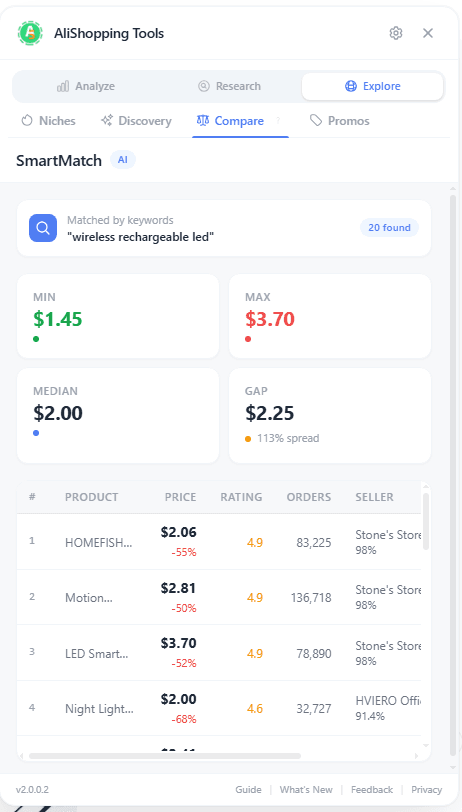
V4: Compare & Decide Table
When you've shortlisted multiple products, generate a side-by-side comparison table as a PNG image. It shows prices, scores, margins, and risk levels so you (and your audience) can see the winner at a glance.
Where to find it: Compare tab > "Export Comparison" button.
V5: Export Watermark
Every exported image and shared card includes a subtle "Sourced with AliShopping Tools" watermark. This builds trust when you share research in communities, and it helps other dropshippers discover the tool.
Performance & Polish
Beyond the headline features, v2.0.0.4 includes a round of improvements that make the extension faster and more reliable.
Mock Mode Leak Fixed
In previous versions, a configuration issue could cause the extension to load mock (demo) data instead of real API data in certain edge cases. This has been fixed. The extension now defaults to the backend provider, ensuring you always see live data from all 26 verified API endpoints.
Welcome Page Updated
The first-install welcome page now correctly displays the "AliShopping Tools" brand name throughout. Small detail, but first impressions matter.
Privacy & Terms Pages Live
The privacy policy and terms of service links now point to live pages at astools.app/en/policy and astools.app/en/term. No more placeholder URLs.
CWS Listing Optimized
We shortened the extension name to 41 characters and rewrote the Chrome Web Store description with targeted keywords. The new description: "FREE dropshipping tool: winning product scores, profit calculator, price history, competitor spy & store analytics. No signup."
Cleaner Build
Four dead Shopify component files were removed from the codebase. This reduces the build size and eliminates unused code. The version number is now properly synced across manifest.json and package.json.
All 26 API Endpoints Verified
The production build was tested against all 26 API endpoints to confirm every feature returns real data. This includes the AliExpress analysis tools (verdict scoring, trend analysis, profit simulation, competition data, risk assessment) and all Shopify spy endpoints.
Full Changelog Summary
| Area | Change |
|---|---|
| Shopify UI | Complete redesign: Shadow DOM, bottom toolbar, glass effect, 4 refreshed tool panels |
| Viral Features | 5 new sharing tools: product card, weekly report, image export, comparison table, watermark |
| Performance | Mock mode default fixed to backend; 4 dead files removed |
| Onboarding | Welcome page brand name corrected to "AliShopping Tools" |
| Legal | Privacy policy and terms URLs now point to live pages |
| CWS Listing | Name shortened to 41 chars; description rewritten with SEO keywords |
| Build | Version synced across manifest + package.json; 26 API endpoints verified |
| Content | Tips & Guides promo link added to Shopify toolbar |
What's Coming Next
We're not slowing down. In the next sprint (March 23-27), we're publishing eight feature-focused blog posts covering every major tool in the extension, from the Verdict scoring system to Shopify store analysis. We're also expanding to Reddit, Quora, and X to help more dropshippers discover these free tools.
If there's a feature you'd like to see, reach out at cs.alishopping@gmail.com. We read every message.
FAQ
How do I update to v2.0.0.4?
Chrome updates extensions automatically. You can force an update by going to chrome://extensions/, enabling Developer mode, and clicking "Update." You should see version 2.0.0.4 in the extension details.
Is AliShopping Tools still free?
Yes. AliShopping Tools is 100% free with no signup, no login, no credit card, and no "freemium" upsell. Every feature listed above is available to all users.
Do I need to reinstall the extension after this update?
No. Chrome handles the update automatically. All your settings and preferences are preserved.
Where can I report a bug or request a feature?
Email us at cs.alishopping@gmail.com or leave a review on the Chrome Web Store with your feedback. We actively monitor both channels.
Get AliShopping Tools
If you're not using AliShopping Tools yet, install it free from the Chrome Web Store. Over 15 analysis tools for AliExpress and Shopify, zero cost, no account required.
Ready to find winning products?
Try AliShopping Tools — 15 free AI tools for product research.
Quick answers
Frequently Asked Questions
1What is the biggest change in AliShopping Tools v2.0.0.4?
Per the post, a completely rebuilt Shopify spy module.
The old floating sidebar is replaced by a sleek 66px bottom toolbar with frosted glass effect that sits at the bottom of any Shopify store.
Click any tool to expand the content panel above the toolbar.
The new layout is unobtrusive, loads instantly, gives more screen space to browse, and keeps all four spy tools (Store X-Ray, Products, Live Sales, App Detection) one click away.
2What does Shadow DOM isolation mean for the user?
The extension UI now renders inside a Shadow DOM container.
The user-facing benefit per the post: the extension's styles never clash with the store's CSS, and the store's styles never break the extension's layout.
No more visual glitches on stores with unusual themes — the toolbar looks pixel-perfect on every Shopify store.
This was a common pain point with overlay extensions before Shadow DOM became standard.
3What do the four refreshed Shopify spy tools do?
Per the post: Store X-Ray (theme detection, store stats, revenue charts, launch timeline in a card-based layout with tabular data), Products (full product catalog with search, sort, pagination, lazy-loaded image component with skeleton placeholders), Live Sales (real-time order tracking with 30-second polling, animated pulse indicator, pause/resume controls), and App Detection (identifies 200+ Shopify apps grouped by category — marketing, analytics, reviews, shipping, and more).
Live Sales is described as the fastest signal that a product is actively selling.
More from the blog
AliShopping Tools: Your Complete Dropshipping Research Toolkit
A full walkthrough of every feature in AliShopping Tools — 11 AliExpress analysis tools, 4 Shopify spy tools, and 5 viral sharing features. All free, no signup required.
Koala Inspector Alternative 2026: Top Tools Compared
Best free Koala Inspector alternative 2026: a Chrome extension adding AliExpress price history, the full review breakdown & supplier search Koala can't do — $0, no signup.
AliExpress Price Chart 2026: Track Price History on Any Product (Free Chrome Extension)
AliExpress sellers inflate 'original prices' to fake 80%-off discounts. This free Chrome extension shows a 90-day price chart on every product page — so you see the real price history before you buy or source.