





AliShopping Tools: Your Complete Dropshipping Research Toolkit
Quick answer: AliShopping Tools is a free Chrome extension that serves as a complete dropshipping research toolkit — 11 AliExpress analysis tools (AI verdict, profit simulator, supplier risk, trend phase, competition, price history, similar products, compare, promotions, review breakdown, daily deals), 4 Shopify spy tools (app detection, product catalog, revenue estimation, theme detection), and 5 viral sharing features. All free, no account needed.
Product research is the difference between a profitable dropshipping store and one that burns through ad spend on duds. But researching products manually — checking prices, estimating margins, reading reviews, spying on competitors — takes 30+ minutes per product.
AliShopping Tools is a free Chrome extension that puts 15+ analysis tools at your fingertips. Visit any AliExpress product page or any Shopify store, and the extension instantly surfaces the data you need to make faster, smarter sourcing decisions.
This guide walks through every feature, organized by how you'll actually use them.
Install AliShopping Tools — Free on Chrome Web Store
How AliShopping Tools Works
Install the extension from the Chrome Web Store. No account, no login, no credit card. Once installed:
- On AliExpress product pages: A floating side panel appears with 11 analysis tools organized into three groups — Analyze, Research, and Explore.
- On any Shopify store: A bottom toolbar appears with 4 spy tools — Store X-Ray, Products, Live Sales, and App Detection.
- Everywhere: The extension popup gives you quick access to settings, your analysis history, and the viral sharing features.
The extension uses Shadow DOM injection, which means its UI is completely isolated from the host page. No style conflicts, no layout breaks, no interference with shopping or browsing.
Let's go through each feature group.
ANALYZE — Product Intelligence on AliExpress
These five tools appear when you visit any AliExpress product detail page. They answer the core question: should I sell this product?
1. Verdict Tab — AI Verdict Score
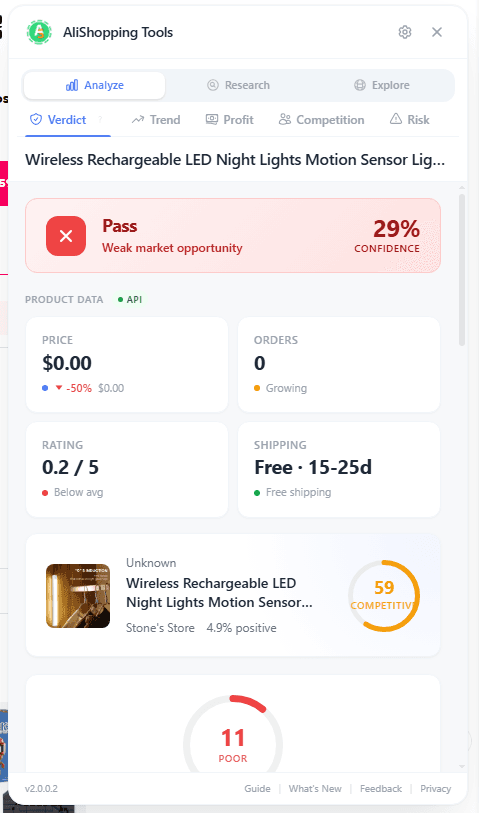
The Verdict tab is the starting point for every product you evaluate. It combines four weighted dimensions into one 0-100 score and maps that score to a single verdict: Strong Buy at 80 and above, Buy Signal from 60, Hold / Watch from 40, and Pass below that. A confidence reading sits beside the verdict.
What it analyzes: Four weighted dimensions — 30% product fundamentals (the Winning Score feeds this dimension), 30% profit estimate, 20% supplier risk, 20% market saturation.
Why it matters: Instead of spending 20 minutes looking at individual data points, you get a data-backed recommendation in seconds. A "Strong Buy" means every dimension came back strong. A "Pass" means move on.
How to use it: Navigate to any AliExpress product page. The Verdict tab loads automatically as the first tab in the panel. Review the overall score, then dig into the breakdown to see which factors are strong and which are weak.
2. Trend Tab — Momentum & TikTok Viral Score
The Trend tab tells you whether a product is gaining or losing momentum, and whether it has viral potential on TikTok.
What it shows:
- Trend Classification — Rising, stable, declining, or seasonal. Based on order velocity and search interest changes over time.
- Momentum Score — A directional indicator showing how fast demand is growing or shrinking.
- TikTok Viral Score (0-100) — A score reading how fast the product's demand is moving, computed from its search-interest change and order-velocity change. It is banded Low Viral (below 50), Viral Potential (50-74), and Highly Viral (75 and above); in practice values land between 20 and 95.
- Trend Signals — Specific data points backing the classification, such as "orders up 340% in 14 days" or "new seller entries accelerating."
Why it matters: Selling a declining product is one of the most expensive mistakes in dropshipping. The Trend tab catches it before you invest. The TikTok Viral Score is especially valuable if TikTok is your primary ad channel — it helps you find products that are inherently shareable.
How to use it: After checking the Verdict, switch to the Trend tab to confirm the product is on an upward trajectory. A rising trend + high TikTok score (70+) is a strong signal.
3. Profit Tab — Simulation, Pricing Strategy & Ad Benchmark
The Profit tab answers: how much money will I actually make selling this?
What it includes:
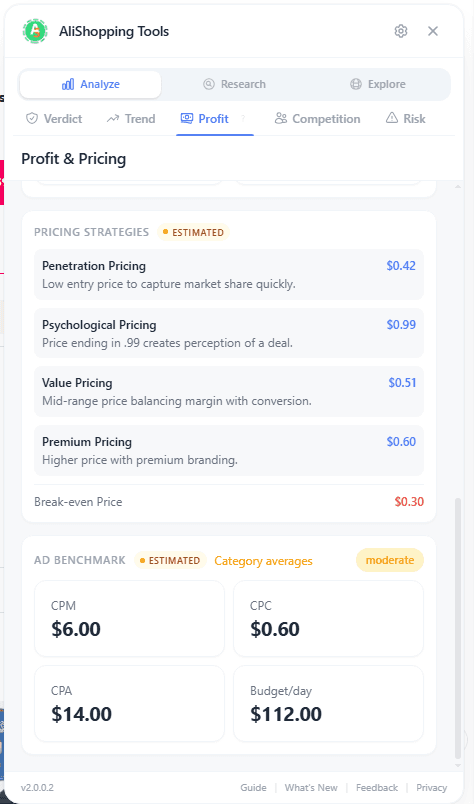
- Profit Simulation — Input your selling price, shipping cost, and ad spend. The calculator shows gross margin, net margin, break-even ROAS, and profit per unit.
- Pricing Strategy — Suggested retail price ranges based on the product category, competitor pricing, and target margin thresholds.
- Ad Benchmark — Average CPM, CPC, and CPA data for the product category. Helps you estimate whether your ad costs will eat your margin.
Why it matters: A product can look great on paper — good reviews, trending up, low competition — but still lose money if the margins are too thin or the ad costs are too high. The Profit tab forces you to do the math before you commit.
How to use it: Enter your target selling price and expected shipping cost. The simulation runs instantly. If the net margin is below 20%, think twice. Cross-reference the ad benchmark to make sure you can acquire customers profitably.
4. Competition Tab — Saturation & Competitor Analysis
The Competition tab tells you how crowded the market is for this product.
What it shows:
- Saturation Percentage — A score indicating how many sellers are already offering this product or close variants.
- Seller Count — The number of active sellers on AliExpress listing the same or very similar products.
- Price Range — The lowest and highest prices across all sellers, so you can see where the market is pricing.
- Competitor Breakdown — Key competitors with their order volumes, ratings, and pricing.
Why it matters: High saturation means you'll be competing on price, which kills margins. Low saturation means you might have found an underserved niche. The Competition tab gives you this intelligence instantly.
How to use it: If saturation is above 70%, proceed with caution. Look for ways to differentiate (better photos, faster shipping, bundle offers). If it's below 30%, you may have found a gap worth exploiting.
5. Risk Tab — Supplier Trust & Red Flags
The Risk tab evaluates the AliExpress supplier behind the product.
What it checks:
- Supplier Trust Score — Based on store age, feedback rating, communication responsiveness, and dispute history.
- Risk Flags — Specific warnings such as "store opened less than 6 months ago," "high dispute rate," "inconsistent product photos," or "price significantly below category average."
Why it matters: A great product from a bad supplier leads to refunds, chargebacks, and angry customers. The Risk tab helps you avoid suppliers that look good on the surface but have red flags underneath.
How to use it: After confirming a product has a good verdict, positive trend, and healthy margins, check the Risk tab before placing a test order. Multiple risk flags? Find another supplier for the same product.
RESEARCH — Deep Dive Tools on AliExpress
These three tools help you go deeper once you've identified a promising product.
6. Reviews Tab — Rating Breakdown & Photo Reviews
The Reviews tab lays out the feedback on a listing so you can read it yourself, instead of taking the headline star rating at face value.
What it shows:
- Review Count — how many reviews the listing actually carries.
- Rating Breakdown — the share of reviews at each star level, 1 through 5, so you can see if feedback is polarized (lots of 5s and 1s) or consistently positive.
- Three Filters — All, With Photos, and Additional.
- Customer Photos — real buyer photos, opened full-size in a lightbox. The fastest way to see what people actually receive.
- Export — download the review set as CSV, JSON, TXT, or XLSX if you want to sort or read it outside the browser.
Why it matters: Star ratings can be misleading. A 4.7-star product with 200 photo reviews showing consistent quality is a much safer bet than a 4.9-star product with 50 text-only reviews. The tab hands you the evidence — the count, the distribution, the photos, the raw export — and leaves the judgement to you. It does not score review authenticity, flag suspicious reviews, or tell you which ones are genuine.
How to use it: Read the star distribution first, then switch to With Photos and scan the images. If the complaints you find are about shipping times (which you'll handle with your own fulfillment) rather than product quality, that's actually a good sign.
7. Similar Products Tab — SmartMatch Alternatives
The Similar Products tab finds alternative versions of the product you're viewing, scored and ranked.
What it shows:
- SmartMatch Alternatives — Products that are visually and functionally similar, sourced from across AliExpress.
- Winning Badges — Products that score highest on the Verdict algorithm get a "Winning" badge, making it easy to spot the best option.
- Price Comparison — Side-by-side pricing so you can find the best supplier for the same product.
Why it matters: The first listing you find is rarely the best one. There might be a cheaper supplier, a higher-rated seller, or a slightly different variant that sells better. The Similar tab surfaces these alternatives automatically.
How to use it: Use this after finding a promising product. Check if any alternative has a better combination of price, rating, and shipping time.
8. Export Tab — Photos, Video & Content Download
The Export tab lets you download product assets for use in your store and marketing.
What it includes:
- Product Photos — Download all product images in original resolution.
- Product Video — Download the supplier's product video, if available.
- Product Content — Export the full product description, specifications, and key details.
- Review Content — Export selected reviews and customer photos.
- ZIP Download — Package everything into a single ZIP file for easy import.
Why it matters: Building product listings from scratch is tedious. The Export tab gives you a head start by packaging all the raw materials you need. Just download, customize for your brand, and upload.
How to use it: Click "Export All" to download a ZIP with photos, video, description, and selected reviews. Always edit and rebrand the content before publishing to your store.
EXPLORE — Discovery Tools on Any AliExpress Page
These four tools work on any AliExpress page, not just product detail pages. They help you find new products and niches.
9. Niches Tab — Category & Keyword Trends
The Niches tab helps you discover trending product categories and keywords before they become saturated.
What it shows:
- Category Trends — Which product categories are seeing increased demand.
- Keyword Trends — Trending search terms that indicate emerging product opportunities.
Why it matters: Finding a winning product is easier when you start with a winning niche. The Niches tab points you toward categories with growing demand and less competition.
How to use it: Browse the trending categories and keywords. When something catches your eye, click through to see the top products in that niche, then evaluate them with the Verdict tab.
10. Discovery Tab — Hot Products Feed
The Discovery tab is a curated feed of trending products with filtering and sorting options.
What it shows:
- Hot Products — Products with high recent order velocity and positive scoring signals.
- Filters — Filter by category, price range, shipping destination, and more.
- Quick Scores — Each product in the feed shows a mini verdict score so you can scan quickly.
Why it matters: Sometimes the best strategy isn't to search for a specific product — it's to browse what's already working and look for patterns. The Discovery tab is your window into what's selling right now.
How to use it: Open the Discovery tab on any AliExpress page. Set your filters (price range, category) and browse. Click any product to open its full analysis in a new tab.
11. Compare Tab — Side-by-Side Product Comparison
The Compare tab lets you build a comparison table of products you're considering.
What it shows:
- SmartMatch Price Comparison — Side-by-side view of multiple products with prices, scores, margins, and key metrics.
- Ranking — Products are ranked by overall score so the best option is highlighted.
Why it matters: When you've narrowed your choices to 3-5 products, you need a clear way to compare them. Spreadsheets work, but the Compare tab does it instantly with live data.
How to use it: Add products to your comparison list as you browse. Switch to the Compare tab to see them side by side. Use the "Export Comparison" button (V4 sharing feature) to save or share the table.
12. Promotions Tab — Flash Sales Browser
The Promotions tab surfaces active AliExpress flash sales and promotional deals.
What it shows:
- Active Flash Sales — Currently running promotions with time remaining.
- Deal Products — Products included in promotions, with original and discounted prices.
Why it matters: Flash sales can significantly improve your margins on products you're already planning to sell. Timing a bulk order during a promotion saves real money.
How to use it: Check the Promotions tab before placing orders. If a product you've already vetted is in a current flash sale, that's extra margin in your pocket.
SHOPIFY SPY — Competitive Intelligence
Visit any Shopify store with AliShopping Tools installed, and a bottom toolbar appears with four spy tools. Use them to learn from successful stores and inform your own strategy.
13. Store X-Ray
Store X-Ray gives you a complete overview of any Shopify store in seconds.
What it reveals:
- Theme Detection — Which Shopify theme the store uses (free or premium).
- Store Stats — Product count, collection count, estimated traffic indicators.
- Revenue Charts — Visual charts showing store performance patterns.
- Launch Timeline — When the store was created and its growth trajectory.
Why it matters: Understanding what successful stores look like — their theme choices, product volume, and growth patterns — helps you make better decisions for your own store.
14. Products
The Products tool gives you full access to any Shopify store's product catalog.
What it shows:
- Complete Catalog — Every product in the store, with images, prices, and variants.
- Search & Sort — Find specific products or sort by price, date added, or title.
- Pagination — Browse large catalogs efficiently with page controls.
- Product Images — Lazy-loaded, high-quality product thumbnails with skeleton placeholders during loading.
Why it matters: Seeing exactly what a successful competitor is selling — including their pricing, product descriptions, and catalog structure — gives you ideas for your own product selection and positioning.
15. Live Sales Tracking
Live Sales is one of the most powerful spy features. It monitors real-time orders on any Shopify store.
What it tracks:
- Real-Time Orders — New orders detected every 30 seconds via polling.
- Animated Pulse — A live indicator showing when new sales come in.
- Pause/Resume — Control the tracking without leaving the page.
- Order Details — Product name, variant, and timestamp for each detected sale.
Why it matters: Seeing what a store is actually selling right now — not what they're listing, but what customers are buying — is the most direct form of product validation. If a competitor's store is getting consistent orders on a specific product, that's a strong signal.
16. App Detection
App Detection identifies the technology stack behind any Shopify store.
What it detects:
- 200+ Shopify Apps — From marketing tools to review widgets to analytics platforms.
- Category Grouping — Apps organized by function: marketing, analytics, reviews, shipping, customer service, and more.
Why it matters: The apps a successful store uses are a window into their strategy. If the top stores in your niche all use a specific review app or a specific email marketing platform, that's worth knowing. It also helps you discover useful tools you might not have found otherwise.

VIRAL GROWTH — Built-In Sharing Features
AliShopping Tools includes five sharing features designed to help you save, export, and share your research.
V1: Share Product Card
Generate a formatted text summary of any product's verdict — score, price, key metrics — and copy it to your clipboard or post it to X (Twitter). Useful for sharing finds with your team or community.
V2: Weekly Winner Report
The extension tracks the products you analyze each week and compiles a report of your top-scoring finds. Share it to X to showcase your research or keep it as a personal record of the best products you've evaluated.
V3: Analysis Image Export
Export any product analysis as a branded 600x420 PNG image. The image includes the product photo, verdict score, and key metrics with AliShopping Tools branding. Ready to share in Discord servers, Telegram groups, Facebook communities, or social media.
V4: Compare & Decide Table
After building a comparison in the Compare tab, export the entire side-by-side table as a PNG image. This is useful for group decisions — share the image in a chat and let your team pick the winner.
V5: Export Watermark
All exported images include a subtle "Sourced with AliShopping Tools" watermark. This builds credibility when sharing research and helps other dropshippers discover the tool.
Quick Reference: All Features at a Glance
| # | Feature | Platform | Available On | What It Does |
|---|---|---|---|---|
| 1 | Verdict | AliExpress | Product pages | AI verdict score (0-100) across four weighted dimensions |
| 2 | Trend | AliExpress | Product pages | Momentum + TikTok Viral Score |
| 3 | Profit | AliExpress | Product pages | Margin calculator + ad benchmark |
| 4 | Competition | AliExpress | Product pages | Saturation % + seller analysis |
| 5 | Risk | AliExpress | Product pages | Supplier trust score + red flags |
| 6 | Reviews | AliExpress | Product pages | Review count, 1–5 star breakdown, photo filter, export |
| 7 | Similar | AliExpress | Product pages | SmartMatch alternatives + badges |
| 8 | Export | AliExpress | Product pages | Photos, video, reviews ZIP download |
| 9 | Niches | AliExpress | All pages | Category + keyword trends |
| 10 | Discovery | AliExpress | All pages | Hot products feed + filters |
| 11 | Compare | AliExpress | All pages | Side-by-side product comparison |
| 12 | Promotions | AliExpress | All pages | Flash sales browser |
| 13 | Store X-Ray | Shopify | Any store | Theme, stats, charts, timeline |
| 14 | Products | Shopify | Any store | Full catalog, search, sort |
| 15 | Live Sales | Shopify | Any store | Real-time order tracking (30s) |
| 16 | App Detection | Shopify | Any store | 200+ apps by category |
| V1 | Share Card | Both | After analysis | Copy/post product summary |
| V2 | Weekly Report | Both | Weekly | Auto-compiled top products |
| V3 | Image Export | Both | After analysis | Branded 600x420 PNG |
| V4 | Compare Export | Both | After comparison | Side-by-side table PNG |
| V5 | Watermark | Both | All exports | "Sourced with AliShopping Tools" |
Key Numbers
| Metric | Value |
|---|---|
| Total analysis tools | 15+ |
| Verdict scoring dimensions | 4 (product 30%, profit 30%, market 20%, risk 20%) |
| Shopify apps detected | 200+ |
| Live tracking interval | 30 seconds |
| Verdict levels | Strong Buy, Buy Signal, Hold / Watch, Pass |
| Score range | 0-100 |
| Supported languages | 16 locales |
| Price | Free (forever) |
| Login required | No |
| Credit card required | No |
Getting Started with AliShopping Tools
- Install — Visit the Chrome Web Store listing and click "Add to Chrome." Takes 3 seconds.
- Go to AliExpress — Navigate to any product page. The analysis panel appears on the right side. Start with the Verdict tab.
- Visit a Shopify store — Go to any Shopify-powered store. The spy toolbar appears at the bottom. Click Store X-Ray to start.
- Share your finds — Use the share buttons (V1-V5) to export and share your research with your team or community.
No setup, no configuration, no account creation. It works immediately after installation.
FAQ
Is AliShopping Tools really free?
Yes. Every feature described in this guide is available at no cost. There is no paid tier, no premium upgrade, no monthly subscription, and no "freemium" limitation. We built this tool to help dropshippers research products more efficiently, and we're committed to keeping it free.
Does it work on all AliExpress and Shopify pages?
On AliExpress, the full suite of 11 analysis tools activates on product detail pages. The Explore tools (Niches, Discovery, Compare, Promotions) work on any AliExpress page, including the homepage and search results. On Shopify, all four spy tools work on any Shopify-powered store, regardless of the domain.
How accurate are the verdict scores?
The Verdict score is a weighted composite of four dimensions — product fundamentals, profit estimate, market saturation and supplier risk. No algorithm is perfect, and we recommend using the score as one input in your decision-making process — not the only input. A "Strong Buy" score means the product looks strong across all measured dimensions, but you should still validate with your own market knowledge.
Will store owners know I'm using the extension?
No. AliShopping Tools operates entirely within your browser using Shadow DOM isolation. It does not inject visible elements into the page's DOM, does not modify the store's behavior, and does not send any data to the store owner. Your research is private.
How do I get support or request a feature?
Email cs.alishopping@gmail.com. We read every message and typically respond within 24 hours. You can also leave feedback via a Chrome Web Store review.
Start Researching Smarter
AliShopping Tools gives you the same product intelligence that used to require multiple paid tools and hours of manual work. Verdict scores, profit calculations, trend analysis, competitor spying, and supplier risk checks — all in one free Chrome extension.
Ready to find winning products?
Try AliShopping Tools — 15 free AI tools for product research.
Quick answers
Frequently Asked Questions
1What tools does AliShopping Tools expose on an AliExpress product page?
A floating side panel with 11 analysis tools organized into three groups — Analyze, Research, and Explore.
The Analyze group answers "should I sell this product?" with five tabs starting with Verdict (returns Strong Buy, Buy Signal, Hold / Watch or Pass off a 0–100 composite) and Trend (trend classification, momentum score, TikTok Viral Score on a 0–100 scale, banded Low Viral / Viral Potential / Highly Viral at 50 and 75, and specific signals like "orders up 340% in 14 days").
The panel uses Shadow DOM injection so its UI stays isolated from the host page without layout breakage.
2What does the Verdict tab actually score?
Four weighted dimensions, not seven: product fundamentals at 30 percent (this is where the Winning Score feeds in), profit estimate at 30 percent, market saturation at 20 percent and risk at 20 percent.
They combine into a 0–100 score that maps to four labels — Strong Buy at 80 and above, Buy Signal 60–79, Hold / Watch 40–59, Pass below 40.
Do not confuse this with the Winning Score, which is a separate 0–100 composite of seven signals read off the listing and banded 75 / 50.
The point is replacing twenty minutes of manual data-point review with a starting position in seconds.
3What does AliShopping Tools do on a Shopify store?
A bottom toolbar appears with 4 spy tools — Store X-Ray, Products, Live Sales, and App Detection.
This is separate from the 11-tool AliExpress panel and covers competitor intelligence on any Shopify storefront.
The extension popup on any page also gives quick access to settings, analysis history, and the viral sharing features.
No account or login required.
4How quickly can I install AliShopping Tools and begin analyzing products?
Installation takes less than a minute, and you can start analyzing products immediately after adding the extension.
Simply visit the Chrome Web Store, click "Add to Chrome," confirm the permissions, and the toolbar appears on every AliExpress and Shopify page.
No account creation or payment information is required, so you avoid any onboarding delay.
Once installed, the AI Verdict, profit simulator, and all other tools load within 2‑3 seconds on each product page, letting you begin research without waiting for additional downloads or updates.
5Is AliShopping Tools compatible with browsers other than Chrome, and what restrictions apply?
The extension works natively only in Chromium‑based browsers such as Google Chrome, Microsoft Edge, and Brave; it does not support Firefox or Safari.
In Edge, all features function identically, but you may need to enable extensions from the Microsoft Store.
Because the toolkit reads page DOM elements, any browser that blocks third‑party scripts can prevent the data overlay from appearing.
Users on non‑Chromium browsers will miss the AI Verdict tab and the Shopify spy widgets, so for full functionality we recommend Chrome or a Chromium‑based alternative.
6How does the profit simulator calculate potential earnings and what assumptions does it use?
The Profit tab estimates margin from the listing itself — the current AliExpress price, a shipping estimate, and a detected or suggested retail price — and shows you the resulting margin percentage.
It is a read-out, not a form: there is no target-ROI field and no default you configure, so treat the figure as directional.
It also assumes a single-unit sale and does not know your ad spend, your bulk pricing or your currency exposure, which is exactly why the number should start your analysis rather than end it.
7What privacy measures does AliShopping Tools implement to protect my browsing data?
AliShopping Tools stores no personal data on external servers and operates entirely within your browser’s local storage.
All information it reads—such as product titles, prices, and review counts—is processed client‑side, and any AI verdicts are generated via secure HTTPS calls that do not retain session identifiers.
The extension requests only read‑access permissions for AliExpress and Shopify pages, and it never accesses your Gmail, cookies, or login credentials.
Additionally, the developer’s privacy policy states that analytics are aggregated anonymously, ensuring that your research activities remain private and compliant with GDPR and CCPA standards.
8How often are daily‑deal and price‑history data refreshed, and can I set custom price alerts?
There are no alerts.
The extension does not request Chrome's notification permission and ships no alerting feature of any kind — no price-drop alert, no daily-deals alert, no threshold you can set.
The Daily Deals list is rebuilt twice a day on our side, and price history is read when you open a product page.
Both are things you go and look at, which means checking them is a habit you build rather than something the extension nags you about.
More from the blog
Koala Inspector Alternative 2026: Top Tools Compared
Best free Koala Inspector alternative 2026: a Chrome extension adding AliExpress price history, the full review breakdown & supplier search Koala can't do — $0, no signup.
AliExpress Verdict Tab: Free AI Product Decision Tool (2026)
AliExpress Verdict Tab 2026: one click returns Strong Buy, Buy Signal, Hold / Watch or Pass — free Chrome extension. How the four verdicts are scored and how they differ from the Winning Score.
AI Product Scoring for Dropshipping: How It Works (2026)
How AI product scoring evaluates dropshipping opportunities across four dimensions — product fundamentals, profit potential, market saturation, and risk — to produce a verdict before you spend money.