






Shopify Store Analysis: What to Look for When Spying on Competitors
Shopify Store Analysis: What to Look for When Spying on Competitors
Quick answer: Effective Shopify competitor analysis tracks seven metrics — theme, product count and catalog depth, pricing strategy, launch timeline, vendor mix, app stack, and sales velocity — using the free AliShopping Tools Chrome extension to surface all seven automatically on any Shopify store visit.
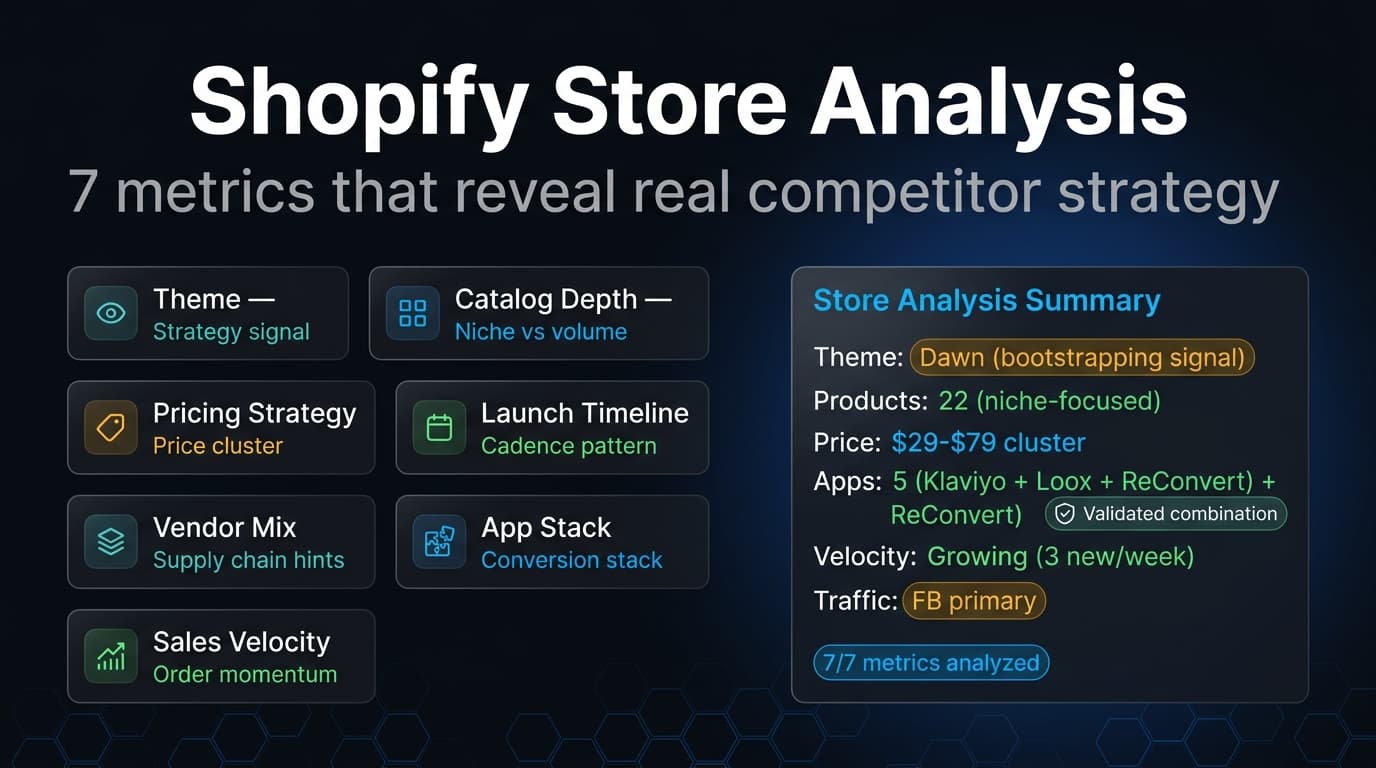
Most Shopify store owners spend hours browsing competitor websites and walk away with nothing useful. They notice the colors. Maybe the font. They think, "their store looks nicer than mine," and move on.
That is not analysis. That is tourism.
Real Shopify store analysis is systematic. It extracts specific data points, maps them to strategic decisions, and produces a clear picture of how a competitor operates — what they sell, how they price it, when they launch, what technology powers their conversion, and how fast products actually move.
This guide covers the seven metrics that matter most when analyzing a Shopify competitor, why each one reveals something strategic, and how to pull this data without spending hours on manual research.
This is the what-to-look-for reference — the metrics and what each one means. If you want the step-by-step procedure instead (the exact endpoints and tool clicks, start to finish in 30 minutes), follow how to analyze any Shopify store. To go straight to detecting a store's app stack, see how to detect what apps a Shopify store uses.
Why Is Shopify Competitor Analysis Non-Negotiable?

Running a Shopify store without studying competitors is like entering a chess match without looking at the board. You might make decent moves, but you have no idea what you are responding to.
Here is what structured competitor analysis actually delivers:
Market positioning clarity. You cannot differentiate if you do not know what everyone else is doing. Competitor data shows you where the market clusters and where the gaps are.
Faster decision-making. Instead of testing 20 product ideas, study what already sells for stores in your niche. Instead of evaluating 30 apps, see which ones successful competitors already vetted for you.
Pricing confidence. Without benchmarks, every pricing decision is a guess. With competitor pricing data, you know exactly where you sit relative to the market — and whether there is room to move.
Early trend detection. When three competitors all launch similar products within the same month, that is a signal. When a competitor suddenly adds 15 products in a new category, that is a pivot worth watching.
Risk reduction. Every product you launch, every app you install, every pricing change you make carries risk. Competitor intelligence reduces that risk by showing you what works in the real market — not in theory.
The best operators in e-commerce are not the ones with the best instincts. They are the ones with the best information.
What Are the 7 Metrics That Reveal a Competitor's Strategy?
When you analyze a Shopify store, you are not looking at everything. You are looking at seven specific things, and each one tells you something different.
1. Theme
The theme is the first signal of positioning and budget.
A store running Dawn (Shopify's free default) is either bootstrapping, prioritizing page speed, or simply has not invested in design yet. A store on Prestige or Impulse is targeting premium buyers willing to pay more. A fully custom theme signals serious development budget and likely a team behind the store.
The theme also reveals conversion strategy. Some themes are built around large hero images and storytelling. Others prioritize grid layouts and fast browsing. The theme choice tells you whether a competitor is selling through brand narrative or through catalog volume.
With AliShopping Tools' Store X-Ray, the theme name is surfaced instantly as a metric card when you visit any Shopify store — no page source digging required.
2. Product Count and Catalog Depth
The total number of products tells you what kind of operation you are competing against.
A store with 15-30 products is running a curated, niche-focused strategy. They bet on fewer items with higher marketing spend per product. A store with 500+ products is playing the catalog game — casting a wide net and letting the market decide what sticks.
But the number alone is not enough. You need to understand the distribution. How many product types do they carry? Is it all one category, or are they spreading across multiple verticals? A store with 200 products across 3 types has a very different strategy than one with 200 products across 20 types.
AliShopping Tools' Products Tab lets you browse the full catalog with search, sort, and pagination — 30 products per page, filterable by price, date, or title. The Overview Tab breaks down product type distribution in a visual chart, so you can see the catalog structure at a glance.
3. Pricing Strategy
Price is the most visible competitive lever, and competitor pricing patterns reveal more than just numbers.
Look at the price range. A tight range ($24.99-$39.99) signals a focused strategy targeting a specific customer segment. A wide range ($9.99-$299.99) suggests a store that is either testing aggressively or serving multiple buyer personas.
Look at price clustering. If 80% of products sit between $29-$39, that is the store's sweet spot — the price point their audience has validated through purchases.
Look at psychological pricing patterns. Do they use .99 endings? Round numbers? Premium pricing with .00? These are deliberate choices that tell you how they want to be perceived.
When you sort the product catalog by price in AliShopping Tools, these patterns become immediately visible. You can spot the floor, the ceiling, and the cluster — three numbers that define a competitor's pricing architecture.
4. Launch Timeline
When a competitor adds products tells you as much as what they add.
A store that launches 10 products every month is running a consistent testing cadence. A store with a burst of 30 products in January followed by silence until March is operating in campaign cycles. A store that launched everything 18 months ago and has not added anything since might be on autopilot — or abandoned.
The launch timeline also reveals trend responsiveness. If you see a competitor suddenly add a cluster of products in a specific category, they likely spotted a trend or got new supplier access. That is intelligence you can act on.
AliShopping Tools' Overview Tab includes a Product Launches chart — a monthly bar chart showing exactly when products were added. The First Product and Newest Product date cards give you the store's full operational timeline in two numbers.
5. Vendor Mix
Vendors are the supply chain fingerprint of a Shopify store.
A single-vendor store likely manufactures their own products or has an exclusive supplier relationship. A multi-vendor store is aggregating from multiple sources — common in dropshipping and marketplace-style operations.
The vendor distribution also reveals sourcing strategy. If one vendor accounts for 70% of products and four others split the remaining 30%, you are looking at a store with a primary supplier and secondary test sources. If vendors are evenly distributed, the store is diversifying supply risk.
For dropshippers, vendor data is especially valuable. Recognizing supplier names can help you identify the same sources — or discover new ones you have not considered.
The Overview Tab's Vendor Analysis chart in AliShopping Tools maps this distribution visually, showing you how concentrated or diversified a competitor's supply chain is.
6. App Stack
The apps a Shopify store uses are its operational playbook.
Review apps (Loox, Judge.me) reveal social proof strategy. Upsell apps (ReConvert, Bold Upsell) reveal average order value tactics. Email apps (Klaviyo, Omnisend) reveal retention strategy. Analytics apps reveal how data-driven the operation is.
When you see the same apps across multiple successful competitors, that is a signal — not a coincidence. Those apps are likely solving a real problem in your niche, and ignoring them puts you at a disadvantage.
AliShopping Tools' Apps Tab scans page scripts against a database of 200+ known Shopify app signatures. It groups detected apps by category with collapsible sections — reviews, marketing, analytics, upsell, shipping — so you can read a competitor's tech stack like a checklist.
7. Sales Velocity
Everything above tells you what a competitor has. Sales velocity tells you what is actually working.
A store can have 500 products, but if only 12 of them are moving, the real strategy is in those 12. Sales velocity separates inventory from performance. It tells you which products the market is buying right now — not which products the store owner hoped would sell six months ago.
Tracking which products show activity and how frequently new sales appear gives you real-time demand data. This is the most actionable intelligence you can extract from a competitor, because it answers the only question that matters: what is the market paying for today?
AliShopping Tools' Live Sales Tab monitors any Shopify store in real-time, checking for product updates every 30 seconds. New activity is highlighted in a timeline feed with a live pulse indicator. You can pause and resume tracking, and the feed caps at 50 items to keep things manageable.
How to Turn Analysis Into Action
Data without a framework is just noise. Here is how to convert the seven metrics above into decisions.
Map the Competitive Landscape
Analyze 5-10 competitors using the same framework. Record the seven metrics for each store. Patterns will emerge:
- Theme patterns reveal the design standard your audience expects
- Price clusters reveal what the market will bear
- App overlaps reveal must-have technology for your niche
- Vendor concentrations reveal dominant supply chains
- Launch timing reveals market seasonality
Identify Strategic Gaps
Once you have the landscape mapped, look for what is missing. If every competitor prices between $25-$40, there might be an opportunity at $15 (budget segment) or $60+ (premium positioning). If no competitor uses a subscription app, recurring revenue might be an untapped model in your niche.
Gaps are where differentiation lives. You cannot find them without the data.
Build Your Response Plan
For each gap or pattern you identify, create a specific action:
- If competitors all use Loox: install a reviews app and start collecting social proof
- If a competitor launched 12 new products this month: investigate the category and evaluate whether to follow or counter-program
- If a competitor's best-sellers cluster in one product type: consider whether to compete directly or own an adjacent category
- If sales velocity shows a specific product moving fast: research the product, evaluate margins, and decide whether to add it to your catalog
Set a Monitoring Cadence
Competitor analysis is not a one-time project. Markets shift. Competitors pivot. New stores enter your niche.
Set a recurring schedule — weekly or biweekly — to re-check your top 3-5 competitors. Focus on changes: new products, new apps, pricing shifts. AliShopping Tools makes this fast because the data surfaces automatically when you visit any Shopify store. For a repeatable tracking workflow, see how to track competitor products over time.
Competitor Analysis Action Template
Use this template for each competitor you analyze:
STORE: [competitor domain]
DATE: [analysis date]

1. THEME: [name] — Positioning signal: [premium/budget/custom]
2. CATALOG: [total products] across [X types] — Strategy: [curated/wide catalog]
3. PRICING: Range $[low]-$[high], cluster at $[sweet spot]
4. TIMELINE: First product [date], newest [date], cadence: [monthly/burst/dormant]
5. VENDORS: [count] vendors, concentration: [single-source/diversified]
6. APPS: [count] detected — Key: [top 3-4 app names]
7. VELOCITY: [active/slow/dormant] — Top movers: [product names]

KEY INSIGHT: [one sentence on what this store does well]
GAP IDENTIFIED: [one sentence on what is missing or could be exploited]
ACTION: [specific next step for your store]
Run this template across five competitors, and you will have a competitive intelligence brief that most agencies would charge hundreds of dollars to produce.
Frequently Asked Questions
How many competitor Shopify stores should I analyze?
Analyze 5-10 stores for a comprehensive competitive landscape. Fewer than 5 gives you an incomplete picture. More than 10 produces diminishing returns and noise. Focus on direct competitors in your niche at similar scale, not just the biggest stores in your category.
Can competitors tell that I am analyzing their Shopify store?
No. Visiting a Shopify store and using an analysis extension like AliShopping Tools looks identical to normal browsing from the store owner's perspective. They see a page visit in their analytics, same as any other visitor. There is no notification or alert that someone is using a spy tool.
What should I do if a competitor copies my products or pricing?
Focus on differentiation rather than reaction. Improve your product photography, add bundle offers, strengthen your review collection, and invest in brand building. Competitors can copy products and prices, but they cannot copy your brand relationship with customers or your content strategy.
Is Shopify store analysis useful if I sell on a different platform?
Yes. Even if you run a WooCommerce or BigCommerce store, analyzing Shopify competitors reveals market pricing, product trends, and app strategies that apply across platforms. The competitive intelligence is about understanding your market, not about the specific platform you sell on.
Which tool should I use to pull these seven metrics?
A free Chrome extension covers all seven for solo operators; paid platforms add historical tracking and agency-scale monitoring. For a full breakdown of free versus paid options, see the best Shopify spy tools comparison.
Stop Guessing. Start Analyzing.
The difference between store owners who grow and those who plateau is not talent or luck. It is information. The operators who win are the ones who study the market systematically — not the ones who make decisions based on what feels right.
AliShopping Tools gives you the full Shopify store analysis toolkit in one free Chrome extension: Store X-Ray for instant overview, Apps Tab for tech stack detection, Products Tab for full catalog browsing, and Live Sales for real-time velocity tracking. No sign-up. No trial period. No credit card.
Install it, visit any competitor's Shopify store, and see everything they would rather you did not know.
Install AliShopping Tools on the Chrome Web Store — free, no signup.
Ready to find winning products?
Try AliShopping Tools — 15 free AI tools for product research.
Quick answers
Frequently Asked Questions
1What does a competitor's Shopify theme reveal?
Per the post, the theme is the first signal of positioning and budget.
A store on Dawn (Shopify's free default) is either bootstrapping, prioritizing page speed, or hasn't invested in design.
A store on Prestige or Impulse is targeting premium buyers willing to pay more.
A fully custom theme signals serious development budget and likely a team.
The theme also reveals conversion strategy — some are built around large hero images and storytelling, others around grid layouts and fast browsing — so it tells you whether the competitor sells through brand narrative or catalog volume.
2How should I interpret a competitor's total product count?
Per the post: 15–30 products = a curated, niche-focused operation betting on fewer items with higher marketing spend per product. 500+ products = playing the catalog game, casting a wide net and letting the market decide what sticks.
The number tells you what kind of operation you're competing against.
Narrow boutiques optimize conversion per product; wide catalogs optimize discoverability and long-tail search — these require different counter-strategies.
3Why is competitor analysis non-negotiable for Shopify operators?
The post names five benefits: market positioning clarity (you cannot differentiate without knowing what everyone else does), faster decision-making (instead of testing 20 product ideas you study what already sells in your niche), pricing confidence (benchmarks replace guessing), early trend detection (three competitors launching similar products in the same month is a signal; sudden 15 new products in a new category is a pivot worth watching), and risk reduction (every launch or app install carries risk, competitor intelligence shows what works in real market rather than theory).
4How can analyzing competitor pricing patterns help determine my price cluster?
Analyzing competitor pricing patterns helps identify the validated price cluster where the target audience is most willing to convert.
Look for the most frequent price range rather than the average, since that highlights the psychological sweet spot for customers in that niche — if most competing products cluster in a narrow band, that's your tested range.
Manually scanning a handful of competitors' catalogs is the practical way to spot this; there's no dedicated pricing-cluster report built into AliShopping Tools, but the Profit tab helps you check whether a given price point still clears your margin target.
5What does a competitor's app stack reveal about their conversion strategy?
A competitor's app stack exposes their specific conversion strategy and which tools they rely on to turn visitors into buyers.
Seeing apps like Klaviyo for email marketing, Loox for photo reviews, or ReConvert for post-purchase upsells indicates that the store has tested and validated this combination in the real market.
If a competitor is paying $50 to $100 monthly for these apps, it suggests they are generating enough revenue to justify the cost.
AliShopping Tools reveals this app stack instantly, showing you exactly which plugins are powering their sales funnel.
6How does launch timing and product addition frequency indicate a dropshipping strategy?
Checking a competitor's "added on" dates on their product pages reveals whether they add products in focused bursts or randomly, which is a decent proxy for their level of experience and strategy.
Established stores often add products in seasonal batches or consistent intervals, whereas amateur dropshippers might upload dozens of items in a single day and then go quiet.
This is a manual check you do on the competitor's own store pages — AliShopping Tools doesn't automate a launch-history timeline for you.
7How can I identify the specific vendors or suppliers a Shopify store is using?
Tracing a competitor's exact supplier is genuinely hard from the outside — there's no reliable automated way to match a competitor's product photo back to a specific AliExpress listing.
The practical approach is manual: reverse-image-search the product photo, or search AliExpress directly for the same item using descriptive keywords, then compare the AliExpress price against what the competitor is charging to estimate their margin.
AliShopping Tools helps once you've found the AliExpress listing — the Profit tab and Risk tab give you cost and supplier-trust data for that specific product — but it doesn't reverse-engineer a competitor's supplier chain automatically.
8What is sales velocity and why is it important for analyzing Shopify competitors?
Sales velocity measures how quickly a store sells through its inventory, providing a clear indicator of demand and cash flow health.
High sales velocity suggests a product has market fit and that the store's marketing is effectively converting traffic.
You can estimate this by tracking how often "out of stock" variants reappear or by analyzing order count estimates on product pages.
If a store moves 100 units a week, they have a validated winner.
AliShopping Tools provides insights into these performance metrics, helping you spot high-velocity products before they become saturated in the market.
More from the blog
Best Free Shopify Spy Tools in 2026: Analyze Competitor Stores Without Paying
Compare the best free Shopify spy tools in 2026. AliShopping Tools offers unlimited free app detection, while Koala Inspector raised prices 120%. Here's what each tool actually does.
47 Shopify Stores Secretly Dropshipping — How I Spotted Every One
100 Shopify stores from TikTok product ads, audited. 47 are secretly dropshipping; 12 pretend to be premium brands. Classify-store methodology + receipts.
Spy Any Shopify Store Free — No Signup, No Limits (2026)
Spy any Shopify store free in 2026 — reveal theme stack, apps, live sales estimates, and top products in 1 click. No signup or account needed. 5 tools tested.