How to Use AliExpress Promo Codes — Step-by-Step Guide 2026
Quick answer: To use an AliExpress promo code, pick the one that matches your shipping country and cart spend tier, then paste it in the "Promo code" field at checkout before paying — not after. The most common mistakes are using the wrong country's code or missing the minimum spend by a few cents. AliShopping Tools auto-detects the codes that match each product page, so you skip the country-and-tier guesswork. Install AliShopping Tools on the Chrome Web Store →
AliExpress runs major promotional sales four to six times a year — Spring Sale, Summer Ready / Winter Ready, 11.11, Black Friday, plus regular monthly Choice Day events. Each sale comes with promo codes that stack on top of any product-level discount, but the codes only work if you understand the three rules they all share: country, tier, and exclusivity.
This guide walks you through how to read a promo code's spec, find the right one for your situation, paste it correctly at checkout, and recover when AliExpress rejects it. The tutorial is sale-agnostic — it applies to any month — but for the current code list see the Vacation Sale 2026 promo codes page, which auto-detects your country and lets you copy any code with one click.

Start here — the checkout flow
Use this order while shopping so you do not waste time testing random codes:
- Choose the shipping country first — AliExpress validates the code against the delivery address, not the account profile.
- Open the live code list — use the current sale promo codes page and filter by the same country.
- Pick the highest tier your cart clears — the best code is the largest discount whose minimum spend is already met.
- Paste the code on checkout — do this before paying and verify the order summary shows a real promo discount line.
- Debug one rule at a time — if it fails, check country, minimum spend, excluded items, expiry, then single-use limits.
Keep that sequence in mind while reading the details below. Most failed codes come from doing step 2 before step 1, or copying the largest-looking code without checking the minimum spend.
What is an AliExpress promo code
An AliExpress promo code is a short string (e.g. USAFF14, AEUKSS12, VIOSS15) that AliExpress accepts at checkout to deduct a fixed dollar amount from your cart. Codes are issued by the AliExpress affiliate and marketing teams and are time-limited — valid only during a specific sale window. Three properties define every code:
- Country scope — the code only works if your shipping address is in the listed country (or in the country pool, for shared series like the EU pool or GCC pool).
- Tier — every code has a minimum spend.
USAFF14means "$14 off when you spend $89 or more" — under-spend by even $0.01 and the code rejects. - Exclusivity — most codes are not stackable. Picking the right tier for your cart matters more than collecting multiple codes.
Reading these three properties before you start shopping saves the friction of bouncing a code at checkout.
Step 1 — find the right code for your country
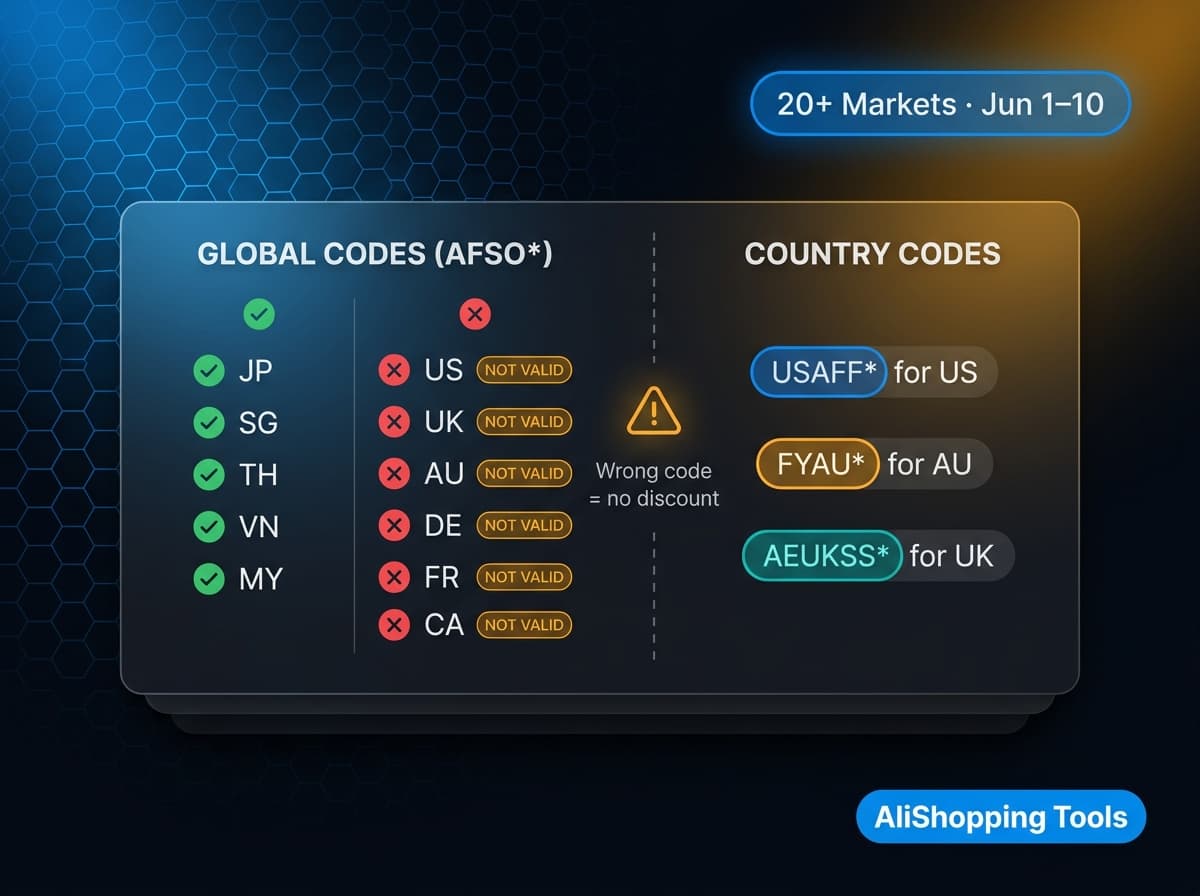
The single most common mistake is using a code from the wrong country. The US USAFF* series will not apply to a UK shipping address even if your AliExpress account was created in the US. The code reads the shipping address on the cart, not the account country.
To find your code:
- Open the current sale promo codes page. The widget on that page filters codes by country and auto-detects your browser locale.
- Confirm the country in the chip filter matches the country your AliExpress account ships to. If you're shopping for someone abroad, switch the chip to their country.
- Look at the discount tiers for that country — each card shows the dollar amount off and the minimum spend.
The widget surfaces the entire country list for the current sale. If you don't see your country, AliExpress likely doesn't issue a code for it this round — but the global AFSO* series is a fallback that works in many smaller markets (with explicit exclusions for major regions; check the rules on the global card).
Step 2 — match the tier to your cart total
Every code is "X off when you spend Y+". Picking the wrong tier is the second-most-common mistake.
Imagine your cart is $115. You see three US codes:
| Code | Discount | Min spend |
|---|---|---|
| USAFF8 | $8 off | $49 |
| USAFF14 | $14 off | $89 |
| USAFF24 | $24 off | $149 |
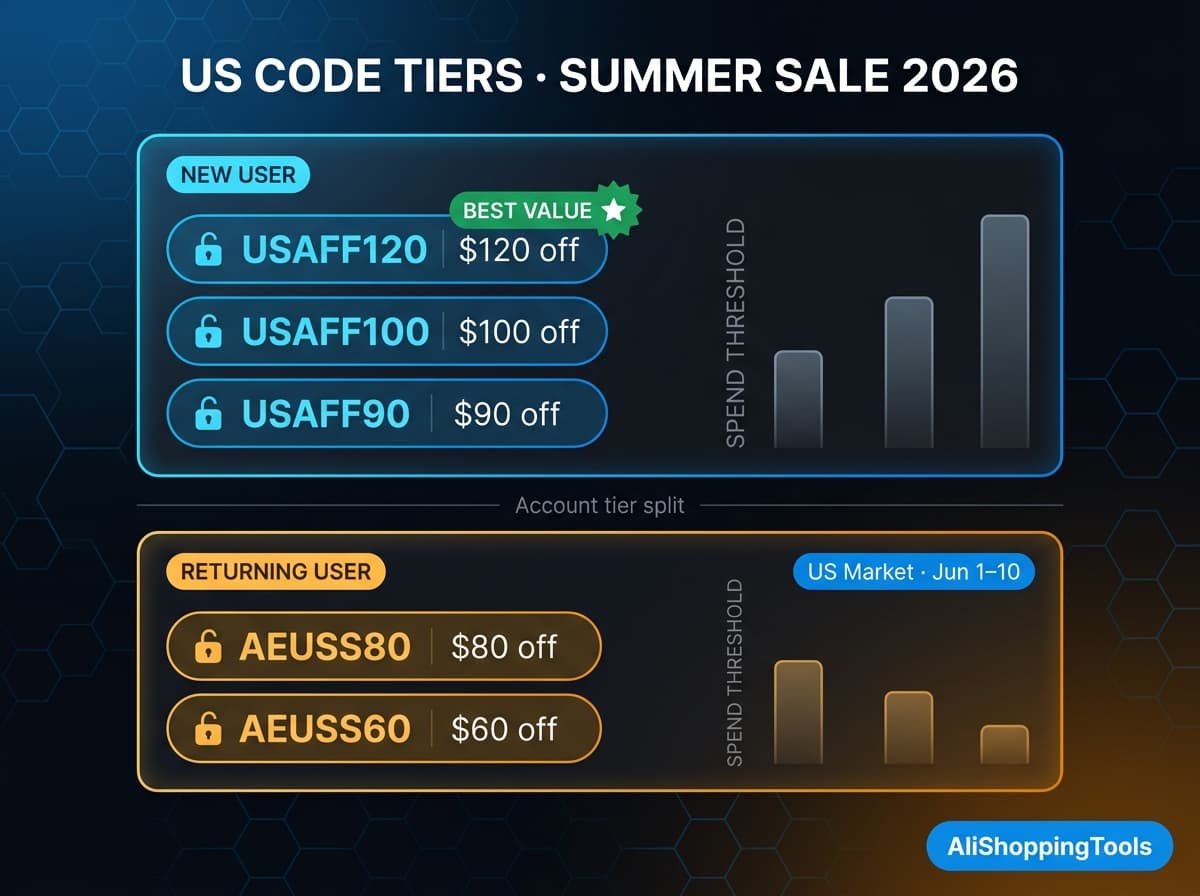
The right pick is USAFF14 — your cart clears the $89 floor by $26 and unlocks the largest discount that still applies. USAFF24 won't apply because your cart is below $149. USAFF8 will apply but leaves $6 on the table.
Rule of thumb: pick the code whose minimum is the highest amount your cart still clears. If your cart is close to the next tier (within $5-10), it's often worth adding one small item to bump into the larger discount — adding $34 of items here would unlock USAFF24 for $10 more in savings.
Step 3 — apply the code at checkout
The application step is the easiest, but the field is hidden if you're not looking for it.
- Add your items to the cart. Confirm the shipping country under the address selector matches the code's country.
- Tap Checkout to advance from the cart to the order review page.
- Look for "Promo code" or "Apply coupon" — usually a single field with a paste icon, located between the items list and the price summary. On mobile it's collapsed under a "More" or "+" dropdown.
- Paste the code (case-insensitive, but most codes are uppercase by convention).
- Tap Apply. The order summary should immediately show a "Promo discount: -$X" line and an updated total.
- Confirm the discount actually applies before paying. If the line shows $0, see the troubleshooting section below.
On mobile (iOS and Android app), the field is in the same checkout step but only visible after you select a payment method. On desktop the field appears earlier, before payment.
Step 4 — combine with other discounts (carefully)
AliExpress runs three discount layers that can stack with promo codes if the rules permit:
- Product-level discounts — the strikethrough price you see on the listing. Always stacks.
- AliExpress Coins — the loyalty points you earn from purchases. Always stacks.
- Choice Day discounts — automatic platform-wide reduction on "Choice" badge items. Stacks with country codes targeted at Choice items (most US/UK/EU codes are Choice-only).
- Other promo codes — almost never stack with another promo code. Pick one.
Two specific exceptions to watch:
- Mexico Star Discount stacks on top of
FELIZ*country codes — this is the only "double-coupon" combo in the current sale lineup. - Korea Toss Pay is a payment-method bonus ($4 off at $80+), not a promo code, so it stacks with the country code.
For most shoppers, the question is not "which codes can I stack" but "which single code is the largest one my cart qualifies for". Stacking is rare; tiering is what saves the real money. If you do want to push savings further, our guide on how to stack AliExpress coupons and promo codes walks through the few combinations that actually layer.
Common errors and how to fix them
When AliExpress rejects a code, the error message is usually vague ("Code not applicable to this order"). The actual cause is one of these five:
1. Wrong country. Your cart's shipping country doesn't match the code's country. Fix: swap to a code from the matching country, or change the shipping address.
2. Below the minimum spend. Your cart is just under the tier. Fix: add a small item to clear the threshold, or drop down to the lower-tier code.
3. Excluded products. Your cart contains items the code doesn't cover (virtual goods, second-hand, certain restricted categories). Fix: remove the excluded item or apply the code to a separate Choice-only order.
4. Code expired. Sales rotate; codes from last month won't work this month. Fix: refresh the code list — the current promo codes page only shows live codes.
5. Already used. Some codes are one-per-account. Fix: use a different tier or save the code for a future order.
If the code field shows red without a clear error, the fastest debug is to halve the cart and re-test — that quickly tells you whether you have an excluded product (cart 1 fails) or a tier issue (cart 2 also fails).
Country-specific quirks worth knowing
A few country pools have rules that surprise first-timers:
- EU pool (
VIOSS*) — covers PT, CH, CZ, IE, HU, BE, SE, FI, AT, DK. Choice-only, never stackable, codes for these countries don't appear in the per-country chip filter — they're under the "Europe pool" filter. - GCC pool (
GCC*) — SA, AE, KW, OM, BH, QA share one series. Codes priced in SAR (Saudi Riyal); your cart total is converted before tier matching. - Spain (
ESSS*) — single prefix for the June sale. Use whichever tier your cart clears. - Brazil (
MEGABR*) — the most generous lineup with multiple tiers and up to 80% off plus free fast shipping from Brazilian warehouses. Codes are Brazil-only and don't work for Portugal. - Japan (
AFSO*) — uses the global series, not a country-specific one. Sale window also runs on JST not PST, ending one day later.
The widget on the current codes page handles all these quirks automatically — the EU and GCC pools each have a single chip that surfaces the right code for any country in the pool.
Mobile vs desktop differences
If you regularly switch devices, two practical differences trip up shoppers:
Mobile app: the promo code field only appears after you select a payment method. Tap your card → the field unfolds. Codes copied from the codes page paste correctly with one tap on the field.
Desktop web: the field appears earlier in checkout, before payment. You can apply the code first, then choose payment, which is faster if you know the code.
Both: the auto-fill from the URL (?code=XYZ) parameter exists but is unreliable. Always paste the code manually if the auto-apply doesn't show a discount line.
Bonus — find products worth using the code on
A 60% promo code on a $5 product saves you $3. The same code on a $300 product saves $180. The codes are most valuable when you're shopping high-ticket items (electronics, robot vacuums, tablets, e-bikes) where the dollar discount actually moves the needle.
This is where the free AliShopping Tools Chrome extension earns its keep. The extension scores any AliExpress product on demand, profit potential, supplier risk, and price history in 30 seconds. The price history sparkline is especially useful during sales — it tells you whether the "60% off" sale price is genuinely lower than the regular shelf price, or just an inflated "before" mark to make the discount look bigger than it is. For more on spotting fake discounts, see how to check AliExpress price history, and for the full sale calendar read the AliExpress Summer Sale 2026 guide.
The extension is free, no account, no payment. Install it once and every AliExpress product page gets the verdict panel automatically.
Install AliShopping Tools — free Chrome extension →
Recap — the checklist
Before you click pay, run through this 5-point list:
- Country match — the cart's shipping country matches the code's country (or pool).
- Tier match — the cart total is at or above the code's minimum spend.
- Code applied — the order summary shows a "Promo discount: -$X" line, not just $0.
- Stack check — only one promo code in play; product-level and Choice discounts stack automatically.
- Single-use sanity — if it's a new-user code or a one-per-account code, you haven't used it before on this account.
If all five pass, the discount is locked in.
What's next
For the current month's code list, see AliExpress Vacation Sale 2026 — All Promo Codes by Country. The widget there auto-detects your country, lets you filter by region or search by code, and copies any code with one click. We update the page each time AliExpress publishes a new monthly sale — bookmark or follow the news.astools.app blog for next month's update.
AliShopping Tools
See live AliExpress data in your browser.
Seller trust score, 90-day price history, and live promo codes — on every AliExpress product page. No account, free.
Ready to find winning products?
Try AliShopping Tools — 15 free AI tools for product research.
Quick answers
Frequently Asked Questions
1Why is AliExpress rejecting my promo code at checkout?
Five common causes:
- 1shipping country doesn't match the code's country,
- 2cart total is below the code's minimum spend (e.g. $109 for USAFF015),
- 3cart contains excluded items like virtual products or non-Choice items,
- 4the code has expired since the sale ended, or
- 5you've already used a one-per-account code. Halve the cart and re-test to isolate whether it's a tier issue or an excluded product.
2Can I stack multiple AliExpress promo codes on one order?
Almost never.
AliExpress promo codes are exclusive — pick one.
The exceptions are Mexico's Star Discount (a tax credit, not a code) which stacks with CDMX* country codes, and Korea's Toss Pay payment-method bonus which stacks with Korean country codes.
Product-level discounts and Choice Day discounts always stack with promo codes automatically — you don't need to combine codes manually.
3Which AliExpress promo code should I pick if my cart qualifies for several tiers?
Pick the highest-tier code your cart still clears.
If your cart is $115 and you see USAFF8 ($8 off, $59 minimum), USAFF015 ($15 off, $109 minimum), and USAFF23 ($23 off, $169 minimum), the right pick is USAFF015.
USAFF23 won't apply because $115 is below $169, and USAFF8 leaves $7 of discount on the table.
Picking the wrong tier is the second-most-common mistake after using the wrong country.
4Do AliExpress promo codes work on the mobile app?
Yes, but the promo code field only appears after you select a payment method on the mobile app — tap your card first to reveal it.
On desktop the field appears earlier, before payment.
Both surfaces accept the same codes; only the placement differs.
URL-based auto-apply (?code=XYZ) exists but is unreliable — always paste the code manually if the discount line doesn't appear in the order summary.
5Why do US codes not work on UK shipping addresses?
AliExpress reads the shipping address on the cart, not the account country.
A US-based account shipping to a UK address must use the UK code series (AEUKCD*), not the US series (USAFF*).
The same applies in reverse and across all country-specific series.
To use a different country's codes, change the shipping address on your AliExpress account first — but be aware that delivery times and product availability change with the address.
6What's the difference between Choice Day discounts and promo codes?
Choice Day is a platform-wide automatic discount applied to items with the 'Choice' badge — you don't enter a code.
Promo codes are entered at checkout for an additional dollar-amount discount.
Most country-specific codes (US, UK, EU pool) target Choice items only, so they stack with the automatic Choice discount.
If your cart includes non-Choice items, the promo code applies only to the Choice subtotal.
7Where is the promo code field on AliExpress checkout?
On desktop web: between the items list and the price summary on the order review page, labeled 'Promo code' or 'Apply coupon'.
On mobile (iOS/Android app): same checkout step but only visible after you select a payment method, sometimes collapsed under a 'More' or '+' dropdown.
Paste the code in the field, tap Apply, and confirm the order summary shows a 'Promo discount: -$X' line before paying.
8Are AliExpress promo codes the same every month?
No.
Codes are tied to specific sale windows (Spring Sale, May Sale, 11.11, Black Friday, monthly Choice Day) and expire when the sale ends.
The dollar amounts and minimum spends rotate too.
The May Sale 2026 codes (USAFF*, AEUKCD*, GCCCD*, etc.) won't work in June.
We update the codes index every time AliExpress publishes a new monthly sale — bookmark the news.astools.app/blog for monthly updates.
9Do AliExpress promo codes work differently for new customers compared to returning shoppers?
New-customer-only promotions do exist alongside general platform codes, but this is set per promotion and shown in its own terms — there's no single blanket rule distinguishing all new-customer codes from all returning-shopper codes.
10What is the difference between a seller coupon and an AliExpress platform promo code?
A seller coupon is issued and funded by an individual store and must be claimed on that seller's page; a platform promo code is issued by AliExpress itself and can apply across eligible sellers.
Both show up in the same Coupon field at checkout.
11How long do AliExpress promo codes typically last before they expire?
Promo code validity windows are set per code and per sale event rather than following one fixed duration — check the code's own terms on the AliExpress coupon page for its exact expiration.
12Will I lose my discount if I return an item bought with a promo code?
Returning an item generally reverses the portion of the price you paid, including any discount from a promo code applied to that item — but exact refund handling can vary by case, so check the refund breakdown shown in your order's dispute/return record.
13Is there a minimum spend requirement to activate AliExpress promo codes?
You can generally stack one platform buyer coupon with one seller-specific store coupon and a shipping voucher on the same order, applied sequentially at checkout.
The exact combined-discount cap and stacking rules are enforced automatically by AliExpress and are not published as a fixed universal percentage — add your items to cart, apply the codes, and the checkout page will show the exact combined discount before you pay.
More from the blog
AliExpress June 2026 Promo Codes — Mid-Year Sale Deals + How to Apply
Confirmed AliExpress Mid-Year Sale promo codes for June 2026 — global AFJMY codes plus US, UK, AU, EU and more by country, how to apply them at checkout, and the best categories to shop. The Mid-Year Sale (June 15–20) is now live; Summer Sale codes expired June 10.
AliExpress Promo Codes May 2026 — Sunshine Savings (May 18-22) + Active Codes
AliExpress Sunshine Savings ran May 18-22, 2026: up to 60% off, US codes up to $90, AU up to A$80, Canada up to C$78. June codes are live — see the new sale.
AliExpress Summer Sale 2026 Calendar + All Promo Codes (June, July, August)
AliExpress Summer Sale 2026 dates, daily deal schedule, and working promo codes in one place. See what's live now and grab the latest codes before they expire.