How to See TikTok Shop Data on Any AliExpress Product Page (Free)
How to See TikTok Shop Data on AliExpress: Free Chrome Extension
Quick answer: Install the free AliShopping Tools Chrome extension, open any AliExpress product page, and click the Trend tab — it overlays TikTok viral score (0-100), trend phase (Emerging/Growing/Peak/Declining), and order velocity data directly on the product page with no account required.
If you source products on AliExpress and sell on TikTok Shop — or want to know whether an AliExpress product is gaining TikTok momentum before you commit to it — there is a free method to see that data directly on the AliExpress product page.
Install AliShopping Tools — TikTok Shop data overlay included →
What TikTok Shop data appears on AliExpress product pages
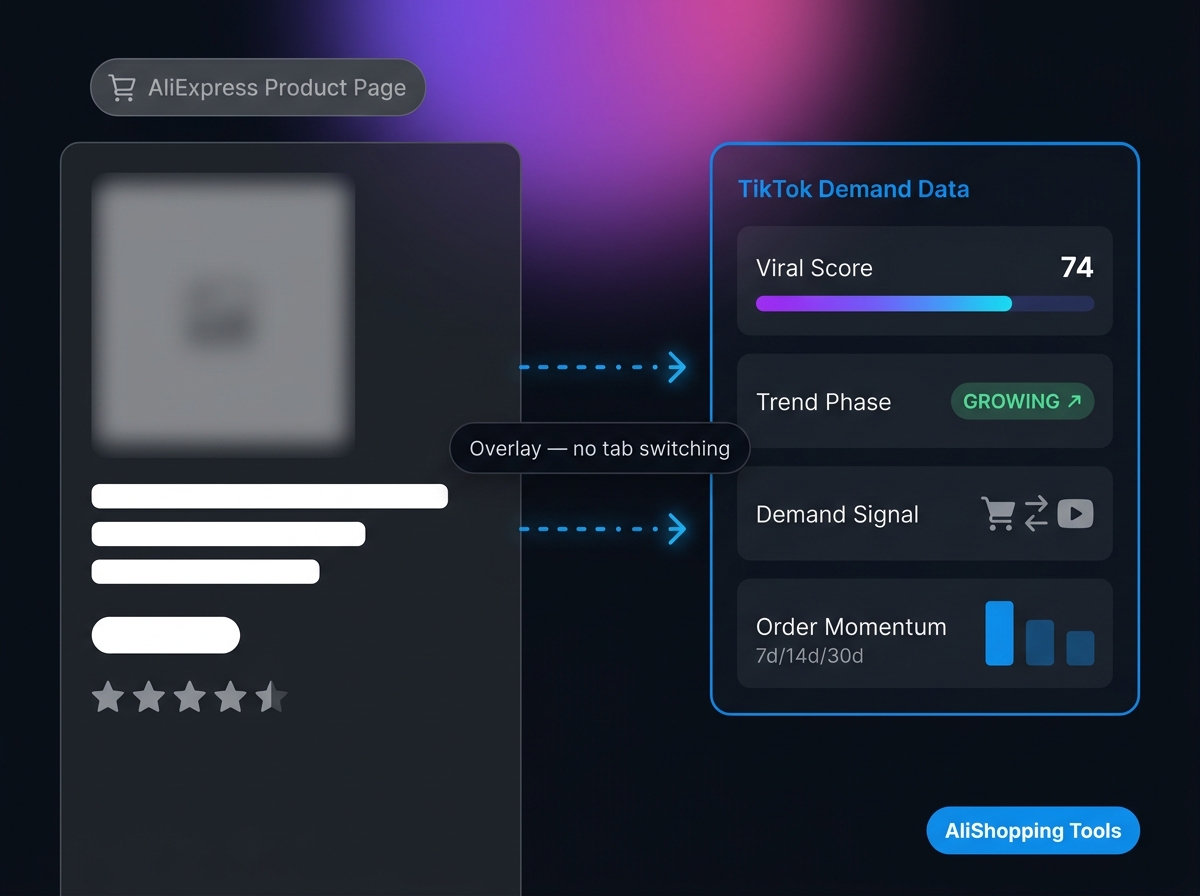
When you open any AliExpress product page with AliShopping Tools installed, the extension's Trend tab shows:
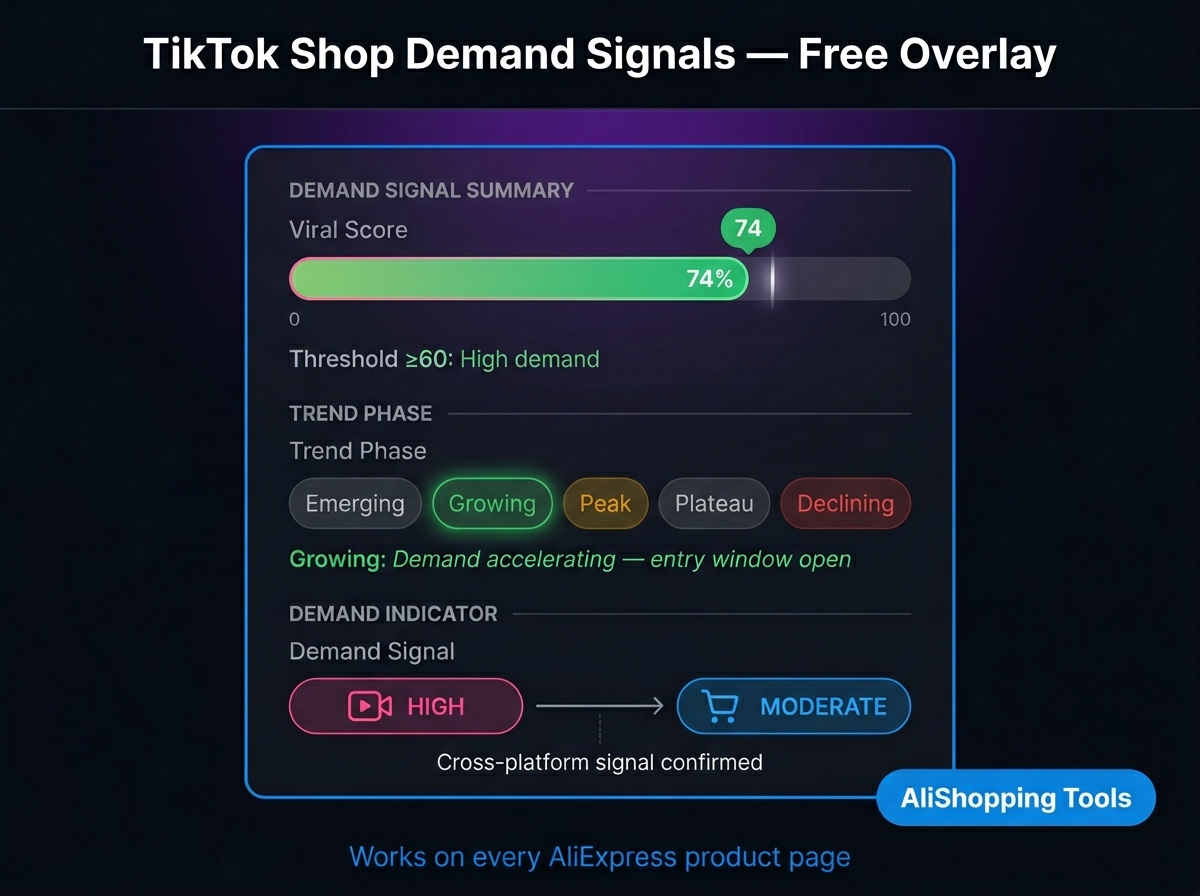
- TikTok viral score (0-100) — demand signal reflecting TikTok Shop momentum for this product's keyword cluster
- Trend phase — Emerging, Growing, Peak, or Declining based on order velocity trajectory
- Order velocity (7d / 14d / 30d) — AliExpress order momentum as a complement to the TikTok signal
- AI verdict — synthesises TikTok score + 6 other algorithms into Strong Buy / Buy / Hold / Pass
This combination tells you whether an AliExpress product is being pulled by TikTok demand (high viral score, Emerging phase) or whether it is in organic plateau (low TikTok score, Peak or Declining phase).
Step-by-step: how to check TikTok Shop data on any AliExpress product
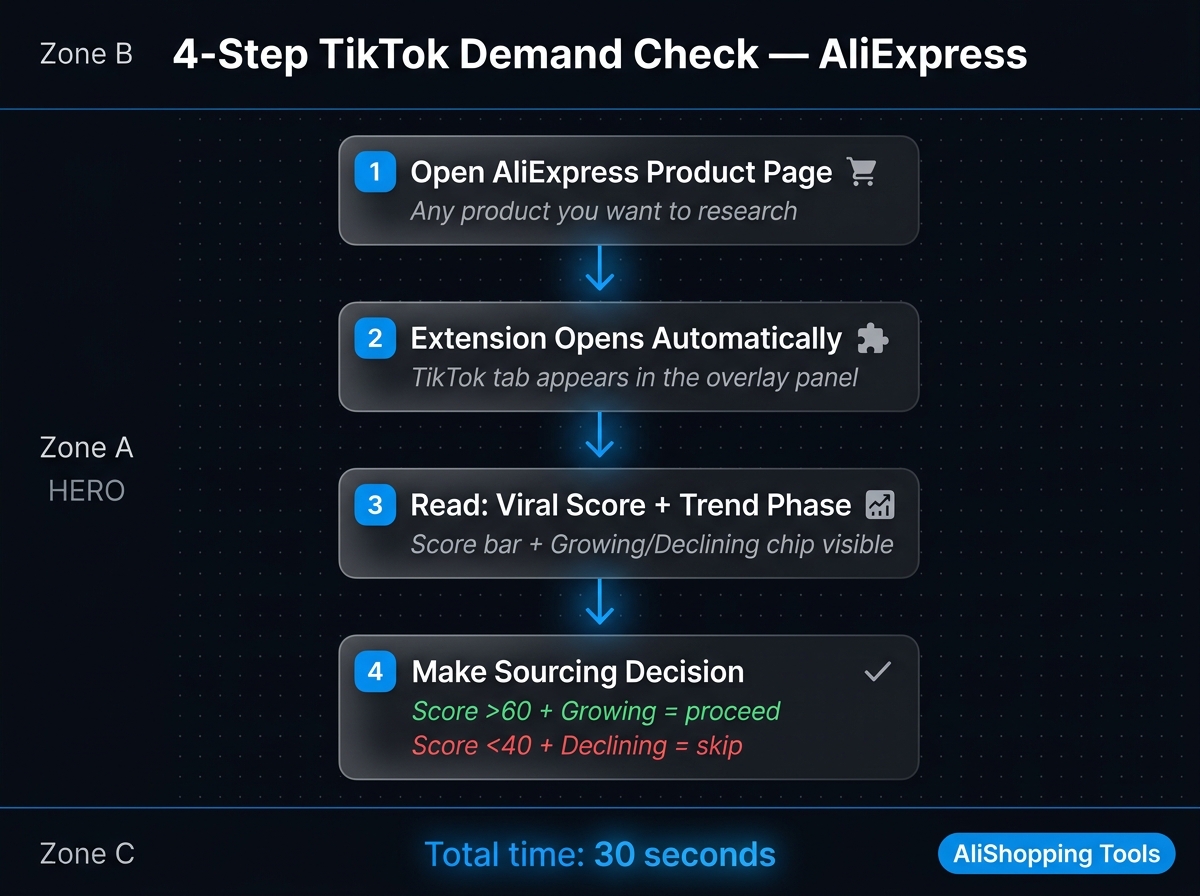
Step 1 — Install the extension Open Chrome Web Store — AliShopping Tools and click "Add to Chrome." Free, no account.
Step 2 — Navigate to AliExpress.com Open any product page. The extension panel loads automatically on the right side.
Step 3 — Open the Trend tab Click Trend. You will see the TikTok viral score and trend phase immediately.
Step 4 — Interpret the phase
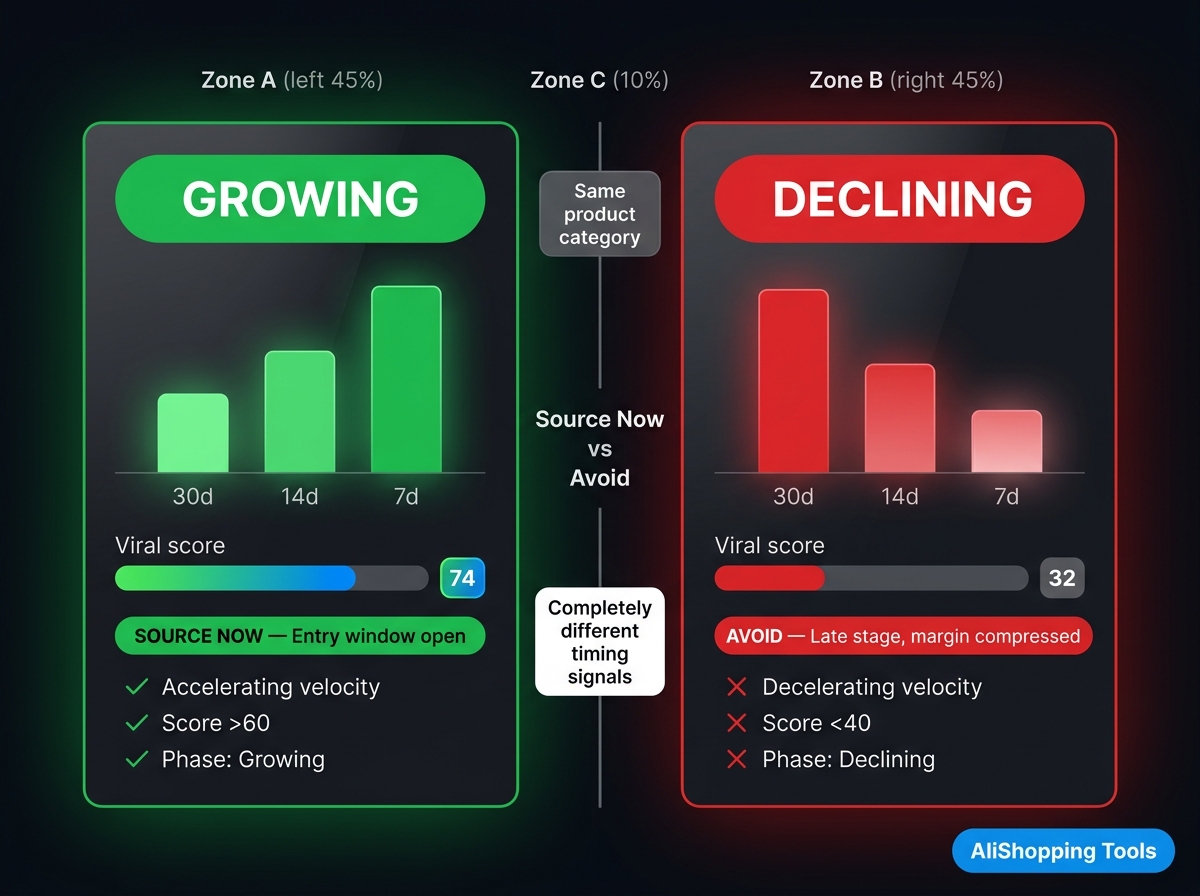
- Emerging (score 60-100) — product has TikTok momentum ahead of AliExpress order volume. Good time to test.
- Growing (score 40-70) — product is gaining on both platforms. Competitive window is narrowing.
- Peak (score 20-50) — product is at maximum visibility. Saturation risk rising.
- Declining (score 0-30) — TikTok momentum fading. Late entry risk is high.
Step 5 — Cross-check with profit and supplier data Use the Profit tab to confirm margins are viable, and the Supplier tab to identify the best-priced reliable supplier for this product.
Why you need TikTok data before sourcing from AliExpress
In 2026, TikTok Shop operates on a different demand timeline than AliExpress. AliExpress reflects accumulated demand — products with tens of thousands of cumulative orders over months. TikTok Shop reflects emerging demand — products that went from 0 to viral in 72 hours.
The products that win in dropshipping often appear on TikTok before they peak on AliExpress. Checking TikTok demand before sourcing gives you a 2-4 week head start over operators who rely on AliExpress order counts alone.
The old workflow: open AliExpress product → open TikTok Creative Center → manually search keywords → try to correlate → make a judgment call. That takes 10-15 minutes per product. The overlay collapses it to zero — the data is there when the product page loads.
What TikTok Shop data the overlay does not cover
- Individual video metrics — The overlay shows demand signals, not specific video view counts or creator handles. For video-level creative analysis, use TikTok Creative Center directly.
- Exact TikTok Shop GMV — Paid tools like FastMoss or Kalodata pull direct TikTok Shop API data. The overlay's signal is a model-based score, not a raw count.
- Historical data beyond 30 days — The overlay is focused on current momentum windows.
FAQ
Is the TikTok data on AliExpress overlay free?
Yes. The TikTok trend overlay is part of the free AliShopping Tools extension — no paid tier, no account.
Does this show TikTok Shop order counts?
The overlay shows demand-signal scores modelled from TikTok Shop trends, not raw TikTok Shop order counts. For exact order counts, use a dedicated TikTok Shop analytics tool.
Which browsers does this work on?
Desktop Chrome (and Chromium-based browsers like Edge). Not available for Firefox or mobile.
Can I use this if I don't have a TikTok Shop account?
Yes. You do not need a TikTok Shop account or any other account to use the extension.
Disclosure: Published by the AliShopping Tools team. Claims based on publicly available information as of May 2026.
Ready to find winning products?
Try AliShopping Tools — 15 free AI tools for product research.
Quick answers
Frequently Asked Questions
1How can I see TikTok Shop data on AliExpress product pages?
Install AliShopping Tools (free Chrome extension).
It overlays TikTok Shop demand signals — viral score (0 to 100), demand-trend direction (rising, stable, or declining), and demand indicator — directly on every AliExpress product page.
No account required.
It is the only free tool combining AliExpress product data with TikTok Shop signals in one overlay.
2What is the TikTok viral score on AliShopping Tools?
The TikTok viral score is a 0 to 100 index measuring creator activity and demand signals for the product category on TikTok Shop.
Scores above 60 indicate meaningful momentum.
Above 75 indicates strong creator-driven demand.
The score helps identify products gaining TikTok traction before that demand saturates the AliExpress supply side.
3What is the demand-trend indicator on AliShopping Tools?
The demand-trend indicator shows which direction a product's demand is moving: rising (early or growing interest, usually with lower competition and the best entry window), stable (steady, established demand), or declining (interest fading).
Products with rising demand are the best entry opportunities.
Products with flat or declining demand typically offer compressed margins.
4Why is TikTok Shop data valuable when researching AliExpress products?
TikTok Shop demand signals show where consumer interest is heading before that interest fully translates into AliExpress search volume and saturation.
Products with rising TikTok momentum but low AliExpress saturation represent the best entry timing — you can source and list before the peak instead of after it.
5Is the AliShopping Tools extension completely free to use?
Yes, the extension is entirely free with no hidden subscription fees or premium tiers required to access the core TikTok Shop data.
Users can install the Chrome add-on immediately without entering credit card details, making it a highly accessible solution for budget-conscious dropshippers.
This free access allows you to overlay viral scores and demand-trend indicators on AliExpress pages indefinitely for your product research needs.
6Do I need to create an account to view TikTok Shop metrics on AliExpress?
No, you do not need to create an account or log in to view the data, ensuring a frictionless and private user experience.
The extension operates directly within your browser to overlay metrics like viral score and order momentum instantly upon visiting any AliExpress product page.
This 'no-login' approach allows researchers to start analyzing product potential within 30 seconds of installation.
7How quickly can I start seeing TikTok Shop data after installation?
You can begin viewing TikTok Shop demand data immediately, as the entire installation process takes approximately 30 seconds to complete.
Once added to Chrome, the tool automatically activates on AliExpress product pages, displaying the viral score and demand-trend direction without requiring a browser restart.
This rapid setup enables dropshippers to validate product ideas without interrupting their research workflow.
8What does the order momentum indicator show on AliExpress?
The order momentum indicator visualizes the current velocity of sales, helping you identify products experiencing a sudden surge in purchases.
Unlike static sales counts, this metric highlights whether an item is gaining traction in real-time on TikTok Shop, which is crucial for spotting winning products before they saturate the market.
By analyzing this metric alongside the viral score, you can distinguish between steady sellers and explosive trends.
9How does TikTok Shop data improve AliExpress dropshipping strategy in 2026?
Integrating TikTok Shop data into your research helps you validate product demand before sourcing, significantly reducing the risk of stocking low-performing inventory.
By filtering for high viral scores and rising demand, dropshippers can identify winning products that are currently resonating with social media audiences rather than relying on outdated supplier data.
This data-driven approach aligns your store with consumer behavior trends for the upcoming year.
More from the blog
TikTok Overlay for AliExpress: See TikTok Sales Data on Any Product
See TikTok Shop sales velocity, viral score, and demand-trend momentum on every AliExpress product page — free Chrome extension, no account, installs in 30 seconds.
7 min read
How to Find TikTok Trending Products on AliExpress (Free)
Find products gaining TikTok momentum before they peak on AliExpress — free method using Chrome extension TikTok viral score + TikTok Creative Center. Step-by-step 2026 guide.
6 min read
Best Fastmoss Alternative 2026: Free Chrome Extension vs. Fastmoss
Fastmoss focuses on TikTok Shop. ASTools covers both AliExpress and TikTok data — free. Compare features and pricing to find the right research tool for your workflow.
15 min read