How to Open an AliExpress Dispute and Win (2026 Guide)
How to Open an AliExpress Dispute and Win (2026 Guide)
Quick answer: Go to My Orders, find the problem order, click "Open Dispute," select your reason (not received, not as described, or counterfeit), upload clear photo and video evidence, and specify your refund amount. The seller has 5 days to respond. If you cannot agree, escalate to AliExpress mediation for a binding ruling. Your evidence quality is the single biggest factor in winning.
Contacting the seller directly resolves most AliExpress order problems. But when it does not — the seller ignores you, refuses a fair resolution, or offers a lowball partial refund — you need to escalate. That is what the dispute system is for.
A dispute is not a complaint form. It is a formal process with deadlines, evidence requirements, and a structured resolution path. Knowing how the system works before you open a dispute is the difference between getting your money back and losing your case on a technicality.
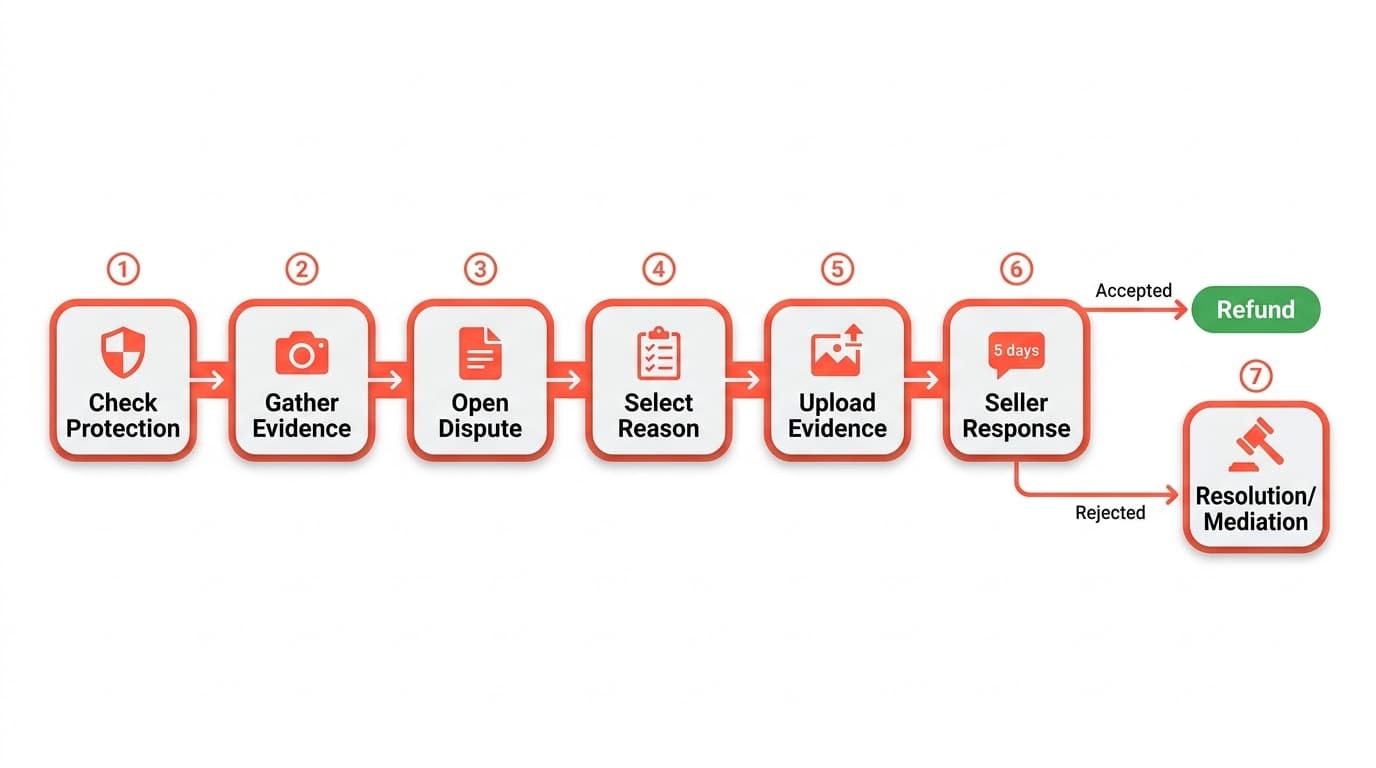
When to open a dispute (vs. contacting the seller)
Not every order problem requires a dispute. Try the seller first for minor issues, recent problems (give them 24-48 hours), or when you want a replacement rather than a refund.
Open a dispute when:
- The seller is unresponsive after 48 hours or gives evasive replies
- The seller explicitly refused your refund request
- Buyer protection has less than a week remaining and the issue is unresolved
- You suspect fraud — fake tracking numbers, delivery to a wrong country, or the store has disappeared
Types of AliExpress disputes
AliExpress categorizes disputes into three main types. Choosing the right one matters because it determines what evidence the platform expects.
Item not received — your order never arrived. Provide tracking screenshots showing no delivery and buyer protection timer evidence. If tracking shows "delivered" but you never got the package, check with neighbors and your post office first, then state the discrepancy clearly in your dispute.
Item not as described — the most common dispute type. This covers wrong items, wrong color/size/material, missing pieces from a set, and defective goods. Evidence is everything here: side-by-side comparisons of listing photos versus what you received are the strongest proof.
Counterfeit goods — you received a fake branded item. AliExpress takes these seriously and generally does not require you to return counterfeit items, since shipping fakes across borders creates legal issues for the seller.
Step-by-step: How to open a dispute
Step 1: Go to My Orders
Log in to AliExpress on desktop or the app. Navigate to "My Orders" and find the order you need to dispute.
Step 2: Click "Open Dispute"
On the order detail page, click "Open Dispute." If the button is grayed out, either buyer protection has expired or the order has not shipped yet. If protection expired, your remaining option is contacting AliExpress customer service directly — which has a lower success rate.
Step 3: Choose your dispute type
- Refund Only — you want your money back without returning the item
- Return and Refund — you will send the item back for a full refund
For most purchases, especially items under $20-30, choose "Refund Only." Return shipping to China frequently costs more than the item itself.
Step 4: Select your reason and describe the issue
Pick the reason category that matches your situation, then write a clear, factual description.
Weak: "This seller is a scammer! The item is terrible!"
Strong: "I ordered a stainless steel knife set (5 pieces) as shown in listing photos. I received 3 plastic-handle knives that do not match the listing. Photos attached show the listing versus what arrived. Requesting full refund."
Step 5: Upload your evidence
This is where disputes are won or lost. Upload:
- Clear, well-lit photos of the received item
- Screenshots of the original listing
- Side-by-side comparisons (listing photo next to your photo)
- Video of defective or non-functional items
- Tracking screenshots for non-delivery claims
- Chat history with the seller if you tried resolving directly
Step 6: Set your refund amount
Request the full amount you believe you are owed. You can negotiate down during the dispute, but you cannot increase your claim later. For items not received or completely wrong, request a full refund.
Step 7: Submit and monitor
The seller has 5 days to respond. Monitor your dispute status in "My Orders" — you will get notifications when the seller responds.
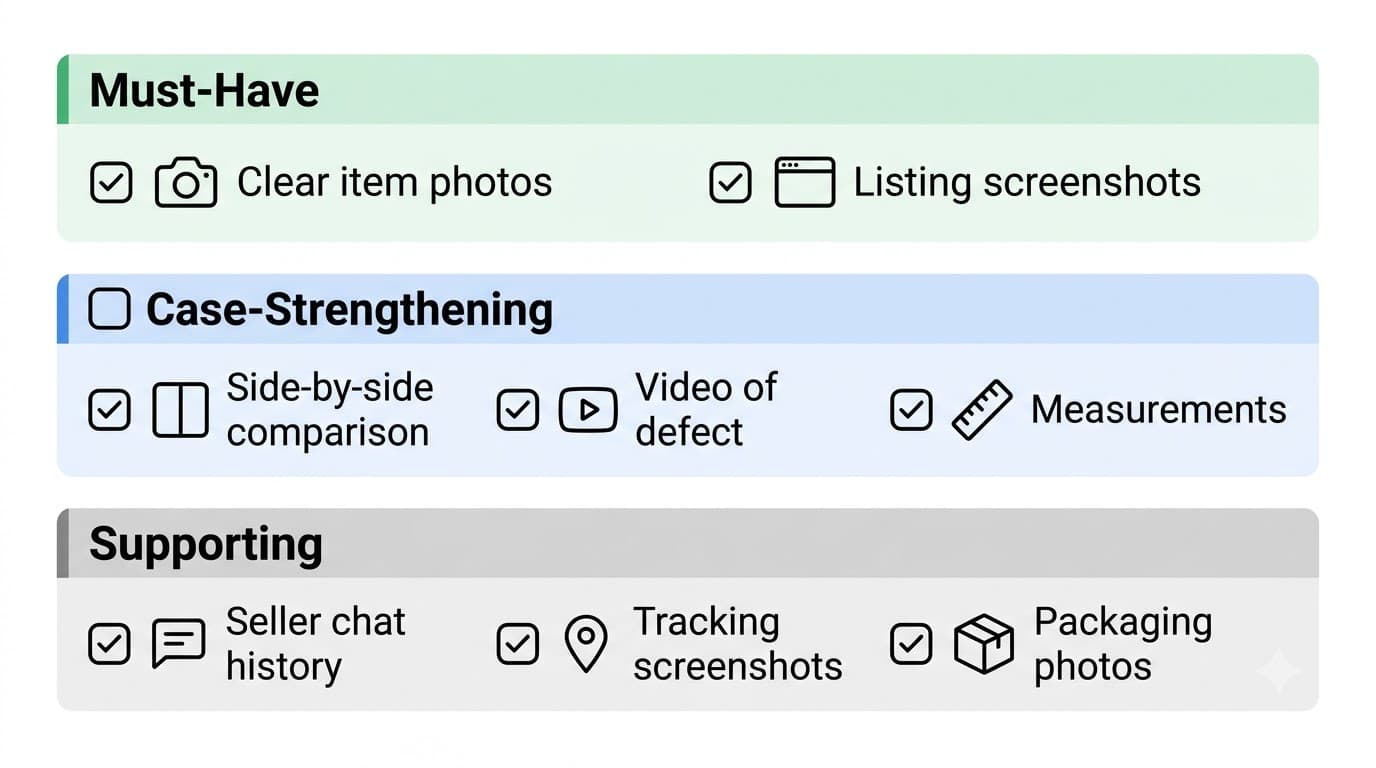
What evidence wins disputes
Evidence quality is the single most important factor in dispute outcomes. AliExpress mediators decide based on what they can see, not what you claim.
Must-have: Clear photos of the received item from multiple angles, plus screenshots of the original listing showing what was promised.
Case-strengthening: Side-by-side comparisons (listing photo on the left, your photo on the right, same angle) are the most persuasive evidence type. Video is essential for defective items — a 15-30 second clip showing the item failing to work is more convincing than any description. Measurements next to a ruler help when size is wrong.
Supporting: Seller chat history showing you tried to resolve directly, tracking screenshots for non-delivery claims, and packaging condition photos for damaged items.
Avoid: Blurry or dark photos, disputes without any listing screenshots (the mediator needs something to compare against), and long emotional messages without documentation.
Dispute timeline: how long does it take?
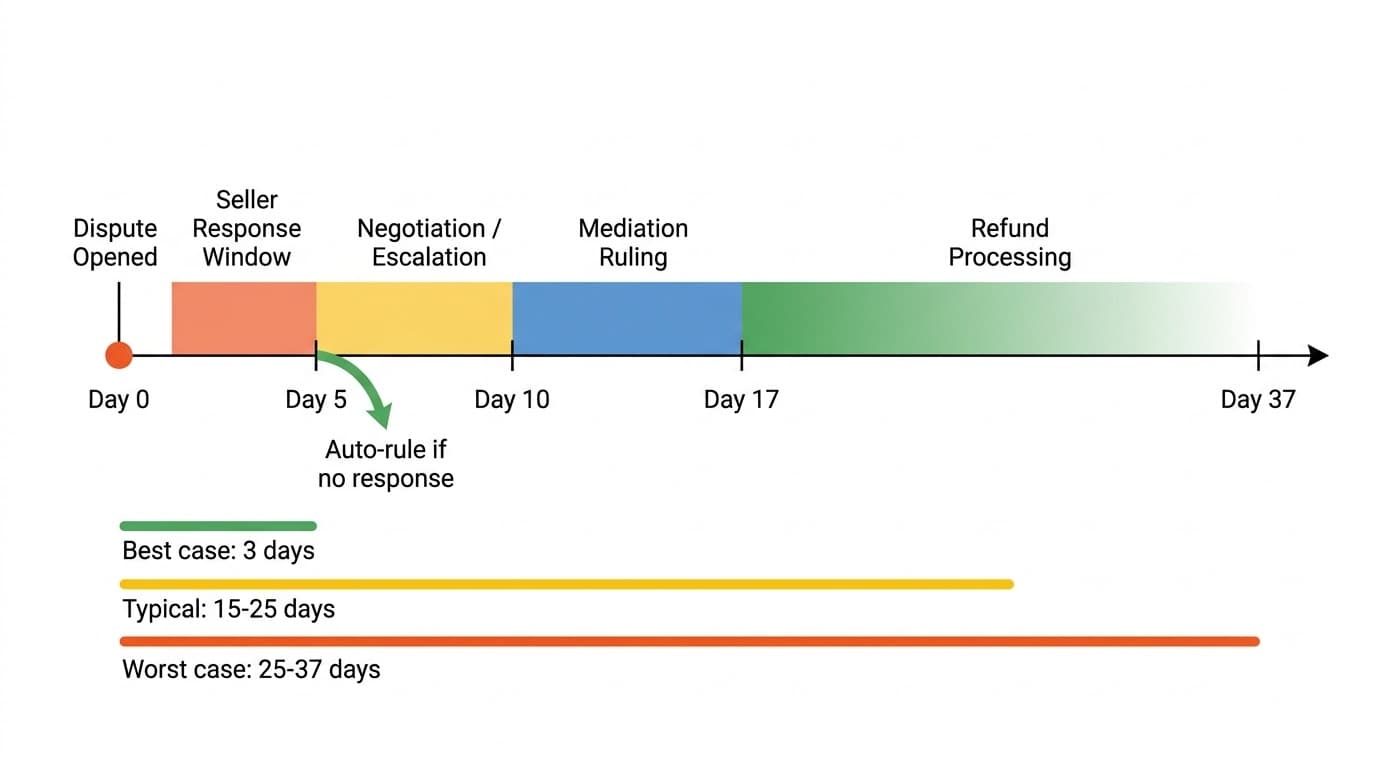
| Stage | Timeline | What happens |
|---|---|---|
| Dispute submitted | Day 0 | You open the dispute with evidence |
| Seller response window | Days 1-5 | Seller can accept, counter, or ignore |
| Seller does not respond | Day 5 | AliExpress typically auto-rules in your favor |
| Escalation to mediation | Day 5-10 | You click "Escalate Dispute" if no agreement reached |
| AliExpress mediation ruling | Days 8-17 | Mediator reviews evidence and issues binding decision |
| Refund processing | Days 8-37 | 1-3 days (wallet) to 7-20 days (bank transfer) after approval |
Best case: Seller accepts on day 1, wallet refund on day 3. Total: 3 days. Typical case: Seller counters, you reject, mediation needed. Total: 15-25 days. Worst case: Full mediation plus credit card or bank transfer processing. Total: 25-37 days.
What happens if the seller rejects your dispute
A seller rejection is not the end — it is one step in the process.
The seller may propose a partial refund (e.g., "keep the item and we refund 30%"). For minor issues, this may be reasonable. For completely wrong, defective, or non-received items, reject and escalate.
When you escalate to AliExpress mediation, a platform representative (not a bot) reviews all evidence from both sides — your photos, the seller's response, tracking information, and chat history. The mediator may request additional information. Their ruling is binding for both parties and typically comes within 3-7 business days.
Never cancel a dispute based on seller promises. Some sellers ask you to cancel the dispute and promise to send a replacement or refund outside the platform. Once you cancel, reopening is extremely difficult. All resolutions should happen within the dispute system.
Tips to win your dispute
-
Document before you complain. Take photos and video immediately when you open the package — before contacting the seller or opening a dispute.
-
Be specific, not emotional. "I ordered X, I received Y, here is the proof" wins disputes. Long complaints without evidence do not.
-
Use side-by-side comparisons. A single image showing the listing photo next to your received item is more powerful than a paragraph of text.
-
Request the right amount. Match your ask to the severity of the issue. Requesting a full refund for a legitimate problem is reasonable. Overreaching on minor issues hurts your credibility.
-
Respond promptly. Disputes have time windows. Check your dispute status daily and respond quickly to any seller or mediator messages.
-
Never cancel a dispute on promises. All resolutions must happen within the dispute system for you to be protected.
Common mistakes that lose disputes
Opening too late. Buyer protection has a finite window. If you wait until the last day or after it expires, your options disappear. Act as soon as you identify a problem.
No evidence. "The item is wrong" without photos is not a case. Even if you are completely right, the mediator needs visual proof.
Wrong dispute category. Selecting "Return and Refund" when you want refund-only can lead to the seller expecting you to pay return shipping to China — which may cost more than the item.
Accepting a lowball partial refund. Sellers sometimes offer 10-20% hoping you will accept and close the dispute. If the item is completely wrong or never arrived, reject and escalate.
Confirming receipt before inspecting. Once you click "Confirm Received," your position weakens. Always open and inspect the package before confirming delivery.
How to avoid disputes in the first place
The best dispute is the one you never need to file. A few minutes of pre-purchase research eliminates most order problems.
Check the seller's feedback score and recent reviews — especially negative ones mentioning wrong items or non-delivery. Read photo reviews from real buyers to see what actually arrives, not just the marketing photos.
Use tools that surface risk signals. AliShopping Tools shows seller trust scores, review authenticity analysis, and price history directly on AliExpress product pages. Checking these before buying takes less than a minute and can flag problematic sellers before you place an order.
FAQ
How do I open a dispute on AliExpress?
Go to My Orders, find the order with the problem, and click "Open Dispute." Select whether you want a refund only or a return and refund. Choose your reason (item not received, not as described, etc.), write a clear description, upload photo and video evidence, and specify your refund amount. The seller has 5 days to respond before you can escalate to AliExpress mediation.
How long does an AliExpress dispute take?
The timeline ranges from 3 days (seller accepts immediately, wallet refund) to 30+ days (full mediation plus bank transfer processing). Most disputes resolve within 15-25 days. The seller response window is 5 days, mediation takes 3-7 business days after escalation, and refund processing adds 1-20 days depending on your payment method.
Can I open a dispute after buyer protection expires?
Your options are limited. You have 15 days after delivery confirmation to open a dispute, but once the full protection window closes, you cannot use the standard dispute system. Your remaining option is contacting AliExpress customer service directly, which has a lower success rate. Always monitor your buyer protection timer and extend it if your order has not arrived.
What happens during AliExpress mediation?
When you and the seller cannot agree, you escalate to mediation. A platform representative reviews all evidence from both sides — your photos, the seller's response, tracking information, and the original listing. They may request additional information, then issue a binding ruling within 3-7 business days.
Will I always win a dispute if the item is wrong?
Not automatically. You need to prove it with clear evidence. A dispute saying "the item is not as described" without photos is significantly weaker than one with side-by-side comparisons. The strength of your evidence determines the outcome, not just the validity of your complaint.
Can I open a dispute for a partial order (some items missing)?
Yes. If you ordered a set and received only part of it, open a "not as described" dispute. Photograph what you received alongside the listing showing what was promised. Request a refund proportional to the missing items, or a full refund if the incomplete set is not useful to you.
Should I contact the seller before opening a dispute?
In most cases, yes. Many sellers resolve issues quickly to avoid disputes on their record. Give the seller 24-48 hours to respond. Skip the seller and go straight to a dispute if buyer protection is about to expire, the store has been shut down, you suspect fraud, or the seller has already refused to help.
The bottom line
AliExpress disputes are a structured process with clear rules, deadlines, and evidence requirements. Act before buyer protection expires, document everything with clear photos and video, describe the issue factually, and never cancel a dispute based on seller promises. If the seller will not cooperate, AliExpress mediation is there as your safety net — and it works, provided you have the evidence to support your claim.
Better yet, avoid the dispute entirely. A minute spent checking seller trust scores and reading photo reviews before you buy can save you weeks of dispute resolution after.
Install AliShopping Tools — check seller trust scores and review authenticity before you buy → — seller risk scores, price history charts, review analysis. Free, no account required.
Disclosure: This article is published by the AliShopping Tools team. The dispute process described reflects AliExpress policies as of July 2026. Policies may change — check AliExpress's official help center for the latest terms. If you notice anything out of date, let us know at our contact page.
Ready to find winning products?
Try AliShopping Tools — 15 free AI tools for product research.
Quick answers
Frequently Asked Questions
1How do I open a dispute on AliExpress?
Go to My Orders, find the order with the problem, and click 'Open Dispute.' Select whether you want a refund only or a return and refund.
Choose your reason (item not received, not as described, etc.), write a clear description, upload photo and video evidence, and specify your refund amount.
The seller has 5 days to respond before you can escalate to AliExpress mediation.
2How long does an AliExpress dispute take?
The timeline ranges from 3 days (seller accepts immediately, wallet refund) to 30+ days (full mediation plus bank transfer processing).
Most disputes resolve within 15-25 days.
The seller response window is 5 days, mediation takes 3-7 business days after escalation, and refund processing adds 1-20 days depending on your payment method.
3Can I open a dispute after buyer protection expires?
Your options are limited once buyer protection expires.
You have 15 days after delivery confirmation to open a dispute, but once the full protection window closes, you cannot use the standard dispute system.
Your remaining option is contacting AliExpress customer service directly, which has a lower success rate.
Always monitor your buyer protection timer and extend it if your order has not arrived.
4What happens during AliExpress mediation?
When you and the seller cannot agree, you escalate the dispute to AliExpress mediation.
A platform representative reviews all evidence from both sides — your photos, the seller's response, tracking information, chat history, and the original listing.
The mediator may request additional information from either party.
They then issue a binding ruling, typically within 3-7 business days.
5Will I always win a dispute if the item is wrong?
Not automatically.
You need to prove the item is wrong with clear evidence.
A dispute that says 'the item is not as described' without photos is significantly weaker than one with side-by-side comparisons of the listing versus the received item.
The strength of your evidence determines the outcome, not just the validity of your complaint.
6Can I open a dispute for a partial order (some items missing)?
Yes.
If you ordered a set or multiple items and only received part of the order, you can open a 'not as described' dispute.
Photograph what you received alongside the listing showing what was promised.
Request a refund proportional to the missing items, or a full refund if the incomplete set is not useful to you.
7Should I contact the seller before opening a dispute?
In most cases, yes.
Many sellers resolve issues quickly to avoid disputes on their record.
Give the seller 24-48 hours to respond.
However, skip the seller and go straight to a dispute if buyer protection is about to expire, the seller's store has been shut down, you suspect fraud, or the seller has already explicitly refused to help.
More from the blog
AliExpress Refund Guide 2026: How to Get Your Money Back
Step-by-step guide to getting a refund on AliExpress. Learn when you're eligible, how to open a dispute, refund timelines by payment method, and what to avoid.
AliExpress Payment Methods 2026: Which Is Safest?
Compare every AliExpress payment method — credit card, PayPal, Alipay, Google Pay, Apple Pay, Klarna, and bank transfer. See which is safest, fastest to refund, and best for your region.
AliExpress Coupon Finder: How to Find and Use Real Promo Codes (2026)
AliExpress has real coupons — store coupons, select coupons, platform codes, and new-user deals. Here's where to find them, how to stack them, and how to tell if a 'discount' is actually a price increase in disguise.