AliExpress Refund Guide 2026: How to Get Your Money Back
AliExpress Refund Guide 2026: How to Get Your Money Back
Quick answer: Check that buyer protection is still active on your order, contact the seller first with photo evidence, and open a dispute if they do not resolve it. AliExpress will mediate if you and the seller cannot agree. Refund timelines range from 1-3 business days (wallet credit) to 7-15 business days (credit card). The most important thing: do not wait until buyer protection expires — that is the single biggest reason refund requests fail.
Buying on AliExpress works well most of the time. But when an order goes wrong — the item never shows up, it looks nothing like the listing, or it arrives broken — you need to know exactly how to get your money back. The refund process is not complicated, but it has specific windows, steps, and evidence requirements that trip up buyers who do not know the rules.
This guide walks through the complete refund process: when you are eligible, how to request one (with and without a dispute), how long it takes by payment method, what to do if the seller refuses, and the mistakes that cost people their refunds.
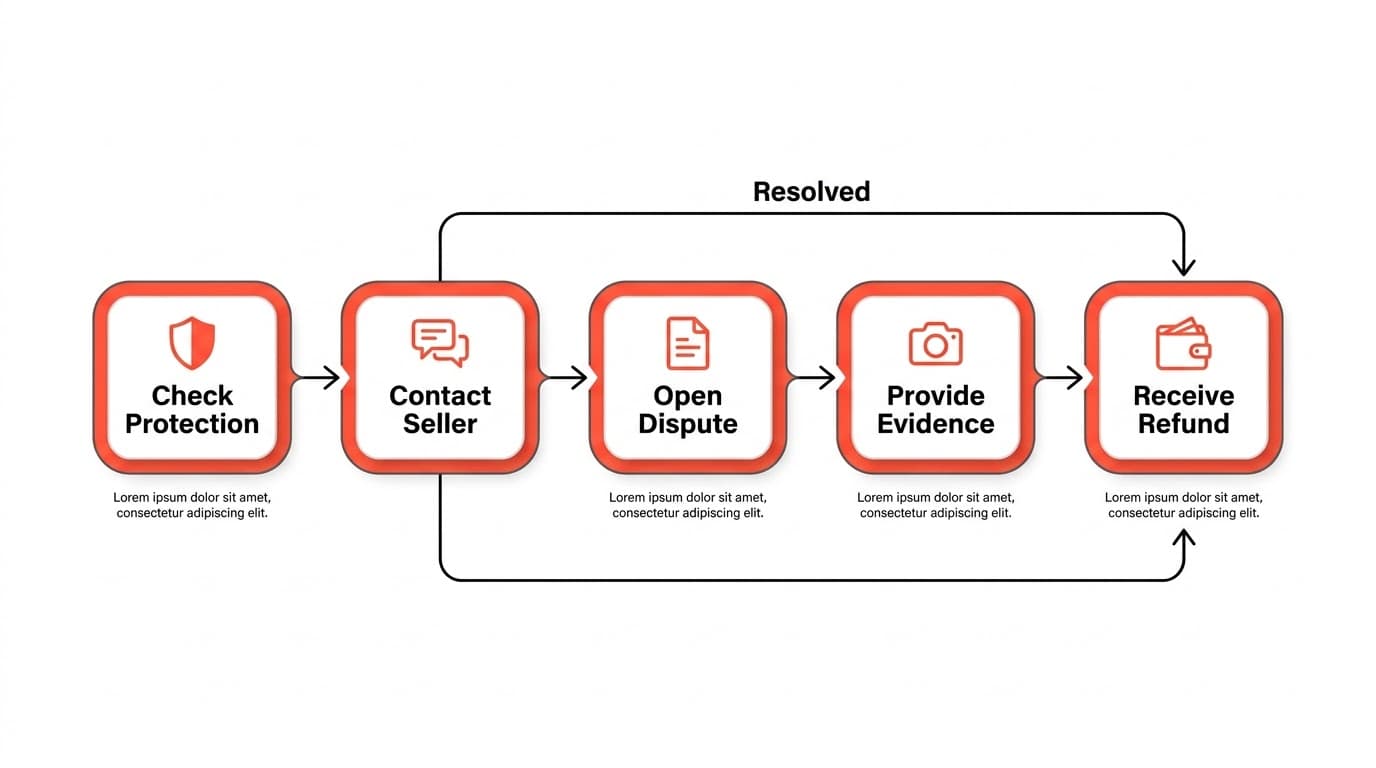
When you are eligible for a refund
Not every order qualifies for a refund, and the timing matters more than most buyers realize. Here are the situations where AliExpress supports a refund:
Item not received
If your order never arrives, you are eligible for a full refund — but only if you act within the buyer protection window. This window starts when the order ships and typically lasts 60-90 days, depending on the seller's stated processing and shipping time.
Important: AliExpress may auto-confirm delivery based on tracking data or after the protection period ends. If tracking shows "delivered" but you never received the package, you can still dispute — but you need to do it before the protection timer runs out.
If the delivery deadline is approaching and your order still has not arrived, extend buyer protection before it expires. You can do this from the order detail page. Sellers usually approve extensions because the alternative is a dispute on their record.
Item not as described
You received the item, but it does not match the listing. Common scenarios:
- Wrong item entirely — you ordered a blue jacket and received a phone case
- Significantly different from photos — the material, color, size, or quality does not match the listing description
- Missing parts or accessories — the listing showed a set of 5 items and you received 3
- Defective or damaged — the item arrived broken or non-functional (not due to shipping damage you caused)
For "not as described" claims, evidence is everything. Take clear photos or video of what you received alongside screenshots of the original listing. Side-by-side comparisons are the most effective evidence in disputes.
Counterfeit or prohibited items
If you receive a counterfeit item (fake branded goods), AliExpress policy supports a full refund. You may not even need to return the item in these cases, since shipping counterfeit goods across borders creates legal issues for the seller.
Seller did not ship within processing time
If the seller accepted your order but did not ship it within the stated processing time (usually 3-7 business days), you can cancel and get a full refund before the item ever ships.
How to request a refund without opening a dispute
A dispute is not always necessary. For straightforward issues, contacting the seller directly is faster and often gets you the same result.
Step 1: Message the seller
Go to your order and click "Contact Seller." Explain the issue clearly and concisely. Include:
- Your order number
- What went wrong (not received, wrong item, defective, etc.)
- Photo or video evidence
- What you want (full refund, partial refund, replacement)
Pro tip: Be polite and specific. Most AliExpress sellers deal with refund requests regularly and will cooperate if the claim is legitimate. Aggressive or vague messages tend to get slower responses.
Step 2: Evaluate the seller's response
The seller may offer:
- Full refund — accept it. This is the best outcome without a dispute.
- Partial refund — the seller asks you to keep the item and accept a percentage back. This can be reasonable for minor issues (slightly wrong color, small cosmetic defect) but not for items that are completely wrong or non-functional.
- Replacement shipment — the seller offers to send a new item. Consider this only if you still want the product and trust the seller to send the correct one.
- No response — if the seller does not respond within 48 hours, move to opening a dispute.
When to skip the seller and go straight to a dispute
- Buyer protection is about to expire (less than a week remaining)
- The seller's store has been shut down or is no longer active
- The seller has explicitly refused your request
- You suspect fraud (seller provided fake tracking numbers, for example)
How to open a dispute on AliExpress
If the seller route does not work, the dispute system is your next step. Here is the process:
Step 1: Go to My Orders
Log in to AliExpress, go to "My Orders," and find the order you need to dispute. Click "Open Dispute."
Step 2: Select your reason
AliExpress will ask you to categorize the issue:
- I want to return the goods — you have the item and want to send it back for a refund
- I want a refund only (no return) — you want your money back without shipping the item back
For most cases involving wrong items, defective goods, or items significantly not as described, select "Refund only." Returning items to China is expensive and rarely worth it for low-cost purchases.
Step 3: Provide evidence
This is where disputes are won or lost. Upload:
- Photos of the received item — clear, well-lit, showing the issue
- Photos of the packaging — especially if the item arrived damaged
- Screenshots of the original listing — showing what was promised
- Side-by-side comparison — what you expected vs. what you got
- Video evidence — particularly useful for items that are defective or non-functional (shows the problem more convincingly than photos)
- Tracking information — for "not received" claims, include screenshots showing no delivery
Step 4: Specify your refund amount
You can request a full or partial refund. For items not received, always request a full refund. For items not as described, request the amount that reflects the gap between what you paid for and what you received.
Step 5: Wait for the seller's response
The seller has 5 days to respond to your dispute. They may:
- Accept your refund request (fastest resolution)
- Make a counteroffer (partial refund or return request)
- Not respond (AliExpress auto-rules in your favor after the response window)
Step 6: AliExpress mediation
If you and the seller cannot agree, click "Escalate Dispute" to bring in an AliExpress mediator. The mediator reviews all evidence from both sides and makes a binding decision. This typically takes 3-7 additional business days.
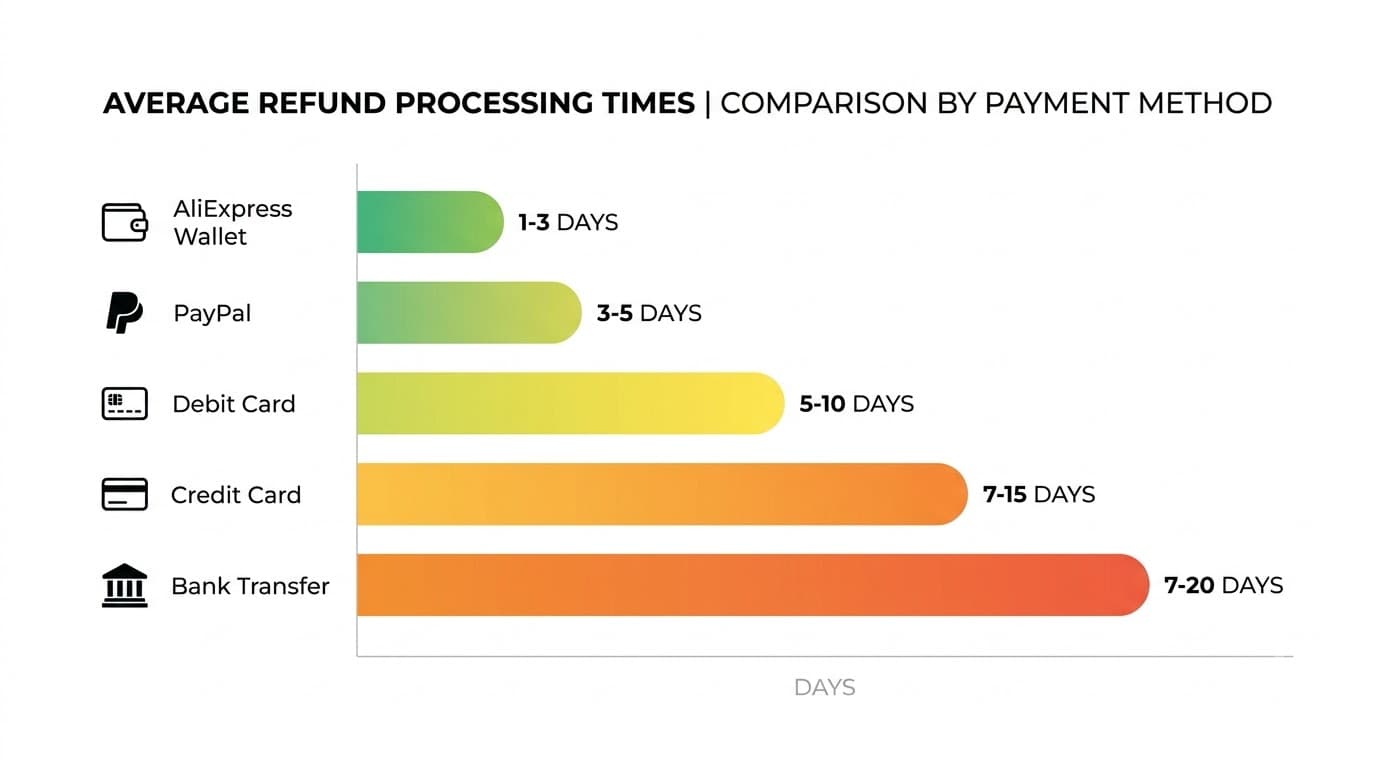
Refund timelines by payment method
Once your refund is approved, how fast you get your money depends on how you paid:
| Payment method | Typical refund timeline | Notes |
|---|---|---|
| AliExpress wallet / account balance | 1-3 business days | Fastest option — credited to your AliExpress balance for future purchases |
| PayPal | 3-5 business days | Refund goes back to your PayPal balance |
| Debit card | 5-10 business days | Depends on your bank's processing speed |
| Credit card | 7-15 business days | Your card issuer processes the reversal; AliExpress sends it immediately but bank processing adds delay |
| Bank transfer / wire | 7-20 business days | Slowest method; international bank processing adds time |
Important: These timelines start after AliExpress approves the refund — not after you open the dispute. The dispute resolution process (seller response + potential mediation) adds days or weeks on top.
If your refund has been approved but has not appeared after the expected window, check your refund status in "My Orders" first. If it shows "Refund sent" but you have not received it, contact your payment provider — the delay is on their side, not AliExpress.
What to do if the seller refuses your refund
Sellers refuse refund requests for several reasons. Here is how to handle each:
"The item was delivered" (but you did not receive it)
The seller may point to tracking data showing delivery. If you genuinely did not receive the package:
- Check with neighbors, building management, or anyone who might have accepted the delivery
- Check if your local postal service has a "safe place" delivery policy where packages are left at the door
- If it truly was not delivered, escalate to AliExpress mediation with screenshots of the tracking page and a clear statement that you did not receive the item
"The item matches the description" (but it does not)
The seller disputes that the item is different from the listing. This is where your evidence quality determines the outcome:
- Side-by-side photos are your strongest tool
- Measure the item and compare to listed dimensions
- If the material is different (e.g., listed as "leather" but received plastic), show the item tag or material test
"We will send a replacement" (but you want a refund)
You are not obligated to accept a replacement. If you prefer a refund, state this clearly in the dispute. If the seller insists on replacement only, escalate to AliExpress mediation — the platform generally supports the buyer's choice.
Seller asks you to cancel the dispute
Never cancel a dispute unless the refund has already been processed to your account. Some sellers ask buyers to cancel disputes with promises to send a replacement or refund outside the platform. Once you cancel a dispute, reopening it is significantly harder. Keep the dispute active until you have your money back.
Common mistakes that lose refunds
Knowing the process is not enough — you also need to avoid the errors that cause legitimate refund requests to fail.
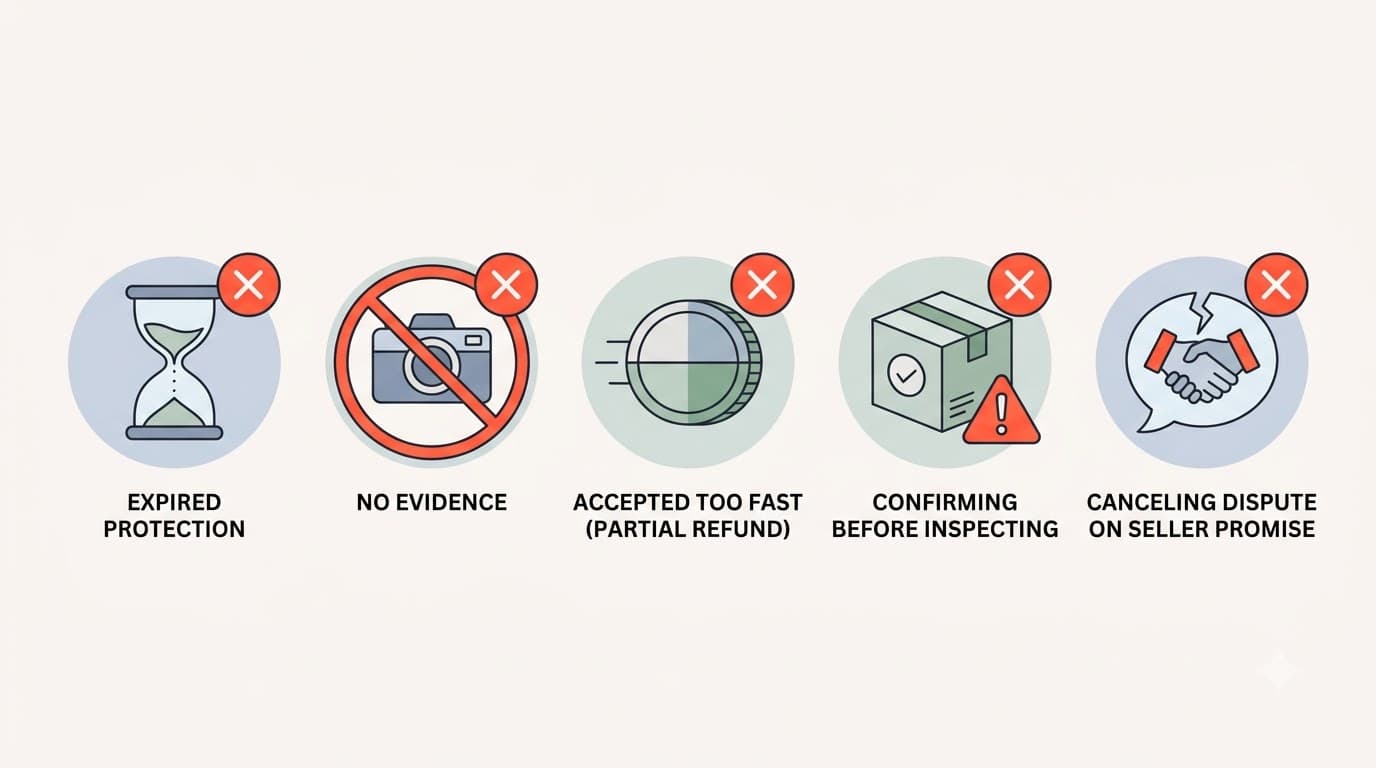
Mistake 1: Letting buyer protection expire
This is the most common and most costly mistake. Once buyer protection expires, AliExpress auto-confirms the order and your ability to open a dispute disappears. If your item has not arrived and the protection timer is running low, extend it immediately — do not wait for the package.
Mistake 2: Not providing evidence
A dispute without evidence is a coin flip at best. "The item is not as described" with no photos is far weaker than "The item is not as described — here are side-by-side photos showing the listing vs. what I received." Take photos before you throw away the packaging.
Mistake 3: Accepting a partial refund too quickly
Sellers often offer partial refunds as a first response, hoping buyers will accept and close the dispute. If the item is completely wrong, defective, or never arrived, a partial refund is not appropriate. Do not accept less than what you are owed out of impatience or desire to close the issue.
Mistake 4: Confirming delivery before inspecting the item
Once you click "Confirm Received," the buyer protection clock changes. You still have 15 days to open a dispute after confirmation, but your position is weaker because you have acknowledged receiving the item. Never confirm delivery until you have opened the package and verified the contents.
Mistake 5: Canceling a dispute based on seller promises
As mentioned above, never cancel an active dispute because the seller promises to fix the issue outside the platform. Once the dispute is closed, your leverage is gone. The resolution must happen within the dispute system for you to be protected.
How to avoid needing refunds in the first place
The best refund is the one you never need to file. A few minutes of research before buying can save you weeks of dispute back-and-forth.
Check the seller before you buy. Look at the seller's feedback score, store age, and recent reviews. A seller with a 90% positive feedback rate and multiple recent complaints about wrong items or shipping delays is a predictable problem.
Read photo reviews from real buyers. The listing photos are marketing material. Photo reviews from buyers who received the item show you what actually arrives. If there are no photo reviews on a high-volume product, that is a warning sign.
Check price history before buying. A product that was $5 last week and is now $25 during a "sale" is not actually on sale. Price manipulation is common on AliExpress, and overpaying makes refund situations more frustrating.
Use tools that surface risk signals. AliShopping Tools shows seller trust scores and price history directly on AliExpress product pages — check both before buying to avoid needing refunds in the first place. A minute of pre-purchase research can save you a month of dispute resolution.
FAQ
How long do I have to request a refund on AliExpress?
You can open a dispute while buyer protection is active — typically 60-90 days after shipment, depending on the seller and shipping method. After delivery confirmation (whether you confirm manually or AliExpress auto-confirms), you have 15 additional days to open a dispute. Once both windows close, your options are limited to contacting AliExpress customer service directly, which has a lower success rate.
Can I get a refund without returning the item?
Yes, in most cases involving low-cost items. AliExpress and sellers generally do not require returns for items under a certain value because the return shipping cost (from your country back to China) often exceeds the item price. For higher-value items, the seller or AliExpress mediator may require a return. You can choose "Refund only (no return)" when opening your dispute.
What if AliExpress sides with the seller?
If the mediation ruling goes against you and you paid by credit card, you can file a chargeback with your card issuer as a last resort. Be aware that filing chargebacks can affect your AliExpress account standing — the platform may restrict your ability to open future disputes. Only use this option if you genuinely received nothing or received something fundamentally different from what you ordered.
Does AliExpress refund shipping costs?
It depends on the situation. If the item was never shipped or never arrived, you typically receive a full refund including any shipping fees you paid. If the item arrived but was not as described, the refund may or may not include shipping — this is determined during the dispute. Free shipping orders (where shipping was included in the item price) do not have a separate shipping component to refund.
How do I check my refund status?
Go to "My Orders" on AliExpress, find the disputed order, and click on the order detail. The refund status will show as one of: Processing, Refund Sent, or Completed. "Refund Sent" means AliExpress has released the funds — but your bank or payment provider may take additional days to process it into your available balance.
Can I dispute an order if the seller's store has closed?
Yes. If a seller's store closes or gets shut down after your purchase, you can still open a dispute through "My Orders." AliExpress handles these disputes directly since the seller is no longer active. In these situations, AliExpress typically rules in the buyer's favor more quickly because the seller cannot respond.
Is it better to ask for a replacement or a refund?
For most situations, requesting a refund is safer. Replacements require trusting the same seller to send the correct item a second time, and the replacement shipment means another 2-6 weeks of waiting. Replacements make sense only if you genuinely want the product, the issue was clearly a one-time packing error, and the seller has an otherwise strong track record.
The bottom line
Getting a refund on AliExpress is a structured process with clear rules. The platform's buyer protection system genuinely works — but it works on timelines and evidence, not just complaints. Keep buyer protection active, document everything with photos and video, do not accept less than you are owed, and never cancel a dispute based on seller promises.
The smartest move is prevention. Spend a minute checking the seller's reputation and price history before you buy. Most refund situations are predictable from the seller's track record — a seller with a history of shipping wrong items will ship you the wrong item too.
Install AliShopping Tools — check seller trust scores and price history before you buy → — seller risk scores, price history charts, review analysis. Free, no account required.
Disclosure: This article is published by the AliShopping Tools team. The refund process described reflects AliExpress policies as of July 2026. Policies may change — check AliExpress's official help center for the latest terms. If you notice anything out of date, let us know at our contact page.
Ready to find winning products?
Try AliShopping Tools — 15 free AI tools for product research.
Quick answers
Frequently Asked Questions
1How long do I have to request a refund on AliExpress?
You can open a dispute while buyer protection is active — typically 60-90 days after shipment, depending on the seller and shipping method.
After delivery confirmation (whether you confirm manually or AliExpress auto-confirms), you have 15 additional days to open a dispute.
Once both windows close, your options are limited to contacting AliExpress customer service directly, which has a lower success rate.
2Can I get a refund without returning the item?
Yes, in most cases involving low-cost items.
AliExpress and sellers generally do not require returns for items under a certain value because the return shipping cost (from your country back to China) often exceeds the item price.
For higher-value items, the seller or AliExpress mediator may require a return.
You can choose 'Refund only (no return)' when opening your dispute.
3What if AliExpress sides with the seller?
If the mediation ruling goes against you and you paid by credit card, you can file a chargeback with your card issuer as a last resort.
Be aware that filing chargebacks can affect your AliExpress account standing — the platform may restrict your ability to open future disputes.
Only use this option if you genuinely received nothing or received something fundamentally different from what you ordered.
4Does AliExpress refund shipping costs?
It depends on the situation.
If the item was never shipped or never arrived, you typically receive a full refund including any shipping fees you paid.
If the item arrived but was not as described, the refund may or may not include shipping — this is determined during the dispute.
Free shipping orders do not have a separate shipping component to refund.
5How do I check my refund status?
Go to 'My Orders' on AliExpress, find the disputed order, and click on the order detail.
The refund status will show as one of: Processing, Refund Sent, or Completed. 'Refund Sent' means AliExpress has released the funds — but your bank or payment provider may take additional days to process it into your available balance.
6Can I dispute an order if the seller's store has closed?
Yes.
If a seller's store closes or gets shut down after your purchase, you can still open a dispute through 'My Orders.' AliExpress handles these disputes directly since the seller is no longer active.
In these situations, AliExpress typically rules in the buyer's favor more quickly because the seller cannot respond.
7Is it better to ask for a replacement or a refund?
For most situations, requesting a refund is safer.
Replacements require trusting the same seller to send the correct item a second time, and the replacement shipment means another 2-6 weeks of waiting.
Replacements make sense only if you genuinely want the product, the issue was clearly a one-time packing error, and the seller has an otherwise strong track record.
More from the blog
How to Open an AliExpress Dispute and Win (2026 Guide)
Complete guide to opening and winning AliExpress disputes. Learn when to dispute, what evidence to submit, how mediation works, and the mistakes that cost buyers their cases.
AliExpress Payment Methods 2026: Which Is Safest?
Compare every AliExpress payment method — credit card, PayPal, Alipay, Google Pay, Apple Pay, Klarna, and bank transfer. See which is safest, fastest to refund, and best for your region.
AliExpress Coupon Finder: How to Find and Use Real Promo Codes (2026)
AliExpress has real coupons — store coupons, select coupons, platform codes, and new-user deals. Here's where to find them, how to stack them, and how to tell if a 'discount' is actually a price increase in disguise.