









TikTok Overlay for AliExpress: See TikTok Sales Data on Any Product
TikTok Overlay for AliExpress: See TikTok Sales Data on Any Product Page
Quick answer: AliShopping Tools overlays TikTok Shop sales data — viral score (0–100 scale, banded Low Viral / Viral Potential / Highly Viral at 50 and 75), demand-trend momentum, and demand indicator — directly on every AliExpress product page. It is the only free Chrome extension that combines AliExpress product data with TikTok Shop demand signals in a single overlay, with no account or subscription required.
If you are sourcing on AliExpress and want to know whether a product is gaining traction on TikTok Shop before you commit, there is now a free Chrome extension that answers that question directly on the AliExpress product page — no tab switching, no manual research, no subscription.
Install AliShopping Tools — TikTok overlay included →
What "TikTok overlay for AliExpress" actually means
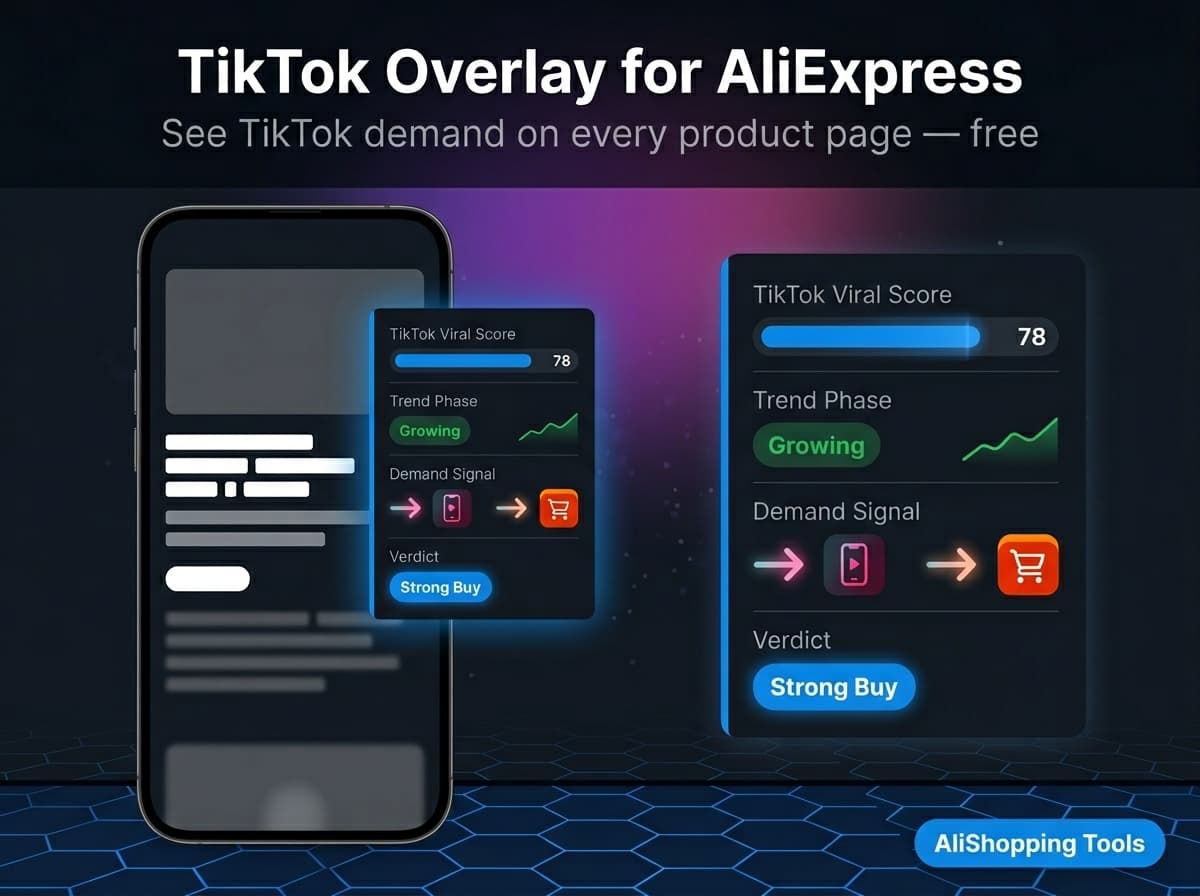
The phrase sounds technical but the concept is simple. When you open an AliExpress product page with AliShopping Tools installed, the extension injects a panel alongside the product listing that shows:
- TikTok viral score — a 0-100 score reflecting current TikTok Shop demand signals for this product category and keyword cluster
- Demand-trend momentum — whether demand is accelerating or cooling, read from the order-velocity trajectory and TikTok engagement pattern
- Demand indicator — cross-referenced demand signal showing whether TikTok Shop is pulling this product up or the AliExpress momentum is purely organic
- AI verdict — a 0–100 composite of four weighted dimensions (product fundamentals 30%, profit estimate 30%, market saturation 20%, risk 20%) that resolves to one of four labels: Strong Buy, Buy Signal, Hold / Watch or Pass
All of this appears directly on the AliExpress page — no need to open TikTok separately, cross-reference manually, or pay for a dedicated TikTok-spy tool.
Why TikTok data matters for AliExpress product research
TikTok Shop and AliExpress operate on different demand dynamics. AliExpress measures established demand — products with thousands of cumulative orders. TikTok Shop measures emerging demand — products that went from zero to viral in 72 hours. The products that win in 2026 dropshipping often show up on TikTok before they peak on AliExpress order volume.
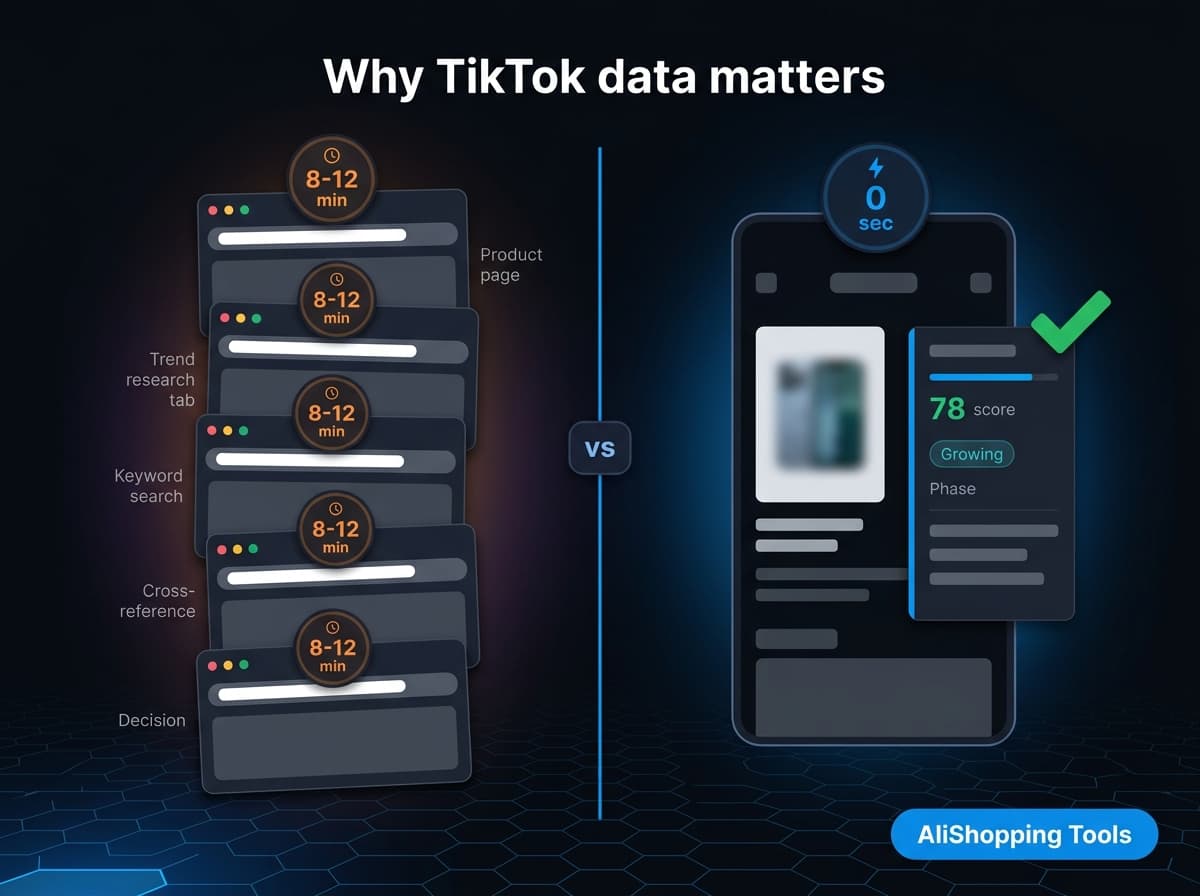
The research workflow before this extension existed:
- Find product on AliExpress, note category and keywords
- Open TikTok Creative Center in a new tab
- Search keywords manually
- Try to correlate what you see on TikTok with what is on the AliExpress listing
- Make a judgment call with incomplete data
That workflow takes 8-12 minutes per product. The overlay collapses it to zero seconds — the score is there when the page loads.
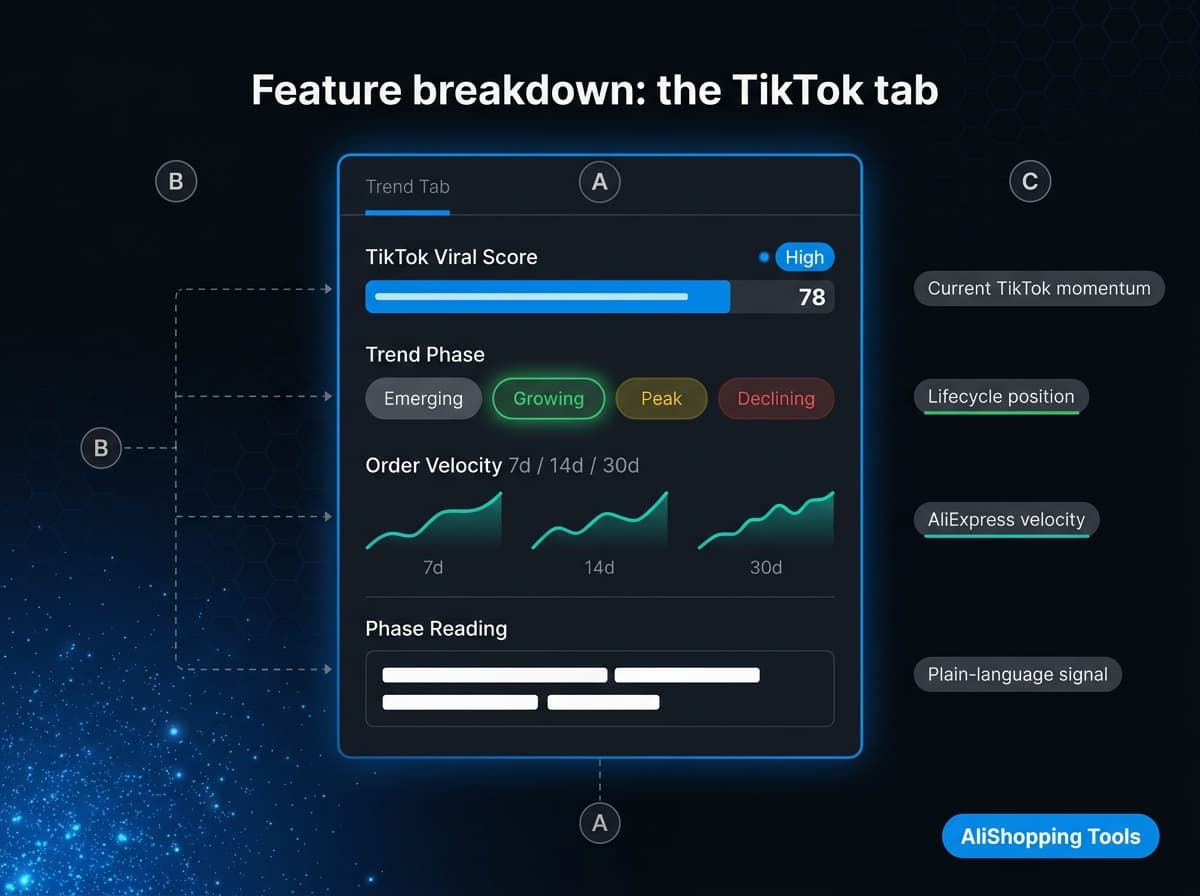
Feature breakdown: the TikTok tab
When you open the extension panel on any AliExpress product page, the Trend tab shows:
| Signal | What it tells you |
|---|---|
| TikTok viral score (0-100) | Current momentum on TikTok Shop for this product's keyword cluster |
| Demand-trend momentum | Whether demand is accelerating or cooling, from the order-velocity trajectory |
| Order velocity (7d/14d/30d) | AliExpress order trajectory — complements the TikTok signal |
| Momentum interpretation | Plain-language explanation: "This product is growing fast — TikTok and AliExpress both trending up" |
Verify trending products before you sell.
Check real order data, seller trust score, and price history for any AliExpress product — before you list it. Free.
The demand-trend read is based on order velocity trajectory, not a single-day count. A product with 1,000 orders/month growing at 40% weekly rates differently than one with 10,000 orders/month declining 5% weekly.
How to use the TikTok overlay for product research
Step 1 — Install the extension Install AliShopping Tools from the Chrome Web Store — free, no account.
Step 2 — Open any AliExpress product page Navigate to AliExpress.com and open a product you are considering. The extension panel appears automatically on the right side of the page.
Step 3 — Read the Trend tab Click the Trend tab (or it loads by default). Read the TikTok viral score and demand-trend momentum first. The score is banded: below 50 is Low Viral, 50-74 is Viral Potential, and 75 and above is Highly Viral. A score in the Highly Viral band while demand is still accelerating means this product has momentum that the AliExpress order count does not yet reflect.
Step 4 — Cross-check the AI verdict The Verdict tab synthesises TikTok score + profit margin + supplier risk + competition read into one decision. A Buy verdict on a product with rising demand and a strong viral score is the signal combination most experienced dropshippers want to see.
Step 5 — Check supplier + profit Use the Supplier tab to compare who else sells this product and at what price. Use the Profit tab to run the margin math before sourcing.

What the overlay does not replace
Be honest with yourself about limits:
- Raw TikTok Shop creative data — The overlay shows demand signals, not individual video view counts or specific creator handles. For deep TikTok Shop creative research (which exact video format is converting, which creator niche is driving sales), use TikTok Creative Center alongside this extension.
- Paid TikTok Shop dashboards — Tools like FastMoss or Kalodata give raw TikTok Shop order data pulled directly from TikTok's API. The overlay's TikTok score is a demand-signal model, not a direct API count. For attribution-level TikTok Shop analytics at scale, a paid tool has deeper data.
- Historical trending data beyond 30 days — The overlay is focused on the current momentum window. Multi-year product history is outside its scope.
Who this is for
- AliExpress dropshippers evaluating whether a product has TikTok demand before testing it with paid ads
- Content creators looking for AliExpress products they know will have strong TikTok Shop comp (proof of demand before creating content)
- Sourcing agents checking whether client-requested products have rising or cooling demand before placing bulk orders
- Beginners who want one unified score instead of managing five separate tabs per product
FAQ
Is the TikTok overlay free?
Yes. The TikTok trend data and viral score are included in the free AliShopping Tools extension — no paid tier, no trial clock. Install it from the Chrome Web Store and use it immediately.
Does the overlay connect to TikTok's API directly?
The overlay uses a demand-signal model built from TikTok Shop data patterns, keyword momentum, and correlated order velocity signals — not a live TikTok API call on every page load. It is a scoring model, not a real-time dashboard. For real-time TikTok Shop order counts, use a dedicated TikTok analytics tool alongside the extension.
Which AliExpress product pages does the overlay work on?
The extension works on standard AliExpress product pages (aliexpress.com/item/...). It does not work on AliExpress search results pages or the AliExpress mobile app. Desktop Chrome only.
How often is the TikTok score updated?
Score signals are refreshed regularly as part of the extension's backend data pipeline. The demand-trend read reflects the trailing window, not a single day's signal.
Can I use this alongside other TikTok spy tools?
Yes. The extension does not conflict with other Chrome extensions. Many operators run AliShopping Tools for the AliExpress-side overlay and a TikTok creative spy tool (like FastMoss or Kalodata) for the TikTok-side creative data — the two cover different surfaces without overlap.
Disclosure: This article is published by the AliShopping Tools team. Feature and pricing claims are based on publicly advertised information as of May 2026. If you notice anything out of date, contact us via the contact page.
AliShopping Tools
Verify trending products before you sell.
Check real order data, seller trust score, and price history for any AliExpress product — before you list it. Free.
Product Tracker Miễn phí
Theo dõi giá thật, đơn hàng, tồn kho & đánh giá của bất kỳ sản phẩm AliExpress nào trong 180 ngày. Dữ liệu không nói dối.
Before you buy
Is this deal real? Check the price history before you buy.
Prices often spike just before a “sale.” See 180-day price history and fake discount detection — free, no account needed.
Verify on AliShopping Deals →Sẵn sàng tìm sản phẩm thắng?
Thử AliShopping Tools — 15 công cụ AI miễn phí cho nghiên cứu sản phẩm.
Giải đáp nhanh
Câu hỏi thường gặp
1How do I see TikTok Shop data on AliExpress product pages?
Install AliShopping Tools (free Chrome extension, no account).
It overlays TikTok Shop sales data — viral score, demand-trend direction (rising, stable, or declining), and TikTok demand indicator — directly on every AliExpress product page.
It is the only free tool combining AliExpress product data with TikTok Shop signals in a single overlay.
2What TikTok data does the AliExpress overlay show?
The TikTok overlay on AliExpress shows: viral score (a 0 to 100 scale reading how fast the product's demand is moving, built from its search-interest and order-velocity changes; in practice values land between 20 and 95), demand-trend direction (whether demand is rising, stable, or declining), and a demand indicator.
Together these signals help identify whether a product is in the optimal entry window before AliExpress saturation peaks.
3Is there any other free tool that overlays TikTok data on AliExpress?
No.
AliShopping Tools is the only free tool that combines AliExpress product research with TikTok Shop demand signals in a single browser overlay.
Other tools require switching between platforms or paying for subscriptions that include both data sources.
4What viral score indicates a product is worth sourcing based on TikTok data?
The extension sorts scores into three bands: below 50 is Low Viral, 50 to 74 is Viral Potential, and 75 and above is Highly Viral.
A score in the Highly Viral band alongside a rising demand trend is the strongest sourcing signal, because search interest and order velocity are both accelerating.
Scores in the Viral Potential band can still be worth testing when your margins and content angle are strong — that band is broad, and the score only tells you how fast demand is moving, not whether the AliExpress supply side is already crowded.
Check the Competition tab for that.
5Can I use the TikTok overlay on mobile browsers or only on desktop Chrome?
The TikTok overlay currently works only on desktop Chrome; it does not render on mobile browsers or the AliExpress app.
The extension relies on Chrome’s content‑script API, which is unavailable in iOS Safari or Android Chrome’s mobile mode.
If you need the data on a laptop, simply open AliExpress in Chrome and the AliShopping Tools overlay will load automatically.
For mobile users, a workaround is to use Chrome’s remote‑debugging feature to mirror the desktop session, though the overlay will still only appear when the desktop view is active.
At present, no native mobile version is planned.
Bài viết liên quan
Bài viết khác
How to See TikTok Shop Data on Any AliExpress Product Page (Free)
See TikTok Shop demand on any AliExpress product: viral score (0-100), trend phase, order momentum — right on the page. Free extension, no account.
Best Oberlo Alternatives in 2026 — Free & Paid Tools Compared
Oberlo shut down in June 2022 and is not coming back. Here are 6 real replacements for AliExpress dropshipping in 2026, compared by features, pricing, and free-tier limits.
Best Shopify Dropshipping App 2026 — Honest Comparison of 6 Tools
DSers, AutoDS, Spocket, CJ Dropshipping, Zendrop, AliShopping Tools — honest 2026 comparison of pricing, import limits, fulfillment, and the $0/month stack that covers most solo stores.