
Best Free Chrome Extensions for Dropshipping in 2026 (Honest Comparison)
Quick answer: The best free Chrome extensions for dropshipping in 2026 are AliShopping Tools (AliExpress AI verdict + Shopify spy in one free install), Koala Inspector free tier (Shopify app detection), DSers (order fulfillment), and free-tier BigSpy (ad creative research). AliShopping Tools is the only free single extension that covers AliExpress product scoring, profit simulation, supplier risk, and Shopify store analysis with no subscription required.
Why You Need Chrome Extensions for Dropshipping
Dropshipping without tools is like doing accounting without a calculator. You can do it, but you will be slower, less accurate, and more likely to make costly mistakes.
The right Chrome extensions let you:
- Analyze products in seconds instead of hours
- Spy on competitor stores without manual research
- Compare suppliers and find the best prices
- Track trends and spot winning products early
- Calculate real profit margins before you commit
The problem is that most "best tools" articles are written by affiliates pushing $50-100/month subscriptions. This guide is different. We focus on what you can get for free — and we are transparent about where paid tools genuinely add value.
The Tool Categories Every Dropshipper Needs
Before comparing specific tools, understand the five categories:
| Category | What It Does | Importance |
|---|---|---|
| Product Research | Analyze AliExpress products (demand, profit, risk) | Essential |
| Store Spy | Analyze competitor Shopify stores | Essential |
| Trend Analysis | Identify trending products before they peak | Important |
| Supplier Comparison | Find the cheapest/best AliExpress seller | Important |
| Order Fulfillment | Connect AliExpress to your store for one-click ordering | Essential (for Shopify sellers) |
Most tools specialize in one category. Very few cover multiple categories well.
Category 1: AliExpress Product Research
AliShopping Tools (Free)
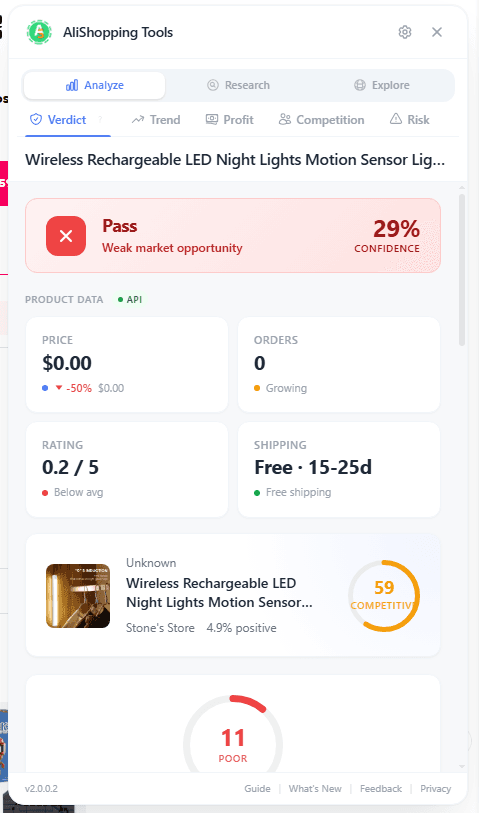
What it does: Full product analysis panel on every AliExpress product page. Includes the AI verdict — four states: Strong Buy / Buy Signal / Hold / Watch / Pass — plus profit simulation, trend analysis, competition scoring, risk assessment, supplier comparison, and product discovery feed.
Strengths:
- 15+ analysis tools in one extension
- Two distinct readouts: the verdict (four weighted dimensions) and the Winning Score (seven weighted listing factors)
- Covers all five analysis dimensions (demand, profit, competition, risk, growth)
- Works on both AliExpress AND Shopify stores
- Completely free, no account required
- 16 languages supported
Limitations:
- AliExpress and Shopify only (no Amazon, eBay)
- Some data is estimated when backend is unavailable
Best for: Dropshippers who want comprehensive analysis without paying for multiple tools.
Install: Chrome Web Store
AliHunter (Free tier + $29.99/mo Pro)
What it does: AliExpress product analysis with sales tracking, price history, and supplier info.
Strengths:
- Clean interface
- Historical price tracking
- Sales volume charts
Limitations:
- Free tier is very limited (basic info only)
- Most useful features require Pro subscription
- No Shopify store analysis
- No AI scoring or verdict system
Best for: Users willing to pay $30/month for detailed historical data.
AliExpress Dropshipping Center (Free, by AliExpress)
What it does: Official AliExpress tool for product research. Shows trending products, niche analysis, and supplier information.
Strengths:
- Free and official
- Access to AliExpress internal data
- Niche analysis tools
Limitations:
- Requires AliExpress seller account
- Interface is clunky and slow
- No store spy capabilities
- No scoring or verdicts — raw data only
Best for: Sellers already active on AliExpress who want official data.
Category 2: Shopify Store Analysis
AliShopping Tools (Free)
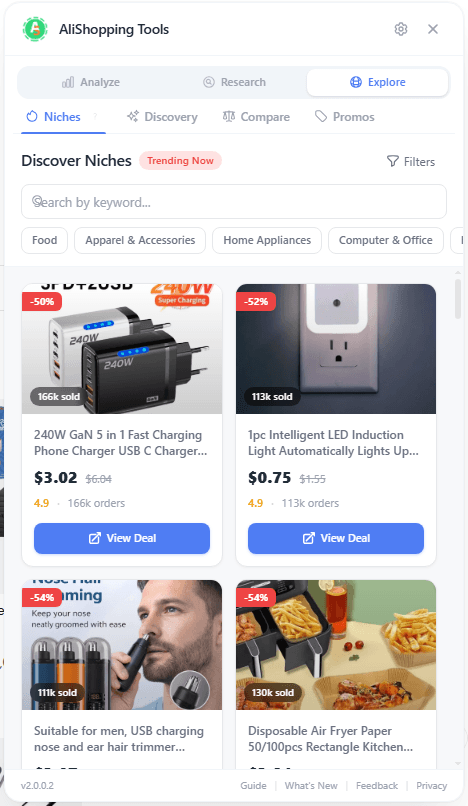
What it does: Bottom toolbar on any Shopify store with store X-ray, app detection (200+ apps), product catalog browser, and live sales tracking.
Strengths:
- 200+ Shopify apps detected
- Live sales tracking (real-time order monitoring)
- Revenue estimation
- Product intelligence (avg price, discount rate, stock levels)
- Free, no limits
Limitations:
- Shopify only (does not work on WooCommerce, BigCommerce)

Koala Inspector (Free tier + $7.99/mo Pro)
What it does: Shopify store analysis with theme detection, app identification, and basic product data.
Strengths:
- Low price for Pro tier
- Theme detection
- Some app identification
Limitations:
- Free tier shows very limited data
- Detects fewer apps than AliShopping (under 100)
- No live sales tracking
- No revenue estimation
Best for: Budget-conscious users who want basic store info.
Commerce Inspector ($29-99/mo)
What it does: Comprehensive Shopify analysis with traffic estimates, app detection, product tracking, and historical data.
Strengths:
- Traffic estimation (unique feature)
- Historical data tracking
- Large app database
Limitations:
- No free tier
- Expensive for beginners ($29-99/month)
- Focused only on Shopify
Best for: Established sellers who need traffic data and can justify the cost.
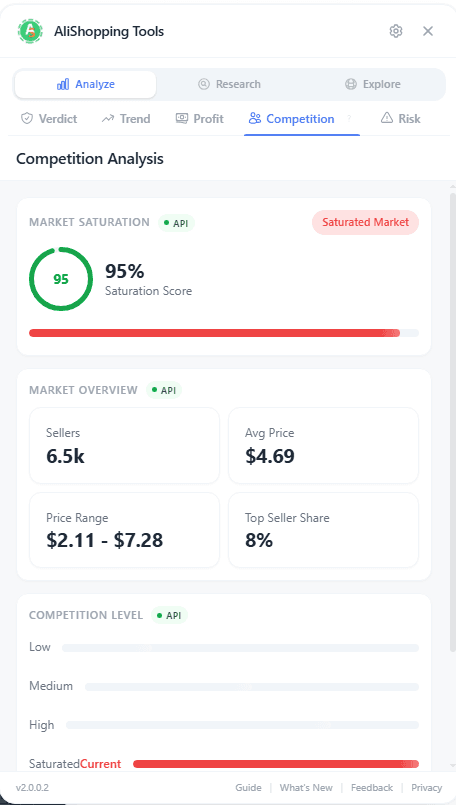
Category 3: Trend & Viral Analysis
AliShopping Tools (Free)
What it does: demand-direction read, momentum scoring, TikTok viral potential, and ad angle suggestions.
Strengths:
- Demand-direction trend read
- TikTok-specific viral scoring
- Suggested ad angles for creative
- Integrated with product verdict
See real delivery time to your country.
Per-seller shipping estimates and trust signals on every AliExpress product page. No account, free.
Limitations:
- Trend data is estimated (improving with backend integration)
Google Trends (Free)
What it does: Search interest over time for any keyword.
Strengths:
- Free and authoritative
- Global and regional data
- Related queries and topics
Limitations:
- Not product-specific
- Does not show AliExpress or e-commerce data
- Requires you to know what to search for
- No scoring or verdict
Best for: Validating macro trends (use alongside product research tools).
Sell The Trend ($39.97-79.97/mo)
What it does: Product trend analysis across AliExpress, Amazon, and social media.
Strengths:
- Multi-platform trend data
- AI product recommendations
- Store automation features
Limitations:
- Expensive ($40-80/month)
- Monthly subscription required
- Can be overwhelming for beginners
Best for: Full-time dropshippers who need cross-platform trend data.
Category 4: Order Fulfillment
DSers (Free tier + paid plans)
What it does: Connects AliExpress to Shopify for one-click product import and order fulfillment.
Strengths:
- Official AliExpress partner
- Free tier supports up to 3,000 products
- Bulk ordering
- Variant mapping
Limitations:
- Not a research tool (fulfillment only)
- Free tier has limitations on some features
Best for: Every Shopify dropshipper needs a fulfillment tool. DSers is the standard.
CJDropshipping (Free)
What it does: Fulfillment service with warehouse in China, US, and EU. Offers product sourcing, quality inspection, and faster shipping.
Strengths:
- Warehousing and faster shipping
- Product sourcing service
- Quality inspection
Limitations:
- Not a Chrome extension (web platform)
- Some services have per-order fees
Best for: Sellers who have validated products and want faster shipping.
The Complete Comparison Matrix
| Feature | AliShopping Tools | AliHunter | Koala Inspector | Commerce Inspector | Sell The Trend |
|---|---|---|---|---|---|
| Price | Free | $0-30/mo | $0-8/mo | $29-99/mo | $40-80/mo |
| AliExpress Analysis | Yes | Yes | No | No | Yes |
| Shopify Spy | Yes | No | Yes | Yes | No |
| AI Verdict/Scoring | Yes | No | No | No | Limited |
| Profit Calculator | Yes | No | No | No | Yes |
| Trend Analysis | Yes | Limited | No | No | Yes |
| Supplier Compare | Yes | No | No | No | No |
| App Detection | 200+ | No | <100 | 200+ | No |
| Live Sales Tracking | Yes | No | No | No | No |
| TikTok Viral Score | Yes | No | No | No | Yes |
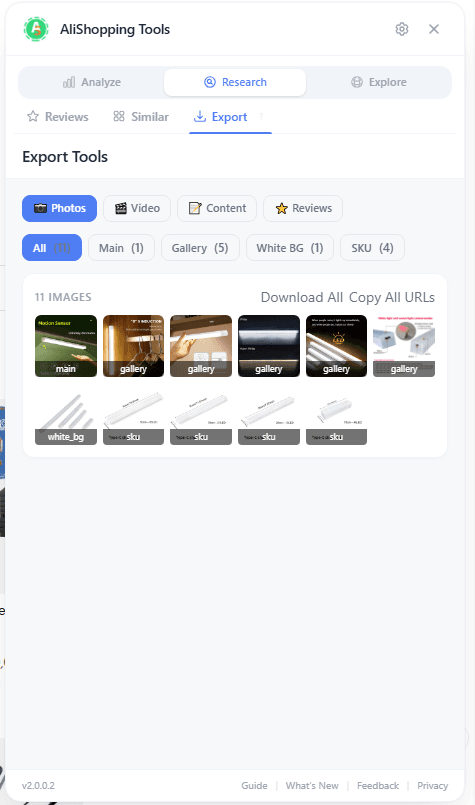
| Export Tools | Yes | No | No | No | No |
| Languages | 16 | 3 | 2 | 1 | 1 |
| Account Required | No | Yes | Yes | Yes | Yes |
Our Honest Recommendation
If you are just starting (Budget: $0)
Install these three free tools:
- AliShopping Tools — Product research + store spy + trend analysis (all-in-one)
- DSers — Order fulfillment (connect AliExpress to Shopify)
- Google Trends — Macro trend validation
Total cost: $0. This stack covers 90% of what you need.
If you are scaling (Budget: $50-100/month)
Keep the free tools above and add:
- Commerce Inspector ($29/mo) — If you need traffic estimates for competitor stores
- Sell The Trend ($40/mo) — If you need cross-platform (Amazon + AliExpress) trend data
If you are established (Budget: $200+/month)
At this level, you should also consider:
- Helium 10 or Jungle Scout — For Amazon sellers
- Minea — For ad spy across Facebook, TikTok, Pinterest
- Custom data feeds — Direct supplier APIs
What Chrome Extensions Help AliExpress Buyers?
Chrome extensions are not just for dropshippers and sellers. If you buy from AliExpress for personal use, the right extensions protect you from overpaying, fake reviews, and unreliable sellers — problems that cost real money when shipping takes 2-4 weeks and returns are complicated.
Price history trackers are the single most valuable category for buyers. AliExpress sellers routinely inflate "original" prices to make discounts look larger than they are. A product showing "was $29.99, now $9.99" may have been $9.99 for the past six months. Price history extensions like AliShopping Tools overlay a 90-day price chart directly on the product page, so you can see whether today's "sale" price is genuinely lower than the regular price before you commit. During major sales like 11.11 and the Anniversary Sale, this check alone can prevent you from buying "deals" that are not actually discounted.
Review analysis tools help you read reviews faster, not replace your judgment. AliShopping Tools shows the full 1-to-5 star distribution on every product page — so you can spot artificially inflated ratings at a glance — plus a photo-only filter that reveals how many reviews come with actual buyer photos. A product with 3,000 reviews but only 8 photos is a warning sign. The extension also lets you export the review set to CSV or XLSX so you can sort by date and catch burst-posting patterns in a spreadsheet. For the full detection method, see our fake AliExpress reviews guide.
Coupon finders scan for available discount codes and stackable coupons during checkout. AliExpress has a layered coupon system (store coupons, select coupons, platform coupons) that can be stacked for significant savings, but finding all available coupons manually is tedious. Extensions that surface these automatically save time — though always verify the final price before confirming, as not all coupons apply to every product.
How to Choose the Right AliExpress Extension?
The extension that works best for you depends on whether you are buying for yourself or sourcing products to resell.
Buyers should prioritize: price verification (is this sale real?), review quality checks (are these reviews trustworthy?), and seller trust indicators (is this seller reliable?). You do not need profit calculators, competition scoring, or Shopify spy features. Look for extensions that surface buyer-protection data — price history, review distribution, dispute rates — without requiring an account or subscription.
Sellers and dropshippers should prioritize: product research (demand, profit margins, competition), supplier comparison (which seller offers the best combination of price, quality, and shipping), and trend analysis (what is gaining traction before it peaks). Fulfillment integration (connecting AliExpress to your Shopify store) is a separate essential.
Key criteria for either use case:
| Criterion | Why it matters |
|---|---|
| No account required | Extensions that require signup before showing any data add friction and may collect more personal information than necessary |
| Minimal permissions | Check what the extension requests access to — it should only need access to AliExpress (and Shopify for seller tools), not all websites |
| Active maintenance | AliExpress changes its page structure regularly; extensions that are not updated break silently. Check the last update date on the Chrome Web Store listing |
| Transparent about limitations | Any extension claiming to "detect fake reviews" or guarantee product quality is overselling. Prefer tools that show you evidence and let you decide |
| Works offline or locally | Extensions that process data in the browser rather than sending your browsing data to external servers offer better privacy |
AliShopping Tools covers both buyer and seller use cases in a single install: buyers get price history, review analysis, and seller trust; sellers get the AI verdict, profit simulation, competition scoring, and Shopify spy. No account, one permission (AliExpress and Shopify page access), updated regularly, and transparent about what it does and does not do.
Install AliShopping Tools on the Chrome Web Store →
The Bottom Line
You do not need to spend $100/month on tools to succeed in dropshipping. The free tools available in 2026 are dramatically better than what paid tools offered just two years ago.
Start free. Only add paid tools when you have proven your business model and need specific data that free tools cannot provide.
The most important tool is not the most expensive one — it is the one you actually use consistently to make data-driven decisions.
Disclosure: This article is published by the AliShopping Tools team. We have tried to be fair and accurate in our comparisons. Feature comparisons are based on publicly available information as of April 2026. If any tool has updated its features, please let us know and we will update this article.
AliShopping Tools
See real delivery time to your country.
Per-seller shipping estimates and trust signals on every AliExpress product page. No account, free.
Product Tracker Free Beta
Track any AliExpress product’s real price, orders, stock & rating for 180 days. Data doesn’t lie. But discounts can.
Before you buy
Is this deal real? Check the price history before you buy.
Prices often spike just before a “sale.” See 180-day price history and fake discount detection — free, no account needed.
Verify on AliShopping Deals →مستعد للعثور على المنتجات الرابحة؟
جرّب AliShopping Tools — 15 أداة ذكاء اصطناعي مجانية لبحث المنتجات.
Quick answers
Frequently Asked Questions
1What are the five Chrome extension categories every dropshipper needs?
The post groups free dropshipping extensions into five categories: product research (analyzing AliExpress products for demand, profit, and risk), store spy (analyzing competitor Shopify stores), trend analysis (identifying trending products before they peak), supplier comparison (finding the cheapest or best AliExpress seller for the same product), and order fulfillment (connecting AliExpress to your store for one-click ordering).
The first two and the last are marked essential; trend analysis and supplier comparison are important.
Most tools specialize in only one.
2What does AliShopping Tools cover across those categories?
Per the post it spans multiple categories in a single install: AI Verdict (Strong Buy / Buy Signal / Hold / Watch / Pass), profit simulation, trend analysis, competition scoring, risk assessment, supplier comparison, and a product discovery feed — plus Shopify spy on competitor stores.
The panel carries eleven analysis tabs on AliExpress plus a Shopify toolbar, runs in 16 interface languages, and needs no account.
Scoring is computed server-side from the listing’s public data rather than on your machine, so a “nothing leaves your browser” claim about the scores would not be accurate.
3What are AliShopping Tools' acknowledged limitations?
The post is upfront about two limits: it works on AliExpress and Shopify only (no Amazon or eBay), and some data is estimated when the backend is unavailable.
Beyond those, the broader caveat in the post is that free extensions in general cannot replace a full product database — they shine as real-time analysis tools on pages you are already viewing, not as bulk-research SaaS alternatives.
4How do I install AliShopping Tools on Chrome without compromising my browser’s security?
Install AliShopping Tools only from the official Chrome Web Store listing, and review the requested permissions before accepting (it needs access to the AliExpress/Shopify pages it analyzes).
As with any extension, keep Chrome itself updated so security patches apply automatically.
There's no separate in-extension “Safety Check” scan feature to run — the standard precaution is just installing from the official store listing and reviewing the permissions like you would for any extension.
5What measurable performance boost can I expect when switching from a paid dropshipping extension to the free AliShopping Tools in 2026?
The practical benefit of AliShopping Tools is consolidating several research steps (AI verdict, profit simulation, supplier risk) into one overlay instead of switching between multiple paid apps, which can save time on each product check.
How much time that saves you depends on your existing workflow and how many products you research per day, so treat any specific minutes-saved figure as anecdotal rather than a benchmarked result.
6Can I export the product data collected by AliShopping Tools into a spreadsheet for bulk analysis, and how long does the export take?
AliShopping Tools includes a CSV export for the product data it surfaces, which you can open in Google Sheets or Excel for further analysis.
Export time depends on how many items you're exporting and your machine/connection, so there's no fixed number of seconds to quote.
The extension processes data locally rather than routing it through a third-party server.
7How does AliShopping Tools handle privacy and data storage compared with other free Chrome extensions for dropshipping?
AliShopping Tools processes product data locally in the browser rather than routing your browsing activity through its own remote servers.
We can't make claims here about specific competing extensions' data practices (e.g.
Koala Inspector) or cite a specific third-party privacy audit/certification — check each extension's own published privacy policy for exact details on what it collects and how long it's retained.
8What Chrome extensions help AliExpress buyers avoid fake discounts and fake reviews?
Price history extensions like AliShopping Tools overlay a 90-day price chart directly on AliExpress product pages, so you can verify whether a sale price is genuinely lower than the regular price or just an inflated original price.
For review quality, the same extension shows the full 1-to-5 star distribution and a photo-only filter — a product with thousands of reviews but almost no buyer photos is a warning sign.
No extension can detect fake reviews automatically, but these data views make the manual checks much faster.
Coupon finder extensions can also surface stackable discount codes during checkout.
9How do I choose between a buyer-focused and a seller-focused AliExpress Chrome extension?
Buyers should prioritize price verification (price history charts), review quality checks (star distribution, photo filter), and seller trust indicators (dispute rate, store age).
Sellers and dropshippers need profit calculators, competition scoring, supplier comparison, and trend analysis.
AliShopping Tools covers both use cases in a single install — buyers get price history and review analysis, sellers get the AI verdict and Shopify spy.
Check the extension's Chrome Web Store listing for its last update date and requested permissions before installing.
10What are the best practices for combining AliShopping Tools with other free Chrome extensions like Everbee and BigSpy to create a seamless dropshipping workflow?
Running research tools in separate tabs (AliShopping Tools for AliExpress product/supplier research, a trend tool for platform-specific validation, an ad-library tool for creative scouting) is a reasonable way to avoid UI conflicts between extensions.
AliShopping Tools doesn't have a dedicated "Single-Tab Mode" that auto-disables its overlay when another extension's panel is open — if you hit visual conflicts between extensions, closing one panel before opening another is the practical workaround.
Any specific lift in lead quality from combining tools this way will vary by workflow, so track your own results rather than expecting a fixed percentage improvement.
Related Articles
- أدوات الدروبشيبينغ المجانية في 2026: القائمة الشاملة (بلا تكاليف خفية)shipping
- Free Dropshipping Tools in 2026: The Ultimate List (No Hidden Costs)shipping
- Best AliExpress Chrome Extensions 2026: Buyer's Guidecompare
- Minea vs Ecomhunt 2026: Ad-Spy vs Curated Productscompare
- Best Dropship.io Alternatives 2026 (Free & Paid) — Tested for Dropshipperscompare
- Winning Products September 2026: 10 Fall-Transition Categories That Convertproducts
Related Tools
المزيد من المدونة
أدوات الدروبشيبينغ المجانية في 2026: القائمة الشاملة (بلا تكاليف خفية)
11 أداة دروبشيبينغ مجانية فعلاً (أو مصنفة بصدق كـ freemium) لأبحاث المنتجات والتجسس على المتاجر وتتبع الأسعار وإنشاء المحتوى وبناء المتجر في 2026 — كل سعر تم التحقق منه مقابل صفحة تسعير الأداة ذاتها، بالإضافة إلى مصفوفة مقارنة شاملة وخطة ميزانية متدرجة.
Free Dropshipping Tools in 2026: The Ultimate List (No Hidden Costs)
11 genuinely free (or honestly-labeled freemium) dropshipping tools for product research, store spying, price tracking, content, and store building in 2026 — every price re-checked against the tool's own pricing page, plus a full comparison matrix and a tiered budget plan.
Winning Products September 2026: 10 Fall-Transition Categories That Convert
10 dropshipping categories for September 2026 — back-to-school tail, fall wardrobe and home refresh, early Halloween prep, and cozy-season essentials — plus how to vet any candidate with AStools before you spend.