How to See TikTok Shop Data on AliExpress (Free Chrome Extension)
How do you see TikTok data on AliExpress? Install the free AliShopping Tools Chrome extension. Once installed, open any AliExpress product page and click the Trend tab — it overlays TikTok Shop sales estimates, creator count, ad spend estimates, and a viral score directly on the listing. No TikTok account needed. No signup. Takes about 30 seconds to set up.
</div>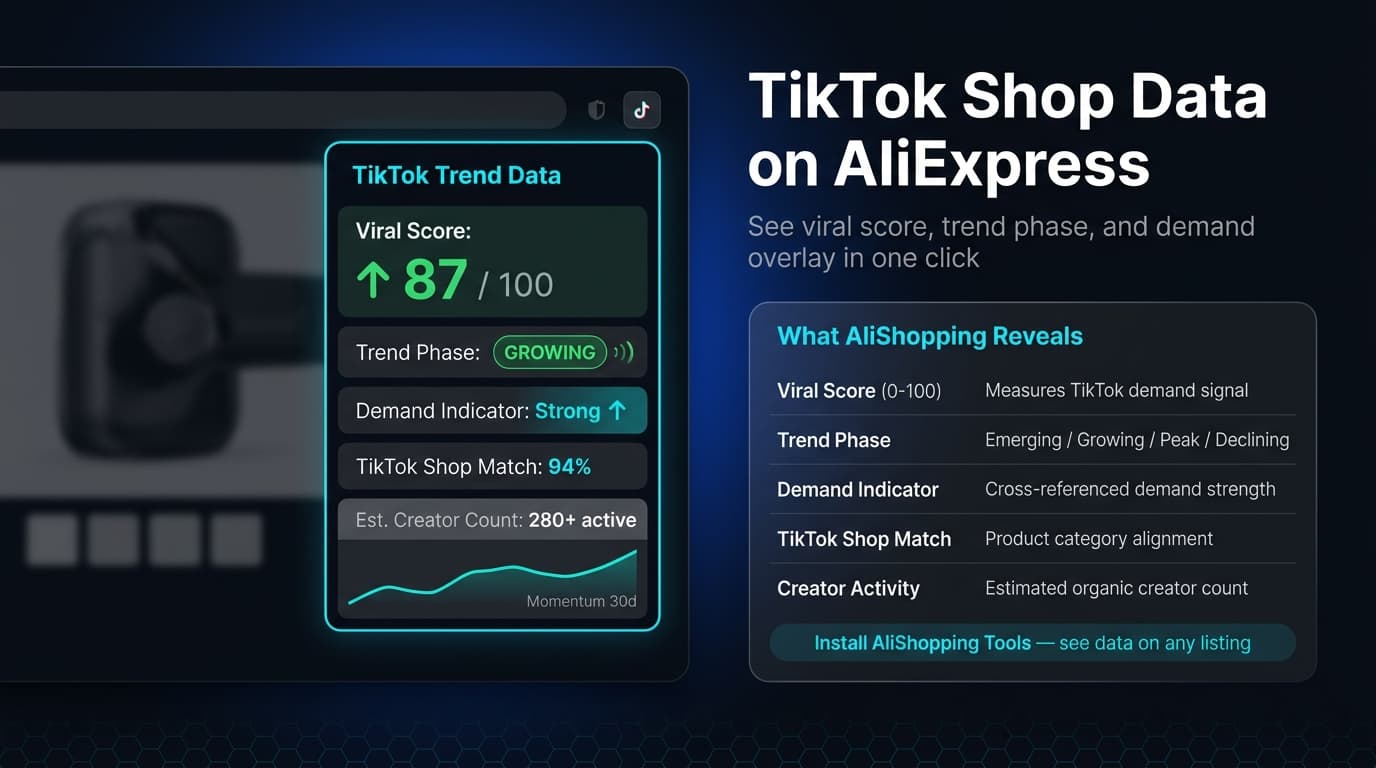
What is the ASTools TikTok overlay?
The AliShopping Tools TikTok overlay is a feature inside the AliShopping Tools Chrome extension that surfaces TikTok Shop intelligence on AliExpress product pages without you needing to switch tabs or manually search TikTok.
The problem it solves is real: TikTok Shop has become one of the strongest demand signals for dropshipping products, but checking TikTok data manually for every product you research is slow and inconsistent. You have to search TikTok, find relevant videos, estimate engagement, check if creators are using the product commercially — all on a separate platform, without any structure. The overlay automates that entire process and delivers the output where you already research: on the AliExpress product listing itself.
The TikTok overlay is part of the Trend tab in AliShopping Tools, alongside demand trend charts and seasonal patterns. It sits next to the Competition tab, Profit tab, Risk tab, and Verdict — so you get the full picture on one screen.
What data does the TikTok overlay show?
When you open the Trend tab on an AliExpress product page with AliShopping Tools installed, the TikTok section shows:
TikTok Shop sales estimate — estimated monthly units sold through TikTok Shop for this product or close variants. This is the most direct demand signal: real purchases through TikTok's built-in checkout, not just views or engagement.
Creator count — how many TikTok creators have posted content featuring this product. A high creator count means organic discovery is already happening. A low creator count on a high-sales product may indicate untapped creator inventory — an opportunity for a brand new entrant to run creator seeding campaigns.
Ad spend estimate — estimated monthly ad spend on TikTok for this product category. High ad spend signals commercial demand (other businesses are profitably advertising it). Very high ad spend signals saturation — you would be entering a paid competition that incumbents are already winning.
Viral score — a 0–100 score reflecting how fast this product's demand is moving, built from its search-interest and order-velocity changes. It is banded: 75 and above is labelled Highly Viral (demand is actively accelerating), 50–74 is Viral Potential, and below 50 is Low Viral (demand is flat or falling). In practice scores land between 20 and 95 rather than reaching the ends of the scale.
Together these four data points answer the most important TikTok research question: is this product being bought through TikTok, or just watched? Views are vanity. Sales are signal.
How to install and use the TikTok overlay
Step 1: Install AliShopping Tools. Go to the Chrome Web Store listing and click "Add to Chrome." The extension is free and requires no account creation.
Step 2: Open any AliExpress product page. Navigate to AliExpress and open a product you want to research. The AliShopping Tools panel loads automatically in the sidebar or bottom panel depending on your screen size.
Step 3: Click the Trend tab. The Trend tab is visible in the extension panel. Click it to open the demand trend view. Scroll down to the TikTok section — this is where the overlay data appears. Review the sales estimate, creator count, ad spend estimate, and viral score in context of the other tabs (Competition, Profit, Risk).
That is the full workflow. No TikTok login, no separate tab, no manual searching. The overlay pulls the data to where your research already happens.
How dropshippers use TikTok overlay data
1. Confirming demand before testing ads. Before spending $50–100 on a test ad, a dropshipper checks the TikTok overlay to see if the product is already generating real purchases on TikTok Shop. If TikTok Shop sales are meaningful and the viral score sits in the Viral Potential band or higher (50 and up), demand is at least moving in the right direction on the platform most relevant to impulse purchases. That de-risks the initial ad test.
2. Finding products in the early viral window. A Highly Viral score (75+) paired with a still-low creator count sometimes indicates a product gaining traction before the market catches on. This is the early-mover window — content supply has not caught up, but the demand signal is rising. These products are worth prioritizing.
3. Spotting oversaturation before committing. An ad spend estimate that is very high combined with a large creator count tells you the opposite story: many advertisers are already competing for TikTok buyers on this product. The window has probably passed. Skip and research the next one.
4. Choosing between two similar products. When researching variants of the same product (e.g., three different portable blenders from different AliExpress suppliers), the TikTok overlay helps differentiate which specific variant has stronger TikTok demand — useful when the AliExpress order counts are similar across listings.
5. Briefing creators for UGC content. Knowing the creator count and ad spend estimate for a product helps when briefing UGC creators. A product with 200+ existing creators means there is plenty of reference content to show creators what style works. A product with 10 creators means you are helping define the creative language for the product — which can be an advantage if your content sets the template.
For a roundup of what is currently trending on TikTok Shop, see our top TikTok Shop products May 2026 → article.
TikTok overlay vs. manually checking TikTok Shop
| Factor | AliShopping Tools overlay | Manual TikTok research |
|---|---|---|
| Time per product | ~10 seconds | 10–20 minutes |
| Sales data | Estimated monthly units | Not visible without TikTok Shop Seller Centre |
| Creator count | Auto-counted | Manual scroll + count |
| Ad spend estimate | Shown in panel | Not available publicly |
| Viral score | Calculated automatically | Subjective judgment |
| TikTok account required | No | No (browsing), Yes (Seller Centre data) |
| Works while browsing AliExpress | Yes | No — requires switching apps/tabs |
| Covers all products | Yes | Only if you search for them manually |
The time difference is the most significant practical factor. Research that takes 20 minutes per product manually takes 10 seconds with the overlay. If you evaluate 20 products per session, that is the difference between a 6-hour research block and a 30-minute one.
FAQ
Is the AliShopping Tools TikTok overlay free? Yes. The TikTok overlay is part of the free AliShopping Tools extension. No subscription, no credit card, no account required. Install from the Chrome Web Store and it works immediately.
Do I need a TikTok account to use the overlay? No. The overlay pulls aggregated data and does not require you to be logged in to TikTok or have a TikTok account of any kind. It works entirely through the extension running on AliExpress.
Does the TikTok overlay work for Shopify product research? The overlay runs on AliExpress product pages specifically. If you are sourcing products from AliExpress for your Shopify store — which is the most common dropshipping workflow — the overlay fits naturally into your existing research process. It tells you which AliExpress products have strong TikTok demand before you import them to Shopify.
How accurate is the TikTok sales estimate? The estimate is a directional signal, not an audited figure. It reflects aggregated data from TikTok Shop and should be used as a comparison tool (this product vs. that product) rather than as an absolute number. A product showing 10,000 estimated TikTok Shop sales is meaningfully more in-demand than one showing 200 — treat the direction and magnitude as reliable, the exact number as approximate.
Does the overlay work outside the US? AliShopping Tools works globally on AliExpress. TikTok Shop data availability varies by region — coverage is strongest for US, UK, and Southeast Asian markets where TikTok Shop is fully operational.
Sẵn sàng tìm sản phẩm thắng?
Thử AliShopping Tools — 15 công cụ AI miễn phí cho nghiên cứu sản phẩm.
Giải đáp nhanh
Câu hỏi thường gặp
1What is the ASTools TikTok overlay for AliExpress?
The ASTools TikTok overlay is a feature inside the free AliShopping Tools Chrome extension that shows TikTok Shop metrics — sales estimates, creator count, ad spend estimates, and a viral score — directly on AliExpress product pages.
It eliminates the need to switch to TikTok manually for every product you research.
Install the extension, open any AliExpress listing, and click the Trend tab to see the overlay.
2Is the TikTok overlay for AliExpress free?
Yes.
The TikTok overlay is part of the free AliShopping Tools Chrome extension.
No subscription, no signup, and no TikTok account required.
Install it from the Chrome Web Store and the overlay appears automatically on every AliExpress product page you visit.
3Do I need a TikTok account to see TikTok data on AliExpress?
No.
The AliShopping Tools TikTok overlay works without any TikTok login or account.
It pulls aggregated TikTok Shop data and displays it in the extension panel on AliExpress — you never need to open TikTok or log in to any TikTok service.
4What TikTok data can I see on an AliExpress product page?
With AliShopping Tools installed, the Trend tab on any AliExpress product page shows: estimated monthly TikTok Shop sales, creator count (how many creators have posted about the product), estimated ad spend on TikTok, and a viral score on a 0–100 scale, banded as Low Viral (below 50), Viral Potential (50–74), and Highly Viral (75 and above).
Together these signals tell you whether a product is being actively bought through TikTok, not just watched.
5Does the TikTok overlay work for Shopify dropshipping research?
Yes.
The typical dropshipping workflow is: find products on AliExpress → import winning ones to Shopify.
The TikTok overlay fits into the AliExpress research step — it tells you which products have strong TikTok demand before you commit to importing and advertising them on Shopify.
You research on AliExpress, the overlay shows you TikTok signal, and you make a more informed import decision.
6How long does it take to install the ASTools TikTok overlay on Chrome and start seeing data?
It takes under two minutes to install the ASTools TikTok overlay and begin viewing metrics.
First, visit the Chrome Web Store, click “Add to Chrome,” and confirm the permission prompt.
Reload any AliExpress product page, and the overlay injects viral sales, creator count, and TikTok Shop figures alongside the original listing.
No additional configuration or account sign‑up is required, so you can start researching dropshipping opportunities almost immediately after the quick installation.
7Why does the TikTok overlay sometimes show 'No data' on certain AliExpress product pages, and how can I troubleshoot it?
The overlay shows 'No data' when a product is not linked to a TikTok Shop or when the TikTok API limit has been temporarily reached.
First, verify that the AliExpress item displays a TikTok Shop badge; without that connection, the overlay cannot retrieve metrics.
If the badge is present, try clearing your browser cache, disabling any VPN, and reloading the page.
Should the issue persist, wait a while for the rate limit to reset, then refresh the overlay manually.
Bài viết khác
AliExpress Find Similar Products — 5 Methods That Actually Work in 2026
Found a great product on AliExpress but want alternatives, a cheaper version, or a better supplier? This guide covers every method to find similar AliExpress products — built-in tools, image search, keyword strategies, and the AStools extension.
PDRN Collagen Skincare Dupes: 10 Real AliExpress Alternatives to TikTok Shop's #1 K-Beauty Trend (July 2026)
PDRN/collagen K-beauty is #1 on TikTok Shop US. 10 real AliExpress dupes — verified prices, sold counts, honest gaps.
How to Do Product Research for Dropshipping: 7-Step Framework (Free Tools, 2026)
A repeatable 7-step product research framework for dropshippers in 2026 — from idea sourcing to live testing, using only free tools. No Ecomhunt subscription needed.